
ແນະນຳ
The Desview A5 is a versatile 5.5-inch touch screen camera field monitor designed to enhance your filmmaking and photography experience. It features a vibrant Full HD 1920x1080 IPS panel with 600nits brightness, ensuring clear and color-accurate visuals in various lighting conditions. Supporting 4K/60Hz HDMI 2.0 input and output, this monitor provides real-time monitoring and advanced tools like HDR, waveform, histogram, and custom 3D LUT support for precise exposure and color control. Its lightweight design and flexible power options make it suitable for both studio and on-location use.
ແມ່ນຫຍັງຢູ່ໃນກ່ອງ
Upon unboxing your Desview A5 monitor, please ensure all the following items are present:
- 1x Desview A5 ຈໍພາບ
- 1x Monitor Mount
- ຜ້າກັນແດດ 1x
- 1x ສາຍ HDMI
- ສາຍ Micro HDMI 1x
- 1x U disk (for LUTs)
- 1x ເຄື່ອງມືການຕິດຕັ້ງ
- 1x Dust Cloth
- 1x ຄູ່ມືຜູ້ໃຊ້
- ກະເປົາຖື 1x

ຕັ້ງຄ່າ
ການຕິດຕັ້ງ Monitor
Attach the included monitor mount to the 1/4" screw hole located on the bottom or side of the Desview A5 monitor. Secure the mount firmly using the installation tool. Then, attach the monitor to your camera's cold shoe mount or any compatible rig.

Connecting HDMI Cables
Connect your camera's HDMI output to the HDMI-IN port on the Desview A5 monitor using the provided HDMI or Micro HDMI cable. If you need to output the video signal to another monitor, use the HDMI-OUT port.
ກຳລັງເປີດ Monitor
The Desview A5 offers multiple power options:
- NP-F Series Batteries: Insert a compatible NP-F series battery (NP-F550/F750/F970) into the battery compartment on the back of the monitor. (Battery not included).
- Type-C Input: Connect a Type-C cable to the Type-C port for power.
- DC 12V Input: Use a DC 12V power adapter (not included) with the DC-IN port.

ໃຊ້ງານ Monitor
Touch Screen & Control Knob
The Desview A5 features a responsive touch screen for intuitive menu navigation. You can also use the side scroll knob to adjust settings. User-customizable shortcut keys (F1, F2, F3) are available for quick access to frequently used functions. A touch-lock key prevents accidental changes during filming.

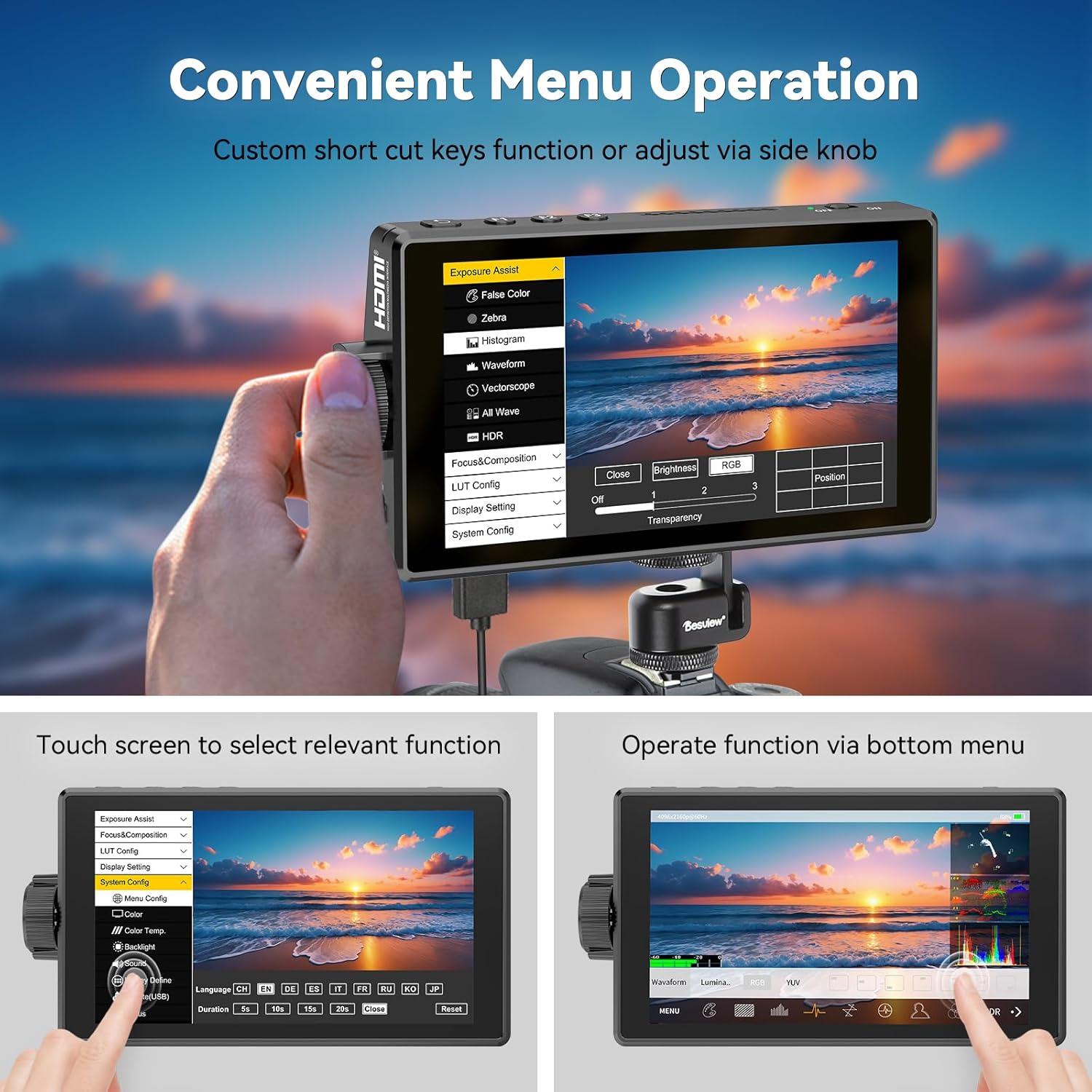
Advanced Monitoring Tools
The monitor includes a suite of professional tools to assist with accurate exposure and focus:
- HDR: High Dynamic Range support for improved contrast and color.
- ຮູບແບບຄື້ນ: Visual representation of video signal luminance.
- ຮິສໂຕແກຣມ: Displays the tonal distribution of your image.
- ຈຸດສູງສຸດ: ເນັ້ນພື້ນທີ່ທີ່ຢູ່ໃນໂຟກັສເພື່ອການໂຟກັສດ້ວຍມືທີ່ຊັດເຈນ.
- ສີທີ່ບໍ່ຖືກຕ້ອງ: Helps in setting correct exposure levels.
- ມ້າລາຍ: ຊີ້ບອກເຖິງພື້ນທີ່ທີ່ມີແສງຫຼາຍເກີນໄປ.
- vectorscope: Analyzes color saturation and hue.
- ເສັ້ນຕາຂ່າຍ: ຊ່ວຍໃນການປະກອບຮູບຊົງ.
- ເຄື່ອງວັດແທກສຽງ: ຕິດຕາມກວດກາລະດັບການປ້ອນຂໍ້ມູນສຽງ.
- Safe Area & Mark Ratio: Ensures content is within broadcast-safe zones.

Custom 3D LUT Support
The Desview A5 allows you to upload custom 3D LUTs (Look Up Tables) via the included U disk. This feature is invaluable for on-set color grading, enabling you to preview foo ຂອງເຈົ້າtage with desired color profiles for a cinematic look.

ການຕັ້ງຄ່າການສະແດງ
Adjust various display settings to suit your needs, including aspect ratio, display flip, zoom, pixel-to-pixel mapping, HV delay, freeze frame, and anamorphic de-squeeze.
ບໍາລຸງຮັກສາ
To ensure the longevity and optimal performance of your Desview A5 monitor, follow these maintenance guidelines:
- ທໍາຄວາມສະອາດ: Use the provided dust cloth to gently wipe the screen and body of the monitor. Avoid using harsh chemicals or abrasive materials.
- ການເກັບຮັກສາ: When not in use, store the monitor in its carry case to protect it from dust, scratches, and impacts.
- ຜ້າຮົ່ມ: Utilize the detachable sunshade to protect the screen from direct sunlight and reduce glare, especially during outdoor shoots.

ການແກ້ໄຂບັນຫາ
ຖ້າທ່ານພົບບັນຫາໃດໆກ່ຽວກັບ Des ຂອງທ່ານview A5 monitor, please refer to the following common troubleshooting steps:
- ບໍ່ມີສັນຍານ: Ensure all HDMI cables are securely connected to both the camera and the monitor. Verify that your camera's HDMI output is enabled and configured correctly.
- ບໍ່ມີພະລັງງານ: Check the battery level or power connection. Ensure the power source is providing adequate voltage (e.g., fully charged NP-F battery, correct DC adapter).
- Screen Flickering/Distortion: Try a different HDMI cable or adjust the resolution settings on your camera. Ensure the monitor's firmware is up to date.
- ໜ້າຈໍສໍາຜັດບໍ່ຕອບສະໜອງ: Check if the touch-lock function is enabled. Disable it if necessary. Restart the monitor.
For persistent issues, please consult the detailed user manual or contact Desview ສະຫນັບສະຫນູນລູກຄ້າ.
ຂໍ້ມູນຈໍາເພາະ
| ຄຸນສົມບັດ | ຂໍ້ມູນຈໍາເພາະ |
|---|---|
| ຍີ່ຫໍ້ | Desview |
| ໝາຍເລກຕົວແບບ | A5 |
| ຂະໜາດໜ້າຈໍ | 5.5 ນິ້ວ |
| ຄວາມລະອຽດ | FHD 1080p (1920x1080 Pixels) |
| ຄວາມສະຫວ່າງ | 600 candela_per_square_meter |
| ອັດຕາສ່ວນກົງກັນຂ້າມ | 1400:1 |
| Viewໃນມຸມ | 178 ອົງສາ |
| ປະເພດການສະແດງ | IPS |
| HDMI Input/Output | 4K/60Hz HDMI 2.0 |
| ຕົວເລືອກພະລັງງານ | Type-C, NP-F Series Batteries, DC 12V Input |
| ຂະໜາດລາຍການ (D x W x H) | 1"D x 5.7"W x 3.2"H |
| ນ້ຳໜັກ | 340 ກຣາມ (ໂດຍປະມານ) |
| ຄຸນສົມບັດເພີ່ມເຕີມ | Touchscreen, Side Knob Navigation, User-customizable shortcut keys, HDR, 3D LUT Support, Waveform, Histogram, Focus Peaking |
ການຮັບປະກັນແລະການສະຫນັບສະຫນູນ
The Desview A5 Touch Screen Camera Field Monitor comes with a ຮັບປະກັນ 1 ປີ. For technical support, warranty claims, or any product-related inquiries, please contact Desview ການບໍລິການລູກຄ້າໂດຍຜ່ານທາງການຂອງພວກເຂົາ webເວັບໄຊທ໌ຫຼືຮ້ານຂາຍຍ່ອຍບ່ອນທີ່ຜະລິດຕະພັນໄດ້ຖືກຊື້. ກະລຸນາເກັບຫຼັກຖານການຊື້ຂອງທ່ານໄວ້ເພື່ອກວດສອບການຮັບປະກັນ.