
1. ບົດແນະນຳ
This manual provides detailed instructions for the installation, operation, and maintenance of your Inefala 9-inch Android 15 Car Radio. Please read this manual thoroughly before using the product to ensure proper function and safety. This unit is designed for Suzuki Splash Ritz and Opel Agila models manufactured between 2004 and 2014.
2. ຜະລິດຕະພັນເກີນview
The Inefala Android 15 Car Radio is an advanced multimedia system featuring a 9-inch display, 2GB RAM, and 64GB internal storage. It offers seamless integration with your vehicle's existing systems and provides a range of modern connectivity options.
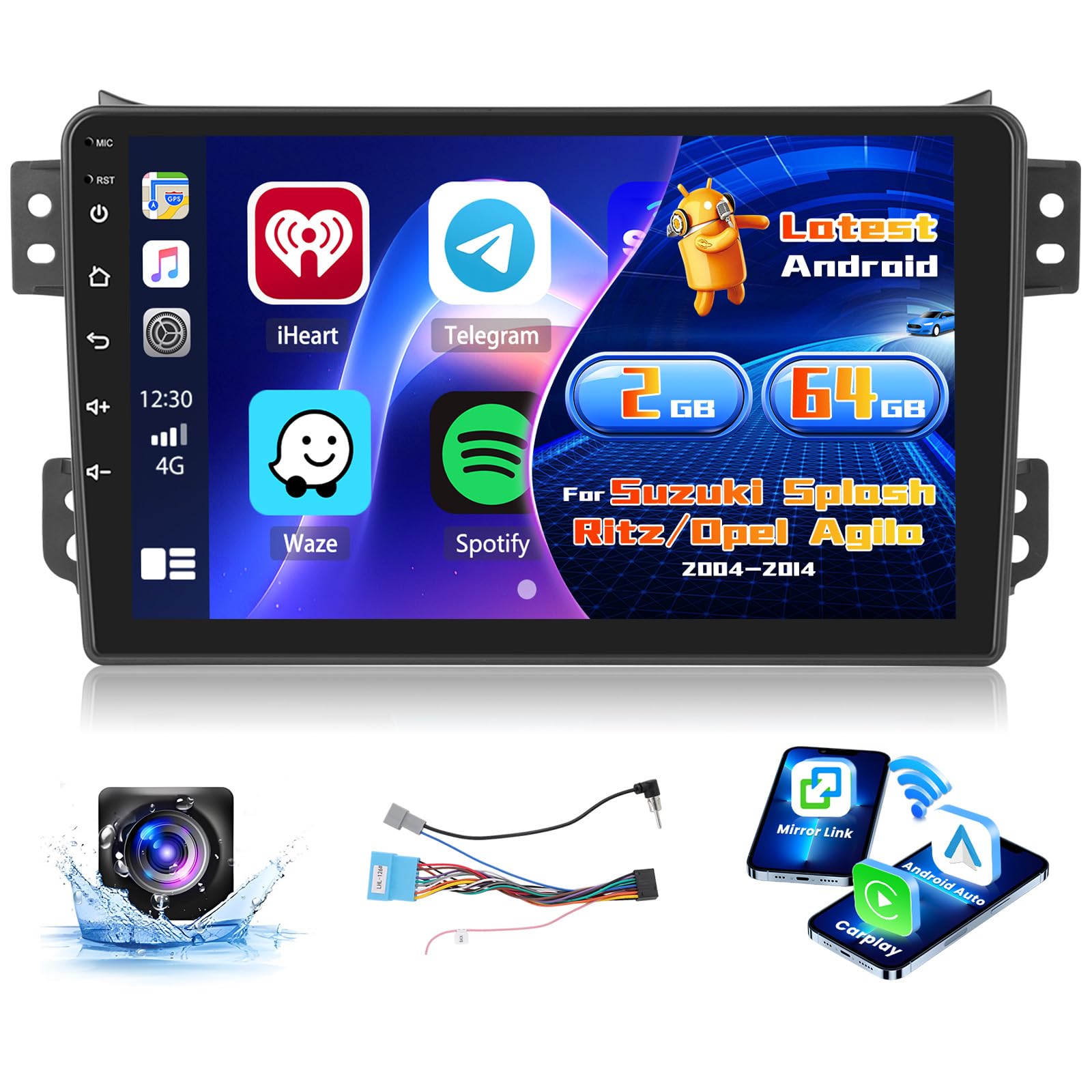
Image: Inefala 9-inch Android 15 Car Radio installed in a vehicle dashboard, displaying a navigation interface. This image provides a general view ຂອງຜະລິດຕະພັນ.
3. ເນື້ອໃນຊຸດ
ກວດສອບວ່າລາຍການທັງຫມົດທີ່ລະບຸໄວ້ຂ້າງລຸ່ມນີ້ແມ່ນລວມຢູ່ໃນຊຸດຂອງທ່ານ:
- Inefala Car Radio Unit for Suzuki Splash Ritz/Opel Agila
- ສາຍໄຟ
- ສາຍ RCA
- GPS Antenna
- Backup Camera Input Cable
- AHD Emergency Camera
- ໄມໂຄຣໂຟນພາຍນອກ
- ສາຍ USB 3 x
- ວົງເລັບຕິດຕັ້ງ
- ເຄື່ອງມືການຕິດຕັ້ງ

Image: Wiring harness details and a list of included accessories. This image illustrates the components provided in the package.
4. ການຕິດຕັ້ງແລະການຕິດຕັ້ງ
ການຕິດຕັ້ງແບບມືອາຊີບແມ່ນແນະນໍາໃຫ້. ກວດໃຫ້ແນ່ໃຈວ່າໄດ້ຕັດການເຊື່ອມຕໍ່ໄຟຟ້າຂອງລົດກ່ອນທີ່ຈະເລີ່ມການຕິດຕັ້ງ.
4.1. ກວດສອບການຕິດຕັ້ງກ່ອນ
Before removing the original radio, compare its dimensions and connectors with the new Inefala unit to ensure compatibility.

Image: Before and after installation comparison. The original radio is shown next to the new Inefala touchscreen unit, demonstrating the upgrade for Suzuki Splash Ritz and Opel Agila models.
4.2. ການເຊື່ອມຕໍ່ສາຍໄຟ
- ເຊື່ອມຕໍ່ສາຍໄຟຫຼັກເຂົ້າກັບສາຍໄຟຂອງລົດ.
- Attach the GPS antenna to the designated port on the unit and position it for optimal signal reception.
- Connect the RCA cables for audio output and auxiliary inputs as needed.
- For the backup camera, connect the camera's video output to the "CAM IN" port on the unit and the power cable to the reverse light circuit.
- ເຊື່ອມຕໍ່ໄມໂຄຣໂຟນພາຍນອກເພື່ອປັບປຸງຄຸນນະພາບການໂທ.
- Plug in the USB cables for external storage or device charging.

Image: Connection diagram for the radio and backup camera. This image details how to connect the various cables for full functionality.
4.3. ການຄວບຄຸມພວງມາໄລ (SWC)
If your vehicle has steering wheel controls, connect the SWC wires from the vehicle harness to the corresponding inputs on the radio. The unit supports CANBUS decoding for seamless integration. Refer to your vehicle's wiring diagram for specific connections.

Image: Steering wheel control options. This image illustrates how the unit integrates with existing steering wheel controls, including CANBUS decoder functionality.
5. ຄໍາແນະນໍາການດໍາເນີນງານ
5.1. Initial Power On and System Setup
After installation, turn on your vehicle's ignition. The unit will boot up. Follow the on-screen prompts for initial language and time zone settings.
5.2. Wireless CarPlay / Android Auto & Mirror Link
Connect your smartphone to the unit via USB cable or Wi-Fi for wireless CarPlay or Android Auto functionality. This allows you to access navigation, music, calls, and messages directly from the car radio's screen. Mirror Link functionality also enables mirroring your phone's screen.
- CarPlay: For iPhone users, connect via USB or Wi-Fi. Follow the prompts on your iPhone to enable CarPlay.
- Android Auto: For Android users, connect via USB or Wi-Fi. Ensure Android Auto is installed on your phone.
- ການເຊື່ອມຕໍ່ກັບກະຈົກ: Connect your smartphone via USB or Wi-Fi and select the Mirror Link option on the unit.

Image: Wireless CarPlay, Android Auto, and Mirror Link interfaces. This image demonstrates the various smartphone integration options available.

Image: Wireless CarPlay & Android Auto interface. The screen displays various applications and connectivity options, including music playback, hands-free calling, and GPS navigation.
5.3. GPS Navigation & Wi-Fi
The unit includes GPS navigation with pre-installed maps. You can also download online navigation applications via Wi-Fi. Connect to a Wi-Fi hotspot to access online features, download apps, music, and videos.

Image: Wi-Fi connection and GPS navigation. The top part shows the unit connected to Wi-Fi, while the bottom part displays a detailed GPS map.
5.4. Bluetooth & FM/RDS Radio
Pair your phone via Bluetooth for music streaming, hands-free calls, and file transfer. The FM/RDS radio allows you to listen to your favorite stations with enhanced information display.
- ການຈັບຄູ່ Bluetooth: ໄປທີ່ການຕັ້ງຄ່າ Bluetooth ໃນຕົວເຄື່ອງ ແລະ ໂທລະສັບຂອງທ່ານ. ຊອກຫາ the unit's Bluetooth name and pair.
- ວິທະຍຸ FM/RDS: Select the Radio application. Use the scan function to find stations or manually tune. RDS provides station information and traffic announcements.
- ຟັງຊັນ EQ: Adjust audio equalization settings to customize your listening experience.
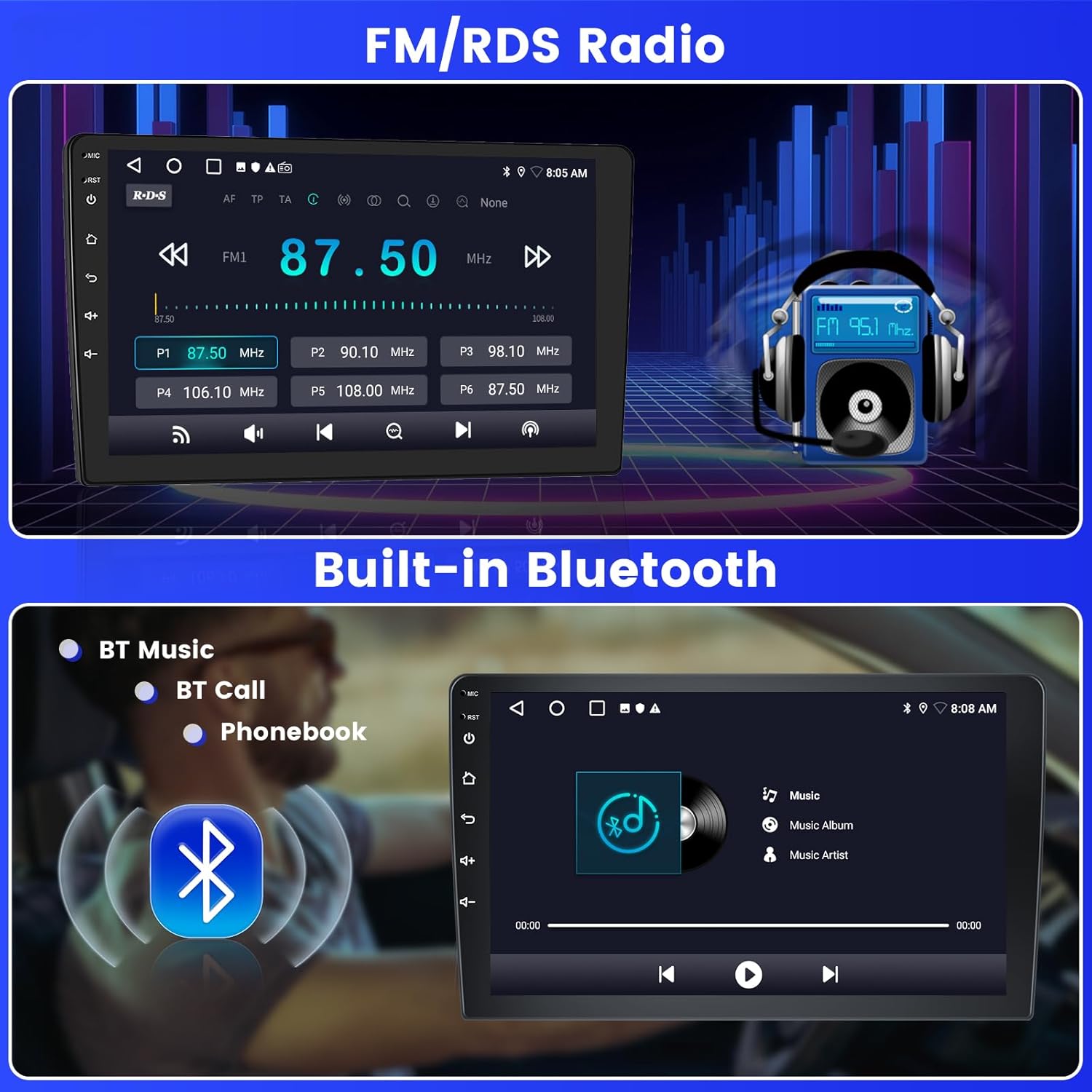
Image: FM/RDS Radio and Built-in Bluetooth. The top section shows the radio interface, and the bottom section displays Bluetooth music playback and call options.
5.5. Split Screen & UI Themes
The split-screen feature allows you to run two applications simultaneously, such as navigation and music. The unit also offers 26 customizable UI themes to personalize your interface.

Image: DSP, Split Screen, and UI Themes. This image highlights the digital sound processing, the ability to view two apps at once, and the variety of user interface themes.
5.6. ກ້ອງຖ່າຍຮູບສໍາຮອງ
When reversing, the unit automatically displays the high-definition image from the AHD backup camera, providing a clear view ຂອງສິ່ງແວດລ້ອມຂອງທ່ານ.
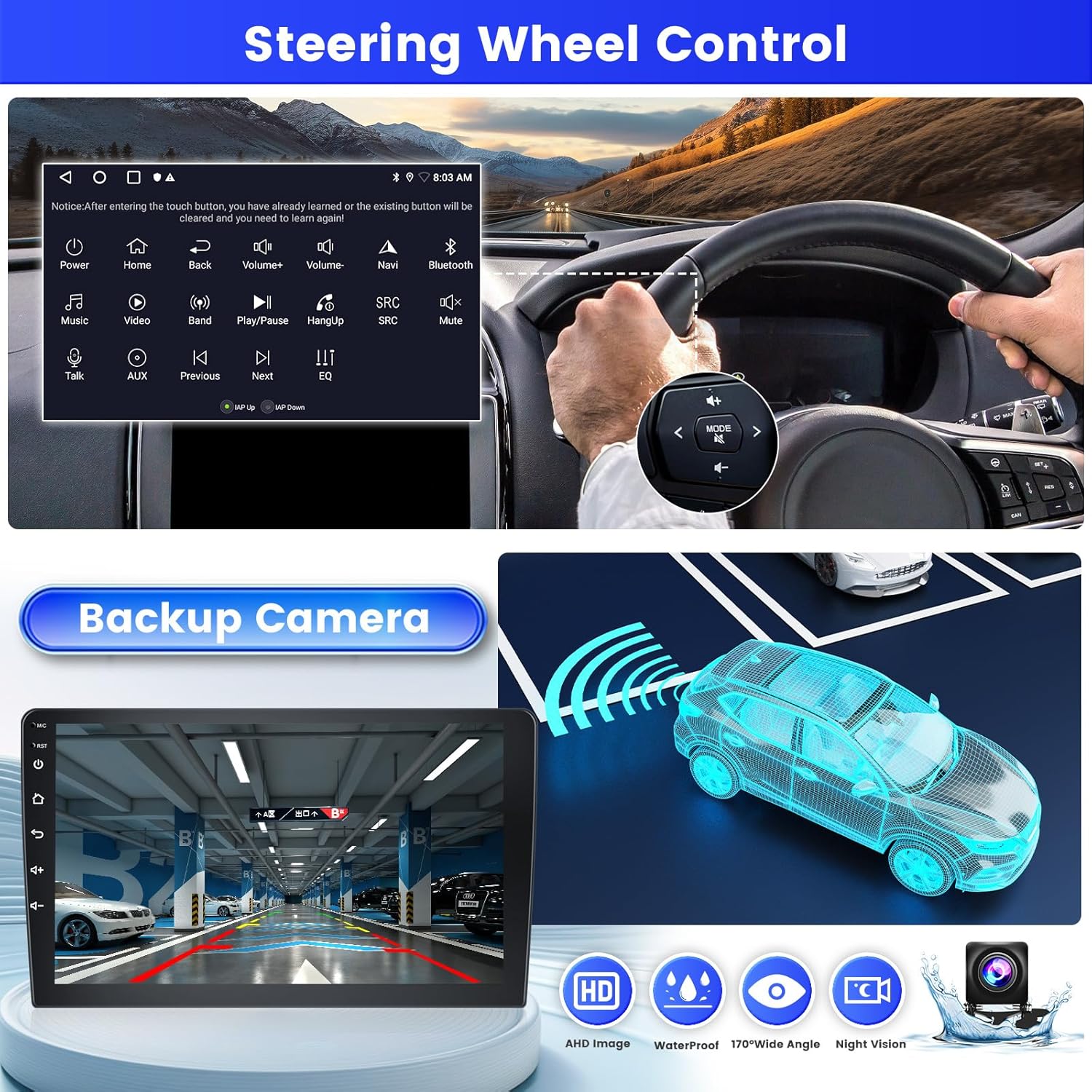
Image: Steering Wheel Control and Backup Camera. The top section shows the steering wheel control interface, while the bottom section displays the backup camera view ແລະລັກສະນະຂອງມັນ.

Image: AHD Backup Camera. This image shows the included backup camera with its mounting bracket and connection cables.
6. ບໍາລຸງຮັກສາ
To ensure the longevity and optimal performance of your Inefala car radio, follow these maintenance guidelines:
- ທໍາຄວາມສະອາດຫນ້າຈໍ: ໃຊ້ຜ້າທີ່ອ່ອນນຸ່ມ, ບໍ່ມີສານດ່າງເພື່ອເຊັດໜ້າຈໍຢ່າງຄ່ອຍໆ. ຢ່າໃຊ້ເຄື່ອງເຮັດຄວາມສະອາດຂັດຫຼືສານລະລາຍ.
- ອັບເດດຊອບແວ: Periodically check for system software updates via Wi-Fi to ensure you have the latest features and security patches.
- ຫຼີກລ້ຽງການອຸນຫະພູມທີ່ຮ້າຍແຮງ: ຫ້າມບໍ່ໃຫ້ເຄື່ອງໃຊ້ຄວາມຮ້ອນ ຫຼື ເຢັນຫຼາຍ, ເພາະວ່ານີ້ສາມາດສົ່ງຜົນກະທົບຕໍ່ປະສິດທິພາບ ແລະ ອາຍຸການໃຊ້ງານຂອງມັນ.
- ການເຊື່ອມຕໍ່ສາຍ: ກວດເບິ່ງທຸກສາຍເຊື່ອມຕໍ່ແຕ່ລະໄລຍະເພື່ອຮັບປະກັນວ່າພວກມັນປອດໄພ ແລະ ບໍ່ເສຍຫາຍ.
7. ການແກ້ໄຂບັນຫາ
ຖ້າທ່ານພົບບັນຫາກັບວິທະຍຸລົດຂອງທ່ານ, ໃຫ້ອ້າງອີງເຖິງບັນຫາ ແລະ ວິທີແກ້ໄຂທົ່ວໄປຕໍ່ໄປນີ້:
| ບັນຫາ | ສາເຫດທີ່ເປັນໄປໄດ້ | ການແກ້ໄຂ |
|---|---|---|
| ຫນ່ວຍບໍລິການບໍ່ເປີດ. | ການເຊື່ອມຕໍ່ພະລັງງານວ່າງ, ຟິວທີ່ເປົ່າ, ບັນຫາຫມໍ້ໄຟລົດ. | ກວດສອບການເຊື່ອມຕໍ່ສາຍໄຟ. ກວດສອບຟິວລົດ. ຮັບປະກັນວ່າແບັດເຕີຣີລົດໄດ້ຖືກສາກແລ້ວ. |
| ບໍ່ມີສຽງ. | ລະດັບສຽງຕໍ່າເກີນໄປ, ປິດສຽງໄດ້ແລ້ວ, ມີບັນຫາກ່ຽວກັບສາຍໄຟລຳໂພງ, ແຫຼ່ງສຽງບໍ່ຖືກຕ້ອງ. | ເພີ່ມລະດັບສຽງ. ກວດສອບການຕັ້ງຄ່າປິດສຽງ. ກວດສອບການເຊື່ອມຕໍ່ລຳໂພງ. ເລືອກແຫຼ່ງສຽງທີ່ຖືກຕ້ອງ. |
| ສັນຍານ GPS ເສຍ ຫຼືບໍ່ຖືກຕ້ອງ. | GPS antenna obstructed or improperly placed, weak signal area. | ໃຫ້ແນ່ໃຈວ່າເສົາອາກາດ GPS ມີຄວາມຊັດເຈນ view of the sky. Relocate antenna if necessary. |
| ບັນຫາການເຊື່ອມຕໍ່ Bluetooth. | ບໍ່ສາມາດຄົ້ນພົບໂທລະສັບໄດ້, ການຈັບຄູ່ບໍ່ຖືກຕ້ອງ, ການລົບກວນ. | Ensure phone's Bluetooth is on and discoverable. Delete previous pairings and re-pair. Move closer to the unit. |
| CarPlay/Android Auto ບໍ່ເຊື່ອມຕໍ່. | Incorrect USB cable, phone software issue, app not installed. | Use a high-quality USB cable. Ensure CarPlay/Android Auto is enabled on your phone. Update phone OS and apps. |
ຖ້າບັນຫາຍັງຄົງຢູ່, ກະລຸນາຕິດຕໍ່ຝ່າຍຊ່ວຍເຫຼືອລູກຄ້າ.
8. ຂໍ້ມູນຈໍາເພາະ
| ຄຸນສົມບັດ | ລາຍລະອຽດ |
|---|---|
| ຍີ່ຫໍ້ | Inefala |
| ໝາຍເລກຕົວແບບ | Inefala-A7210A4092H1MI2IT53-C490 |
| ລະບົບປະຕິບັດການ | Android 15 |
| ໜ່ວຍຄວາມຈຳ (RAM) | 2GB |
| ບ່ອນຈັດເກັບຂໍ້ມູນ (ROM) | 64GB |
| ຂະໜາດໜ້າຈໍ | 9 ນິ້ວ |
| ການເຊື່ອມຕໍ່ | Bluetooth, USB, Wi-Fi |
| ຄຸນນະສົມບັດພິເສດ | Wireless CarPlay, Android Auto, Mirror Link, FM/RDS Radio, EQ, GPS, 26 UI Themes, Steering Wheel Control (SWC), Dual USB Input |
| ອຸປະກອນທີ່ເຂົ້າກັນໄດ້ | ໂທລະສັບສະຫຼາດ |
| ຮູບແບບການອອກສຽງ | APE/FLAC/WAV/MP3/WMA |
| ຊ່ອງສຽງອ້ອມຮອບ | 4 |
| ການເຂົ້າລະຫັດວິດີໂອ | H.264, H.265/HEVC |
| ພະລັງງານຜົນຜະລິດ | 45 ວັດ x 4 ຊ່ອງ |
| ວິທີການຄວບຄຸມ | ແຕະ |
| ນ້ໍາຫນັກລາຍການ | 1.29 ກິໂລກຣາມ |
| ປະເທດຕົ້ນກໍາເນີດ | ຈີນ |
9. ການຮັບປະກັນແລະການສະຫນັບສະຫນູນ
9.1. ຂໍ້ມູນການຮັບປະກັນ
This Inefala car radio comes with a ຮັບປະກັນ 24 ເດືອນ from the date of purchase. The warranty covers manufacturing defects and malfunctions under normal use. Please retain your proof of purchase for warranty claims.
9.2. ການຊ່ວຍເຫຼືອລູກຄ້າ
For any inquiries, technical assistance, or warranty claims, Inefala offers lifetime online support. Our support team aims to respond to all inquiries within 24 hours.
Please visit the official Inefala website or contact our customer service department for support. Contact details can typically be found on our webສະຖານທີ່ຫຼືຢູ່ໃນການຫຸ້ມຫໍ່ຜະລິດຕະພັນຂອງທ່ານ.