
ແນະນຳ
Thank you for choosing the Cherub WST-670 Rechargeable Clip-On Tuner. This compact and versatile tuner is designed for precise tuning of various musical instruments, including chromatic, guitar, ukulele, and violin. Featuring a high-contrast color LCD display and a long-lasting rechargeable battery, it offers convenience and accuracy for musicians of all levels.
ເນື້ອໃນຊຸດ
ກະລຸນາກວດເບິ່ງຊຸດສຳລັບລາຍການຕໍ່ໄປນີ້:
- 1 x Cherub WST-670 Clip-On Tuner
- 1 x ສາຍສາກ USB
- 1 x ຄູ່ມືຜູ້ໃຊ້ (ເອກະສານນີ້)
ສິນຄ້າເກີນview
The Cherub WST-670 tuner features a robust clip mechanism and a clear display for easy readability. Its intuitive controls allow for quick mode selection and precise tuning.

ຮູບພາບ: ທາງຫນ້າ view of the Cherub WST-670 Clip-On Tuner, showing the display and clip mechanism.

Image: Close-up of the Cherub WST-670 Tuner's color LCD display, showing tuning indicators and battery level.
ຄຸນນະສົມບັດທີ່ສໍາຄັນ:
- ໂໝດປັບ: Chromatic (C), Guitar (G), Ukulele (U), Violin (V).
- ແບັດເຕີຣີທີ່ສາມາດສາກໄດ້: Built-in Li-Po battery provides over 10 hours of continuous use per charge.
- High-Contrast LCD: Bright and clear color display shows tuning status.
- ຄລິບທີ່ສາມາດປັບໄດ້: Strong and flexible clip for optimal viewມຸມ ing.
- ປິດເຄື່ອງອັດຕະໂນມັດ: Automatically turns off to maximize battery life.
ຕັ້ງຄ່າ
1. Charging the Tuner
Before first use, fully charge the tuner. The built-in rechargeable battery ensures long operation time.
- Connect the included USB charging cable to the tuner's charging port.
- ເຊື່ອມຕໍ່ປາຍອື່ນໆຂອງສາຍ USB ກັບອະແດັບເຕີໄຟ USB ມາດຕະຖານ (ບໍ່ລວມ) ຫຼືພອດ USB ຂອງຄອມພິວເຕີ.
- The battery indicator on the display will show charging status. Once fully charged, the indicator will show a full battery.
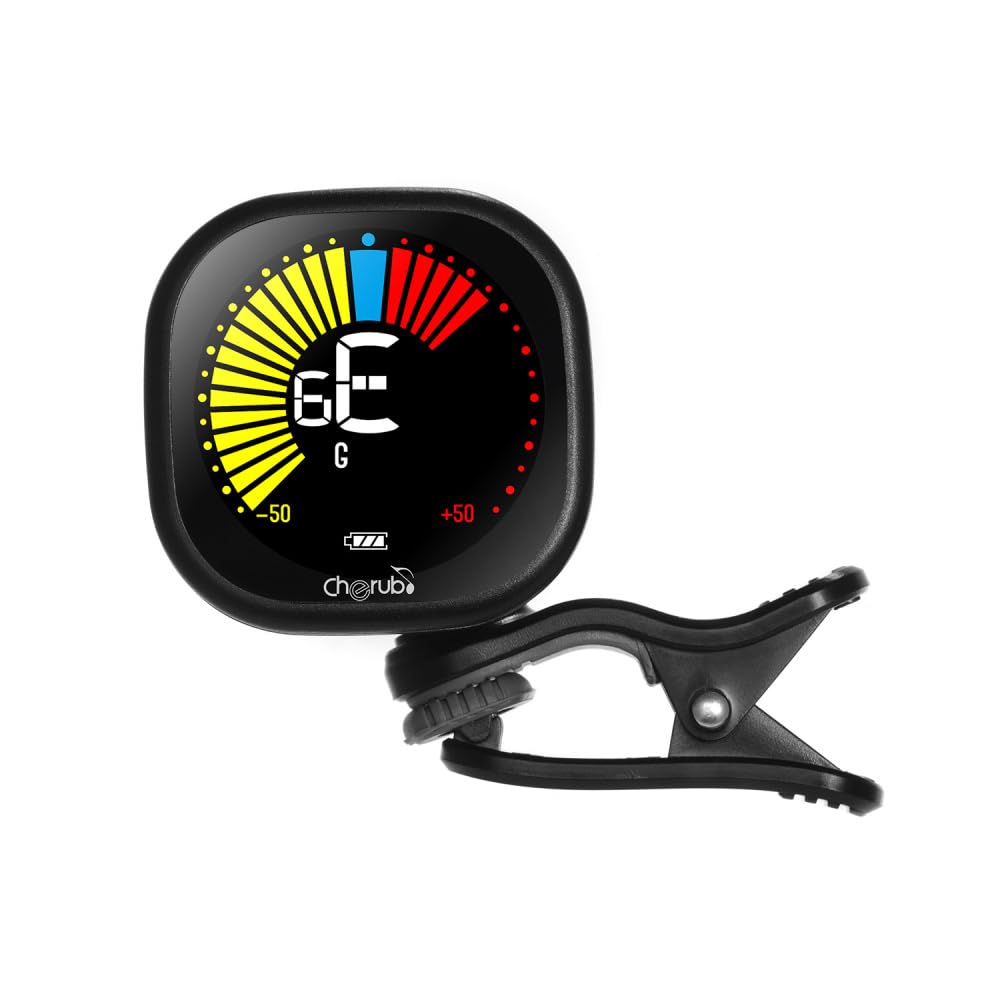
Image: Diagram illustrating how to connect the USB charging cable to the Cherub WST-670 Tuner for recharging.
2. Attaching the Tuner
The clip-on design allows for easy attachment to the headstock of your instrument.
- Gently open the clip and attach it securely to the headstock of your guitar, ukulele, or violin.
- Adjust the tuner's display angle for optimal visibility.

Image: The Cherub WST-670 Tuner securely clipped onto the headstock of an acoustic guitar.
ຄໍາແນະນໍາການດໍາເນີນງານ
1. ເປີດ/ປິດ
- To power on, press and hold the power button (usually marked with a power symbol) for a few seconds.
- To power off, press and hold the power button again. The tuner also features an auto power-off function to save battery.
2. Selecting Tuning Mode
The WST-670 supports multiple tuning modes:
- ໂຄຣມາຕິກ (C): For all instruments, displays the exact note.
- ກີຕ້າ (G): ປັບໃຫ້ເໝາະສົມສຳລັບການປັບແຕ່ງກີຕ້າ.
- ອູຄູເລເລ (U): ເໝາະສຳລັບການປັບແຕ່ງ ukulele.
- ໄວໂອລິນ (V): ເໝາະສົມສຳລັບການປັບແຕ່ງໄວໂອລິນ.
To change the tuning mode, press the "MODE" button repeatedly until the desired mode (C, G, U, or V) is displayed on the screen.
3. ການປັບແຕ່ງເຄື່ອງດົນຕີຂອງທ່ານ
- Ensure the tuner is powered on and the correct tuning mode is selected for your instrument.
- Pluck a single string on your instrument. The tuner will detect the vibration and display the note.
- ການຕີຄວາມໝາຍຂອງຈໍສະແດງຜົນ:
- If the needle points to the left and the display is red/yellow, the note is flat. Tighten the string.
- If the needle points to the right and the display is red/yellow, the note is sharp. Loosen the string.
- When the note is in tune, the needle will be centered, and the display will turn green.
- Repeat for all strings until your instrument is perfectly in tune.
ບໍາລຸງຮັກສາ
ທໍາຄວາມສະອາດ
To clean the tuner, use a soft, dry cloth. Do not use liquid cleaners or abrasive materials, as they may damage the display or casing.
ການດູແລຫມໍ້ໄຟ
- ຫຼີກເວັ້ນການປົດສາກແບັດເຕີຣີໃຫ້ເຕັມທີ່ເລື້ອຍໆເພື່ອຍືດອາຍຸຂອງມັນ.
- If storing the tuner for an extended period, charge it to about 50% capacity and recharge every few months.
- Use only the provided USB cable or a compatible cable for charging.
ການແກ້ໄຂບັນຫາ
ເຄື່ອງຈູນເນີບໍ່ເປີດ:
- Ensure the battery is charged. Connect the tuner to a USB power source and allow it to charge for at least 30 minutes before attempting to power on again.
- ກົດປຸ່ມເປີດປິດຄ້າງໄວ້ໃຫ້ແໜ້ນເປັນເວລາສອງສາມວິນາທີ.
ການປັບບໍ່ຖືກຕ້ອງ:
- Check that the tuner is securely clipped to the instrument's headstock. Loose attachment can affect vibration detection.
- Ensure the correct tuning mode (C, G, U, or V) is selected for your instrument.
- ປັບສະພາບແວດລ້ອມທີ່ງຽບສະຫງົບເພື່ອຫຼີກເວັ້ນການລົບກວນຈາກສຽງພາຍນອກ.
- If using Chromatic mode, ensure you are aware of the specific notes for your instrument's standard tuning.
ຈໍສະແດງຜົນແມ່ນມືດ ຫຼືກະພິບ:
- The battery might be low. Recharge the tuner using the provided USB cable.
ຂໍ້ມູນຈໍາເພາະ
| ຍີ່ຫໍ້: | ເຊຣູບ |
| ຕົວແບບ: | WST-670 |
| ໂໝດປັບ: | Chromatic (C), Guitar (G), Ukulele (U), Violin (V) |
| ໄລຍະການກວດຫາ: | A0 (27.50 Hz) - C8 (4186 Hz) |
| ວິທີການກວດຫາ: | Piezo (ຄລິບ) |
| ການອ້າງອິງ: | 440 Hz |
| ຄວາມຖືກຕ້ອງຂອງການປັບ: | +/-1 ເຊັນ |
| ການສະຫນອງພະລັງງານ: | Built-in Rechargeable Li-Po Battery (3.7V 180mAh) |
| ນ້ໍາຫນັກລາຍການ: | 30 g / 1.1 ອໍ |
| ຂະໜາດຜະລິດຕະພັນ: | 10.5 x 9.5 x 5 cm (ປະມານ 4.1 x 3.7 x 2 ນິ້ວ) |
ການຮັບປະກັນແລະການສະຫນັບສະຫນູນ
This product comes with a standard manufacturer's warranty. For specific warranty details, please refer to the documentation provided at the time of purchase or contact your retailer. For technical support or further assistance, please contact the customer service department of your retailer.
Note: The guitar shown in images is for illustration purposes only and is not included with the tuner.