
ແນະນຳ
This manual provides detailed instructions for the assembly, operation, maintenance, and troubleshooting of your Claiks 24-Inch Sit-Stand Workstation. Please read this manual thoroughly before use to ensure proper function and safety. This workstation is designed to convert a traditional desk into a height-adjustable ergonomic setup, promoting a healthier work environment.
ຂໍ້ມູນຄວາມປອດໄພ
- Ensure all components are securely fastened before placing equipment on the workstation.
- ບໍ່ໃຫ້ເກີນຄວາມອາດສາມາດໂຫຼດໄດ້ສູງສຸດຂອງ 22 lbs (10 kg).
- ຮັກສາມື ແລະ ນິ້ວມືໃຫ້ຫ່າງຈາກຊິ້ນສ່ວນທີ່ເຄື່ອນທີ່ໃນລະຫວ່າງການປັບຄວາມສູງ.
- Place the workstation on a stable, level surface.
- Avoid placing liquids directly on the workstation surface to prevent damage.
ການຕິດຕັ້ງແລະການປະກອບ
The Claiks 24-Inch Sit-Stand Workstation features tool-free assembly for quick setup.
- Unpack ອົງປະກອບ: Carefully remove all parts from the packaging and verify against the parts list (not included in this manual, refer to packaging for full list).
- Attach to Desk: Position the workstation on your existing desk. Utilize the dual fixation clamps to secure the unit firmly to the desk edge. Tighten the clamps until the workstation is stable and does not wobble.
- Place Monitor and Keyboard: Place your monitor(s) on the upper platform and your keyboard and mouse on the lower tray. Ensure cables are routed safely and do not interfere with movement.

ຄໍາແນະນໍາການດໍາເນີນງານ
The workstation allows for seamless transitions between sitting and standing positions.
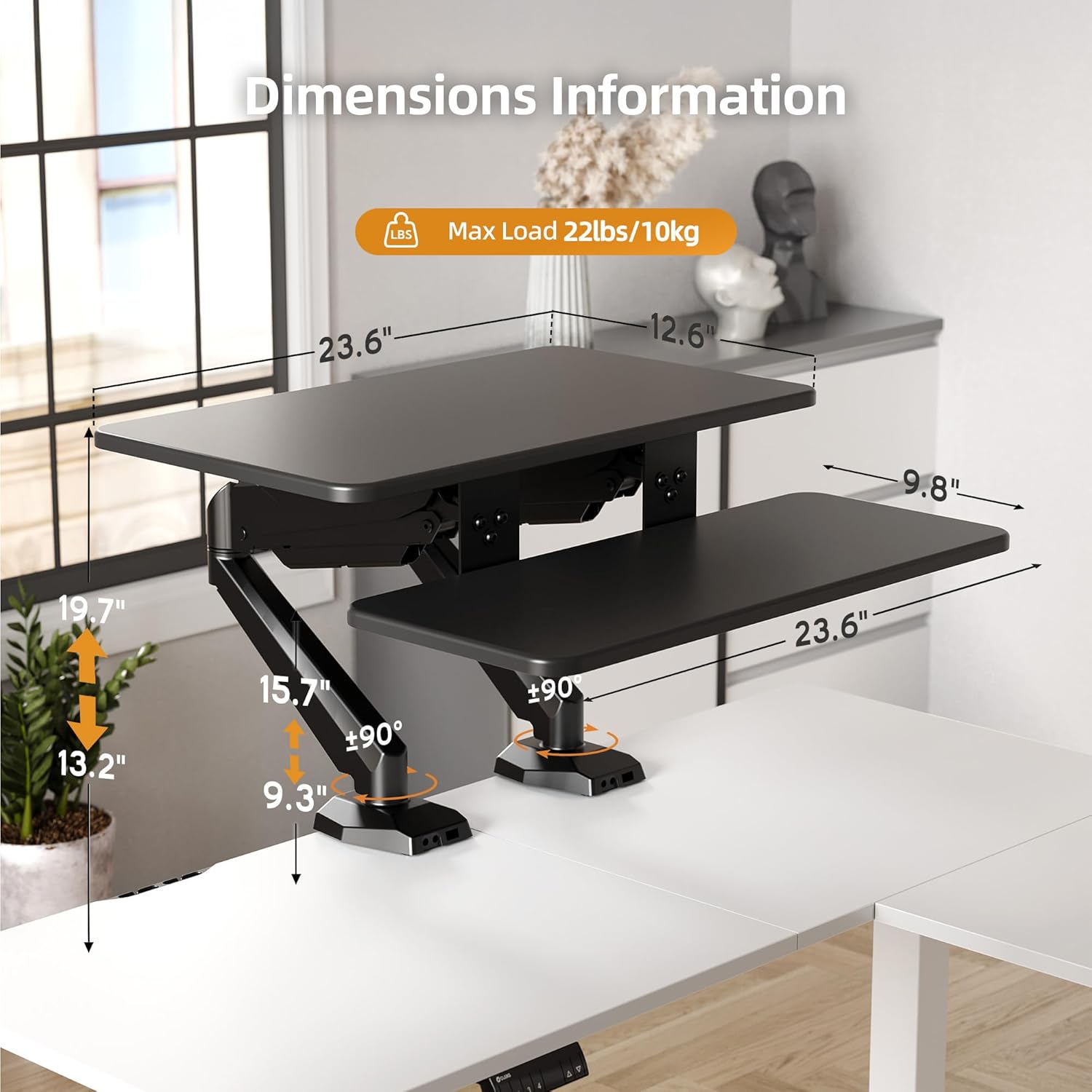
- ການປັບຄວາມສູງ: To adjust the height, gently press the levers located on the sides of the workstation. Apply slight upward or downward pressure to guide the platforms to your desired height. The upper platform adjusts from 13.2 inches to 19.7 inches, and the lower tray adjusts from 9.3 inches to 15.9 inches. Release the levers to lock the workstation in place.
- Platform Rotation: The platforms offer 180-degree rotation, allowing for flexible viewing angles and workspace configurations. Gently rotate the platforms to achieve the desired orientation.


ບໍາລຸງຮັກສາ
- ທໍາຄວາມສະອາດ: ເຊັດພື້ນຜິວໃຫ້ອ່ອນໆ, ງamp ຜ້າ. ຫຼີກລ້ຽງການເຮັດຄວາມສະອາດຂັດຫຼືສານລະລາຍ.
- ການກວດກາ: ກວດສອບສະກູ ແລະ ກະບອກທຸກອັນເປັນໄລຍະamps to ensure they remain tight and secure.
- ອາຍແກັສ Spring: The pneumatic gas spring mechanism is designed for long-term use and generally requires no maintenance. If you notice any issues with height adjustment, refer to the troubleshooting section.
ການແກ້ໄຂບັນຫາ
| ບັນຫາ | ສາເຫດທີ່ເປັນໄປໄດ້ | ການແກ້ໄຂ |
|---|---|---|
| Workstation is difficult to raise or lower. | Obstruction or incorrect lever operation. | Ensure no objects are blocking the mechanism. When lowering, the unit may require a slight backward lean to clear the desk edge if positioned too close to a wall. Ensure both levers are fully engaged. |
| Workstation feels unstable or wobbles. | Clamps are not sufficiently tightened or uneven load distribution. | ຮັດໂຕະໃຫ້ແໜ້ນຂຶ້ນamps securely. Distribute weight evenly across the platforms. Ensure the desk surface itself is stable. |
| Platforms do not rotate smoothly. | Friction or obstruction. | Check for any debris or obstructions around the rotation points. Ensure no cables are caught. |
ຂໍ້ມູນຈໍາເພາະ
| ຄຸນສົມບັດ | ລາຍລະອຽດ |
|---|---|
| ຍີ່ຫໍ້ | Claiks |
| ໝາຍເລກຕົວແບບ | CL-SDC-SZZSZ |
| ຂະໜາດສິນຄ້າ (ກວ້າງ x ຍາວ x ສູງ) | 10.04" x 34.25" x 6.69" |
| Upper Platform Dimensions | 23.6" x 13.6" |
| Lower Tray Dimensions | 23.6" x 9.8" |
| Upper Platform Height Range | 13.2" ຫາ 19.7" |
| Lower Tray Height Range | 9.3" ຫາ 15.9" |
| ຄວາມສາມາດໃນການໂຫຼດສູງສຸດ | 22 lbs (10 ກິໂລ) |
| ສີ | ດຳ |
| ວັດສະດຸ | Wood (Top), Metal (Base) |
| ຄຸນນະສົມບັດພິເສດ | Adjustable Height, Flexible Rotation, Dual Fixation |
| ປະເພດການຕິດຕັ້ງ | ໂຕະ Clamp |
| ນ້ໍາຫນັກລາຍການ | 12.04 ກິໂລກຣາມ |
ຂໍ້ມູນການຮັບປະກັນ
This Claiks Sit-Stand Workstation is backed by a ການຮັບປະກັນໂຄງສ້າງ 5 ປີ. This warranty covers defects in materials and workmanship under normal use. For specific terms and conditions, please refer to the warranty card included with your product or contact customer support.
ການຊ່ວຍເຫຼືອລູກຄ້າ
For further assistance, technical support, or warranty claims, please contact Claiks customer service. Contact information can typically be found on the product packaging or on the official Claiks webເວັບໄຊ.
ສະຫນັບສະຫນູນອອນໄລນ໌: Visit the official Claiks webເວັບໄຊທ໌ສໍາລັບ FAQs ແລະຊັບພະຍາກອນສະຫນັບສະຫນູນ.
ສະຫນັບສະຫນູນອີເມວ: ອ້າງອີງໃສ່ເອກະສານຜະລິດຕະພັນຂອງທ່ານສໍາລັບທີ່ຢູ່ອີເມວການບໍລິການລູກຄ້າ.