
1. ບົດແນະນຳ
This manual provides essential information for the safe and efficient use of your AT&T Cingular Flex 2 Smart Flip Phone (Model 6723D). Please read these instructions carefully before operating your device to ensure optimal performance and longevity.
The Cingular Flex 2 is a compact flip phone designed for reliable communication. It features a vibrant display, a built-in camera for capturing moments, and 4GB of internal storage for essential files and applications. The device operates on KaiOS, offering a streamlined user experience.
2. ສິ່ງທີ່ຢູ່ໃນກ່ອງ
ກວດສອບວ່າລາຍການທັງຫມົດແມ່ນມີຢູ່ໃນຊຸດຜະລິດຕະພັນຂອງທ່ານ:
- AT&T Cingular Flex 2 Smart Flip Phone
- Power Adapter
- ແບັດເຕີຣີລິທຽມໄອອອນ (ຕິດຕັ້ງລ່ວງໜ້າ ຫຼື ແຍກຕ່າງຫາກ)
3. ອຸປະກອນເກີນview
Familiarize yourself with the physical components of your AT&T Cingular Flex 2 phone.
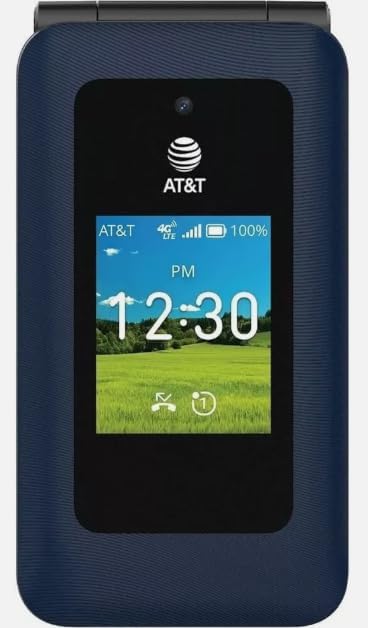
ຮູບທີ 3.1: ດ້ານໜ້າ view of the AT&T Cingular Flex 2 Smart Flip Phone, showing the main display with time, network signal, and battery indicator.

ຮູບທີ 3.2: ຫລັງ view of the AT&T Cingular Flex 2 Smart Flip Phone, highlighting the textured back cover and the speaker grille at the top.
ອົງປະກອບທີ່ສໍາຄັນ:
- ການສະແດງພາຍນອກ: Shows notifications, time, and caller ID when closed.
- ຈໍສະແດງຜົນຫຼັກ: Internal screen for navigation and content.
- ປຸ່ມກົດ: Numeric and navigation buttons for input.
- ກ້ອງຖ່າຍຮູບ: Located on the device for capturing photos and videos.
- ປຸ່ມລະດັບສຽງ: ປັບລະດັບສຽງ.
- Power/End Call Button: Turns the device on/off and ends calls.
- ຊ່ອງສາກໄຟ: ສໍາລັບການເຊື່ອມຕໍ່ອະແດບເຕີພະລັງງານ.
4. ຕັ້ງຄ່າ
4.1. ການໃສ່ຊິມກາດ ແລະ ແບັດເຕີຣີ
- ກວດໃຫ້ແນ່ໃຈວ່າໂທລະສັບປິດຢູ່.
- ເອົາຝາປິດຫຼັງຂອງໂທລະສັບອອກຢ່າງລະມັດລະວັງ.
- If the battery is installed, remove it by gently lifting it from the notch.
- Locate the SIM card slot, typically beneath the battery compartment. Insert your SIM card with the gold contacts facing down and the notched corner aligned correctly.
- Insert the battery, ensuring the contacts align with those in the phone.
- ປ່ຽນຝາຫຼັງໃໝ່ຈົນກວ່າມັນຈະກົດເຂົ້າທີ່ປອດໄພ.
4.2. ການສາກອຸປະກອນ
- ເຊື່ອມຕໍ່ອະແດບເຕີໄຟກັບຜອດສາກໄຟຢູ່ໃນໂທລະສັບຂອງທ່ານ.
- ສຽບອະແດບເຕີໄຟເຂົ້າໄປໃນປລັກໄຟຟ້າມາດຕະຖານ.
- Allow the phone to charge completely before initial use. The battery indicator on the screen will show charging status.
4.3. ເປີດ / ປິດພະລັງງານ
- ເພື່ອເປີດເຄື່ອງ: ກົດປຸ່ມເປີດ/ປິດການໂທຄ້າງໄວ້ຈົນກວ່າໜ້າຈໍຈະສະຫວ່າງ.
- ປິດເຄື່ອງ: ກົດປຸ່ມເປີດ/ປິດການໂທຄ້າງໄວ້, ຈາກນັ້ນເລືອກ 'ປິດເຄື່ອງ' ຈາກຕົວເລືອກໃນໜ້າຈໍ.
5. ການປະຕິບັດໂທລະສັບຂອງທ່ານ
5.1. ການນໍາທາງພື້ນຖານ
The Cingular Flex 2 uses a physical keypad for navigation. Use the directional pad (D-pad) to move between menu items and the center button to select. The left and right soft keys perform actions indicated on the screen above them.
5.2. ເຮັດ ແລະ ຮັບສາຍ
- ໂທອອກ: Enter the phone number using the keypad and press the Call button (usually the green button).
- ເພື່ອຮັບສາຍ: ເມື່ອໂທລະສັບດັງຂຶ້ນ, ກົດປຸ່ມໂທ.
- ເພື່ອວາງສາຍ: Press the Power/End Call button (usually the red button).
5.3. ການສົ່ງ ແລະ ຮັບຂໍ້ຄວາມ
ທ່ອງໄປຫາແອັບພລິເຄຊັນ 'ຂໍ້ຄວາມ' ຈາກເມນູຫຼັກ.
- To Send a New Message: Select 'New Message', enter the recipient's number or select from contacts, then type your message using the keypad.
- Note on Multimedia Messaging: Sending photos via text message may not be consistently supported. Receiving multimedia messages can also be intermittent.
- Voice to Text: This device does not support voice-to-text input for messaging.
5.4. ການນໍາໃຊ້ກ້ອງຖ່າຍຮູບ
The phone includes a built-in camera. You can access it via the main menu or by pressing the dedicated camera shortcut button on the side of the device.
- ຖ່າຍຮູບ: Open the camera app, frame your shot, and press the center button or camera button to capture.
- ບັນທຶກວິດີໂອ: Switch to video mode within the camera app and press the record button.
5.5. Internet and Applications
The Cingular Flex 2 runs on KaiOS. Access the KaiOS store for additional applications. Pre-installed apps include YouTube and a feature-reduced version of Google Maps. Be aware that some utility apps downloaded from the store may display advertisements.
6. ບໍາລຸງຮັກສາ
6.1. ການດູແລຫມໍ້ໄຟ
- ຫຼີກເວັ້ນການເປີດເຜີຍແບດເຕີລີ່ກັບອຸນຫະພູມທີ່ຮຸນແຮງ.
- Charge the battery using only the provided power adapter.
- Unplug the charger once the battery is fully charged to conserve energy.
6.2. ການເຮັດຄວາມສະອາດອຸປະກອນຂອງທ່ານ
ໃຊ້ຜ້າແພທີ່ອ່ອນ, ແຫ້ງ, ບໍ່ມີເສັ້ນດ່າງເພື່ອເຮັດຄວາມສະອາດໜ້າຈໍ ແລະ ຮ່າງກາຍຂອງໂທລະສັບ. ຫຼີກເວັ້ນການນໍາໃຊ້ສານເຄມີທີ່ຮຸນແຮງຫຼືວັດສະດຸຂັດ.
6.3. ການປັບປຸງຊອບແວ
Periodically check for software updates in the phone's settings menu to ensure your device has the latest features and security enhancements.
7. ການແກ້ໄຂບັນຫາ
If you encounter issues with your Cingular Flex 2, refer to the following common problems and solutions:
| ບັນຫາ | ການແກ້ໄຂທີ່ເປັນໄປໄດ້ |
|---|---|
| Slow interface or app loading | Close unused applications. Restart the phone. Consider uninstalling less frequently used apps to free up resources. |
| Operating System crashes | Restart the device. Ensure the software is up to date. If persistent, a factory reset may be necessary (back up data first). |
| Wi-Fi or network connectivity issues | Toggle Wi-Fi/Mobile Data off and on. Restart the phone. Check router or network settings. Ensure notifications for network disconnections are managed in settings to avoid excessive alerts. |
| Keyboard input errors (e.g., double key strokes) | Ensure you are pressing keys firmly and deliberately. If the issue persists, contact customer support. |
| Cannot send photos via text message | This is a known limitation for some devices. Try alternative methods for sharing images if available, or reduce image size if an option. |
| ຊີວິດຫມໍ້ໄຟບໍ່ດີ | Reduce screen brightness. Close background apps. Limit use of power-intensive features like GPS. Ensure the battery is fully charged. |
7.1. ຣີເຊັດເປັນຄ່າໂຮງງານ
ການຣີເຊັດເປັນຄ່າໂຮງງານຈະລຶບຂໍ້ມູນທັງໝົດອອກຈາກໂທລະສັບຂອງທ່ານ ແລະ ກູ້ມັນຄືນເປັນຄ່າໂຮງງານເດີມຂອງມັນ. ນີ້ສາມາດແກ້ໄຂບັນຫາຊອບແວທີ່ຍັງຄົງຄ້າງ. ສຳຮອງຂໍ້ມູນທີ່ສຳຄັນທັງໝົດກ່ອນທີ່ຈະດຳເນີນການຣີເຊັດເປັນຄ່າໂຮງງານ. Consult your phone's settings menu for the 'Reset' or 'Erase all data' option.
8. ຂໍ້ມູນຈໍາເພາະ
Detailed technical specifications for the AT&T Cingular Flex 2 Smart Flip Phone (Model 6723D):
| ຄຸນສົມບັດ | ຂໍ້ມູນຈໍາເພາະ |
|---|---|
| ຊື່ຕົວແບບ | Cingular Flex 2 |
| ໝາຍເລກຕົວແບບ | 6723 ດ |
| ຍີ່ຫໍ້ | AT&T |
| ລະບົບປະຕິບັດການ | KaiOS |
| ຄວາມອາດສາມາດເກັບຮັກສາຫນ່ວຍຄວາມຈໍາ | 4 GB |
| RAM ຂະຫນາດທີ່ຕິດຕັ້ງ | 512 MB |
| ຕົວແບບ CPU | Mediatek Dimensity 1100 |
| ຄວາມລະອຽດ | 720 x 1520 |
| ເຕັກໂນໂລຊີການເຊື່ອມຕໍ່ | 4G LTE |
| ເຕັກໂນໂລຊີໂທລະສັບມືຖື | 4G |
| ຜູ້ໃຫ້ບໍລິການໄຮ້ສາຍ | ປົດລັອກແລ້ວ |
| GPS | ຄວາມຈິງ |
| ປັດໄຈແບບຟອມ | ພິກ |
| ສີ | Classic Navy |
| ຄວາມອາດສາມາດຫມໍ້ໄຟ | 1400 ລ້ານamp ຊົ່ວໂມງ |
| ການປະເມີນພະລັງງານຫມໍ້ໄຟ | 2800 Amp ຊົ່ວໂມງ |
| ນ້ໍາຫນັກລາຍການ | 7.4 ອອນສ໌ (0.21 ກິໂລກຣາມ) |
| ຂະໜາດແພັກເກັດ | 4.69 x 2.91 x 2.13 ນິ້ວ |
| ຜູ້ຜະລິດ | AT&T |
| ວັນທີທໍາອິດທີ່ມີ | ວັນທີ 11 ກຸມພາ 2025 |
9. ການຮັບປະກັນແລະການສະຫນັບສະຫນູນ
For warranty information, please refer to the documentation provided with your purchase or visit the official AT&T support website. If you require technical assistance or have questions not covered in this manual, please contact AT&T customer support.
ທ່ານສາມາດຊອກຫາຊັບພະຍາກອນສະຫນັບສະຫນູນເພີ່ມເຕີມແລະຂໍ້ມູນການຕິດຕໍ່ກ່ຽວກັບການ AT&T Store ໃນ Amazon.