
GESKS Tuya 8MP
GESKS Tuyasmart Wireless 4K 8MP WiFi Security Camera User Manual
Model: Tuya 8MP
ແນະນຳ
This manual provides detailed instructions for the installation, operation, and maintenance of your GESKS Tuyasmart Wireless 4K 8MP WiFi Security Camera. This advanced security camera offers 4K Ultra HD resolution, intelligent features like motion detection and human tracking, two-way audio, and robust night vision, ensuring comprehensive surveillance for your property.
ແມ່ນຫຍັງຢູ່ໃນກ່ອງ
ກະລຸນາກວດສອບວ່າອົງປະກອບທັງໝົດມີຢູ່ກ່ອນທີ່ຈະດໍາເນີນການຕິດຕັ້ງ.
- GESKS Tuyasmart Wireless 4K 8MP WiFi Camera
- Power Adapter
- screws ການຕິດຕັ້ງ
- ຄູ່ມືການສອນ (ເອກະສານສະບັບນີ້)
ສິນຄ້າເກີນview
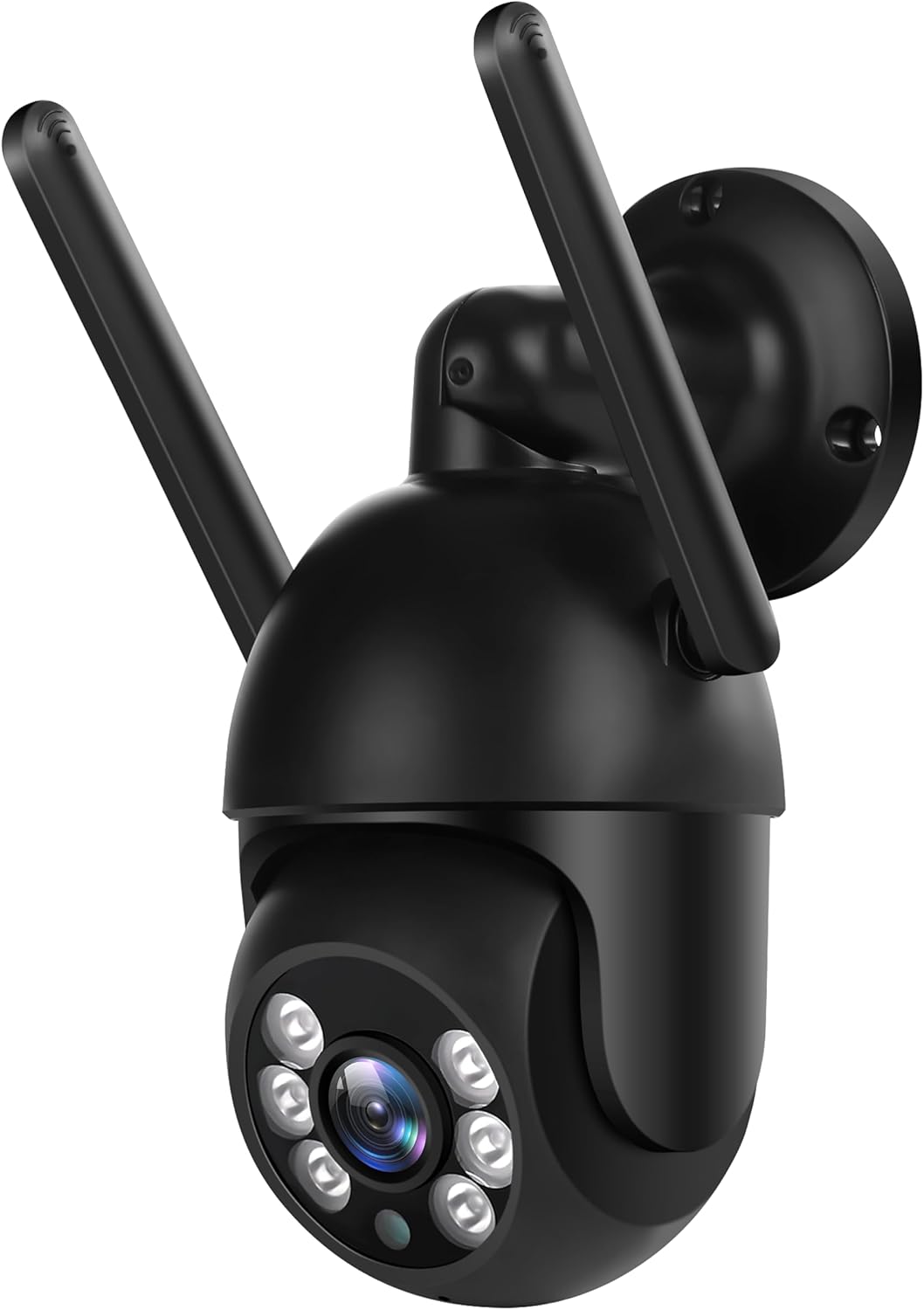
Figure 1: GESKS Tuyasmart Wireless 4K 8MP WiFi Security Camera. This image displays the black dome-shaped security camera with two external antennas. The camera features a lens surrounded by multiple infrared and white light LEDs for night vision. It is designed for wall mounting, with a circular base visible at the top right. The camera's compact design allows for versatile installation.
The GESKS Tuyasmart camera is a compact, outdoor-rated dome PTZ camera. It features a 2.8mm lens, IR-CUT filter, and a combination of infrared and white light LEDs for effective night vision up to 20 meters. The camera supports horizontal rotation of 355 degrees and vertical rotation of 110 degrees, providing wide area coverage.
ຕັ້ງຄ່າ
1. ການຕິດຕັ້ງກ້ອງຖ່າຍຮູບ
- ເລືອກສະຖານທີ່: Select a suitable outdoor or indoor location that provides the desired viewມຸມສາກ ແລະ ຢູ່ພາຍໃນຂອບເຂດຂອງເຄືອຂ່າຍ Wi-Fi ຂອງທ່ານ. ໃຫ້ແນ່ໃຈວ່າພື້ນຜິວຕິດຕັ້ງແຂງແຮງພໍທີ່ຈະຮອງຮັບກ້ອງຖ່າຍຮູບໄດ້.
- Mark Drill Holes: Use the camera's mounting base as a template to mark the positions for drilling holes on the wall or ceiling.
- ຮູເຈາະ: Drill pilot holes at the marked positions. Insert wall anchors if necessary for added stability.
- ຮັບປະກັນກ້ອງຖ່າຍຮູບ: Align the camera's mounting base with the drilled holes and secure it using the provided mounting screws.
2. ການເຊື່ອມຕໍ່ພະລັງງານ
Connect the provided power adapter to the camera's power input port. Plug the power adapter into a standard electrical outlet. The camera will power on and initiate its startup sequence.
3. ການຕິດຕັ້ງແອັບຯ ແລະການເຊື່ອມຕໍ່ Wi-Fi
- ດາວໂຫລດ App ໄດ້: Download the "Tuyasmart" or "Smartlife" app from the iOS App Store (for Apple devices) or Google Play Market (for Android devices).
- ລົງທະບຽນ/ເຂົ້າສູ່ລະບົບ: ເປີດ app ແລະລົງທະບຽນບັນຊີໃຫມ່ຫຼືເຂົ້າສູ່ລະບົບຖ້າຫາກວ່າທ່ານມີແລ້ວ.
- ເພີ່ມອຸປະກອນ: Tap the "+" icon or "Add Device" button in the app. Select "Security & Video Surveillance" and then "Smart Camera (Wi-Fi)".
- ເຊື່ອມຕໍ່ກັບ Wi-Fi: Follow the on-screen instructions to connect the camera to your 2.4GHz Wi-Fi network. Ensure your mobile device is connected to the same Wi-Fi network during the setup process. You may need to scan a QR code displayed on your phone with the camera lens or listen for a connection tone.
- ເພີ່ມອຸປະກອນແລ້ວ: Once connected, the camera will appear in your device list within the app. You can rename the camera for easier identification.
ປະຕິບັດການກ້ອງຖ່າຍຮູບ
1. ມີຊີວິດ View ແລະການບັນທຶກ
- ເຂົ້າເຖິງສົດ View: Open the Tuyasmart/Smartlife app and tap on your camera's name to access the live video feed.
- ການບັນທຶກຄູ່ມື: ໃນຂະນະທີ່ຢູ່ໃນຊີວິດ view, you can manually start and stop video recording directly to your mobile device.
- ຫຼິ້ນຄືນ: ການເຂົ້າເຖິງບັນທຶກ footage from the app's playback section. You can view recordings stored on a TF card or in cloud storage.
2. ການຄວບຄຸມການເລື່ອນ, ການອຽງ, ແລະ ການຊູມ (PTZ)
ຈາກການຖ່າຍທອດສົດ view interface in the app, use the directional controls to remotely adjust the camera's viewing angle. The camera supports 355 degrees horizontal rotation and 110 degrees vertical rotation.
3. Motion Detection and Human Tracking
- ເປີດໃຊ້ການກວດຈັບການເຄື່ອນໄຫວ: Navigate to the camera settings in the app and enable motion detection. You can adjust sensitivity levels and set detection zones.
- ການຕິດຕາມມະນຸດ: When enabled, the camera will automatically track detected human figures within its field of view, keeping them centered in the frame.
- Alarm Push Notifications: Configure the app to send rapid push notifications to your mobile device when motion or human activity is detected.
4. ສຽງສອງທາງ
The camera features a built-in microphone and speaker. Tap the microphone icon in the live view interface to speak through the camera, and listen to audio from the camera's surroundings.
5. ວິໄສທັດກາງຄືນ
The camera automatically switches to night vision mode in low-light conditions. It utilizes 6 infrared LEDs and 6 white light LEDs to provide clear visibility up to 20 meters, offering both infrared (black and white) and colorful night vision options.
6. ທາງເລືອກໃນການເກັບຮັກສາ
- ການເກັບຮັກສາບັດ TF: Insert a MicroSD (TF) card (up to 128GB, not included) into the camera's TF card slot for local storage of recordings. The app supports playback and downloading of videos from the TF card.
- ການບັນທຶກຄລາວ: The camera supports optional cloud storage services (subscription may be required). Refer to the app for details on activating and managing cloud recording.
ບໍາລຸງຮັກສາ
- ທໍາຄວາມສະອາດ: Regularly clean the camera lens and housing with a soft, dry cloth to ensure clear image quality. Do not use abrasive cleaners or solvents.
- ການອັບເດດເຟີມແວ: Check the Tuyasmart/Smartlife app periodically for available firmware updates. Keeping the firmware updated ensures optimal performance and access to new features.
- ການຈັດການການເກັບຮັກສາ: If using a TF card, periodically review ແລະຈັດການ foo ທີ່ເກັບໄວ້tage to prevent the card from becoming full. Old footage may be overwritten automatically depending on settings.
- ວົງຈອນພະລັງງານ: If the camera experiences connectivity issues or unusual behavior, try power cycling it by unplugging and re-plugging the power adapter.
ການແກ້ໄຂບັນຫາ
| ບັນຫາ | ສາເຫດທີ່ເປັນໄປໄດ້ | ການແກ້ໄຂ |
|---|---|---|
| ກ້ອງຖ່າຍຮູບອອບລາຍຢູ່ໃນແອັບ | ບໍ່ມີໄຟຟ້າ; Wi-Fi ຖືກຕັດການເຊື່ອມຕໍ່; ມີບັນຫາເຣົາເຕີ | ກວດສອບການເຊື່ອມຕໍ່ພະລັງງານ; ກວດສອບຄວາມແຮງຂອງສັນຍານ Wi-Fi; ປິດເປີດເຣົາເຕີ ແລະ ກ້ອງຖ່າຍຮູບຄືນໃໝ່. |
| ບໍ່ສາມາດເຊື່ອມຕໍ່ກັບ Wi-Fi ໄດ້ | ລະຫັດຜ່ານ Wi-Fi ບໍ່ຖືກຕ້ອງ; ເລືອກເຄືອຂ່າຍ 5GHz; ສັນຍານອ່ອນ | Ensure correct 2.4GHz Wi-Fi password; Connect to a 2.4GHz network; Move camera closer to router. |
| ຄຸນນະພາບຮູບພາບບໍ່ດີ | Dirty lens; Insufficient lighting; Network bandwidth issues | Clean the lens; Ensure adequate lighting or check night vision settings; Check network speed. |
| ການກວດຈັບການເຄື່ອນໄຫວບໍ່ເຮັດວຽກ | Feature disabled; Sensitivity too low; Incorrect detection zone | Enable motion detection in app; Increase sensitivity; Adjust detection zone. |
| ບັນຫາສຽງສອງທາງ | Microphone/speaker muted; Network delay | Check audio settings in app; Ensure stable network connection. |
ຂໍ້ມູນຈໍາເພາະ
| ຄຸນສົມບັດ | ລາຍລະອຽດ |
|---|---|
| ຊື່ຕົວແບບ | 4K 8Mpx |
| ຄວາມລະອຽດ | 8MP (3840*2160) |
| ເຊັນເຊີຮູບພາບ | 1/2.7" 8megapixel progressive CMOS sensor |
| ປະເພດເລນ | 2.8ມມ |
| ຂອບເຂດວິໄສທັດກາງຄືນ | 20 ແມັດ (66 ຟຸດ) |
| LED ອິນຟາເຣດ | 6 infrared + 6 white light |
| Rotation Angle (Horizontal) | 355 ອົງສາ |
| Rotation Angle (Vertical) | 110 ອົງສາ |
| ການເຊື່ອມຕໍ່ | WiFi 2.4G |
| ສຽງສອງທາງ | Supported (with Echo Cancellation) |
| ກວດຈັບການເຄື່ອນໄຫວ | ສະຫນັບສະຫນູນ |
| ການຕິດຕາມມະນຸດ | Supported (Auto Tracking) |
| ການເກັບຮັກສາ | TF card (max 128G), Cloud Recording |
| APP ມືຖື View | Tuyasmart and Smartlife App |
| ການສະຫນອງພະລັງງານ | DC12V/2A |
| Material & Use Environment | Plastic / Outdoor dome PTZ camera |
| ຂະໜາດສິນຄ້າ | 3.2 x 3.2 x 7.4 ນິ້ວ |
| ນ້ໍາຫນັກລາຍການ | 14.1 ອອນ |
ການຮັບປະກັນແລະການສະຫນັບສະຫນູນ
For warranty information and technical support, please refer to the contact details provided with your purchase or visit the official GESKS webເວັບໄຊ. ຮັກສາໃບຮັບເງິນການຊື້ຂອງທ່ານໄວ້ເປັນຫຼັກຖານການຊື້ສໍາລັບການຮ້ອງຂໍການຮັບປະກັນ.
Ask a question about this manual
Ask about setup, troubleshooting, compatibility, parts, safety, or missing instructions. Manuals+ will review the question and use this page’s manual context to help answer it.