
1. ຂໍ້ມູນຄວາມປອດໄພ
- ອ່ານຄໍາແນະນໍາທັງຫມົດຢ່າງລະອຽດກ່ອນທີ່ຈະໃຊ້.
- ຮັກສາຄູ່ມືນີ້ໄວ້ສໍາລັບການອ້າງອີງໃນອະນາຄົດ.
- ຫ້າມບໍ່ໃຫ້ອຸປະກອນຖືກຝົນ ຫຼື ຄວາມຊຸ່ມຊື່ນ.
- ຫ້າມວາງຢູ່ໃກ້ກັບແຫຼ່ງຄວາມຮ້ອນເຊັ່ນ: ລັງສີ, ເຄື່ອງບັນທຶກຄວາມຮ້ອນ, ເຕົາ ຫຼືອຸປະກອນອື່ນໆ (ລວມທັງ. amplifiers) ທີ່ຜະລິດຄວາມຮ້ອນ.
- ເຮັດຄວາມສະອາດດ້ວຍຜ້າແຫ້ງເທົ່ານັ້ນ.
- ຖອດອຸປະກອນນີ້ອອກໃນລະຫວ່າງການມີພາຍຸຟ້າຜ່າ ຫຼືເມື່ອບໍ່ໄດ້ໃຊ້ເປັນເວລາດົນນານ.
2. ເນື້ອໃນຊຸດ
- Escape AM/FM Alarm Clock Radio
- Power Adapter
- ຄູ່ມືການສອນ
3. ຜະລິດຕະພັນເກີນview
The Escape AM/FM Alarm Clock Radio is designed for reliable timekeeping and customizable wake-up options. It features a compact design, digital display, and intuitive controls for ease of use.
ດ້ານໜ້າ View
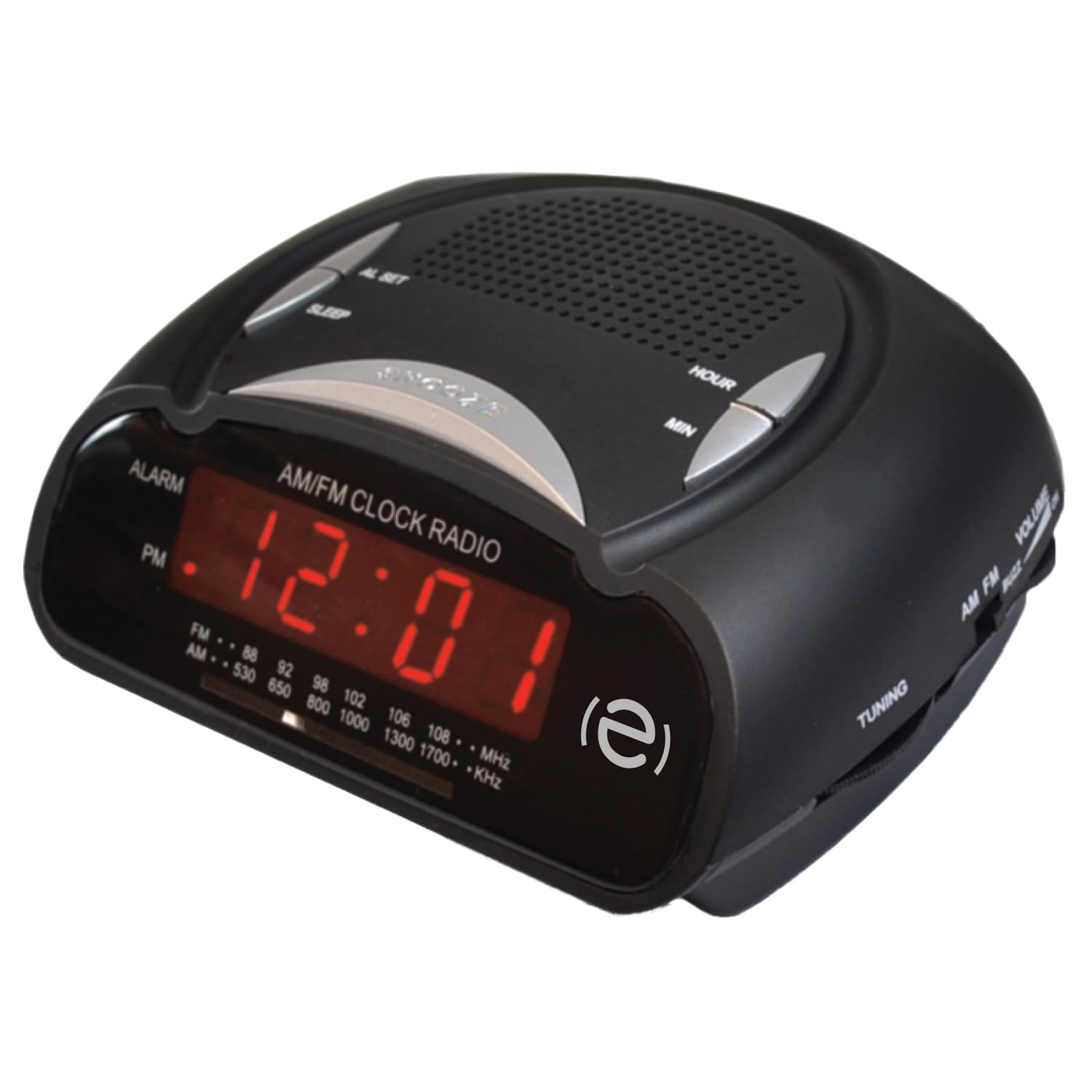
ດ້ານໜ້າ view of the Escape AM/FM Alarm Clock Radio, showing the digital display and top control buttons.
ຄຸນນະສົມບັດທີ່ສໍາຄັນ

Product packaging highlighting key features like snooze, sleep timer, and alarm options.
- ການສະແດງເວລາດິຈິຕອນ
- ເຄື່ອງຮັບສັນຍານວິທະຍຸ AM/FM
- Dual Alarm Settings (Buzzer or Radio)
- ຟັງຊັນເລື່ອນ
- ຈັບເວລານອນ
- Telescopic Antenna for improved radio reception
- 9V Battery Backup Option (battery not included)
4. ຕັ້ງຄ່າ
4.1 ການເຊື່ອມຕໍ່ພະລັງງານ
Plug the power adapter into a standard wall outlet and connect it to the DC input port on the back of the alarm clock. The display will illuminate, and the time will flash, indicating it is ready for time setting.
4.2 ແບັດເຕີຣີສຳຮອງ
ສໍາລັບພະລັງງານ outage protection, insert a 9V battery (not included) into the battery compartment located on the bottom of the unit. This will maintain time and alarm settings during a power interruption.
4.3 ການ ກຳ ນົດເວລາ
When the unit is first plugged in, the time display will flash. To set the current time:
- ກົດ ກຳ ນົດເວລາ ປຸ່ມ. ຕົວເລກຊົ່ວໂມງຈະເລີ່ມກະພິບ.
- ໃຊ້ HR (Hour) button to adjust the hour. Press and hold for faster adjustment. Observe the PM indicator for correct AM/PM setting.
- ກົດ ນາທີ (Minute) button to adjust the minutes. Press and hold for faster adjustment.
- ກົດ ກຳ ນົດເວລາ again to confirm and save the time. The display will stop flashing.
To adjust the time after initial setup, press and hold the ກຳ ນົດເວລາ button until the display flashes, then follow steps 2-4.
Video: Instructions on how to set the time on a similar alarm clock model. Please note that button labels or exact steps may vary slightly from your Escape model.
5. ຄໍາແນະນໍາການດໍາເນີນງານ
5.1 ການຕັ້ງໂມງປຸກ
The alarm clock features two independent alarms. To set an alarm:
- Ensure the radio is off. If the radio is playing, press the AM/FM ປຸ່ມເພື່ອປິດມັນ.
- ກົດແລະຖືທັງ ໂມງປຸກ 1 or ໂມງປຸກ 2 button for 2 seconds. The alarm time will start flashing.
- ໃຊ້ HR (ຊົ່ວໂມງ) ແລະ ນາທີ (Minute) buttons to set your desired alarm time.
- ກົດ ໂມງປຸກ 1 or ໂມງປຸກ 2 button repeatedly to cycle through alarm options: Buzzer, Radio, or Off. The corresponding icon (bell for buzzer, music note for radio) will appear on the display.
- ກົດ ກຳ ນົດເວລາ button or wait 10 seconds for the settings to save automatically.
The alarm volume cannot be adjusted independently; it will sound at a preset level for the buzzer or the last radio volume for the radio alarm.
Video: Instructions on how to set the alarm on a similar alarm clock model. Please note that button labels or exact steps may vary slightly from your Escape model.
5.2 Using the Radio
- ກົດ AM/FM ປຸ່ມເພື່ອເປີດວິທະຍຸ.
- Adjust the telescopic antenna for optimal reception.
- ໃຊ້ Tuning ປຸ່ມ (ໂດຍປົກກະຕິແລ້ວຈະຢູ່ຂ້າງ) ເພື່ອເລືອກສະຖານີວິທະຍຸທີ່ທ່ານຕ້ອງການ.
- ໃຊ້ ປະລິມານ knob (usually on the side) to adjust the sound level.
- ເພື່ອປິດວິທະຍຸ, ກົດປຸ່ມ AM/FM ປຸ່ມອີກເທື່ອຫນຶ່ງ.
5.3 Snooze ຟັງຊັນ
ເມື່ອສຽງປຸກດັງຂຶ້ນ, ກົດປຸ່ມໃຫຍ່ ງອກ button (often labeled SNOOZE/SLEEP/DIM) on the top of the unit. The alarm will pause for approximately 9 minutes and then sound again.
5.4 ຈັບເວລານອນ
ເຄື່ອງຈັບເວລານອນອະນຸຍາດໃຫ້ທ່ານນອນຫຼັບກັບວິທະຍຸ, ເຊິ່ງຈະປິດອັດຕະໂນມັດຫຼັງຈາກໄລຍະເວລາທີ່ກໍານົດໄວ້.
- ໃນຂະນະທີ່ວິທະຍຸກຳລັງຫຼິ້ນຢູ່, ກົດປຸ່ມ ນອນ button (often combined with SNOOZE).
- Each press will cycle through preset sleep times (e.g., 90, 60, 30, 15 minutes, or OFF). Select your desired duration.
- ວິທະຍຸຈະຫຼິ້ນເປັນໄລຍະເວລາທີ່ເລືອກ ແລະຈາກນັ້ນປິດອັດຕະໂນມັດ.
6. ບໍາລຸງຮັກສາ
- ເຊັດເຄື່ອງດ້ວຍຜ້າອ່ອນ, ແຫ້ງ. ຢ່າໃຊ້ເຄື່ອງເຮັດຄວາມສະອາດຂັດຫຼືສານລະລາຍ.
- Keep the unit away from direct sunlight, extreme temperatures, and dusty environments.
- Ensure the telescopic antenna is not bent or damaged.
7. ການແກ້ໄຂບັນຫາ
| ບັນຫາ | ການແກ້ໄຂ |
|---|---|
| ໜ້າຈໍໂມງວ່າງເປົ່າ. | Ensure the power adapter is securely plugged into both the unit and a working wall outlet. Check if the power outlet is functional. |
| ໂມງປຸກບໍ່ມີສຽງ. | Verify that the alarm time is set correctly and the alarm is activated (Buzzer or Radio icon visible). Check if the volume is not set too low for radio alarm. |
| ການຮັບວິທະຍຸທີ່ບໍ່ດີ. | Extend and adjust the telescopic antenna. Try repositioning the unit to improve signal. |
| ເວລາບໍ່ຖືກຕ້ອງຫຼັງຈາກພະລັງງານ outage. | Ensure a fresh 9V battery is installed for backup. Reset the time manually if no backup battery is present or if the battery is depleted. |
8. ຂໍ້ມູນຈໍາເພາະ
- ຍີ່ຫໍ້: ໜີ
- ຕົວແບບ: B0DVBJ7SJF
- ສີ: ດຳ
- ຂະໜາດຜະລິດຕະພັນ: 11 x 3.81 x 5 cm
- ແຫຼ່ງພະລັງງານ: AC Power Adapter, 9V Battery Backup (not included)
- ປະເພດໂມງປຸກ: Buzzer or AM/FM Radio
- ຈໍສະແດງຜົນ: LED ດິຈິຕອລ
9. ການຮັບປະກັນແລະການສະຫນັບສະຫນູນ
For warranty information or technical support, please refer to the contact details provided on the product packaging or visit the official Escape webເວັບໄຊ. ຮັກສາໃບຮັບເງິນການຊື້ຂອງທ່ານໄວ້ເປັນຫຼັກຖານການຊື້.