
Inefala 2G+64G Poste Radio
Inefala 2+64G 9-inch Android 15 Car Radio User Manual
Model: 2G+64G Poste Radio for Hyundai i20 (2008-2012)
1. ບົດແນະນຳ
This manual provides detailed instructions for the installation, operation, and maintenance of your Inefala 2+64G 9-inch Android 15 Car Radio. Please read this manual thoroughly before installation and use to ensure proper function and safety. This device is designed specifically for Hyundai i20 models manufactured between 2008 and 2012.
2. ຄວາມເຂົ້າກັນໄດ້ຂອງຍານພາຫະນະ
This car radio is compatible with Hyundai i20 models from 2008 to 2012. Ensure your vehicle's dashboard matches the compatible configuration shown below before proceeding with installation.

Image: Dashboard compatibility for Hyundai i20 (2008-2012). The image displays a compatible dashboard layout with a green checkmark and two incompatible layouts with red crosses, indicating which original car stereo configurations are suitable for this product.
3. ເນື້ອໃນຊຸດ
ກວດສອບວ່າລາຍການທັງຫມົດທີ່ລະບຸໄວ້ຂ້າງລຸ່ມນີ້ແມ່ນລວມຢູ່ໃນຊຸດຂອງທ່ານ:
- Inefala 9-inch Android 15 Car Radio for Hyundai i20
- ສາຍໄຟ
- ສາຍ RCA
- GPS Antenna
- ສາຍປ້ອນກ້ອງຫຼັງ
- AHD Emergency Camera (Rear View ກ້ອງຖ່າຍຮູບ)
- ໄມໂຄຣໂຟນພາຍນອກ
- ສາຍ USB 2 x
- ເຄື່ອງມືການຕິດຕັ້ງ
- Accessories (specific small parts for installation)

Image: Port Details and Package List. This diagram illustrates the main wiring harness connections and a visual representation of all components included in the package, such as the power cable, USB cables, GPS antenna, and AHD rear camera.
4. ການຕິດຕັ້ງແລະການຕິດຕັ້ງ
Professional installation is recommended. Incorrect wiring can damage the unit or your vehicle. Ensure the vehicle's battery is disconnected before starting installation.
4.1. General Wiring
Connect the main power cable harness to the corresponding ports on the car radio and your vehicle's wiring. Ensure all connections are secure.
4.2. ຫລັງ View ການເຊື່ອມຕໍ່ກ້ອງ
The car stereo includes an AHD rear view camera for enhanced safety during reversing. Proper connection is crucial for its functionality.
- ສາຍໄຟສີແດງ (1): Connects to the positive terminal of the car's reverse light cable.
- ສາຍສີດຳ (2): Connects to the negative terminal of the car's reverse light cable.
Note: The reverse input cable must be plugged in even if the reverse camera is not being used. Otherwise, it may affect Bluetooth and WiFi signal reception.

Image: How to Connect the Backup Camera. This diagram illustrates the wiring connections for the AHD rear view camera, showing how to connect the red and black cables to the vehicle's reverse light system.
4.3. ການຄວບຄຸມພວງມາໄລ (SWC)
The unit supports steering wheel controls for convenient operation.
- Without CANBUS Decoder: Connect the plugs or the steering wheel control wires (Key1/Key2) in the power cable to the corresponding port or wire of your original car. Then, navigate to "SWC manual match" in the radio settings to activate the button function.
- With CANBUS Decoder: Connect the CANBUS decoder before powering on the radio. Then, follow this path: Car Settings > Factory (000000) > CarType Setting to make SWC work properly. First, select the brand of the CANBUS decoder, then select the matching model and year according to the actual situation.

Image: Steering Wheel Control. This image displays the car radio's interface for configuring steering wheel controls and provides a visual of the wiring connections for SWC functionality.
5. ຄໍາແນະນໍາການດໍາເນີນງານ
5.1. Android System and Storage
The radio operates on the Android 15 system, providing a smooth and responsive user experience. With 2GB of RAM and 64GB of internal storage, you have ample space for applications, music, and videos.
5.2. Wireless CarPlay / Android Auto & Mirror Link
Connect your smartphone wirelessly via WiFi or USB cable to access CarPlay or Android Auto. This allows you to use navigation, music, calls, and other apps directly on the radio's screen. The Mirror Link function projects your phone's screen onto the car stereo.

Image: Wireless CarPlay and Android Auto. This image shows the car radio display with the CarPlay interface, featuring app icons for YouTube, Spotify, Phone, Messages, Waze, and TikTok, along with a visual representation of Bluetooth and wireless connectivity.
5.3. GPS & WiFi Navigation
The unit supports both online and offline GPS navigation. Connect to a WiFi network to download maps, stream videos, music, and access other online applications.

Image: WiFi Connection and GPS Navigation. The top panel shows the WiFi connection interface, allowing the user to browse online content. The bottom panel displays the GPS navigation interface with a map and speed limit information.
5.4. Bluetooth & FM RDS Radio & EQ
- Bluetooth: Pair your phone via Bluetooth to stream music, make hands-free calls, and transfer files.
- ວິທະຍຸ FM RDS: Tune into your favorite FM radio stations with RDS (Radio Data System) support for station information.
- EQ (ຄວາມເທົ່າທຽມ): Customize your audio experience with the built-in equalizer to adjust sound frequencies to your preference.
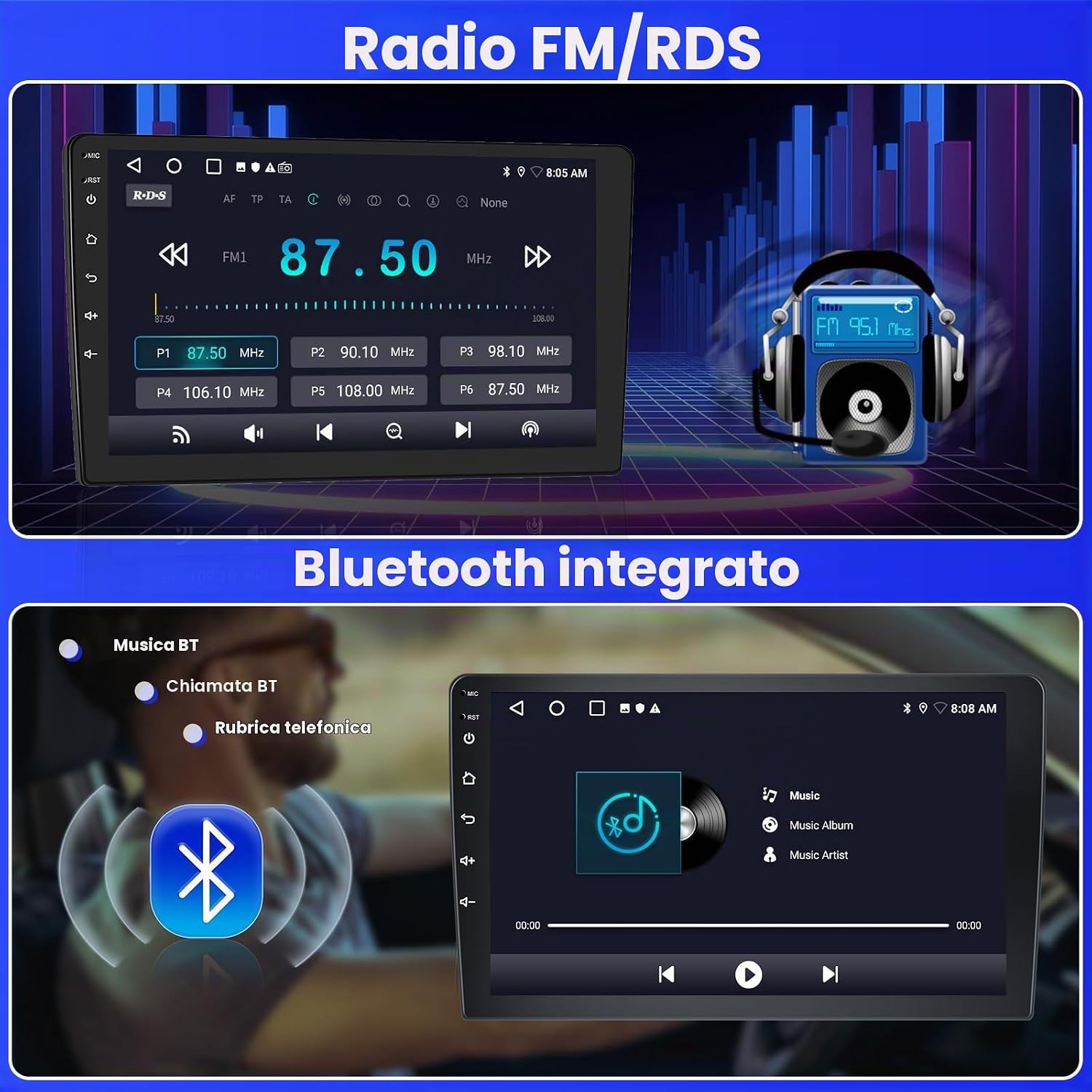
Image: FM/RDS Radio and Integrated Bluetooth. The top panel shows the FM radio interface with station frequencies and RDS information. The bottom panel displays the Bluetooth music playback screen, indicating a connected device and music controls.
5.5. ຟັງຊັນ Split Screen
The 9-inch screen supports a split-screen function, allowing you to run and view two applications simultaneously. For exampຖ້າຫາກວ່າ, ທ່ານສາມາດມີການນໍາທິດຂ້າງຫນຶ່ງແລະການຫຼິ້ນດົນຕີອີກດ້ານຫນຶ່ງ.

Image: DSP, Split Screen, and 26 UI Themes. This image illustrates the Digital Sound Processor (DSP) settings, the split-screen feature displaying navigation and music concurrently, and a selection of the 26 available user interface themes for personalization.
5.6. User Interface Themes
Personalize your car radio's appearance with 26 different user interface themes available in the settings menu.
6. ບໍາລຸງຮັກສາ
- ທໍາຄວາມສະອາດ: ໃຊ້ຜ້າອ່ອນ, ແຫ້ງເພື່ອເຮັດຄວາມສະອາດຫນ້າຈໍແລະພາຍນອກ. ຫຼີກລ້ຽງການເຮັດຄວາມສະອາດຂັດຫຼືສານລະລາຍ.
- ອັບເດດຊອບແວ: ກວດເບິ່ງການປັບປຸງຊອບແວເປັນໄລຍະຜ່ານການຕັ້ງຄ່າລະບົບເພື່ອຮັບປະກັນປະສິດທິພາບທີ່ດີທີ່ສຸດ ແລະເຂົ້າເຖິງຄຸນສົມບັດໃໝ່.
- ອຸນຫະພູມ: ຫຼີກລ້ຽງການເປີດຫນ່ວຍບໍລິການກັບອຸນຫະພູມທີ່ຮ້າຍແຮງ.
7. ການແກ້ໄຂບັນຫາ
| ສະບັບ | ສາເຫດທີ່ເປັນໄປໄດ້ | ການແກ້ໄຂ |
|---|---|---|
| ບໍ່ມີພະລັງງານ | ສາຍໄຟບໍ່ຖືກຕ້ອງ; ຟິວເປົ່າ; ແບັດເຕີຣີລົດຕໍ່າ. | Check power connections; Inspect and replace fuses; Check vehicle battery. |
| ບໍ່ມີສຽງ | ສາຍລຳໂພງຖືກຕັດການເຊື່ອມຕໍ່; ລະດັບສຽງຕ່ຳເກີນໄປ; ປິດສຽງຖືກເປີດໃຊ້ງານແລ້ວ. | ຢືນຢັນການເຊື່ອມຕໍ່ລໍາໂພງ; ເພີ່ມປະລິມານ; ປິດໃຊ້ງານຟັງຊັນປິດສຽງ. |
| ການສູນເສຍສັນຍານ GPS | GPS antenna obstructed or disconnected; Poor satellite reception. | ໃຫ້ແນ່ໃຈວ່າເສົາອາກາດ GPS ຖືກເຊື່ອມຕໍ່ຢ່າງຖືກຕ້ອງແລະມີຄວາມຊັດເຈນ view of the sky; Move to an open area. |
| ກ້ອງຫຼັງບໍ່ສະແດງ | Camera wiring incorrect; Reverse gear not detected; Camera faulty. | Check camera power and video input connections; Ensure reverse gear is engaged; Test camera functionality. |
| Bluetooth/WiFi Connectivity Issues | Incorrect pairing; Signal interference; Module error. | Re-pair device; Ensure no obstructions; Restart the radio. |
8. ຂໍ້ມູນຈໍາເພາະ
| ຄຸນສົມບັດ | ລາຍລະອຽດ |
|---|---|
| ຍີ່ຫໍ້ | Inefala |
| ຊື່ຕົວແບບ | 2G+64G Poste Radio |
| ຂະໜາດໜ້າຈໍ | 9 ນິ້ວ |
| ລະບົບປະຕິບັດການ | Android 15 |
| ໜ່ວຍຄວາມຈຳ (RAM) | 2GB |
| ບ່ອນຈັດເກັບຂໍ້ມູນ (ROM) | 64GB |
| ຄຸນນະສົມບັດພິເສດ | Wireless CarPlay, Android Auto, Mirror Link, Bluetooth, EQ, WiFi, GPS, Steering Wheel Control (SWC), 26 UI Themes |
| ເຕັກໂນໂລຊີການເຊື່ອມຕໍ່ | Bluetooth, USB, Wi-Fi |
| ປະເພດແຜນທີ່ | Roads (Online/Offline) |
| ຮູບແບບການອອກສຽງ | APE/FLAC/WAV/MP3/WMA |
| ປະເພດການຕິດຕັ້ງ | Mountable |
| ອຸປະກອນທີ່ເຂົ້າກັນໄດ້ | ໂທລະສັບສະຫຼາດ |
| ວິທີການຄວບຄຸມ | ແຕະ |
| Supported Satellite Navigation | GPS |
| Compatible Flash Memory Type | SD |
| ຜູ້ຜະລິດ | Inefala |
| ປະເທດຕົ້ນກໍາເນີດ | ຈີນ |
9. ການຮັບປະກັນແລະການສະຫນັບສະຫນູນ
9.1. ການຮັບປະກັນຜະລິດຕະພັນ
This Inefala product comes with a ຮັບປະກັນ 24 ເດືອນ ນັບແຕ່ວັນທີຂອງການຊື້, ກວມເອົາຂໍ້ບົກພ່ອງການຜະລິດແລະຄວາມຜິດພາດພາຍໃຕ້ການນໍາໃຊ້ປົກກະຕິ.
9.2. ສະຫນັບສະຫນູນດ້ານວິຊາການ
For any technical assistance, questions, or issues, Inefala provides lifetime online consultation support. Our support team aims to respond to inquiries within 24 hours.
To contact support, please refer to the seller's contact information on the platform where you purchased the product.
ເອກະສານທີ່ກ່ຽວຂ້ອງ - 2G+64G Poste Radio
 |
ຄູ່ມືຜູ້ໃຊ້ເຄື່ອງຫຼິ້ນອັດສະລິຍະ F133 7 ນິ້ວ - Inefala User manual for the Inefala F133 7-Inch Smart Player, a multifunctional portable car media player featuring Apple CarPlay, Android Auto, screen mirroring, Bluetooth connectivity, FM transmission, and media playback from TF/USB. Includes setup instructions, interface details, and troubleshooting. |
 |
Inefala Single DIN Car Stereo ຄູ່ມືຜູ້ໃຊ້ແລະຂໍ້ມູນຈໍາເພາະ ຄູ່ມືການນໍາໃຊ້ທີ່ສົມບູນແບບສໍາລັບການ Inefala Single DIN Car Stereo, ລາຍລະອຽດການນໍາສະເຫນີການທໍາງານ, disassembly, ອຸປະກອນ, ແລະຄໍານິຍາມ pin ການສະຫນອງພະລັງງານ. ຄຸນສົມບັດລວມມີໜ້າຈໍສຳຜັດທີ່ສາມາດຖອດໄດ້ຂະໜາດ 7 ນິ້ວ, Bluetooth, USB/Type-C, ແລະຮອງຮັບກ້ອງຖ່າຍຮູບສຳຮອງ. |
 |
ຄູ່ມື Inefala 1DIN CarPlay: ຄູ່ມືຜູ້ໃຊ້ເຄື່ອງຫຼິ້ນລົດຍົນແບບ Single-Din ຄູ່ມືຜູ້ໃຊ້ທີ່ຄົບຖ້ວນສຳລັບເຄື່ອງສຽງລົດ Inefala 1DIN CarPlay. ຮຽນຮູ້ກ່ຽວກັບການຕິດຕັ້ງ, ຄຸນສົມບັດຕ່າງໆເຊັ່ນ Apple CarPlay, Android Auto, MirrorLink, Bluetooth, ການຫຼິ້ນ USB, ໜ້າທີ່ວິທະຍຸ, ແລະ ການແກ້ໄຂບັນຫາ. |
 |
Modifying a 2010-2015 Toyota Prius Android Audio Head Unit with Factory Features A guide detailing the process of replacing a JBL audio system in a 2010-2015 Toyota Prius with an Android audio head unit, integrating factory features like the antenna, GPS, backup camera, and microphone. |
 |
Fortdows Car Stereo Manual ສໍາລັບ Toyota Tundra & Sequoia (2007-2018) ຄູ່ມືຜູ້ໃຊ້ Fortdows ສໍາລັບຫົວຫນ່ວຍສະເຕີລິໂອລົດທີ່ຖືກອອກແບບມາສໍາລັບ Toyota Tundra (2007-2013) ແລະ Toyota Sequoia (2008-2018/2016). ຄູ່ມືນີ້ກວມເອົາການຖອດສ່ວນກາງຂອງການຄວບຄຸມ, ການສະແດງຜົນຫຼັງການຕິດຕັ້ງ, ການແກ້ໄຂບັນຫາການສະແດງກ້ອງຫຼັງ, ການເຊື່ອມຕໍ່ CarPlay/Android Auto ແບບໄຮ້ສາຍ ແລະແບບມີສາຍຜ່ານ Car Link 2.0, ແລະລາຍລະອຽດກ່ຽວກັບປະເພດສາຍສາກຫຼັກ (ມີ/ບໍ່ມີ JBL amplifier). ຮວມເອົາຂໍ້ມູນການຣີເຊັດລະບົບ ແລະຕິດຕໍ່ພົວພັນການຊ່ວຍເຫຼືອຫຼັງການຂາຍ. |
 |
ການຕິດຕັ້ງ Android Car Stereo ແລະຄູ່ມືຜູ້ໃຊ້ສໍາລັບ Subaru Forester / Impreza ຄູ່ມືທີ່ສົມບູນແບບສໍາລັບການຕິດຕັ້ງແລະປະຕິບັດລະບົບສະເຕີລິໂອລົດ Android ທີ່ຖືກອອກແບບມາສໍາລັບຍານພາຫະນະ Subaru Forester ແລະ Impreza. ຮວມມີການຕິດຕັ້ງແບບລະອຽດ, ແຜນວາດສາຍໄຟ, ຄຳແນະນຳຄວາມປອດໄພ, ການແກ້ໄຂບັນຫາ ແລະຄຳແນະນຳການເຊື່ອມຕໍ່ສຳລັບ CarPlay ແລະ Android Auto. |
Ask a question about this manual
Ask about setup, troubleshooting, compatibility, parts, safety, or missing instructions. Manuals+ will review the question and use this page’s manual context to help answer it.