
1. ບົດແນະນຳ
Thank you for choosing the ZIHNIC AI Translation Earphones S11A. These earphones are designed to provide seamless communication across language barriers with real-time translation capabilities. This manual will guide you through the setup, operation, and maintenance of your device to ensure optimal performance.
2. ຜະລິດຕະພັນເກີນview
2.1 ເນື້ອໃນຊຸດ
- ZIHNIC AI Translation Earphones S11A
- ສາຍສາກ
- ຄູ່ມືຜູ້ໃຊ້
2.2 ລັກສະນະທີ່ສໍາຄັນ
- 3 Smart Translation Modes: Supports real-time translation in up to 138 languages.
- ລະດັບກັນນໍ້າ IPX5: Resistant to sweat and rain, suitable for various environments.
- ການຄວບຄຸມການສໍາພັດ intuitive: Manage music, calls, and voice assistant with simple taps.
- Bluetooth Wireless Freedom: Stable and quick pairing with compatible devices.
- ການອອກແບບຫູເປີດທີ່ສະດວກສະບາຍ: Flexible earhooks ensure a secure and comfortable fit for extended wear.
- HiFi Stereo ສຽງ: Delivers clear audio quality for music and calls.
- HD Noise-Canceling Calls: ເພີ່ມຄວາມຊັດເຈນຂອງການໂທໂດຍການຫຼຸດຜ່ອນສຽງລົບກວນພື້ນຫຼັງ.

Image: ZIHNIC AI Translation Earphones S11A and charging case. The earphones are shown with text indicating translation capabilities.

Image: Diagram illustrating HiFi Stereo Sound and Voice Assistant features of the earphones.

Image: Diagram highlighting 360-degree surround sound quality, HD Noise-canceling Calls, Open Ear Design, IPX5 Water Resistance, and Convenient Touch Control.
3. ຕັ້ງຄ່າ
3.1 ການສາກຫູຟັງ
Before first use, fully charge the earphones and their charging case. Connect the provided charging cable to the charging case and a USB power source. The indicator lights on the case will show the charging status.
3.2 ການໃສ່ຫູຟັງ
For optimal comfort and sound quality, ensure the earphones are worn correctly.
- Take out the earbud from the charging case.
- Hang the end of the earbud on the ear bone.
- Turn the earbud and slide it behind the ear.
- Adjust the ear hook to fit your ears securely.

Image: Step-by-step guide on how to wear the earphones for a secure and comfortable fit.
3.3 ການຈັບຄູ່ Bluetooth
- Open the charging case; the earphones will automatically enter pairing mode.
- ໃນສະມາດໂຟນ ຫຼືອຸປະກອນຂອງທ່ານ, ເປີດໃຊ້ Bluetooth ແລະຊອກຫາອຸປະກອນທີ່ມີຢູ່.
- Select "ZIHNIC S11A" from the list to connect.
- Once connected, you will hear an audio prompt, and the indicator light on the earphones will change.
3.4 ການຕິດຕັ້ງແອັບສຳລັບການແປພາສາ
To utilize the full translation features, you will need to download and install the dedicated ZIHNIC translation application on your smartphone. Refer to the QR code provided in the product packaging or search for the official ZIHNIC translation app in your device's app store. Follow the in-app instructions for setup and language selection.
4. ຄໍາແນະນໍາການດໍາເນີນງານ
4.1 ແຕະການຄວບຄຸມ
The ZIHNIC S11A earphones feature intuitive touch controls on each earbud. Specific functions may vary slightly based on the connected device and app settings.
- ຫຼິ້ນ/ຢຸດດົນຕີ: ແຕະເທື່ອດຽວໃສ່ຫູຟັງຫູຟັງ.
- ຮັບ/ສາຍໂທ: ແຕະເທື່ອດຽວໃສ່ຫູຟັງຫູຟັງ.
- ປະຕິເສດການໂທ: ກົດຫູຟັງອັນໃດອັນໜຶ່ງຄ້າງໄວ້ 2 ວິນາທີ.
- ເພງຕໍ່ໄປ: ແຕະສອງເທື່ອໃສ່ຫູຟັງເບື້ອງຂວາ.
- ຕິດຕາມກ່ອນ ໜ້າ ນີ້: ແຕະສອງເທື່ອໃສ່ຫູຟັງທາງຊ້າຍ.
- ກະຕຸ້ນຜູ້ຊ່ວຍສຽງ: ແຕະສາມເທື່ອໃສ່ຫູຟັງຫູຟັງ.
- ປັບລະດັບສຽງ: Typically controlled via your connected device. Some apps may offer in-app volume control.
4.2 ຮູບແບບການແປ
The earphones support multiple translation modes through the dedicated ZIHNIC translation app:
- ການແປພາສາແບບໜ້າຕໍ່ໜ້າ: Ideal for direct conversations. One person speaks, and the earphones provide real-time translation to the other person.
- AI Automatic Translation: For continuous conversations, the earphones automatically detect pauses in speech and provide translations.
- ໂໝດສົນທະນາ AI: Use the app to type or speak, and the earphones will translate and output the audio.
To initiate translation, open the ZIHNIC translation app, select the desired mode and languages, then follow the on-screen prompts. A simple tap on the earbud may activate the translation function within the app.

Image: Illustration of face-to-face translation using the earphones, showing translated text on screen.

Image: Depiction of automatic AI translation in a business setting, with the app interface visible.
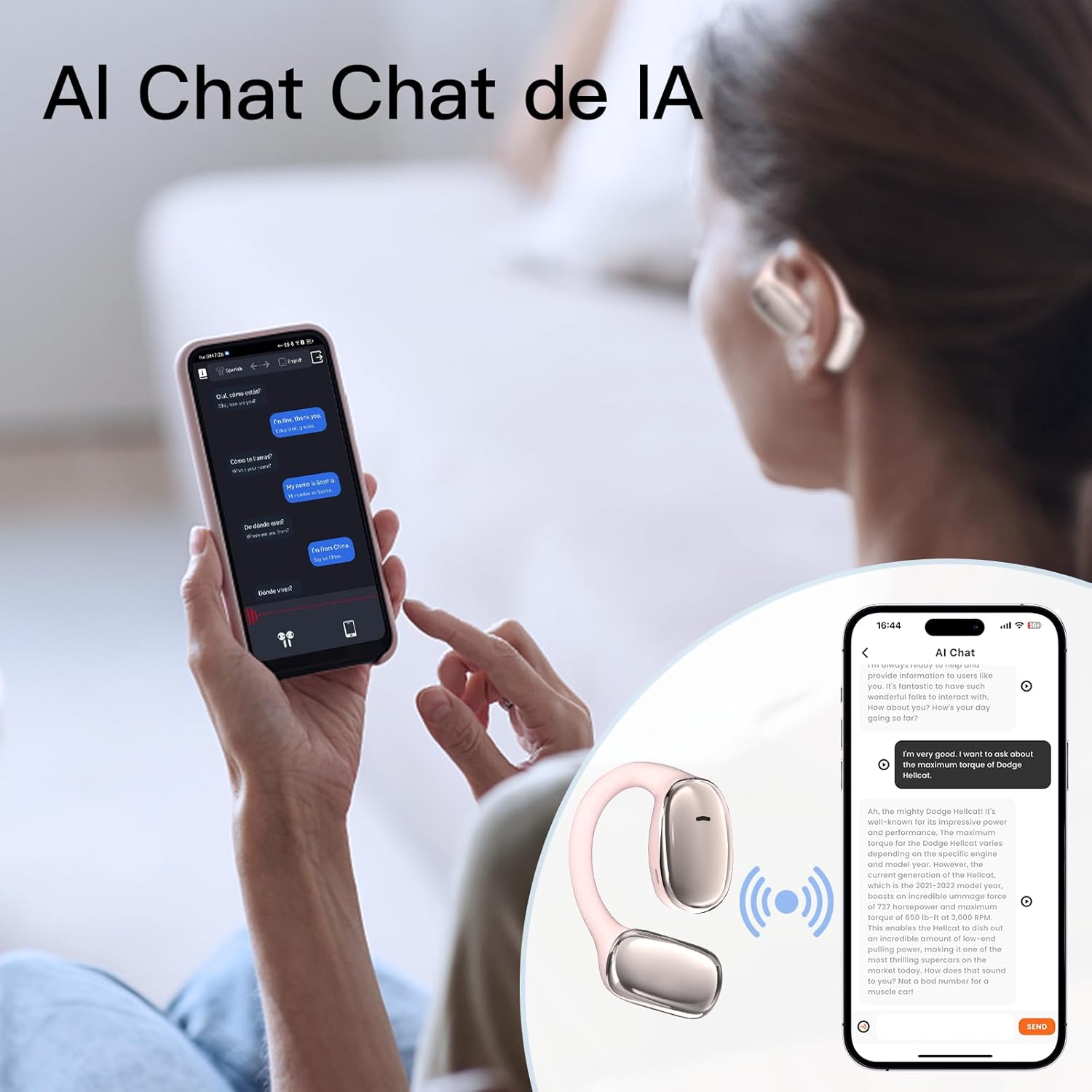
Image: User interacting with an AI chat application on a smartphone, with the earphones providing translation.

Image: A woman using the earphones with a smartphone showing real-time translation in a chat interface.
5. ບໍາລຸງຮັກສາ
5.1 ການທໍາຄວາມສະອາດ
- ເຊັດຫູຟັງ ແລະ ກະເປົ໋າສາກໄຟດ້ວຍຜ້າແພອ່ອນໆ, ແຫ້ງ, ບໍ່ມີເສັ້ນດ່າງ.
- ຢ່າໃຊ້ເຄື່ອງເຮັດຄວາມສະອາດຂັດ, ເຫຼົ້າ, ຫຼືສານລະລາຍສານເຄມີ.
- ໃຫ້ແນ່ໃຈວ່າຈຸດເຊື່ອມຕໍ່ການສາກໄຟສະອາດ ແລະ ບໍ່ມີສິ່ງເສດເຫຼືອ.
5.2 ການເກັບຮັກສາ
- ເກັບຮັກສາຫູຟັງໃສ່ໃນກະເປົ໋າສາກໄຟຂອງພວກມັນເມື່ອບໍ່ໄດ້ໃຊ້ເພື່ອປົກປ້ອງພວກມັນ ແລະ ຮັກສາມັນໄວ້.
- ຫຼີກລ່ຽງການເກັບຮັກສາໄວ້ໃນອຸນຫະພູມສູງ, ແສງແດດໂດຍກົງ ຫຼື ຄວາມຊຸ່ມສູງ.
5.3 ການຕໍ່ຕ້ານນ້ໍາ
The earphones have an IPX5 waterproof rating, meaning they are resistant to sweat and light splashes of water. They are not designed for submersion in water or use during swimming. Ensure the earphones are dry before placing them back in the charging case to prevent damage.
6. ການແກ້ໄຂບັນຫາ
If you encounter issues with your ZIHNIC AI Translation Earphones S11A, please refer to the following common solutions:
| ບັນຫາ | ການແກ້ໄຂທີ່ເປັນໄປໄດ້ |
|---|---|
| ຫູຟັງບໍ່ໄດ້ຈັບຄູ່/ເຊື່ອມຕໍ່ |
|
| ບໍ່ມີສຽງ ຫຼືຄຸນນະພາບສຽງບໍ່ດີ |
|
| ການແປບໍ່ເຮັດວຽກ |
|
| Earphones not charging or holding charge |
|
| ແຕະຄວບຄຸມບໍ່ຕອບສະໜອງ |
|
7. ຂໍ້ມູນຈໍາເພາະ
- ຕົວແບບ: S11A
- ນ້ໍາຫນັກລາຍການ: 1.76 ອອນສ໌ (ປະມານ 50 ກຣາມ)
- ຂະໜາດແພັກເກດ: 4.92 x 3.82 x 1.54 ນິ້ວ
- ປະເພດຫມໍ້ໄຟ: Lithium Polymer (ລວມ)
- ການປະເມີນກັນນ້ໍາ: IPX5
- ພາສາແປ: Up to 138 languages
- ການເຊື່ອມຕໍ່: Bluetooth Wireless

Image: Illustration indicating long battery life, with a 450mAh battery capacity likely referring to the charging case.
8. ຂໍ້ມູນການຮັບປະກັນ
ZIHNIC products are covered by a limited warranty. Please refer to the warranty card included in your product packaging or visit the official ZIHNIC webເວັບໄຊສໍາລັບເງື່ອນໄຂການຮັບປະກັນລາຍລະອຽດ. ຮັກສາໃບຮັບເງິນການຊື້ຂອງທ່ານໄວ້ເປັນຫຼັກຖານການຊື້ສໍາລັບການຮ້ອງຂໍການຮັບປະກັນ.
9. ການຊ່ວຍເຫຼືອລູກຄ້າ
For further assistance, technical support, or inquiries regarding your ZIHNIC AI Translation Earphones S11A, please contact ZIHNIC customer service through the following channels:
- ທາງການ Webເວັບໄຊ: Visit the ZIHNIC official webເວັບໄຊທ໌ສຳລັບຄຳຖາມທີ່ຖືກຖາມເລື້ອຍໆ, ຊັບພະຍາກອນສະໜັບສະໜູນ ແລະ ແບບຟອມຕິດຕໍ່.
- ສະຫນັບສະຫນູນອີເມວ: ອ້າງເຖິງການຫຸ້ມຫໍ່ຜະລິດຕະພັນຂອງທ່ານຫຼືຢ່າງເປັນທາງການ webເວັບໄຊທ໌ສໍາລັບທີ່ຢູ່ອີເມລ໌ສະຫນັບສະຫນູນລູກຄ້າ.