
ແນະນຳ
Thank you for choosing the BACKWIN B800-T USB-C Wired Headphones. This manual provides detailed instructions for the proper use, setup, and maintenance of your new headphones. Please read this manual thoroughly before using the product to ensure optimal performance and longevity.
ເນື້ອໃນຊຸດ
ໃຫ້ແນ່ໃຈວ່າທຸກລາຍການຢູ່ໃນຊຸດ:
- BACKWIN B800-T USB-C Wired Headphones
- Ear Cushions (various sizes: large, medium, small)

Image: The BACKWIN B800-T USB-C Wired Headphones, showing the earbuds, inline control, and USB-C connector. Also included are additional ear cushions.
ສິນຄ້າເກີນview
ຄຸນນະສົມບັດທີ່ສໍາຄັນ
- Four-Unit Driver Design: Each earbud features a dynamic bass unit and a high-definition decoding iron coil unit for powerful subwoofer sound and clear high-pitched audio.
- ຊິບ DAC ປະສົມປະສານ: Equipped with a 24-bit/96Khz DAC decoding chip for high-fidelity audio.
- ຄວາມເຂົ້າກັນໄດ້ Universal USB-C: Designed for devices with a Type-C interface, especially those without a 3.5mm audio jack.
- Inline Control with Microphone: Features volume control and a high-definition microphone for convenient call management and music playback.
- ການຍົກເລີກສິ່ງລົບກວນແບບ Passive: The earbud design and included silicone ear caps provide passive noise isolation.
- ການກໍ່ສ້າງທົນທານ: Metal back shell of the headphones is CNC machined for precise workmanship.
ອົງປະກອບ

Image: An exploded diagram illustrating the internal components of the earbud, including the dynamic coil, composite vibration film, sound processor with physical noise reduction, and the iron ring. This combination delivers rich bass, full midrange, and clear treble.
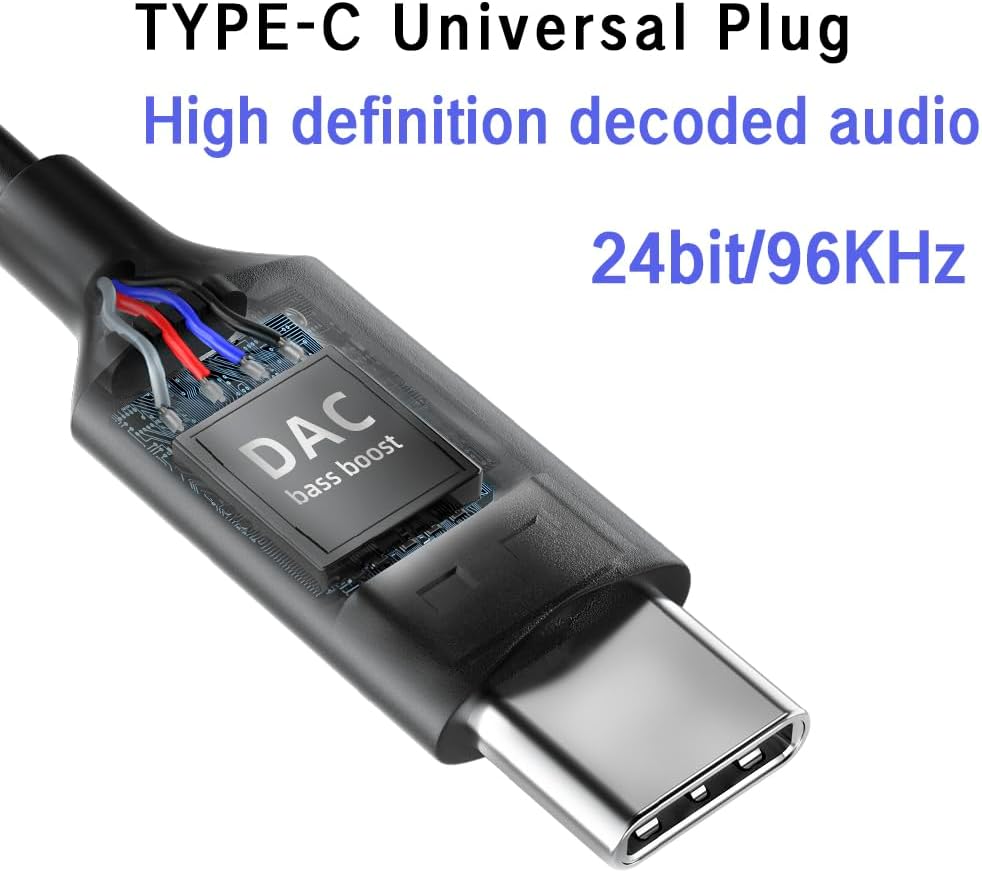
ຮູບພາບ: A close-up view of the USB-C plug, highlighting the integrated DAC (Digital-to-Analog Converter) chip, which supports 24-bit/96KHz high-definition audio decoding.

ຮູບພາບ: A ລາຍລະອຽດ view of the earbud's metal back shell, showcasing the CNC precision machining and overall craftsmanship.
ຕັ້ງຄ່າ
1. Selecting Ear Cushions
The headphones come with large, medium, and small soundproof silicone ear caps. Choose the size that provides the most comfortable and secure fit for your ears. A proper fit is crucial for optimal sound quality and passive noise cancellation.
2. ການເຊື່ອມຕໍ່ກັບອຸປະກອນຂອງທ່ານ
- Locate the USB-C port on your compatible device (e.g., smartphone, tablet, laptop).
- ສຽບສຽບ USB-C ຂອງຫູຟັງໃສ່ຊ່ອງສຽບ USB-C ຂອງອຸປະກອນຢ່າງແໜ້ນໜາ.
- Your device should automatically recognize the headphones. No additional drivers are typically required.
ໝາຍເຫດ: These headphones are designed for devices with a Type-C interface, especially those without a 3.5mm audio jack. Compatibility may vary with some devices; ensure your device supports audio output via its USB-C port.

Image: A person wearing the BACKWIN B800-T USB-C Wired Headphones, demonstrating proper ear placement and fit.
ຄໍາແນະນໍາການດໍາເນີນງານ
Inline Remote Control Functions
The inline remote control allows you to manage audio playback and calls without needing to access your device directly.

Image: A diagram detailing the functions of the inline remote control, including volume up, volume down, microphone, and multi-function button for calls and music playback.
- ປຸ່ມເພີ່ມສຽງຂຶ້ນ (+): ກົດເພື່ອເພີ່ມລະດັບສຽງ.
- ປຸ່ມປະລິມານລົງ (-): ກົດເພື່ອຫຼຸດລະດັບສຽງ.
- ປຸ່ມຫຼາຍຟັງຊັນ (ປຸ່ມກາງ):
- For Calls:
- ຄລິກດຽວ: Answer an incoming call or end an active call.
- ຂ່າວຍາວ: ປະຕິເສດສາຍໂທເຂົ້າ.
- ສໍາລັບດົນຕີ:
- ຄລິກດຽວ: Play or Pause music.
- ກົດສອງຄັ້ງ: ຂ້າມໄປເພງຕໍ່ໄປ.
- ຄລິກສາມເທື່ອ: ກັບຄືນໄປຫາເພງທີ່ຜ່ານມາ.
- For Calls:
- ໄມໂຄຣໂຟນ: The built-in microphone allows for hands-free communication during calls.
ບໍາລຸງຮັກສາ
- ທໍາຄວາມສະອາດ: ເຊັດຫູຟັງ ແລະ ສາຍຢ່າງເບົາໆດ້ວຍຜ້າອ່ອນໆແຫ້ງ. ຢ່າໃຊ້ສານເຄມີທີ່ຮຸນແຮງ ຫຼື ວັດສະດຸຂັດ.
- ເບາະຫູ: Remove and clean the silicone ear cushions regularly with mild soap and water. Ensure they are completely dry before reattaching.
- ການເກັບຮັກສາ: Store the headphones in a clean, dry place when not in use. Avoid extreme temperatures and direct sunlight.
- ການດູແລສາຍໄຟ: ຫຼີກເວັ້ນການງໍແຫຼມຫຼືດຶງຫຼາຍເກີນໄປກ່ຽວກັບສາຍເຄເບີນເພື່ອປ້ອງກັນຄວາມເສຍຫາຍ.
- ການເປີດເຜີຍນ້ໍາ: ຫູຟັງເຫຼົ່ານີ້ແມ່ນບໍ່ກັນນ້ໍາ. ຫຼີກເວັ້ນການສໍາຜັດກັບນ້ໍາຫຼືຄວາມຊຸ່ມຊື່ນຫຼາຍເກີນໄປ.
ການແກ້ໄຂບັນຫາ
| ບັນຫາ | ສາເຫດທີ່ເປັນໄປໄດ້ | ການແກ້ໄຂ |
|---|---|---|
| ບໍ່ມີສຽງຫລືປະລິມານຕ່ ຳ |
|
|
| ໄມໂຄຣໂຟນບໍ່ເຮັດວຽກ |
|
|
| ການບິດເບືອນສຽງ ຫຼືຄຸນນະພາບທີ່ບໍ່ດີ |
|
|
ຂໍ້ມູນຈໍາເພາະ
| ຊື່ຕົວແບບ | B800-T |
| ຍີ່ຫໍ້ | ກັບຄືນ |
| ເຕັກໂນໂລຊີການເຊື່ອມຕໍ່ | ມີສາຍ |
| Jack ຫູຟັງ | ປະເພດ-C (USB-C) |
| ປະເພດໄດເວີສຽງ | Hybrid Driver (Dynamic bass unit + high-definition decoding iron coil unit) |
| ການຕອບສະໜອງຄວາມຖີ່ | Up to 96 KHz (24bit/96Khz Decoding chip) |
| ຄວາມອ່ອນໄຫວ | 96 dB |
| impedance | 32 ໂອມ |
| ການຄວບຄຸມສິ່ງລົບກວນ | ການຍົກເລີກສິ່ງລົບກວນແບບ Passive |
| ປະເພດການຄວບຄຸມ | Volume Control, Push Button (for calls/music) |
| ວັດສະດຸ | Metal (earbud back shell) |
| ນ້ໍາຫນັກລາຍການ | 3.17 ອອນ |
| ອົງປະກອບລວມ | ເບາະຫູ |
ການຮັບປະກັນແລະການສະຫນັບສະຫນູນ
For warranty information or technical support, please refer to the documentation provided with your purchase or contact BACKWIN customer service through the retailer where the product was purchased. Keep your proof of purchase for warranty claims.
ສໍາລັບການຊ່ວຍເຫຼືອເພີ່ມເຕີມ, ທ່ານສາມາດໄປຢ້ຽມຢາມໄດ້ BACKWIN Store on Amazon.