1. ບົດແນະນຳ
ຂອບໃຈສໍາລັບການຊື້asing the Portable Mini Projector. This device is designed to provide a versatile and immersive viewing experience, supporting high-definition decoding and various connectivity options for both indoor and outdoor use. Please read this manual thoroughly before operating the projector to ensure proper use and to maximize its performance and lifespan.
2. ຂໍ້ມູນຄວາມປອດໄພ
To prevent fire, electric shock, or damage to the projector, please observe the following safety precautions:
- ຢ່າປິດຊ່ອງລະບາຍອາກາດ. ຮັບປະກັນການໄຫຼວຽນຂອງອາກາດທີ່ພຽງພໍຢູ່ອ້ອມແອ້ມໂປເຈັກເຕີ.
- Do not expose the projector to rain or moisture. Keep it away from water sources.
- ໃຊ້ພຽງແຕ່ອະແດັບເຕີໄຟທີ່ສະໜອງໃຫ້ກັບໂປເຈັກເຕີເທົ່ານັ້ນ.
- ຫຼີກເວັ້ນການເບິ່ງໂດຍກົງໃນເລນໂປເຈັກເຕີໃນເວລາທີ່ lamp is on, as the bright light can cause eye strain or damage.
- ຢ່າພະຍາຍາມຖອດປະກອບ ຫຼື ດັດແປງເຄື່ອງໂປຣເຈັກເຕີ. ໃຫ້ຕິດຕໍ່ພະນັກງານທີ່ມີຄຸນວຸດທິເພື່ອບໍລິການທັງໝົດ.
- ວາງໂປເຈັກເຕີຢູ່ເທິງພື້ນຜິວທີ່ມີລະດັບຄວາມຫມັ້ນຄົງເພື່ອປ້ອງກັນບໍ່ໃຫ້ມັນຫຼຸດລົງ.
- Keep the projector away from direct sunlight, heat sources, and extreme temperatures.
3. ເນື້ອໃນຊຸດ
ກະລຸນາກວດເບິ່ງເນື້ອໃນຂອງແພັກເກດເມື່ອ unboxing:
- Portable Mini Projector
- Power Adapter
- ການຄວບຄຸມໄລຍະໄກ (ແບດເຕີຣີບໍ່ລວມ)
- ສາຍ HDMI
- ຄູ່ມືຜູ້ໃຊ້
4. ຄຸນສົມບັດ ແລະ ອົງປະກອບຂອງຜະລິດຕະພັນ
Familiarize yourself with the projector's key features and components:
- ເລນການສາຍ: Emits the image onto the screen or surface.
- ແຫວນຈຸດສຸມ: ປັບຄວາມຊັດເຈນຂອງຮູບທີ່ຄາດໄວ້.
- Ports ການປ້ອນຂໍ້ມູນ: HDMI, USB, AV, Memory Card slot for various device connections.
- ລຳໂພງໃນຕົວ: ສະຫນອງສຽງອອກ.
- Grilles ລະບາຍອາກາດ: ສໍາລັບການກະຈາຍຄວາມຮ້ອນ.
- ປຸ່ມເປີດປິດ: ເປີດ/ປິດໂປຣເຈັກເຕີ.
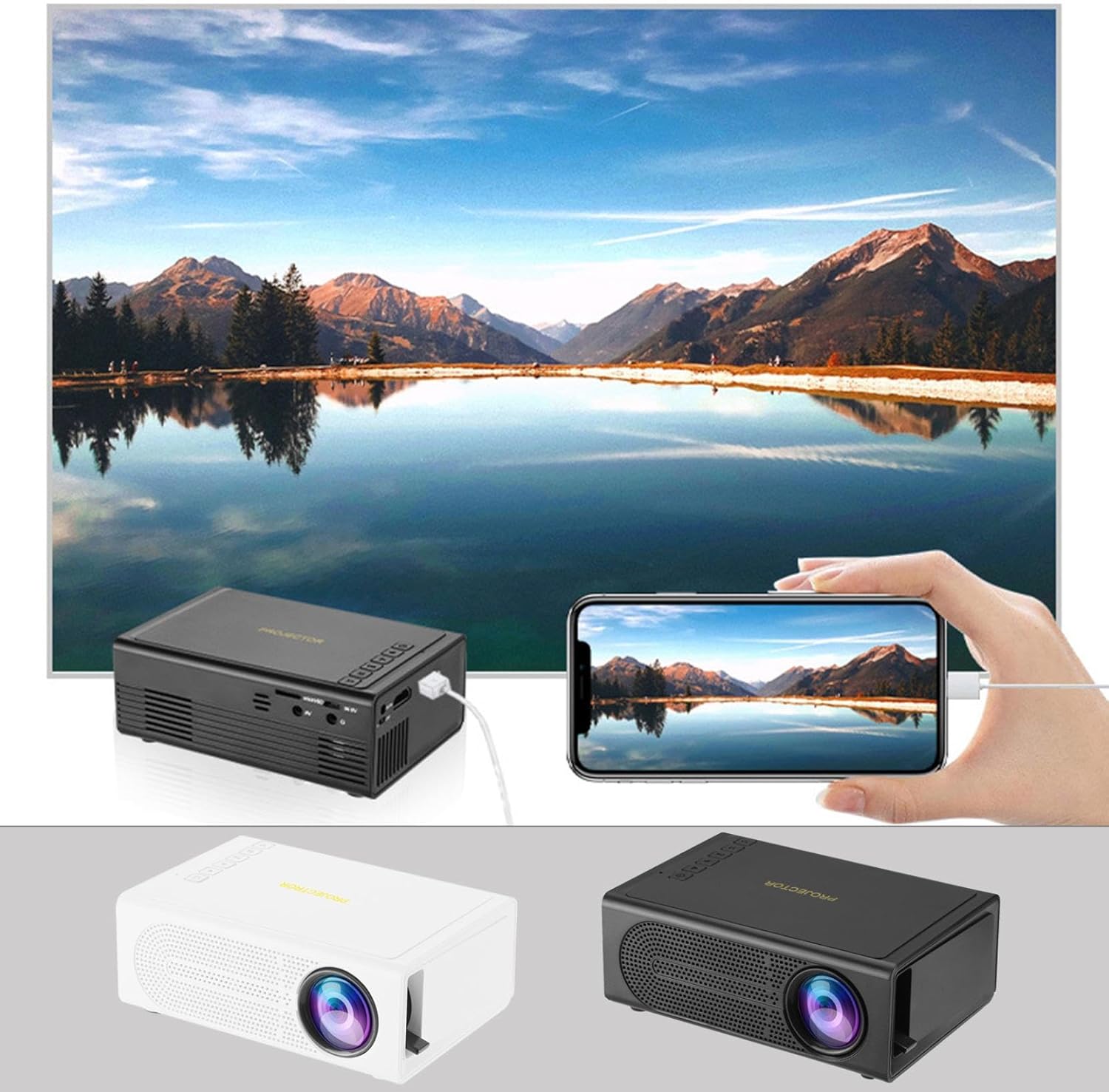
Image: The Portable Mini Projector in use, demonstrating its ability to mirror a smartphone screen onto a large display. Both black and white color options of the projector are shown.

Image: Physical dimensions of the projector, indicating its compact size.
5. ຕັ້ງຄ່າ
- ການເຊື່ອມຕໍ່ພະລັງງານ: Connect the supplied power adapter to the projector's power input port and then plug it into a power outlet.
- ການຈັດວາງ: ວາງໂປເຈັກເຕີຢູ່ເທິງພື້ນທີ່ຮາບພຽງທີ່ຫມັ້ນຄົງ. ສໍາລັບທີ່ດີທີ່ສຸດ viewໃນການຕັ້ງຄ່າ, ວາງໂປເຈັກເຕີຕັ້ງສາກກັບໜ້າຜິວທີ່ໂປເຈັກເຕີ (ຝາ ຫຼື ໜ້າຈໍ).
- ເປີດ: ກົດປຸ່ມເປີດປິດຢູ່ໂປເຈັກເຕີ ຫຼືຣີໂໝດຄວບຄຸມເພື່ອເປີດອຸປະກອນ.
- ການປັບຈຸດສຸມ: Once powered on, rotate the focus ring on the projector until the projected image appears clear and sharp.
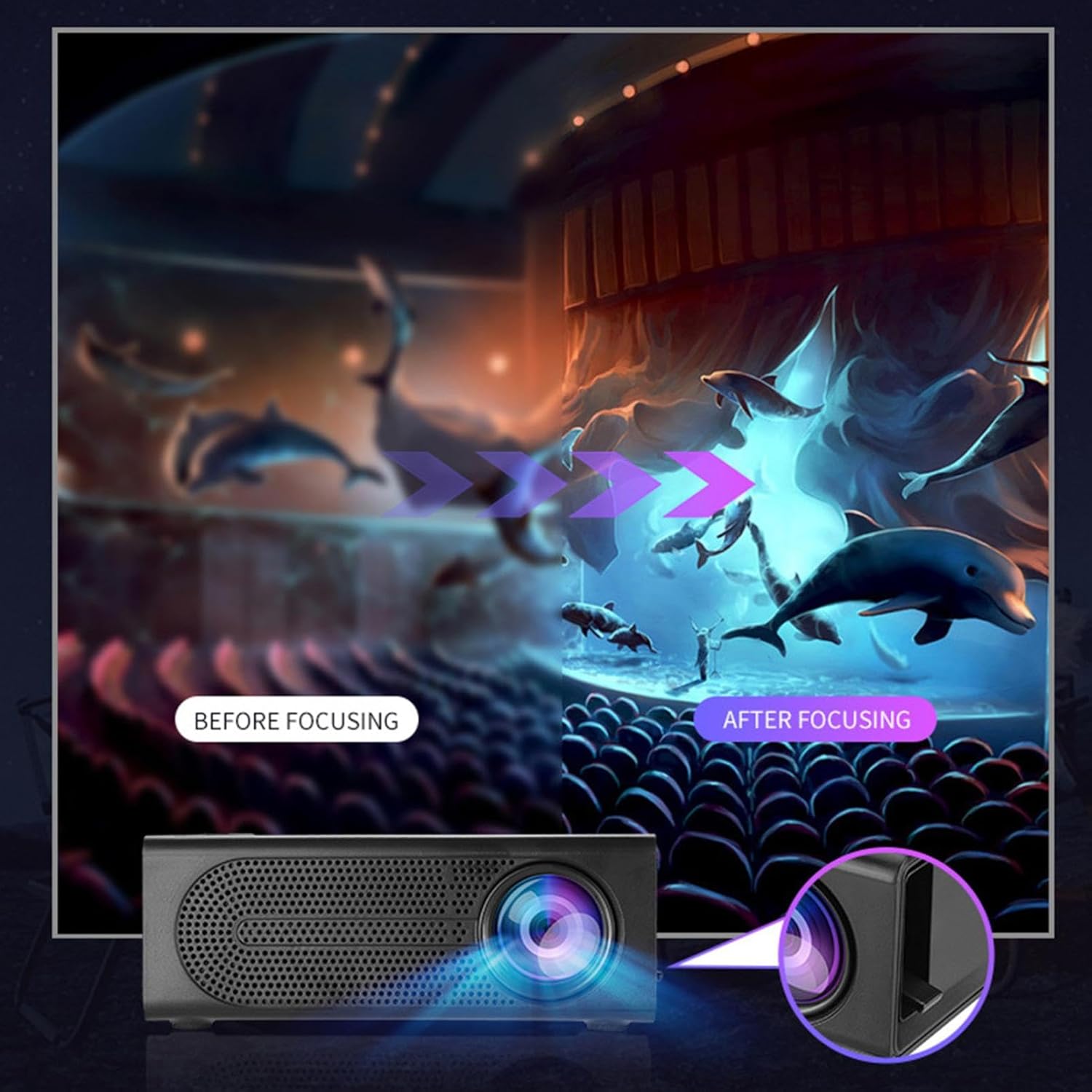
Image: Visual demonstration of focus adjustment, showing the difference between a blurry and a sharp image.
6. ຄໍາແນະນໍາການດໍາເນີນງານ
6.1 ອຸປະກອນເຊື່ອມຕໍ່
The projector supports various input sources. Select the appropriate input mode from the projector's menu after connecting your device.
- HDMI: Connect laptops, gaming consoles, DVD players, or other HDMI-enabled devices using an HDMI cable.
- USB: ໃສ່ແຟລດໄດຣຟ໌ USB ເພື່ອຫຼິ້ນສື່ files ໂດຍກົງ.
- ຂອງ: Use an AV cable to connect older devices like VCRs or some set-top boxes.
- ກາດຫນ່ວຍຄວາມຈໍາ: Insert a compatible memory card to view ຮູບພາບຫຼືວິດີໂອ.
- ໂທລະສັບສະຫຼາດ/ແທັບເລັດ: For wired phone same screen playback, connect your smartphone or tablet via a compatible cable (e.g., USB to Lightning/USB-C for screen mirroring, if supported by your device and the projector).

Image: Connectivity diagram illustrating the wide range of devices compatible with the projector.
6.2 ການປັບຂະໜາດຂອງການຄາດຄະເນ
The projector can project images ranging from 32 to 100 inches. The projection size is determined by the distance between the projector and the projection surface. Move the projector closer to the surface for a smaller image, and further away for a larger image.
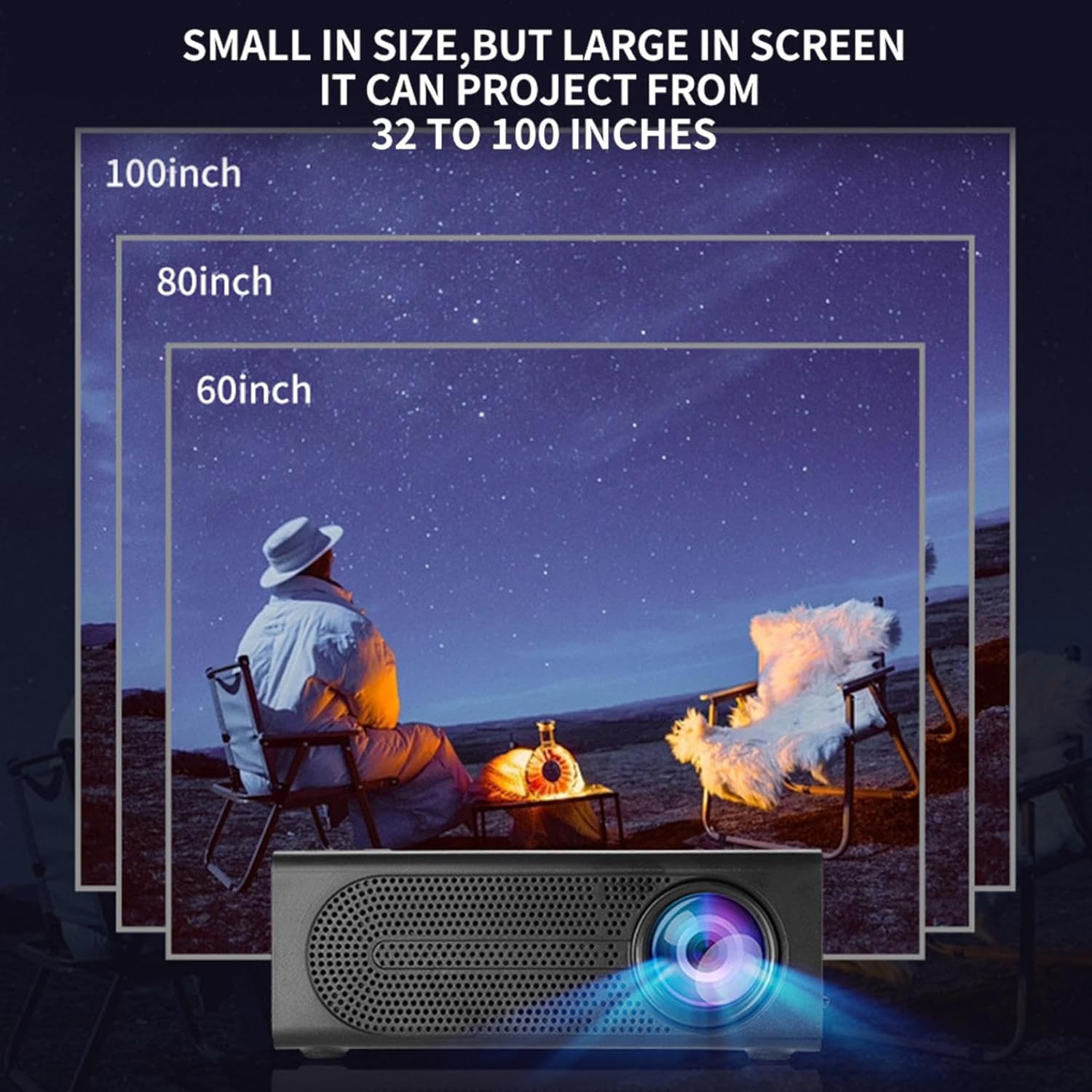
Image: Illustration of various projection sizes achievable with the projector, from 32 to 100 inches.
6.3 ສະຖານະການນຳໃຊ້
This projector is suitable for a variety of environments and uses:
- Parent-child interaction: Enjoy movies or educational content with family.
- Outdoor cinema: Set up a movie night in your backyard.
- Bedroom projection: Watch content comfortably from your bed.
- Living room cinema: Transform your living space into a home theater.

ຮູບພາບ: Examples of diverse usage scenarios for the projector, from indoor home theater to outdoor entertainment.

Image: Depiction of family entertainment using the projector, alongside a technical diagram explaining the benefit of diffuse reflection for eye comfort compared to direct-ray light from a TV.
7. ບໍາລຸງຮັກສາ
ການບຳລຸງຮັກສາທີ່ເໝາະສົມຮັບປະກັນອາຍຸການໃຊ້ງານທີ່ຍາວນານ ແລະ ປະສິດທິພາບທີ່ດີທີ່ສຸດຂອງໂປເຈັກເຕີຂອງທ່ານ:
- ການອະນາໄມເລນ: ໃຊ້ຜ້າແພທີ່ອ່ອນນຸ່ມ, ບໍ່ມີສານດ່າງທີ່ອອກແບບມາສະເພາະສຳລັບແວ່ນຕາເພື່ອເຊັດເລນໂປເຈັກເຕີ້ຄ່ອຍໆ. ຢ່າໃຊ້ເຄື່ອງເຮັດຄວາມສະອາດຂັດຫຼືແຮງເກີນໄປ.
- ການກຳຈັດຂີ້ຝຸ່ນ: Regularly clean the ventilation grilles with a soft brush or compressed air to prevent dust buildup, which can affect cooling and performance.
- ການເກັບຮັກສາ: ເມື່ອບໍ່ໄດ້ໃຊ້ເປັນເວລາດົນ, ໃຫ້ເກັບຮັກສາໂປເຈັກເຕີໄວ້ໃນບ່ອນເຢັນ, ແຫ້ງແລ້ງ, ຫ່າງຈາກແສງແດດໂດຍກົງ ແລະ ອຸນຫະພູມສູງສຸດ.
- ປິດເຄື່ອງຢ່າງຖືກຕ້ອງ: ປິດໂປເຈັກເຕີສະເໝີໂດຍໃຊ້ປຸ່ມເປີດປິດ ແລະ ປ່ອຍໃຫ້ມັນເຢັນລົງກ່ອນທີ່ຈະຖອດປລັກ ຫຼື ຍ້າຍມັນ.
8. ການແກ້ໄຂບັນຫາ
ຖ້າເຈົ້າພົບບັນຫາກັບໂປເຈັກເຕີຂອງເຈົ້າ, ໃຫ້ອ້າງອີງເຖິງບັນຫາ ແລະວິທີແກ້ໄຂບັນຫາທົ່ວໄປຕໍ່ໄປນີ້:
| ບັນຫາ | ສາເຫດທີ່ເປັນໄປໄດ້ | ການແກ້ໄຂ |
|---|---|---|
| ບໍ່ມີຮູບທີ່ຄາດໄວ້ | ບໍ່ໄດ້ເຊື່ອມຕໍ່ໄຟ; ບໍ່ໄດ້ເລືອກແຫຼ່ງທີ່ມາອິນພຸດ; ຝາປິດເລນເປີດຢູ່. | Ensure power is connected and unit is on; Select correct input source; Remove lens cap. |
| ຮູບພາບມົວ | ຈຸດສຸມບໍ່ໄດ້ປັບ; ໂປເຈັກເຕີໃກ້/ໄກຈາກໜ້າຈໍເກີນໄປ. | Adjust the focus ring; Adjust projection distance. |
| ບໍ່ມີສຽງ | Volume too low; Audio cable not connected; Muted. | Increase volume; Check audio connections; Unmute projector/source device. |
| ການຄວບຄຸມໄລຍະໄກບໍ່ເຮັດວຽກ | ໝໍ້ໄຟຕາຍ/ໃສ່ບໍ່ຖືກຕ້ອງ; ການຂັດຂວາງລະຫວ່າງຫ່າງໄກສອກຫຼີກແລະໂປເຈັກເຕີ. | ປ່ຽນແບັດເຕີຣີ; ໃຫ້ແນ່ໃຈວ່າສາຍຕາຂອງເຄື່ອງຮັບ IR ຢູ່ໃນແນວຕັ້ງຢ່າງຊັດເຈນ. |
ຖ້າບັນຫາຍັງຄົງຢູ່ຫຼັງຈາກພະຍາຍາມແກ້ໄຂເຫຼົ່ານີ້, ກະລຸນາຕິດຕໍ່ຝ່າຍຊ່ວຍເຫຼືອລູກຄ້າ.
9. ຂໍ້ມູນຈໍາເພາະ
- ປະເພດຜະລິດຕະພັນ: Portable Mini Projector
- ຍີ່ຫໍ້: ທົ່ວໄປ
- ອຸປະກອນທີ່ເຂົ້າກັນໄດ້: Laptop, Gaming Console, Tablet, Camera, Smartphone
- ອັດຕາສ່ວນຄວາມຄົມຊັດຂອງຮູບພາບ: ສູງ
- ຂະໜາດການຄາດຄະເນ: 32 ຫາ 100 ນິ້ວ
- ການຖອດລະຫັດວິດີໂອ: H.264, H.265
- ການເຊື່ອມຕໍ່: HDMI, USB, AV, Memory Card
- ຂະໜາດ: Approximately 5in (L) x 3.2in (W) x 1.9in (H) / 12.7cm (L) x 8.15cm (W) x 4.85cm (H)
10. ການຮັບປະກັນແລະການສະຫນັບສະຫນູນ
This product comes with a standard manufacturer's warranty. Please refer to the warranty card included in your package for specific terms and conditions. For technical support, troubleshooting assistance, or warranty claims, please contact the retailer or manufacturer's customer service department.
ຕິດຕໍ່ຝ່າຍຊ່ວຍເຫຼືອລູກຄ້າ: Please refer to retailer or manufacturer webເວັບໄຊທ for ສໍາລັບລາຍລະອຽດການຕິດຕໍ່.