
SUVCON M02
SUVCON M02 4K Dash Cam User Manual
ຮຸ່ນ: M02
ແນະນຳ
Thank you for choosing the SUVCON M02 4K Dash Cam. This manual provides detailed instructions for the installation, operation, and maintenance of your dash cam. Please read this manual thoroughly before using the product to ensure proper functionality and safety.
ຂໍ້ມູນຄວາມປອດໄພທີ່ສໍາຄັນ
- ຢ່າໃຊ້ກ້ອງວົງຈອນປິດໃນຂະນະຂັບຂີ່. ປັບການຕັ້ງຄ່າເມື່ອລົດຈອດຢ່າງປອດໄພເທົ່ານັ້ນ.
- ຮັບປະກັນວ່າກ້ອງ dash ຖືກຕິດຢູ່ຢ່າງປອດໄພ ແລະ ບໍ່ກີດຂວາງຜູ້ຂັບຂີ່ view ຫຼືການນໍາໃຊ້ຖົງລົມນິລະໄພ.
- Use only the original power cable provided to prevent damage to the device or vehicle.
- ຫຼີກລ່ຽງການໃຫ້ກ້ອງວົງຈອນປິດຖືກອຸນຫະພູມສູງ, ແສງແດດໂດຍກົງເປັນເວລາດົນ ຫຼື ຄວາມຊຸ່ມຊື່ນຫຼາຍເກີນໄປ.
- Do not attempt to disassemble or repair the dash cam yourself. Contact customer support for assistance.
- ຟໍແມັດແຜ່ນຄວາມຈຳເປັນປະຈຳເພື່ອຮັບປະກັນປະສິດທິພາບທີ່ດີທີ່ສຸດ ແລະ ປ້ອງກັນການເສຍຫາຍຂອງຂໍ້ມູນ.
ເນື້ອໃນຊຸດ
ກະລຸນາກວດເບິ່ງຊຸດສຳລັບລາຍການຕໍ່ໄປນີ້:
- SUVCON M02 4K Dash Cam (Front Camera)
- Rear Camera (if included in your package)
- Car Charger with Power Cable
- ດູດຈອກ Mount
- ຄລິບສາຍ
- ຄູ່ມືຜູ້ໃຊ້
- 32GB MicroSD Card (if included in your package)
ສິນຄ້າເກີນview
Familiarize yourself with the components of your SUVCON M02 Dash Cam.
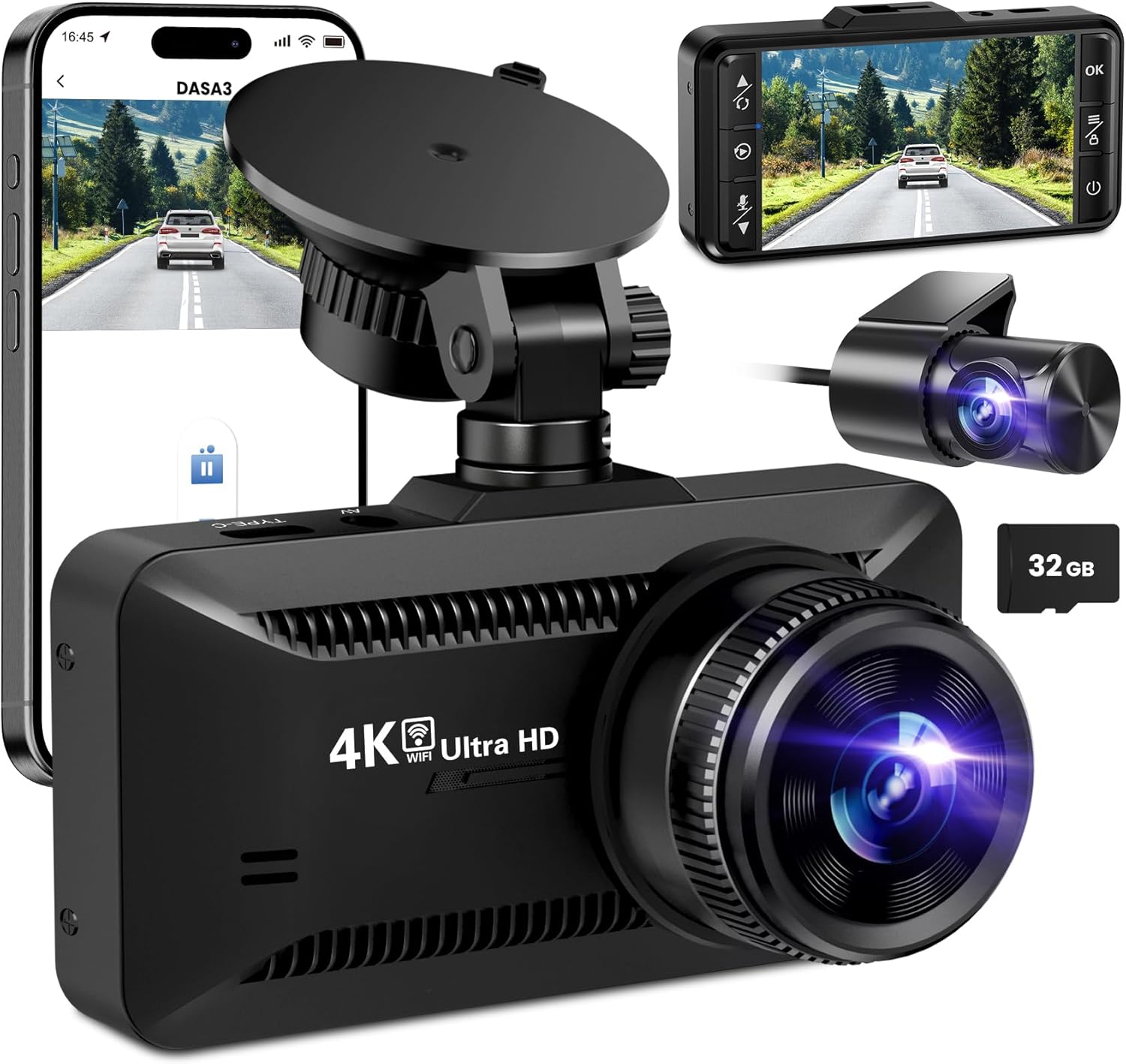
ຮູບພາບ: The SUVCON M02 4K Dash Cam is shown with its main front camera unit, a separate rear camera, a smartphone displaying the dash cam's app interface, and a 32GB microSD card. The main unit features a prominent lens, a display screen on the back (not fully visible in this angle), and a suction cup mount. The rear camera is compact with its own lens. The smartphone screen shows a live view from the dash cam, indicating Wi-Fi connectivity.
Front Camera Unit
- ເລນ: ຖ່າຍວິດີໂອ 4K.
- ຈໍສະແດງຜົນ: ສໍາລັບ viewກໍາລັງດໍາລົງຊີວິດ footage, ການຫຼິ້ນຄືນ, ແລະ ການນຳທາງເມນູ.
- ປຸ່ມຄວບຄຸມ: Power, Menu, Up, Down, OK.
- ຊ່ອງສຽບກາດ MicroSD: ສໍາລັບການໃສ່ກາດຫນ່ວຍຄວາມຈໍາ.
- USB Power Port (Type-C): ສຳລັບເຊື່ອມຕໍ່ເຄື່ອງສາກໄຟລົດ.
- ພອດກ້ອງຫຼັງ: For connecting the rear camera cable.
- ລຳໂພງ/ໄມໂຄຣໂຟນ: ສຳລັບການບັນທຶກສຽງ ແລະ ການຫຼິ້ນຄືນ.
ຫນ່ວຍກ້ອງຖ່າຍຮູບຫລັງ
- ເລນ: Captures rear view ວິດີໂອ.
- ສາຍ: Connects to the main dash cam unit.
ການຕິດຕັ້ງແລະການຕິດຕັ້ງ
1. ການໃສ່ MicroSD Card
- ກວດໃຫ້ແນ່ໃຈວ່າກ້ອງຕິດປິດ.
- ຊອກຫາຊ່ອງໃສ່ກາດ MicroSD ຢູ່ດ້ານຂ້າງຂອງກ້ອງວົງຈອນປິດ.
- Insert the MicroSD card with the gold contacts facing the back of the dash cam until it clicks into place.
- ເພື່ອເອົາອອກ, ຄ່ອຍໆຍູ້ບັດເຂົ້າໄປຈົນກວ່າມັນຈະຄລິກ, ຈາກນັ້ນປ່ອຍ.
ໝາຍເຫດ: A Class 10 or higher MicroSD card (up to 128GB recommended) is required. Format the card in the dash cam's settings before first use.
2. ການຕິດຕັ້ງ Dash Cam
- ອະນາໄມພື້ນທີ່ແວ່ນແຍງບ່ອນທີ່ທ່ານຕັ້ງໃຈຈະຕິດກ້ອງ dash.
- ຕິດຕັ້ງຕົວຍຶດຈອກດູດເຂົ້າກັບກ້ອງວົງຈອນປິດ.
- Press the suction cup firmly against the windshield, ideally behind the rearview mirror, and flip the lever to secure it.
- Adjust the angle of the dash cam lens to ensure it captures the road ahead clearly, avoiding obstruction from the hood or dashboard.
3. ການເຊື່ອມຕໍ່ພະລັງງານ
- Connect the small end of the car charger cable to the USB Type-C port on the dash cam.
- Plug the larger end of the car charger into your vehicle's 12V power outlet (cigarette lighter socket).
- Route the power cable neatly along the edge of the windshield and dashboard using the provided cable clips to avoid obstructing your view.
4. ການຕິດຕັ້ງກ້ອງຖ່າຍຮູບດ້ານຫຼັງ (ທາງເລືອກ)
- Connect the rear camera cable to the dedicated rear camera port on the main dash cam unit.
- Route the cable from the front unit to the rear of the vehicle, typically along the headliner and side panels.
- Mount the rear camera on the rear windshield using its adhesive or screws, ensuring a clear view ຂອງເສັ້ນທາງຫລັງ.
- Connect the red wire of the rear camera cable to the vehicle's reverse light positive wire if you wish to enable parking assist lines when reversing.
ຄໍາແນະນໍາການດໍາເນີນງານ
ເປີດ/ປິດ
- ອັດຕະໂນມັດ: The dash cam will automatically power on and begin recording when connected to power and the vehicle engine starts. It will power off automatically when the engine is turned off.
- ຄູ່ມື: Press and hold the Power button to manually turn the dash cam on or off.
ບັນທຶກວິທີ
- ການບັນທຶກວົງ: The dash cam records video in continuous loops (e.g., 1, 3, or 5 minutes). When the memory card is full, the oldest unlocked files ຈະຖືກຂຽນທັບ.
- G-Sensor (ການບັນທຶກສຸກເສີນ): The built-in G-sensor detects sudden impacts or collisions. When triggered, the current video segment is automatically locked and saved to prevent it from being overwritten by loop recording.
- ບ່ອນຈອດລົດຕິດຕາມກວດກາ (Parking Monitor): With a hardwire kit (sold separately) or continuous power, the dash cam can monitor your vehicle while parked. If a vibration or impact is detected, it will automatically record a short video.
ເມນູ ນຳ ທາງ
Use the control buttons on the dash cam to navigate the menu:
- ປຸ່ມເມນູ: Press to enter the settings menu. Press again to switch between video settings, system settings, and playback mode.
- ປຸ່ມຂຶ້ນ/ລົງ: ທ່ອງໄປຫາຕົວເລືອກເມນູ.
- ປຸ່ມຕົກລົງ: Confirm selection or start/stop recording in recording mode.
ການເຊື່ອມຕໍ່ Wi-Fi ແລະການນໍາໃຊ້ແອັບຯ
The SUVCON M02 features Wi-Fi connectivity for easy access to recordings and settings via a smartphone app.
- Download the recommended app (e.g., "DASA3" or similar, check packaging for exact app name) from your smartphone's app store.
- On the dash cam, enable Wi-Fi from the system settings. The dash cam's Wi-Fi SSID and password will be displayed on the screen.
- On your smartphone, go to Wi-Fi settings and connect to the dash cam's Wi-Fi network using the provided password.
- ເປີດ app ໄດ້. ດຽວນີ້ເຈົ້າສາມາດ view ດໍາລົງຊີວິດ footage, download recorded videos, change settings, and format the SD card directly from your phone.
ຫຼິ້ນຄືນ
- On Dash Cam: In recording mode, press the Menu button twice to enter playback mode. Use Up/Down buttons to select files and OK to play.
- ຜ່ານ App: Connect your smartphone via Wi-Fi and use the app's playback feature to view ແລະດາວໂຫລດວິດີໂອ.
- On Computer: Remove the MicroSD card from the dash cam and insert it into a computer's card reader. Videos can be played using standard media players.
ບໍາລຸງຮັກສາ
ການເຮັດຄວາມສະອາດ Dash Cam
- ໃຊ້ຜ້າແຫ້ງທີ່ອ່ອນໆເພື່ອເຮັດຄວາມສະອາດຮ່າງກາຍຂອງ dash cam.
- ສໍາລັບເລນ, ໃຊ້ຜ້າເຮັດຄວາມສະອາດເລນແລະການແກ້ໄຂການເຮັດຄວາມສະອາດເລນພິເສດເພື່ອຫຼີກເວັ້ນການຂັດ.
- ຢ່າໃຊ້ເຄື່ອງເຮັດຄວາມສະອາດຂັດຫຼືສານລະລາຍ.
MicroSD Card Formatting
It is recommended to format the MicroSD card every 2-4 weeks to maintain optimal recording performance and prevent data corruption. This can be done through the dash cam's menu settings or via the smartphone app.
ອັບເດດເຟີມແວ
Periodically check the SUVCON official website for available firmware updates. Firmware updates can improve performance, add new features, or fix bugs. Follow the instructions provided with the firmware file ລະມັດລະວັງ.
ການແກ້ໄຂບັນຫາ
| ບັນຫາ | ການແກ້ໄຂທີ່ເປັນໄປໄດ້ |
|---|---|
| Dash cam ບໍ່ເປີດ. |
|
| ກ້ອງວົງຈອນປິດຢຸດການບັນທຶກ ຫຼື ຄ້າງ. |
|
| ວິດີໂອ footage ແມ່ນມົວຫຼືບໍ່ຈະແຈ້ງ. |
|
| ບັນຫາການເຊື່ອມຕໍ່ Wi-Fi. |
|
ຂໍ້ມູນຈໍາເພາະ
| ຄຸນສົມບັດ | ລາຍລະອຽດ |
|---|---|
| ຕົວແບບ | M02 |
| ຍີ່ຫໍ້ | SUVCON |
| ຄວາມລະອຽດການຖ່າຍວິດີໂອ | 4K (Front), 1080P (Rear, if applicable) |
| ຄຸນນະສົມບັດພິເສດ | G-Sensor, Loop Recording, Parking Monitor, Wi-Fi Connectivity |
| ເຕັກໂນໂລຊີການເຊື່ອມຕໍ່ | Wi-Fi |
| ປະເພດການຕິດຕັ້ງ | ຕິດຕັ້ງແຜງໜ້າປັດ (ຈອກດູດ) |
| ການເກັບຮັກສາ | MicroSD Card (Class 10 or higher, up to 128GB recommended) |
| ແຫຼ່ງພະລັງງານ | ເຄື່ອງສາກໄຟລົດ (12V) |
| ຂະໜາດສິນຄ້າ | 2.54 x 2.54 x 2.54 ຊມ (ປະມານ, ຕາມຂໍ້ມູນຜະລິດຕະພັນ) |
ການຮັບປະກັນ ແລະການຊ່ວຍເຫຼືອລູກຄ້າ
For warranty information, technical support, or any inquiries regarding your SUVCON M02 Dash Cam, please refer to the warranty card included in your package or visit the official SUVCON website. Please have your model number (M02) and purchase details ready when contacting support.
Webເວັບໄຊ: www.suvcon.com (ຕ. ຢample URL, please refer to actual product documentation)
ອີເມວ: support@suvcon.com (ຕ. ຢample Email, please refer to actual product documentation)
Ask a question about this manual
Ask about setup, troubleshooting, compatibility, parts, safety, or missing instructions. Manuals+ will review the question and use this page’s manual context to help answer it.