
1. ບົດແນະນຳ
Thank you for choosing the Anmite A160W03T 16-inch Portable Touch Monitor. This manual provides essential information for the safe and efficient use of your new monitor. Please read it thoroughly before operation and retain it for future reference.
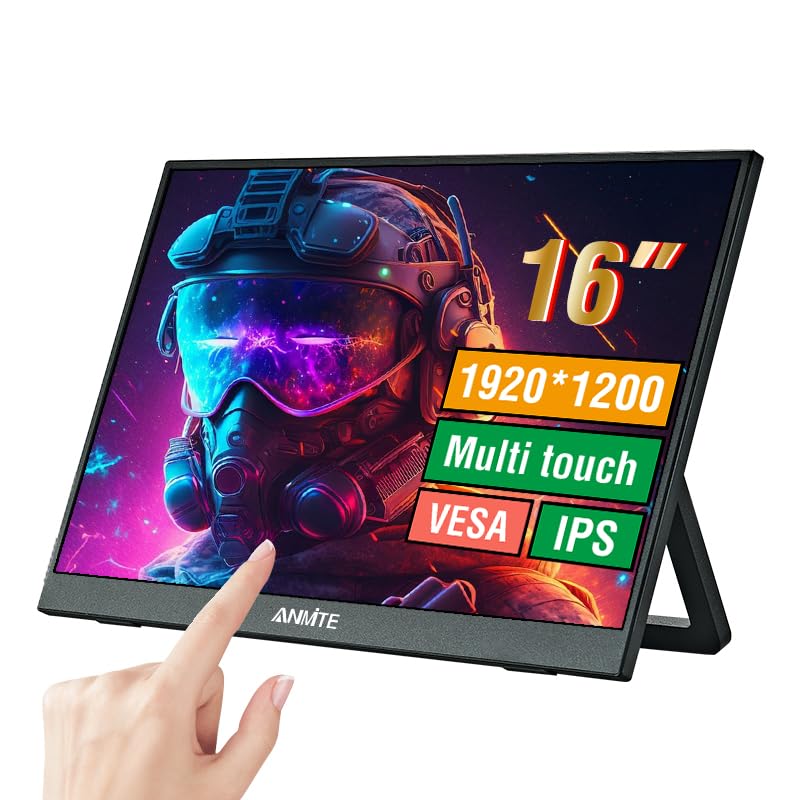
Image 1.1: Anmite 16-inch Portable Touch Monitor. This image displays the monitor's front view, highlighting its 16-inch screen, 1920x1200 resolution, 16:10 aspect ratio, 100% sRGB color gamut, VESA mount compatibility, touch functionality, 1200P resolution, and IPS panel technology. A hand is shown interacting with the touch screen.
2. ຂໍ້ມູນຄວາມປອດໄພທີ່ສໍາຄັນ
- ຢ່າເຮັດໃຫ້ຈໍສະແດງຜົນຖືກຝົນຫຼືຄວາມຊຸ່ມຊື່ນເພື່ອປ້ອງກັນໄຟໄຫມ້ຫຼືໄຟຟ້າ.
- ຫຼີກເວັ້ນການວາງຈໍພາບຢູ່ໃນແສງແດດໂດຍກົງ ຫຼືຢູ່ໃກ້ກັບແຫຼ່ງຄວາມຮ້ອນ.
- ໃຊ້ພຽງແຕ່ອະແດບເຕີສາຍໄຟ ແລະສາຍທີ່ສະໜອງໃຫ້ໂດຍຜູ້ຜະລິດ.
- Do not attempt to disassemble or modify the monitor. Refer all servicing to qualified personnel.
- ຮັກສາຈໍພາບຢູ່ຫ່າງຈາກສະຫນາມແມ່ເຫຼັກທີ່ເຂັ້ມແຂງ.
- ຮັບປະກັນການລະບາຍອາກາດທີ່ເຫມາະສົມຮອບຈໍ.
3. ເນື້ອໃນຊຸດ
ກະລຸນາກວດເບິ່ງເນື້ອໃນຂອງແພັກເກດເມື່ອ unboxing. ຖ້າລາຍການໃດຂາດຫາຍໄປ ຫຼືເສຍຫາຍ, ໃຫ້ຕິດຕໍ່ຝ່າຍຊ່ວຍເຫຼືອລູກຄ້າ.
- Anmite Portable Monitor x 1
- Mini-HDMI to HDMI cable x 1
- ສາຍ Type-C ຫາ Type-C x 1
- Type-C to USB-A cable x 1
- ຄູ່ມືຜູ້ໃຊ້ x 1

Image 3.1: Contents of the Anmite Portable Monitor package. This image shows the monitor lying next to its retail box, which displays various product labels and certifications.
4. ຄຸນສົມບັດ ແລະຂໍ້ມູນສະເພາະຂອງຜະລິດຕະພັນ
ຄຸນນະສົມບັດທີ່ສໍາຄັນ:
- 16-inch IPS Panel with 1920x1200 Resolution
- 16:10 ອັດຕາສ່ວນ
- ການທໍາງານຂອງຫນ້າຈໍສໍາຜັດ
- Multiple Connectivity Options: Mini-HDMI, Full-Function Type-C
- Built-in Speakers (1W*2)
- Lightweight Metal Enclosure
ຂໍ້ມູນຈໍາເພາະທາງວິຊາການ:
| ຂໍ້ມູນຈໍາເພາະ | ມູນຄ່າ |
|---|---|
| ນ້ຳໜັກສຸດທິ | 0.81kg (28.57oz) |
| ຂະໜາດ | 355 x 237 x 5-13 mm (13.97 x 9.33 x 0.51 inches) |
| ຂະໜາດໜ້າຈໍ | 16 ນິ້ວ |
| ປະເພດແຜງ | IPS |
| ອັດຕາສ່ວນ | 16:10 |
| ຄວາມລະອຽດ | 1920 x 1200 |
| ສະແດງສີ | 16.7M |
| ອັດຕາສ່ວນກົງກັນຂ້າມ | 1000:1 |
| ຄວາມສະຫວ່າງ | 300cd/m² |
| ສີ Gamut | 100% sRGB |
| ອັດຕາການໂຫຼດຂໍ້ມູນຄືນໃໝ່ | 60Hz |
| ເວລາຕອບສະຫນອງ | 5 ມິນລິວິນາທີ |
| ອິນເຕີເຟດຂາເຂົ້າ | Mini-HDMI, Type-C (Full Function), Type-C (Power) |
| Output Interface | ການໂຕ້ຕອບສຽງ 3.5mm |
| ລໍາໂພງ | Built-in (1W*2) |
| ສະບັບtage | 5 ໂວນ (DC) |

Image 4.1: Product dimensions. This diagram illustrates the physical measurements of the monitor, including width, height, and thickness, in both centimeters and inches.
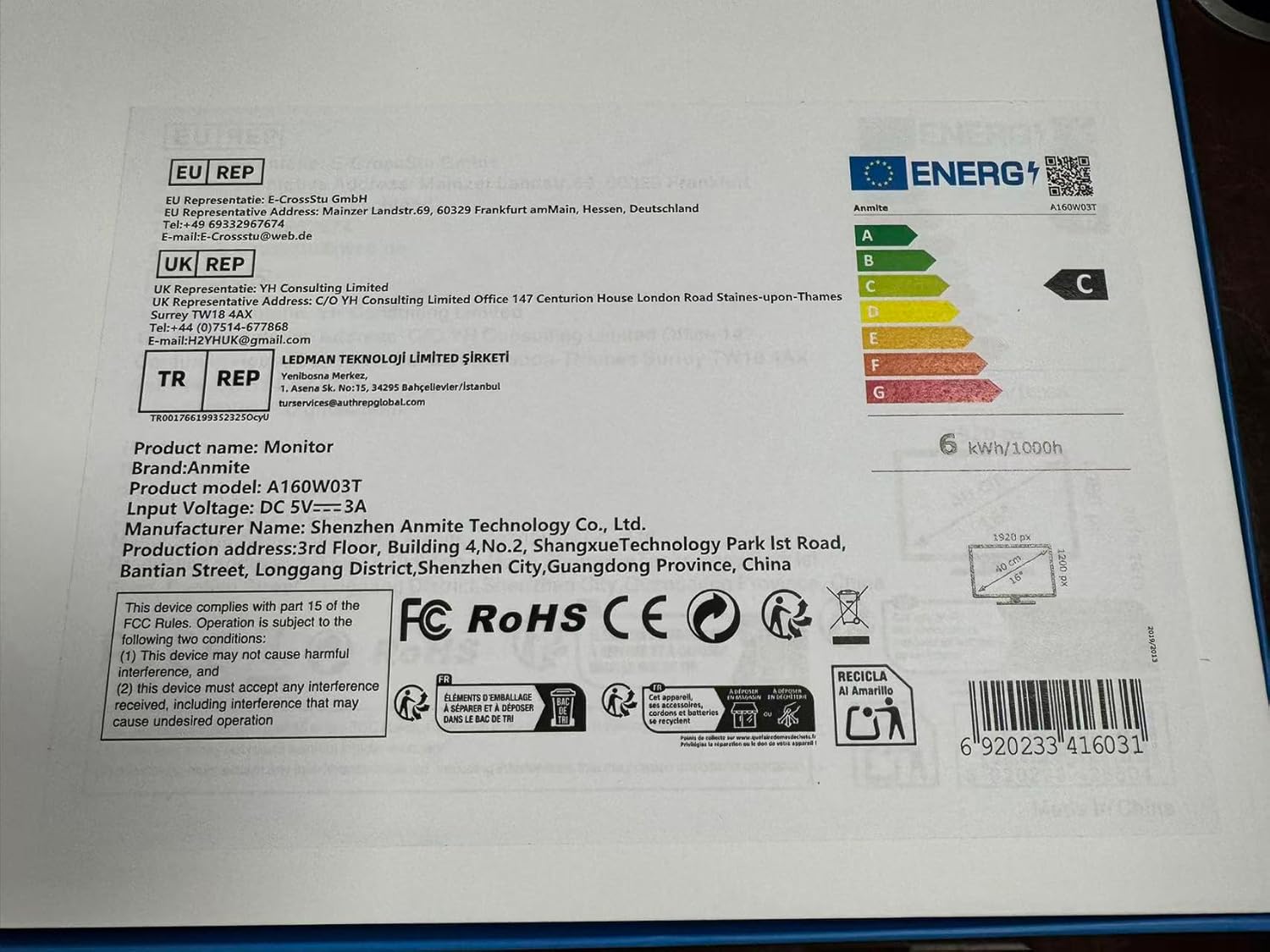
Image 4.2: Product label details. This close-up shows the product name, brand, model number (A160W03T), input voltage (DC 5V-3A), manufacturer information, and various compliance logos.
5. ຕັ້ງຄ່າ
5.1 ການເຊື່ອມຕໍ່ກັບອຸປະກອນ
The Anmite A160W03T monitor supports connectivity via Type-C (Full Function) and Mini-HDMI.
- ການເຊື່ອມຕໍ່ພະລັງງານ: Connect the monitor to a power source using the provided Type-C to USB-A cable and a compatible power adapter (not always included, typically 5V/3A). Alternatively, if your device provides sufficient power via a full-function Type-C port, a separate power connection may not be needed.
- Type-C Connection (Full Function):
- Ensure your device's Type-C port supports video output (DisplayPort Alternate Mode) and power delivery.
- Connect one end of the Type-C to Type-C cable to your device's full-function Type-C port and the other end to the monitor's full-function Type-C port.
- This single cable can transmit video, audio, touch signals, and power.
- Mini-HDMI Connection:
- Connect one end of the Mini-HDMI to HDMI cable to the monitor's Mini-HDMI port and the other end to your device's HDMI port.
- For power, use the Type-C to USB-A cable connected to the monitor's dedicated power Type-C port and a power adapter.
- For touch functionality with HDMI, an additional USB-A to Type-C cable (provided) must be connected from your device's USB-A port to the monitor's full-function Type-C port.

ຮູບພາບ 5.1: ດ້ານຫລັງ view of the monitor. This image shows the integrated stand and the location of the various input/output ports on the side and back of the monitor.
5.2 Stand Adjustment
The monitor features an integrated stand. Gently pull out the stand from the back of the monitor to adjust it to your desired viewing angle. Ensure the stand is stable on a flat surface.
6. ຄໍາແນະນໍາການດໍາເນີນງານ
6.1 ເປີດ/ປິດ
- To power on the monitor, press the power button located on the side or back of the monitor.
- To power off, press and hold the power button for a few seconds until the screen turns off.
6.2 ເມນູການສະແດງເທິງໜ້າຈໍ (OSD).
The monitor includes an OSD menu for adjusting settings such as brightness, contrast, color, and input source. Use the control buttons (typically located on the side or back) to navigate the menu:
- ກົດປຸ່ມເມນູເພື່ອເປີດ OSD.
- Use the navigation buttons (up/down or +/-) to select options.
- Press the Enter button to confirm selections.
- ກົດປຸ່ມອອກເພື່ອປິດ OSD.
6.3 ການທໍາງານຂອງຫນ້າຈໍສໍາຜັດ
The monitor features a 10-point capacitive touch screen. When connected via a full-function Type-C cable or an HDMI + USB-A to Type-C cable, the touch function will be enabled automatically. Ensure your operating system supports touch input.
6.4 ສຽງອອກ
The monitor has built-in speakers. You can also connect external headphones or speakers to the 3.5mm audio output interface for private listening or higher quality audio.
7. ບໍາລຸງຮັກສາ
7.1 ການທໍາຄວາມສະອາດ Monitor
- Always power off the monitor and unplug all cables before cleaning.
- ໃຊ້ຜ້າແພອ່ອນໆ ທີ່ບໍ່ມີເສັ້ນດ່າງ ງampຫຸ້ມດ້ວຍນ້ໍາຫຼືເຄື່ອງເຮັດຄວາມສະອາດຫນ້າຈໍທີ່ບໍ່ມີການຂັດ.
- ຢ່າສີດນໍ້າສະອາດໃສ່ໜ້າຈໍໂດຍກົງ.
- Avoid using harsh chemicals, alcohol, or abrasive materials.
7.2 ການເກັບຮັກສາ
When not in use for extended periods, store the monitor in a cool, dry place, preferably in its original packaging, to protect it from dust and physical damage.
8. ການແກ້ໄຂບັນຫາ
ຖ້າເຈົ້າພົບບັນຫາກັບຈໍພາບຂອງເຈົ້າ, ໃຫ້ອ້າງອີງເຖິງບັນຫາ ແລະວິທີແກ້ໄຂບັນຫາທົ່ວໄປຕໍ່ໄປນີ້:
- ບໍ່ມີສັນຍານ:
- Ensure all cables (video and power) are securely connected.
- Verify that your device's Type-C port supports video output if using Type-C.
- ລອງໃຊ້ສາຍ ຫຼື ພອດອື່ນໃນອຸປະກອນຂອງທ່ານ.
- ເລືອກແຫຼ່ງສັນຍານເຂົ້າທີ່ຖືກຕ້ອງໃນເມນູ OSD ຂອງຈໍພາບ.
- ບໍ່ມີພະລັງງານ:
- Check if the power adapter is properly connected and the power outlet is functional.
- Ensure the Type-C power cable is connected to the correct power input port on the monitor.
- ຟັງຊັນສໍາຜັດບໍ່ເຮັດວຽກ:
- For Type-C connection, ensure it's a full-function Type-C port on your device.
- For HDMI connection, ensure the additional USB-A to Type-C cable is connected from your device to the monitor's full-function Type-C port for touch data.
- ປິດເປີດອຸປະກອນທີ່ເຊື່ອມຕໍ່ຂອງທ່ານຄືນໃໝ່.
- ບໍ່ມີສຽງ:
- ກວດເບິ່ງການຕັ້ງຄ່າລະດັບສຽງໃນທັງຈໍ ແລະອຸປະກອນທີ່ເຊື່ອມຕໍ່ຂອງທ່ານ.
- ໃຫ້ແນ່ໃຈວ່າໄດ້ເລືອກອຸປະກອນສົ່ງອອກສຽງທີ່ຖືກຕ້ອງໃນຄອມພິວເຕີຂອງທ່ານ.
- If using HDMI, ensure the HDMI cable supports audio transmission.
9. ການຮັບປະກັນແລະການສະຫນັບສະຫນູນ
This Anmite portable monitor is manufactured by Shenzhen Anmite Technology Co., Ltd. For warranty information and technical support, please refer to the documentation provided with your purchase or contact your retailer. Please have your model number (A160W03T) and UPC (6920233416031) available when seeking support.