
1. ບົດແນະນຳ
This manual provides essential information for the assembly, operation, maintenance, and troubleshooting of your Hbada E2 Ergonomic Office Chair. Please read these instructions carefully before use to ensure proper function and longevity of your chair.

Figure 1: Hbada E2 Ergonomic Office Chair, side view.
2. ຂໍ້ມູນຄວາມປອດໄພ
- ສະເຫມີປະຕິບັດຕາມຄໍາແນະນໍາການປະກອບຢ່າງລະມັດລະວັງ.
- Keep the chair away from direct heat sources to prevent material damage.
- Do not exceed the maximum weight capacity of the chair. Refer to specifications for details.
- ໃຫ້ແນ່ໃຈວ່າ screws ແລະການເຊື່ອມຕໍ່ທັງຫມົດໄດ້ຖືກ tightened ຢ່າງປອດໄພກ່ອນທີ່ຈະນໍາໃຊ້ແລະແຕ່ລະໄລຍະການກວດສອບການວ່າງ.
- ໃຊ້ເກົ້າອີ້ຢູ່ເທິງພື້ນຜິວທີ່ຮາບພຽງ.
3. ການຕິດຕັ້ງແລະການປະກອບ
Assembly is required for this product. Detailed step-by-step assembly instructions and all necessary tools are included in the product packaging. Please refer to the separate assembly guide for a complete walkthrough. Ensure all components are present before beginning assembly.

Figure 2: Hbada E2 Ergonomic Office Chair, front view ຂອງຜະລິດຕະພັນປະກອບ.
4. ຄໍາແນະນໍາການດໍາເນີນງານ (ການປັບຕົວ)
The Hbada E2 chair offers multiple adjustment features to customize your seating experience for optimal comfort and support.
4.1. ການປັບທີ່ວາງຫົວ
The 3D adjustable headrest can be positioned to support your neck and head effectively.
- ການປັບແນວຕັ້ງ: Adjust the headrest up or down by up to 10 cm.
- Forward and Backward Adjustment: Move the headrest forward or backward by up to 3 cm.
- ໝຸນ: Rotate the headrest up to 60 degrees to find your preferred angle.

Figure 3: Headrest adjustment capabilities.
4.2. ການປັບຕົວສະຫນັບສະຫນູນ lumbar
The 6-way adjustable lumbar support provides comprehensive lower back protection.
- Forward and Backward Adjustment: Adjust the lumbar support in 3 levels.
- ການປັບແນວຕັ້ງ: Move the lumbar support up or down.
- Left-Right Suspension: The floating structure adapts to your movements.

Figure 4: Lumbar support dynamic adjustment features.
4.3. ການປັບທີ່ວາງແຂນ
The 3D armrests can be adjusted to provide optimal elbow support.
- ການປັບຄວາມສູງ: Adjust armrest height by up to 7.5 cm.
- Forward and Backward Adjustment: Move armrests forward or backward by up to 5 cm.
- ໝຸນ: Rotate armrests 40 degrees left and right.

Figure 5: Armrest adjustment options.
4.4. ຟັງຊັນການນຽງ ແລະ ການລັອກ
The chair features a reclining function with three lockable tilt angles.
- Recline up to 135 degrees.
- Lockable angles for 90° (comfortable office), 115° (leisure and entertainment), and 138° (short nap).

Figure 6: Three-level locking recline positions.
4.5. Wired Control Adjustment
The aluminum alloy wired control allows for easy adjustment without bending down.
- Simply toggle the adjuster for one-touch operation of chair functions.

Figure 7: Wired control for easy adjustments.
5. ບໍາລຸງຮັກສາ
Regular maintenance ensures the longevity and optimal performance of your Hbada E2 chair.
- ທໍາຄວາມສະອາດ: ສໍາລັບຜ້າຕາຫນ່າງ, ຄ່ອຍໆເຊັດດ້ວຍໂຄສະນາamp cloth and mild soap. Avoid harsh chemicals. For the frame, use a soft, dry cloth.
- ການກວດກາ: ກວດເບິ່ງທຸກສະກູແລະສະກູເປັນໄລຍະເພື່ອຮັບປະກັນວ່າພວກມັນແຫນ້ນ. ເຄັ່ງຄັດຄືນໃໝ່ຖ້າຈຳເປັນ.
- ນັກສະແດງ: ຮັກສາລໍ້ໃຫ້ບໍ່ມີຜົມ ແລະ ສິ່ງເສດເຫຼືອເພື່ອຮັບປະກັນການເຄື່ອນໄຫວທີ່ລຽບງ່າຍ.
- ຫຼີກເວັ້ນການໂຫຼດເກີນ: Do not place excessive weight on the chair or armrests beyond the specified capacity.
6. ການແກ້ໄຂບັນຫາ
If you encounter any issues with your Hbada E2 chair, please refer to the following common solutions:
- Chair Squeaks: Check and tighten all assembly bolts. A small amount of silicone spray on moving parts may help, but avoid contact with mesh or upholstery.
- Chair Not Adjusting: Ensure no obstructions are blocking the adjustment mechanisms. Verify that the wired control is functioning correctly.
- Casters ບໍ່ Rolling Smoothly: Clean any debris from the caster wheels. Ensure they are properly inserted into the chair base.
- Gas Lift Issues: If the chair does not hold its height, the gas lift may need replacement. Contact customer support for assistance.
For persistent issues or concerns not addressed here, please contact Hbada customer support.
7. ຂໍ້ມູນຈໍາເພາະ
| ຄຸນສົມບັດ | ລາຍລະອຽດ |
|---|---|
| ຍີ່ຫໍ້ | Hbada |
| ຊື່ຕົວແບບ | E2 |
| ສີ | ສີຂາວ |
| ຂະໜາດສິນຄ້າ (ກວ້າງ x ຍາວ x ສູງ) | 30.51"D x 22.24"W x 18.11"H |
| ວັດສະດຸ | Alloy Steel (Frame), Mesh (Back, Seat), Foam (Fill) |
| ແບບກັບຄືນໄປບ່ອນ | ຕາຫນ່າງ |
| ແບບແຂນ | ສາມາດປັບໄດ້ 3D |
| ຈຳນວນຕຳແໜ່ງທີ່ນອນ | 3 |
| ອົງປະກອບລວມ | Arm Pad, Cushion |
| ຄໍາແນະນໍາດ້ານຫນ້າ | ຊັ້ນແຂງ, ພົມ |
| ຜູ້ຜະລິດ | Hbada |
| ວັນທີທໍາອິດທີ່ມີ | ວັນທີ 18 ທັນວາ 2024 |
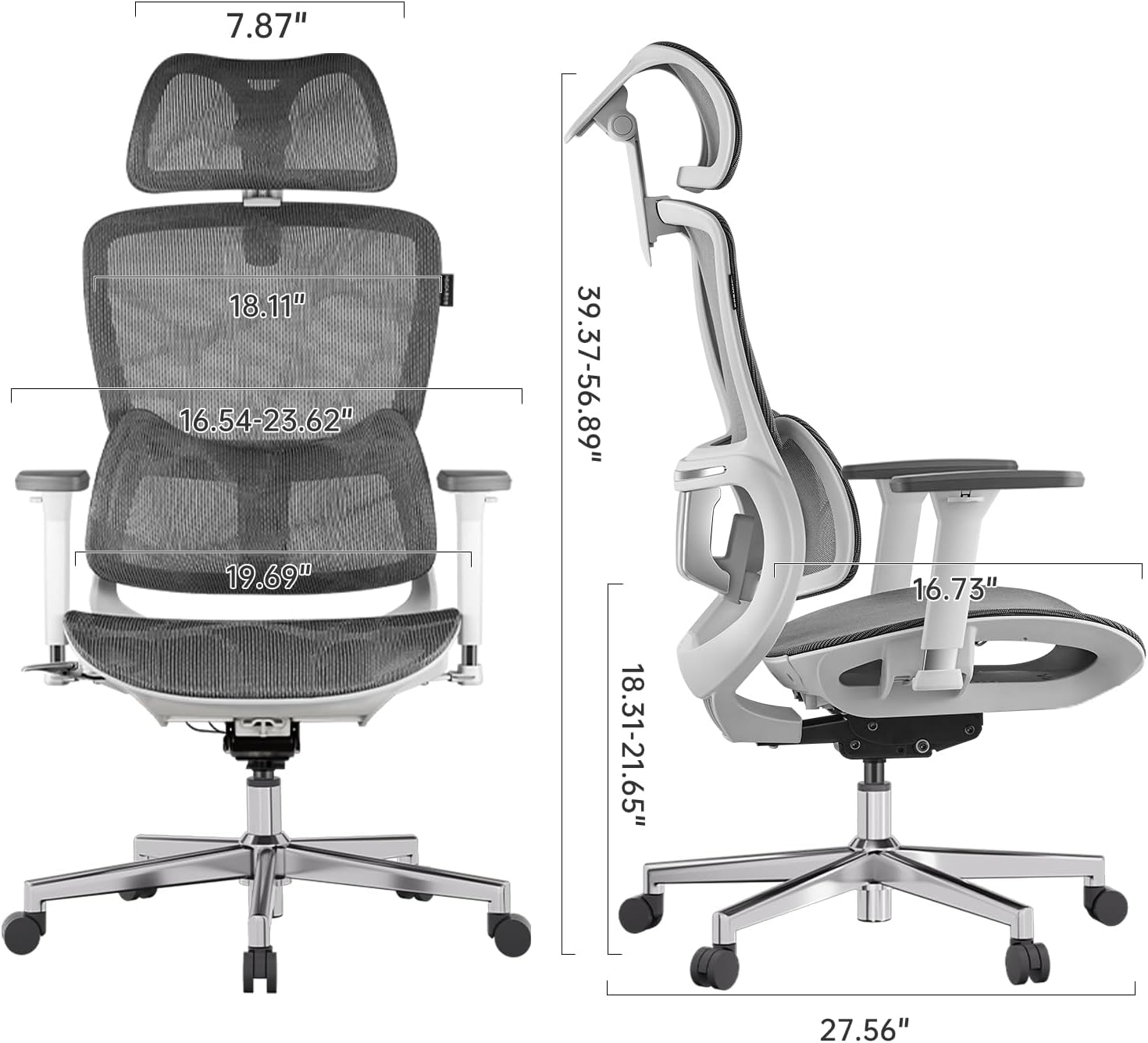
Figure 8: Detailed dimensions of the Hbada E2 Office Chair.
8. ການຮັບປະກັນແລະການສະຫນັບສະຫນູນ
Hbada is committed to providing high-quality products and customer satisfaction.
8.1. ນະໂຍບາຍການກັບຄືນ
ຜະລິດຕະພັນນີ້ມີສິດສົ່ງຄືນພາຍໃນ 30 ມື້ນັບຈາກມື້ຊື້, ໂດຍຂຶ້ນກັບນະໂຍບາຍການສົ່ງຄືນຂອງຜູ້ຂາຍຍ່ອຍ.
8.2. ແຜນການປົກປ້ອງ
Optional protection plans are available for purchase to extend coverage beyond the standard warranty:
- ແຜນການປົກປ້ອງ 2 ປີ: One-time payment of $44.99.
- ແຜນການປົກປ້ອງ 3 ປີ: One-time payment of $56.99.
- ປົກປ້ອງສົມບູນ: Monthly billing of $16.99, covering eligible past and future purchases.
These plans offer additional coverage and are separate from any manufacturer's warranty.
8.3. ການຊ່ວຍເຫຼືອລູກຄ້າ
For product inquiries, assembly assistance, or warranty claims, please visit the official Hbada store or contact their customer service directly.

Figure 9: Hbada's commitment to customer service.
ຢ້ຽມຢາມ Hbada Store ສໍາລັບຂໍ້ມູນເພີ່ມເຕີມ.