
1. ບົດແນະນຳ
This manual provides detailed instructions for the installation, operation, and maintenance of the Aiphone VM-RMVU Residential Fire Alarm Compatible Monitor Security Master Unit. Please read this manual thoroughly before using the product to ensure correct and safe operation. Keep this manual in a safe place for future reference.
2. ການຕິດຕັ້ງແລະການຕິດຕັ້ງ
The Aiphone VM-RMVU unit is designed for wall-mounted installation. Ensure proper power supply and network connections as described below.
2.1 ພາຍນອກ View ແລະການຕິດຕັ້ງ
Refer to the diagram below for the external dimensions and mounting details. The unit requires a compatible wall box for installation.

ຮູບພາບ 1: ພາຍນອກ view of the Aiphone VM-RMVU unit with detailed mounting dimensions. This diagram illustrates the physical layout, including the location of the power switch, sensors, microphone, speaker, and various indicator lights. It also shows the dimensions for wall-mounted installation.
2.2 ການເຊື່ອມຕໍ່ສາຍໄຟ
Follow the wiring diagram carefully to connect the master unit to power, entrance units, sub-units, and other security devices. The system supports both wired and wireless LAN connections.
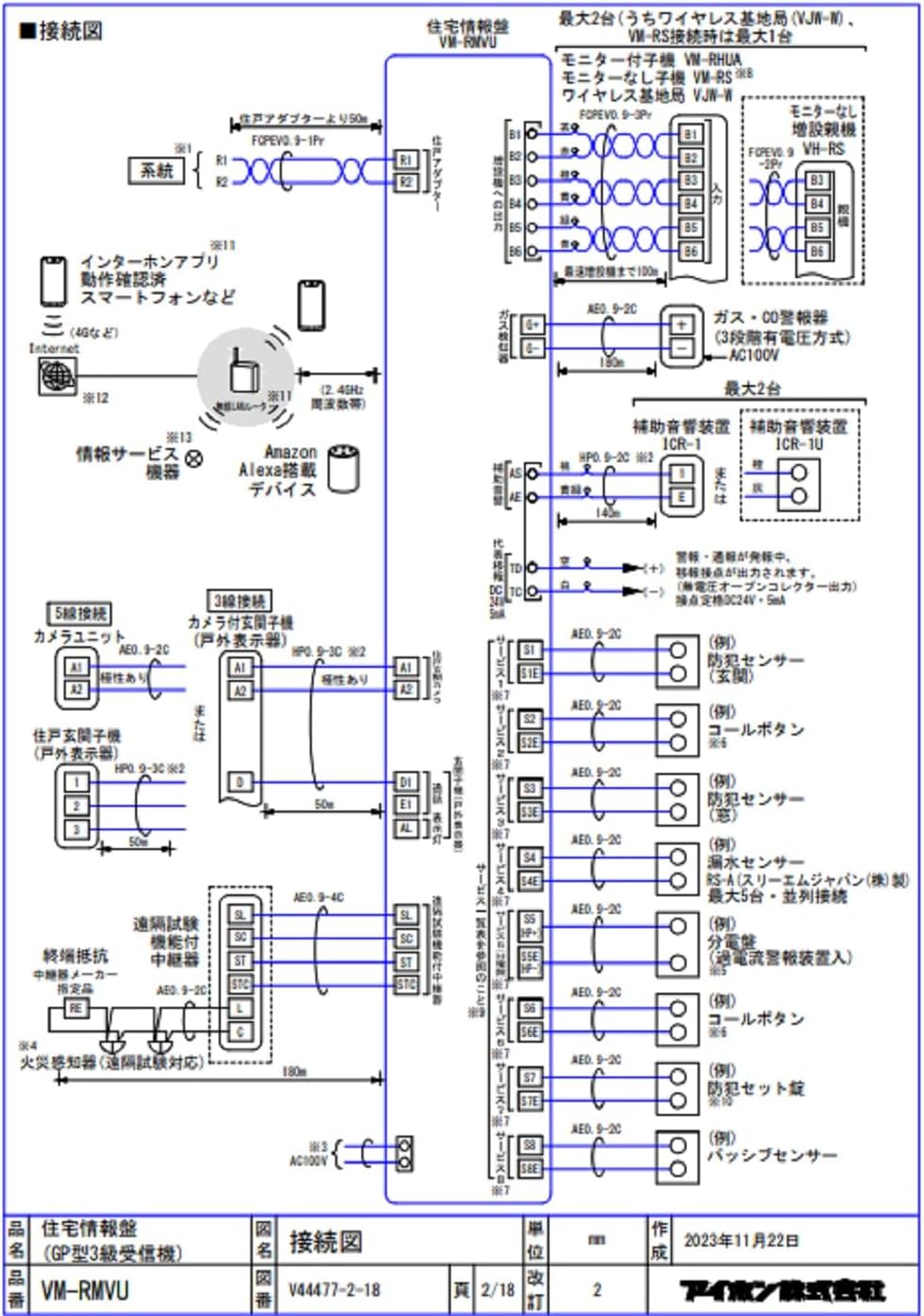
ຮູບພາບ 2: Comprehensive wiring diagram for the Aiphone VM-RMVU system. This diagram details connections for power, entrance units, monitor sub-units, wireless base stations, extension master units, gas/CO alarms, auxiliary alarm devices, call buttons, security set panels, and passive sensors. It also illustrates connections for internet apps, smartphones, and Amazon Alexa devices via wireless LAN.
ການສະຫນອງພະລັງງານ:
- Connect the unit to an AC100V, 50/60Hz power source.
- Ensure the power switch (located on the rear panel) is in the OFF position before connecting.
ການເຊື່ອມຕໍ່ເຄືອຂ່າຍ:
- The VM-RMVU supports wireless LAN (IEEE 802.11b/g/n) for connection to internet apps, smartphones, and Amazon Alexa devices.
- Refer to the separate wireless LAN setup guide for detailed configuration instructions.
3. ຄໍາແນະນໍາການດໍາເນີນງານ
The Aiphone VM-RMVU features a 7-inch TFT LCD touch panel and intuitive buttons for various functions.

ຮູບພາບ 3: Front panel of the Aiphone VM-RMVU showing the 7-inch LCD display and control buttons. Key buttons include EMERGENCY, POWER indicator, TALK, OFF, OPEN, and ALARM STOP. The model name 'AIPHONE VM-RMVU' is also visible below the screen.
3.1 ຫນ້າທີ່ພື້ນຖານ
- ເປີດ/ປິດ: Press the power switch on the rear panel to turn the unit on or off. The green POWER indicator will illuminate when on.
- ຮັບສາຍ: When an entrance unit calls, the display will show the caller. Press the ສົນທະນາ button to initiate a simultaneous call. The green TALK indicator will light up.
- ການສິ້ນສຸດການໂທ: ກົດ ປິດ button to end a call. The red OFF indicator will light up briefly.
- ປະຕູເປີດ: ໃນລະຫວ່າງການໂທ, ກົດປຸ່ມ ເປີດ button to unlock the connected door. The green OPEN indicator will light up.
3.2 Security and Alarm Functions
- ປຸ່ມສຸກເສີນ: ກົດ EMERGENCY button in case of an emergency to trigger an alarm.
- Alarm Stop: If an alarm sounds (e.g., fire, gas, security alert), press the ຢຸດໂມງປຸກ button to silence it. The red ALARM STOP indicator will light up when an alarm is active.
- Security Display: The security display unit provides visual indicators for Fire, Gas, and Security Alert statuses.
3.3 Touch Panel Operation
The 7-inch TFT LCD is a touch panel. Navigate through menus and settings by tapping on the screen icons and options. Refer to the on-screen guide for specific menu functions.
4. ບໍາລຸງຮັກສາ
Regular maintenance ensures the longevity and optimal performance of your Aiphone VM-RMVU unit.
- ທໍາຄວາມສະອາດ: Use a soft, dry cloth to clean the unit's surface and display. Do not use abrasive cleaners or solvents.
- ການກວດກາ: Periodically check all connections for security and ensure no cables are damaged.
- ອັບເດດຊອບແວ: ກວດເບິ່ງຜູ້ຜະລິດ website for any available firmware updates to ensure your unit has the latest features and security enhancements.
5. ການແກ້ໄຂບັນຫາ
If you encounter issues with your Aiphone VM-RMVU unit, refer to the following common troubleshooting steps:
- ບໍ່ມີພະລັງງານ: Ensure the power cable is securely connected and the power switch on the rear panel is ON. Check your circuit breaker.
- ບໍ່ມີວິດີໂອ/ສຽງ: Verify all wiring connections to entrance units and sub-units. Ensure network connectivity for wireless functions.
- Alarm Malfunction: Check the status indicators on the security display unit. If the issue persists, contact customer support.
- Touch Panel Unresponsive: Try restarting the unit by turning the power off and on. If the problem continues, contact support.
For more complex issues, please consult a qualified technician or Aiphone customer support.
6. ຂໍ້ມູນຈໍາເພາະ
| ຄຸນສົມບັດ | ຂໍ້ມູນຈໍາເພາະ |
|---|---|
| ຍີ່ຫໍ້ | ໄອໂຟນ |
| ໝາຍເລກຕົວແບບ | VM-RMVU |
| ພະລັງງານ Voltage | AC100V: 50/60Hz |
| ການບໍລິໂພກພະລັງງານ | Standby 6W: Max 17W |
| ວິທີການໂທຫາ | Simultaneous Call Method |
| ຈໍສະແດງຜົນ | 7-inch TFT LCD Display (Touch Panel) |
| ຈໍານວນຂອງ pixels | ປະມານ. 1.15 ລ້ານພິກເຊລ |
| LAN ໄຮ້ສາຍ | IEEE 802.11b/g/n (2.4GHz) |
| ຂະໜາດສິນຄ້າ (LxWxH) | 18 x 22 x 4.5 cm |
| ນ້ຳໜັກ | ປະມານ. 880g |
| ປະຕິບັດການອຸນຫະພູມສະພາບແວດລ້ອມ | ອຸນຫະພູມໃນລະຫວ່າງ 0-40 ອົງສາ |
| ອົງປະກອບລວມ | Main Unit |
7. ການຮັບປະກັນແລະການສະຫນັບສະຫນູນ
For warranty information, technical support, or service inquiries, please refer to the official Aiphone website or contact your local Aiphone distributor. Keep your purchase receipt as proof of purchase.
ໄອໂຟນຢ່າງເປັນທາງການ Webເວັບໄຊ: www.aiphone.com