
1. ບົດແນະນຳ
ຂອບໃຈສໍາລັບການຊື້asing the Kaiser MSA-2073M Professional One Body Speaker. This powerful and versatile audio system is designed to deliver clear, robust sound for various events, both indoors and outdoors. Featuring dual 8-inch woofers, 70W RMS power, Bluetooth connectivity, a wireless microphone, and dynamic Infinity Light effects, the MSA-2073M is built to enhance your audio experience. Please read this manual carefully to ensure proper setup, operation, and maintenance of your speaker.
2. ຄໍາແນະນໍາຄວາມປອດໄພ
- Do not expose the speaker to rain or moisture to prevent fire or electric shock.
- ຫ້າມເປີດລຳໂພງ ຄasing. ອ້າງອີງການບໍລິການທັງໝົດໃຫ້ກັບບຸກຄະລາກອນທີ່ມີຄຸນວຸດທິ.
- ເກັບຮັກສາລຳໂພງໃຫ້ຫ່າງຈາກແຫຼ່ງຄວາມຮ້ອນ ເຊັ່ນ: ເຄື່ອງເຮັດຄວາມຮ້ອນ, ເຄື່ອງບັນທຶກຄວາມຮ້ອນ, ເຕົາໄຟ ຫຼື ອຸປະກອນອື່ນໆທີ່ຜະລິດຄວາມຮ້ອນ.
- ໃຊ້ພຽງແຕ່ໄຟລ໌ແນບ/ອຸປະກອນເສີມທີ່ລະບຸໂດຍຜູ້ຜະລິດ.
- ຖອດປລັກລຳໂພງອອກໃນລະຫວ່າງມີພະຍຸຟ້າຜ່າ ຫຼື ເມື່ອບໍ່ໄດ້ໃຊ້ເປັນເວລາດົນ.
- ຮັບປະກັນການລະບາຍອາກາດທີ່ເຫມາະສົມ. ຫ້າມປິດຊ່ອງລະບາຍອາກາດໃດໆ.
- ຫ້າມວາງວັດຖຸໜັກຢູ່ເທິງລຳໂພງ.
- Avoid placing the speaker in unstable positions where it might fall.
3. ເນື້ອໃນຊຸດ
ກະລຸນາກວດເບິ່ງເນື້ອໃນຂອງຊຸດຂອງທ່ານ. ຖ້າລາຍການໃດຂາດຫາຍໄປ ຫຼືເສຍຫາຍ, ໃຫ້ຕິດຕໍ່ຮ້ານຂາຍຍ່ອຍຂອງເຈົ້າ.
- Kaiser MSA-2073M Professional One Body Speaker
- ໄມໂຄຣໂຟນໄຮ້ສາຍ
- ສາຍສາກ USB
- Audio Cable (3.5mm AUX)
- ຄູ່ມືຜູ້ໃຊ້
4. ຜະລິດຕະພັນເກີນview
Familiarize yourself with the different parts and controls of your Kaiser MSA-2073M speaker.

ຮູບ 4.1: ດ້ານຫນ້າ View. Shows the speaker's front panel with dual 8-inch woofers and the dynamic Infinity Light display.

ຮູບ 4.2: ດ້ານຫລັງ View. Displays the speaker's rear, including the integrated handle and transport wheels for easy mobility.
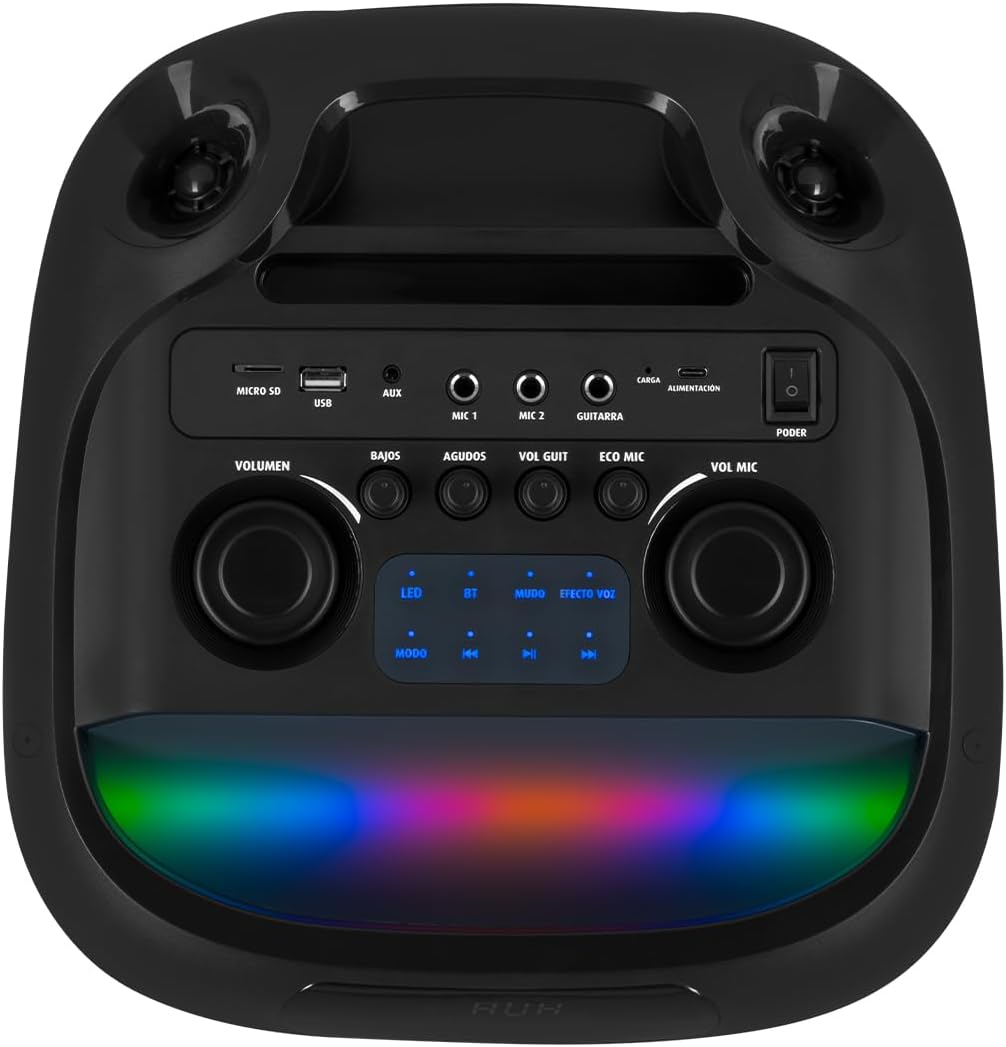
ຮູບທີ 4.3: ແຜງຄວບຄຸມ. Details the top-mounted control panel with inputs for USB, Micro SD, AUX, two microphones, and a guitar, along with volume, bass, treble, and effect controls.

Figure 4.4: Wireless Microphone. The included wireless microphone for vocal performances and announcements.
5. ຕັ້ງຄ່າ
5.1 ການຫຸ້ມຫໍ່
- ເອົາລຳໂພງ ແລະອຸປະກອນເສີມທັງໝົດອອກຈາກເຄື່ອງຫຸ້ມຫໍ່ຢ່າງລະມັດລະວັງ.
- ຮັກສາການຫຸ້ມຫໍ່ສໍາລັບການຂົນສົ່ງຫຼືການເກັບຮັກສາໃນອະນາຄົດ.
5.2 ການສາກໄຟເບື້ອງຕົ້ນ
Before first use, it is recommended to fully charge the speaker's internal battery.
- Connect the provided USB charging cable to the speaker's charging port (labeled 'CARGA' or 'ALIMENTACIÓN' on the control panel).
- ເຊື່ອມຕໍ່ອີກສົ້ນຂອງສາຍ USB ກັບອະແດັບເຕີໄຟ USB ທີ່ເຂົ້າກັນໄດ້ (ບໍ່ລວມ) ຫຼືພອດ USB ທີ່ໃຊ້ໄດ້.
- ໄຟສະແດງການສາກຈະສະຫວ່າງຂຶ້ນ. ລໍຖ້າສອງສາມຊົ່ວໂມງເພື່ອໃຫ້ສາກໄຟເຕັມ.
- ເມື່ອສາກໄຟເຕັມແລ້ວ, ໄຟສັນຍານອາດຈະປ່ຽນ ຫຼື ມອດລົງ. ໃຫ້ຖອດສາຍສາກອອກ.
5.3 ເປີດ/ປິດ
To power on the speaker, locate the 'PODER' (Power) switch on the control panel and slide it to the 'ON' position. To power off, slide it to 'OFF'.
6. ຄໍາແນະນໍາການດໍາເນີນງານ
6.1 ການເຊື່ອມຕໍ່ Bluetooth
Connect your mobile device wirelessly to the speaker.
- Turn on the speaker. The 'BT' indicator on the control panel should blink, indicating it's in pairing mode.
- ໃນອຸປະກອນມືຖືຂອງທ່ານ, ເປີດໃຊ້ Bluetooth ແລະຊອກຫາອຸປະກອນທີ່ມີຢູ່.
- Select "Kaiser MSA-2073M" from the list of devices.
- Once paired, the 'BT' indicator will stop blinking and remain solid. You can now play audio from your device through the speaker.
- ໄລຍະ Bluetooth ແມ່ນສູງເຖິງ 10 ແມັດ.
6.2 AUX Input
ເຊື່ອມຕໍ່ອຸປະກອນສຽງພາຍນອກໂດຍໃຊ້ສາຍ AUX 3.5 ມມ.
- Connect one end of the 3.5mm audio cable to the 'AUX' port on the speaker.
- ເຊື່ອມຕໍ່ສົ້ນອື່ນກັບຊ່ອງສຽບຫູຟັງ ຫຼືສຽງອອກຂອງອຸປະກອນພາຍນອກຂອງທ່ານ.
- Press the 'MODE' button on the speaker until 'AUX' mode is selected.
- ຫຼິ້ນສຽງຈາກອຸປະກອນພາຍນອກຂອງທ່ານ.
6.3 ການຫຼິ້ນ USB/Micro SD
Play music directly from a USB flash drive or Micro SD card.
- Insert a USB flash drive into the 'USB' port or a Micro SD card into the 'MICRO SD' slot.
- The speaker will automatically switch to USB/Micro SD mode and begin playing compatible audio fileຖ້າບໍ່, ໃຫ້ກົດປຸ່ມ 'ໂໝດ' ເພື່ອເລືອກອິນພຸດທີ່ຖືກຕ້ອງ.
- Use the playback controls (play/pause, next/previous track) on the speaker to manage your music.
6.4 ການນຳໃຊ້ໄມໂຄຣໂຟນ
Use the included wireless microphone for karaoke or announcements.
- ກວດໃຫ້ແນ່ໃຈວ່າໄມໂຄຣໂຟນໄຮ້ສາຍເປີດຢູ່.
- The microphone will automatically connect to the speaker.
- Adjust the microphone volume using the 'VOL MIC' knob on the control panel.
- Use the 'ECO MIC' knob to adjust the echo effect for the microphone.
- The speaker also features five voice effects for the microphone, accessible via the 'EFECTOS VOZ' button.
6.5 Guitar Input
Connect an electric guitar to the speaker.
- Connect your guitar to the 'GUITARRA' input jack on the control panel.
- Adjust the guitar volume using the 'VOL GUIT' knob.
6.6 ການປັບສຽງ
Customize your audio output.
- ກຳ ມະບານ: ປັບລະດັບສຽງຫຼັກໂດຍລວມຂອງລຳໂພງ.
- BAJOS (Bass): ປັບຜົນຜະລິດຄວາມຖີ່ຕ່ຳ.
- AGUDOS (Treble): ປັບຜົນຜະລິດຄວາມຖີ່ສູງ.
6.7 Infinity Light Effects
Enhance your listening experience with dynamic LED lighting.
- Press the 'LED' button on the control panel to cycle through different light modes or turn the lights off.
- The lights synchronize with the music for an immersive effect.
6.8 KSR-LINK (True Wireless Stereo)
Connect two MSA-2073M speakers for a true wireless stereo experience.
- ໃຫ້ແນ່ໃຈວ່າລຳໂພງທັງສອງຕົວເປີດຢູ່ ແລະ ຢູ່ໃນໂໝດ Bluetooth, ແຕ່ບໍ່ໄດ້ເຊື່ອມຕໍ່ກັບອຸປະກອນໃດໆ.
- On one speaker, press and hold the 'MUDO' (Mute) button (which also functions as the KSR-LINK pairing button). You will hear a confirmation tone.
- ລຳໂພງສອງຕົວຈະຈັບຄູ່ກັນໂດຍອັດຕະໂນມັດ.
- Once paired, connect your mobile device to one of the speakers via Bluetooth as described in section 6.1. Audio will now play in stereo through both speakers.
7. ການສາກໄຟ
The speaker features a rechargeable battery for portable use. A full charge allows for prolonged use.
- Connect the USB charging cable to the speaker's charging port and a power source.
- ຕົວຊີ້ວັດການສາກໄຟຈະສະແດງສະຖານະຂອງການສາກໄຟ.
- Avoid overcharging the battery. Disconnect the charger once the battery is full.
8. ບໍາລຸງຮັກສາ
8.1 ການທໍາຄວາມສະອາດ
- ເຊັດລໍາໂພງດ້ວຍຜ້າອ່ອນ, ແຫ້ງ.
- ຢ່າໃຊ້ເຄື່ອງເຮັດຄວາມສະອາດຂັດ, ຂີ້ເຜີ້ງ, ຫຼືສານລະລາຍ.
8.2 ການເກັບຮັກສາ
- ເກັບຮັກສາລຳໂພງໄວ້ໃນບ່ອນທີ່ເຢັນ, ແຫ້ງ, ຫ່າງຈາກແສງແດດໂດຍກົງ ແລະ ອຸນຫະພູມທີ່ຮ້າຍກາດ.
- ຖ້າເກັບຮັກສາໄວ້ເປັນເວລາດົນ, ໃຫ້ສາກແບັດເຕີຣີເປັນໄລຍະໆເພື່ອຮັກສາອາຍຸຂອງມັນ.
9. ການແກ້ໄຂບັນຫາ
| ບັນຫາ | ສາເຫດທີ່ເປັນໄປໄດ້ | ການແກ້ໄຂ |
|---|---|---|
| ບໍ່ມີພະລັງງານ | ແບັດເຕີຣີໝົດແລ້ວ; ສະວິດໄຟປິດຢູ່. | Charge the speaker; Turn the power switch to 'ON'. |
| ບໍ່ມີສຽງ | ລະດັບສຽງຕໍ່າເກີນໄປ; ເລືອກໂໝດການປ້ອນຂໍ້ມູນບໍ່ຖືກຕ້ອງ; ອຸປະກອນບໍ່ໄດ້ເຊື່ອມຕໍ່ຢ່າງຖືກຕ້ອງ. | Increase volume; Press 'MODE' to select correct input; Reconnect device/Bluetooth. |
| Bluetooth ບໍ່ເຊື່ອມຕໍ່ | Speaker not in pairing mode; Device too far; Already connected to another device. | Ensure 'BT' indicator is blinking; Move device closer; Disconnect from other devices and try again. |
| ໄມໂຄຣໂຟນບໍ່ເຮັດວຽກ | Microphone is off; Microphone volume is low; Microphone battery is low. | Turn on microphone; Increase 'VOL MIC' knob; Charge/replace microphone battery. |
10. ຂໍ້ມູນຈໍາເພາະ
| ຄຸນສົມບັດ | ຂໍ້ມູນຈໍາເພາະ |
|---|---|
| ຍີ່ຫໍ້ | ໄກເຊີ |
| ຕົວແບບ | MSA-2073M |
| ຂະຫນາດລໍາໂພງ | 2 x 8 ນິ້ວ |
| RMS ພະລັງງານອອກ | 70 ວັດ |
| PMPO Power Output | 28000 ວັດ |
| ເຕັກໂນໂລຊີການເຊື່ອມຕໍ່ | ໄຮ້ສາຍ (Bluetooth) |
| ຊ່ວງ Bluetooth | ເຖິງ 10 ແມັດ |
| ຮູບແບບການອອກສຽງ | ສະເຕຣິໂອ |
| impedance | 3 ໂອມ |
| ການຕອບສະໜອງຄວາມຖີ່ | 60 Hz |
| ວິທີການຄວບຄຸມ | Push Button, Rotary Knobs |
| ແຫຼ່ງພະລັງງານ | ແບັດເຕີຣີ |
| ຂະໜາດ (DxWxH) | 37.4 x 36.2 x 80 cm |
| ນ້ໍາຫນັກລາຍການ | 10.8 ກິໂລກຣາມ |
| ລວມອຸປະກອນເສີມ | ໄມໂຄຣໂຟນໄຮ້ສາຍ |
11. ວິດີໂອຜະລິດຕະພັນຫຼາຍກວ່າview
Video 11.1: Product Features and Unboxing. ວິດີໂອນີ້ໃຫ້ເບິ່ງໂດຍຫຍໍ້view of the Kaiser MSA-2073M speaker, showcasing its unboxing, key features like 70W RMS power, 10m Bluetooth range, included cables, and detailed views of the control panel with independent volume, bass, treble, microphone, guitar, and echo controls. It also highlights the five voice effects for the microphone, 3 Ohm impedance, and convenient transport wheels. The video also mentions the KSR-LINK technology for connecting two speakers.
12. ການຮັບປະກັນແລະການສະຫນັບສະຫນູນ
Your Kaiser MSA-2073M speaker comes with a ຮັບປະກັນຈາກໂຮງງານ 90 ວັນ. ກະລຸນາຮັກສາຫຼັກຖານການຊື້ຂອງທ່ານສໍາລັບການຮຽກຮ້ອງການຮັບປະກັນ.
For technical support, troubleshooting assistance, or warranty inquiries, please contact Kaiser customer service through their official website or the retailer where you purchased the product. Do not attempt to repair the device yourself, as this may void your warranty.