
1. ບົດແນະນຳ
The JLab JBuds Mini Tones are true wireless Bluetooth earbuds designed for compact size and robust performance. These earbuds offer a range of features to enhance your audio experience, whether for music, podcasts, or calls.
ຄຸນນະສົມບັດທີ່ສໍາຄັນປະກອບມີ:
- ການອອກແບບກະທັດຮັດ: Significantly smaller earbuds and charging case for enhanced portability.
- ຂະຫຍາຍເວລາຫຼິ້ນ: Up to 5.5 hours per earbud, with a total of 20 hours using the charging case.
- Bluetooth Multipoint: Seamlessly connect and switch between two devices simultaneously.
- ການຈັດອັນດັບ IP55: Sweat and dustproof for durability during active use.
- JLab App Customization: Personalize sound settings, touch controls, and Be Aware Audio.
- Be Aware Audio: Allows ambient noise to be heard for situational awareness.
- Crystal Clear ໂທ: MEMS microphones in each earbud reduce background noise for clear communication.

Figure 1.1: JLab JBuds Mini Tones Earbuds and Charging Case.
2. ສິ່ງທີ່ຢູ່ໃນກ່ອງ
Your JLab JBuds Mini Tones package includes the following items:
- JBuds Mini Earbuds
- ກໍລະນີສາກໄຟໄຮ້ສາຍ
- 3 Sets of Silicone Gel Tips (various sizes)
- ຄູ່ມືຜູ້ໃຊ້ (ເອກະສານນີ້)
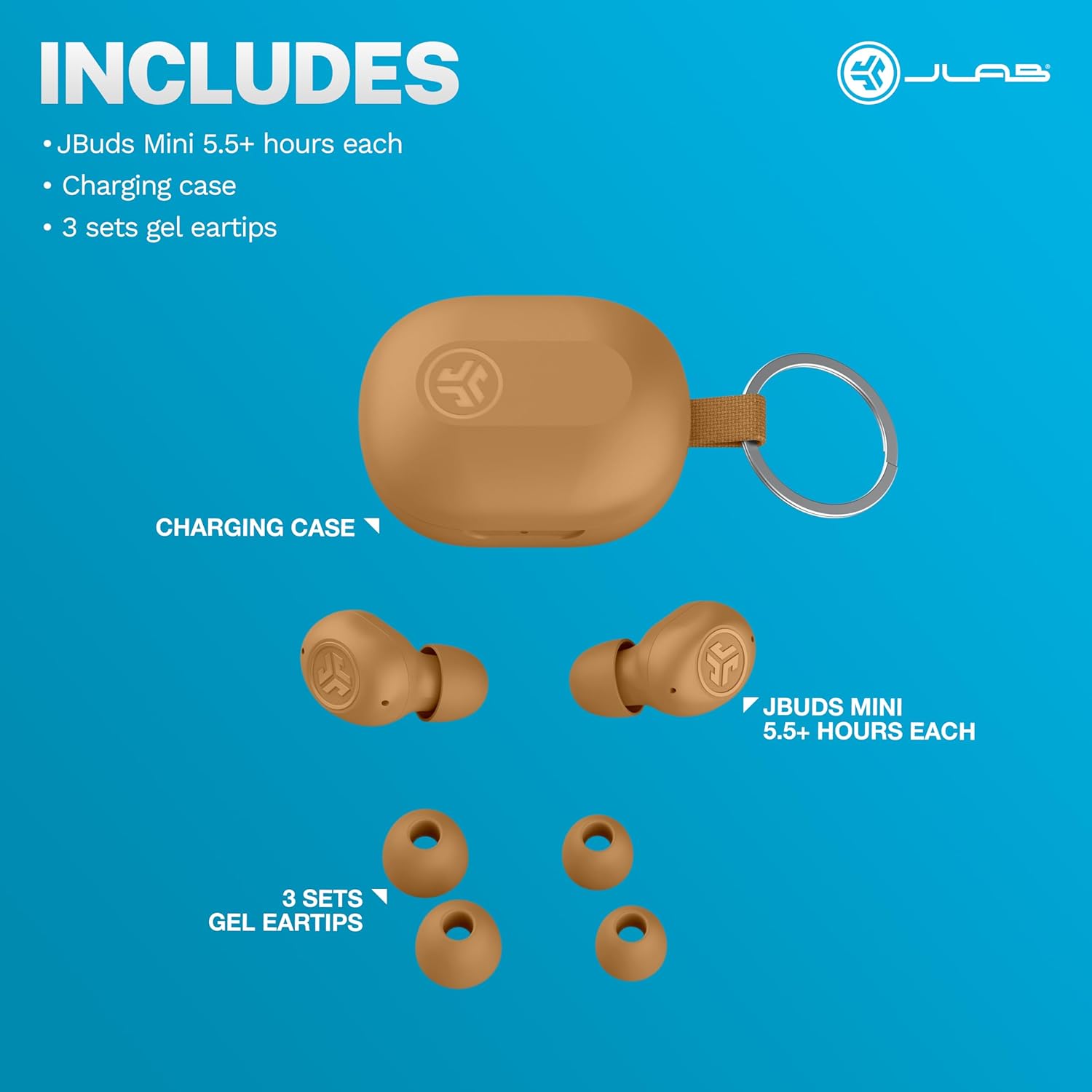
Figure 2.1: Included components: JBuds Mini earbuds, charging case, and three sets of silicone gel tips.
3. ຕັ້ງຄ່າ
3.1 ການສາກຫູຟັງ ແລະ ເຄສ
Before first use, fully charge your JBuds Mini. The charging case provides additional power for on-the-go use.
- ວາງຫູຟັງໃສ່ຊ່ອງສາກໄຟ.
- Connect the charging case to a USB-C power source using the provided cable.
- The earbuds offer approximately 5.5 hours of playtime, with the charging case extending total playtime to 20 hours.
3.2 ການຈັບຄູ່ເບື້ອງຕົ້ນ
ເພື່ອຈັບຄູ່ JBuds Mini ຂອງທ່ານກັບອຸປະກອນ:
- ເອົາຫູຟັງຫູຟັງທັງສອງອອກຈາກກ່ອງສາກ. ພວກເຂົາຈະເຂົ້າສູ່ໂໝດຈັບຄູ່ໂດຍອັດຕະໂນມັດ.
- On your device (smartphone, laptop, etc.), open Bluetooth settings.
- Select "JBuds Mini" from the list of available devices.
- ເມື່ອເຊື່ອມຕໍ່ແລ້ວ, ທ່ານຈະໄດ້ຍິນສຽງເຕືອນຢືນຢັນການຈັບຄູ່ສຳເລັດແລ້ວ.
3.3 ການເຊື່ອມຕໍ່ Bluetooth Multipoint
The JBuds Mini support Bluetooth Multipoint, allowing simultaneous connection to two devices.
- Pair with your first device as described in section 3.2.
- ປິດ Bluetooth ໃນອຸປະກອນທຳອິດ. ຫູຟັງເອຍບັດຈະເຂົ້າສູ່ໂໝດຈັບຄູ່ອີກຄັ້ງ.
- Pair with your second device.
- Re-enable Bluetooth on the first device. The earbuds will now be connected to both devices.
- Audio will automatically switch between devices based on active playback.
3.4 ຄວາມເໝາະສົມທີ່ດີທີ່ສຸດ
Selecting the correct ear tip size is crucial for comfort and sound quality. Experiment with the three included silicone gel tip sizes to find the best fit for your ears.

Figure 3.1: The compact design of the JBuds Mini ensures a discreet and comfortable fit.
Video 3.1: A user demonstrates the unboxing and size comparison of JBuds Mini with other earbuds, highlighting their compact nature.
4. ຄໍາແນະນໍາການດໍາເນີນງານ
4.1 ແຕະການຄວບຄຸມ
The JBuds Mini feature intuitive touch controls on each earbud for managing playback, calls, and sound modes. Specific functions can be customized via the JLab App.
4.2 JLab App Customization
Download the JLab App to unlock the full potential of your JBuds Mini. The app allows you to:
- Adjust Be Aware Audio levels.
- ປັບແຕ່ງການຄວບຄຸມການສໍາພັດ.
- Select from preset EQ sound settings (JLab Signature, Balance, Bass Boost) or create custom profiles.
- ເປີດໃຊ້ຕົວເລືອກການຟັງທີ່ປອດໄພດ້ວຍການຈຳກັດລະດັບສຽງ.
- ໄດ້ຮັບການອັບເດດຊອບແວສໍາລັບຫູຟັງຂອງທ່ານ.

Figure 4.1: Customize your sound and controls using the JLab App.
4.3 Be Aware Audio
Activate Be Aware Audio to allow ambient sounds to pass through, keeping you connected to your surroundings. This feature is ideal for outdoor activities or when you need to hear conversations while listening to audio.

Figure 4.2: Be Aware Audio allows you to hear your surroundings for safe listening.
4.4 ການໂທທີ່ຈະແຈ້ງ
Each JBuds Mini earbud is equipped with a MEMS microphone designed to minimize background noise, ensuring your voice is transmitted clearly during calls. You can use either earbud independently for calls or both together.
5. ບໍາລຸງຮັກສາ
5.1 ການທໍາຄວາມສະອາດ
Regularly clean your earbuds and charging case to maintain optimal performance and hygiene. Use a soft, dry cloth to wipe down the surfaces. For ear tips, remove them and clean with mild soap and water, ensuring they are completely dry before reattaching.
5.2 ກັນນໍ້າ ແລະຝຸ່ນ (IP55)
The JBuds Mini are rated IP55, meaning they are protected against dust ingress and low-pressure water jets from any direction. This makes them suitable for workouts and light rain. However, they are not designed for submersion in water.

Figure 5.1: The IP55 rating ensures durability against sweat and dust.
6. ການແກ້ໄຂບັນຫາ
If you encounter issues with your JBuds Mini, refer to the following common solutions:
6.1 Connectivity Issues (Sound Breaking Up)
If the audio connection is unstable or breaks up, ensure your earbuds are within close proximity to your connected device. Obstacles between the earbuds and the device can interfere with the Bluetooth signal. Try moving closer to your device or removing any potential obstructions.
6.2 Accidental Control Activation
If touch controls are accidentally triggered, particularly when lying down or adjusting the earbuds, ensure they are seated correctly in your ear. The JLab App allows for customization of touch controls, which may help mitigate unintended activations.
Video 6.1: A user highlights the comfort of JBuds Mini for side sleepers, indicating minimal pressure on the ear.
Video 6.2: A user demonstrates the comfortable fit of the JBuds Mini, suitable for various activities including lying down.
6.3 ຄໍາເຕືອນຫມໍ້ໄຟຕ່ໍາ
The earbuds provide subtle audio warnings when the battery is low, allowing ample time to place them back in the charging case before they power off.
7. ຂໍ້ມູນຈໍາເພາະ
| ຄຸນສົມບັດ | ຂໍ້ມູນຈໍາເພາະ |
|---|---|
| ຊື່ຕົວແບບ | JBuds Mini |
| ເຕັກໂນໂລຊີການເຊື່ອມຕໍ່ | ໄຮ້ສາຍ (Bluetooth) |
| ລຸ້ນ Bluetooth | 4.0 |
| ລະດັບຄວາມຕ້ານທານນ້ໍາ | IP55 (ກັນເຫື່ອ ແລະ ຝຸ່ນ) |
| ອາຍຸແບັດເຕີຣີ (ຫູຟັງ) | 5.5 ຊົ່ວໂມງ |
| ເວລາຫຼິ້ນທັງໝົດ (ພ້ອມກໍລະນີ) | 20 ຊົ່ວໂມງ |
| ເວລາສາກໄຟ | 5.5 Hours (for case, likely refers to total charge time for case + earbuds) |
| ປະເພດການຄວບຄຸມ | ສຳຜັດ, ການຄວບຄຸມລະດັບສຽງ |
| ຄຸນນະສົມບັດການຄວບຄຸມສິ່ງລົບກວນ | Be Aware Audio, Sound Isolation |
| ອຸປະກອນທີ່ເຂົ້າກັນໄດ້ | Mobile Phones, Laptops, Computers |
| ນ້ໍາຫນັກລາຍການ | 0.04 ກິໂລກຣາມ (1.44 ອອນສ໌) |
| ວັດສະດຸ | ພາດສະຕິກ |
| UPC | 810119073532 |
8. ການຮັບປະກັນແລະການສະ ໜັບ ສະ ໜູນ
8.1 ຂໍ້ມູນການຮັບປະກັນ
Your JLab JBuds Mini Tones True Wireless Bluetooth Earbuds come with a JLab Two Year Warranty. Please refer to the official JLab webເວັບໄຊທ໌ຫຼືເອກະສານການຊື້ຂອງທ່ານສໍາລັບເງື່ອນໄຂການຮັບປະກັນຢ່າງເຕັມທີ່.
8.2 ສະຫນັບສະຫນູນລູກຄ້າ
For further assistance, technical support, or warranty claims, please visit the official JLab support page or contact their customer service directly.
ຢ້ຽມຢາມ JLab Store ໃນ Amazon ສໍາລັບຂໍ້ມູນເພີ່ມເຕີມ.