
1. ບົດແນະນຳ
The HITBOX MIG200III is a versatile multi-process welding machine designed for both beginners and professionals. It supports Gas MIG, Flux MIG, Stick (MMA), Lift TIG, and Spot Welding. This welder is suitable for various materials including carbon steel, iron, galvanized steel, stainless steel, and aluminum, providing precision and efficiency for DIY projects, agricultural repairs, and professional tasks.
Key features include an easy-to-read LED display for essential welding data, compatibility with a spool gun for aluminum welding, and 2T/4T/Spot Welding modes for precise control.
2. ຂໍ້ມູນຄວາມປອດໄພ
ຄຳເຕືອນ: Welding can be dangerous. Always follow safety precautions to prevent injury or damage.
- ໃສ່ອຸປະກອນປ້ອງກັນສ່ວນຕົວ (PPE) ທີ່ເໝາະສົມ, ລວມທັງໝວກກັນກະທົບ, ຖົງມື ແລະ ເຄື່ອງນຸ່ງປ້ອງກັນ.
- ຮັບປະກັນໃຫ້ມີລະບາຍອາກາດພຽງພໍໃນພື້ນທີ່ເຮັດວຽກເພື່ອຫຼີກເວັ້ນການສູດດົມຄວັນ.
- ຮັກສາວັດຖຸທີ່ຕິດໄຟໄດ້ຢູ່ຫ່າງຈາກພື້ນທີ່ເຊື່ອມ.
- ຢ່າແຕະຕ້ອງພາກສ່ວນໄຟຟ້າທີ່ມີຊີວິດ.
- ຖອດສາຍໄຟອອກສະເໝີກ່ອນປະຕິບັດການບຳລຸງຮັກສາ ຫຼື ປ່ຽນອຸປະກອນເສີມ.
- The HITBOX MIG200III is equipped with safety protections such as VRD (Voltage Reduction Device), overcurrent, overvoltage, overload, and overheating protection.

ຮູບທີ 1: Internal components and safety features of the HITBOX MIG200III welder. This image illustrates the machine's robust design, incorporating protections against overcurrent, overvoltage, overheating, overload, and a Voltage Reduction Device (VRD) for enhanced user safety.
3. ເນື້ອໃນຊຸດ
ກວດສອບວ່າລາຍການທັງຫມົດທີ່ລະບຸໄວ້ຂ້າງລຸ່ມນີ້ແມ່ນລວມຢູ່ໃນຊຸດຂອງທ່ານ:
- Cl ດິນamp 1.5 ມ
- Electrode Holder 1.5 m
- MIG 15AK Torch 3.0 m
- Graphene Tube 3.5 m
- Gas Hose 2.0 m
- Flux Wire 0.8 mm 1 kg
- Contact Tips (0.8 mm * 2; 1.0 mm * 2)
- Rollers * 3 (V: 0.6 mm / 0.8 mm & 0.9 mm / 1.0 mm; U: 1.0 mm / 1.2 mm, Note: Max. 1.0 mm supported)
- ປະແຈ
- ໄມ້ຄ້ອນ
- ທໍ່ Clamps*2
- ຄູ່ມືຜູ້ໃຊ້
4. ຂໍ້ມູນຈໍາເພາະ
| ຄຸນສົມບັດ | ລາຍລະອຽດ |
|---|---|
| ຜູ້ຜະລິດ | HITBOX |
| ໝາຍເລກຕົວແບບ | MIG200III (H1032035) |
| ຂະໜາດສິນຄ້າ (L x W x H) | 40 x 20 x 35 cm |
| ນ້ຳໜັກເຄື່ອງ | 8.52 ກິໂລ |
| ປະເພດພະລັງງານ | AC |
| ຂະບວນການເຊື່ອມ | Flux MIG, Gas MIG, MMA (Stick), Lift TIG, Spot Welding |
| Gasless Welding Wire Sizes | 0.8 ມມ / 0.9 ມມ / 1.0 ມມ |
| Gas Welding Wire Sizes (Carbon Steel with CO2) | 0.6 mm / 0.8 mm / 0.9 mm / 1.0 mm |
| Gas Welding Wire Sizes (Aluminum with Argon) | 1.0 ມມ |
| TIG Electrode Sizes | 1.6 ມມ ຫາ 3.2 ມມ |
| Welding Thickness (TIG) | 1 ມມ ຫາ 4 ມມ |
| Welding Thickness (MIG) | 1 ມມ ຫາ 4 ມມ |
| Welding Thickness (MMA) | 2 ມມ ຫາ 10 ມມ |
| ການປັບຄວາມໄວຂອງສາຍອາຫານ | 0 ຫາ 10 |
| Inductance Adjustment | -10 ເຖິງ +10 |
| Pre/Post Gas Flow Adjustment | 0 ຫາ 2 ວິນາທີ |
5. ຕັ້ງຄ່າ
5.1 ການເຊື່ອມຕໍ່ພະລັງງານ
Connect the welder to a suitable 230V AC power supply. Ensure the power source meets the machine's requirements.
5.2 Wire Spool Installation and Feeding
Open the wire spool compartment. Place the welding wire spool onto the spindle, ensuring it rotates freely. Thread the wire through the guide tube and into the drive rollers. Adjust the tension of the drive rollers to prevent slipping or crushing the wire.
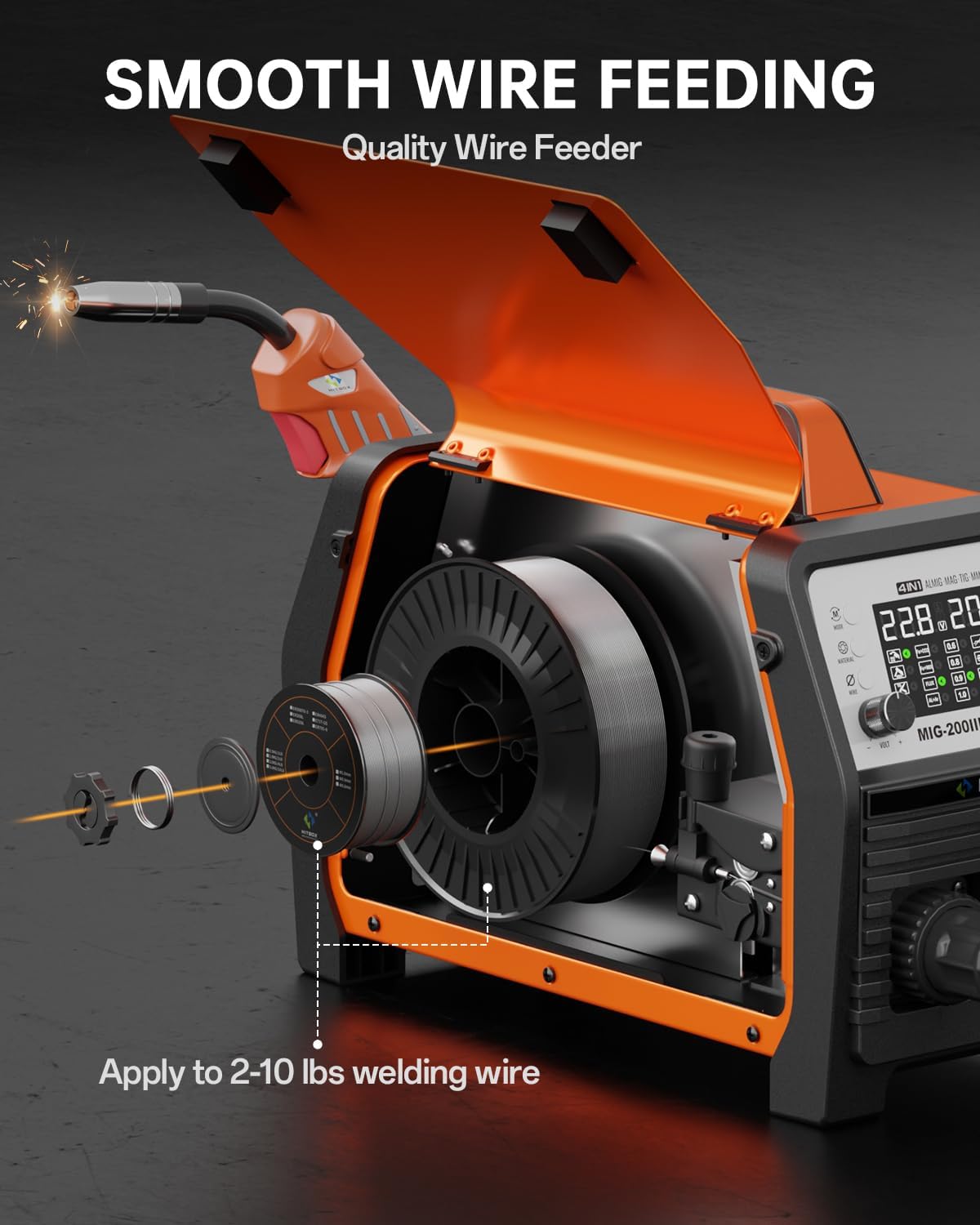
ຮູບທີ 2: Wire spool installation and feeding mechanism. This illustration shows how to correctly install the welding wire spool and thread it through the machine's smooth wire feeding system, compatible with 2-10 lbs spools.
5.3 Gas Connection (for Gas MIG/TIG)
For Gas MIG or TIG welding, connect the gas hose (included) from your gas cylinder regulator to the gas inlet on the back of the welder. Ensure all connections are secure and leak-free.
5.4 ໄຟ ແລະ ດິນ Clamp ການເຊື່ອມຕໍ່
- MIG/TIG without Gas (Flux Core MIG): ເຊື່ອມຕໍ່ດິນ clamp ໄປທີ່ຈຸດບວກ (+).
- MIG/MMA with Gas: ເຊື່ອມຕໍ່ດິນ clamp ກັບຈຸດລົບ (-) terminal.
- Connect the MIG torch or TIG torch (sold separately for TIG) to the appropriate connectors on the front panel.
6. ຄໍາແນະນໍາການດໍາເນີນງານ
The HITBOX MIG200III offers multiple welding modes and synergic control for ease of use.

ຮູບທີ 3: ເກີນview of welding processes. This image highlights the 7-in-1 multi-process capabilities of the welder, including Gas MIG, Flux MIG, Spool Gun compatibility, Lift TIG, Spot Welding, Single Pulse MIG, and MMA.
6.1 Synergic Control and Mode Selection
The synergic control feature simplifies parameter setting.
- Select SYN mode: Activate synergic mode on the control panel.
- ເລືອກວັດສະດຸ: Choose the material type (e.g., Fe+CO2 for carbon steel with CO2 gas, AL+Ar for aluminum with Argon gas).
- Select Wire Size: Specify the diameter of your welding wire.
The machine will automatically suggest recommended current and wire feed speed settings. You can fine-tune these settings as needed.

ຮູບທີ 4: Synergic control panel. The LED display provides clear visual feedback for selecting welding modes, materials, and wire sizes, making setup straightforward for all skill levels.
6.2 Welding Modes and Adjustments
- 2T/4T/Spot Welding: Select between 2T (trigger held for weld), 4T (trigger press to start, press again to stop), or Spot Welding mode for precise control. Spot welding time is adjustable.
- Wire Feed ຄວາມໄວ: Adjust the wire feed speed from 0 to 10 for optimal welding control.
- inductance: Adjust inductance from -10 to +10 to control arc stability.
- Pre/Post Gas Flow: Customize pre-flow and post-flow gas times from 0 to 2 seconds for optimal weld protection.
6.3 Aluminum Welding
The MIG200III supports aluminum welding with argon gas using a 1.0 mm wire. For enhanced performance, a spool gun (sold separately) is recommended.

ຮູບທີ 5: Aluminum welding methods. This image demonstrates the use of both the standard MIG gun and an optional spool gun for effective aluminum welding.
7. ບໍາລຸງຮັກສາ
ການບໍາລຸງຮັກສາເປັນປົກກະຕິຮັບປະກັນອາຍຸຍືນແລະການປະຕິບັດທີ່ດີທີ່ສຸດຂອງເຄື່ອງເຊື່ອມຂອງທ່ານ.
- ທໍາຄວາມສະອາດ: ທຳຄວາມສະອາດພາຍນອກ ແລະ ຊ່ອງລະບາຍອາກາດຂອງເຄື່ອງເປັນໄລຍະເພື່ອປ້ອງກັນຝຸ່ນ ແລະ ສິ່ງເສດເຫຼືອທີ່ສະສົມ. ໃຊ້ລົມອັດເພື່ອກຳຈັດອົງປະກອບພາຍໃນຖ້າຈຳເປັນ, ໂດຍຮັບປະກັນວ່າເຄື່ອງໄດ້ຖືກຖອດປລັກອອກແລ້ວ.
- ໄຟສາຍ ແລະ ອຸປະກອນບໍລິໂພກ: Inspect the MIG torch, contact tips, nozzles, and electrode holder regularly. Replace worn or damaged consumables to maintain weld quality.
- Wire Feeder: Keep the wire feeder rollers clean and free of debris. Check for proper wire tension.
- ສາຍ ແລະ ການເຊື່ອມຕໍ່: Inspect all cables for damage and ensure connections are tight and secure.
- ການເກັບຮັກສາ: ເກັບຮັກສາເຄື່ອງເຊື່ອມໃນສະພາບແວດລ້ອມທີ່ແຫ້ງ, ສະອາດເມື່ອບໍ່ໄດ້ໃຊ້.
8. ການແກ້ໄຂບັນຫາ
ພາກນີ້ສະຫນອງການແກ້ໄຂບັນຫາທົ່ວໄປທີ່ທ່ານອາດຈະພົບ.
| ບັນຫາ | ສາເຫດທີ່ເປັນໄປໄດ້ | ການແກ້ໄຂ |
|---|---|---|
| ບໍ່ມີພະລັງງານ | ສາຍໄຟຖືກຕັດການເຊື່ອມຕໍ່, ເບກເກີຕັດ, ເຄື່ອງປິດ | ກວດເບິ່ງການເຊື່ອມຕໍ່ໄຟຟ້າ, ຣີເຊັດເບກເກີ, ເປີດສະວິດເຄື່ອງ |
| Poor arc start/unstable arc | Improper ground connection, incorrect settings, dirty workpiece, worn contact tip | Ensure good ground, adjust voltage/wire speed, clean workpiece, replace contact tip |
| ບັນຫາການໃຫ້ອາຫານສາຍ | Incorrect roller tension, clogged liner, wrong wire size, tangled wire spool | Adjust roller tension, clean/replace liner, verify wire size, untangle spool |
| ເປີດໃຊ້ການປ້ອງກັນຄວາມຮ້ອນເກີນແລ້ວ | ເກີນວົງຈອນການເຮັດວຽກ, ລະບາຍອາກາດອຸດຕັນ | Allow machine to cool down, ensure clear ventilation paths |
ຖ້າທ່ານພົບບັນຫາທີ່ບໍ່ໄດ້ກວມເອົາທີ່ນີ້, ກະລຸນາຕິດຕໍ່ຝ່າຍຊ່ວຍເຫຼືອລູກຄ້າ.
9. ການຮັບປະກັນແລະການສະຫນັບສະຫນູນ
Each HITBOX MIG welding machine undergoes rigorous testing before leaving the factory to ensure it meets high industrial standards.
For specific warranty details and terms, please refer to the warranty card included with your product or contact HITBOX customer support directly.
ການຊ່ວຍເຫຼືອລູກຄ້າ: For technical assistance, troubleshooting, or parts inquiries, please visit the official HITBOX webເວັບໄຊ ຫຼືຕິດຕໍ່ພະແນກບໍລິການລູກຄ້າຂອງເຂົາເຈົ້າ.