
1. ບົດແນະນຳ
ຂອບໃຈສໍາລັບການຊື້asing the XO F41 Mirror Bluetooth Speaker. This device combines a digital clock display with a portable Bluetooth speaker, offering multiple playback options including Bluetooth, TF card, and FM radio. Please read this manual carefully before use to ensure proper operation and to maximize your experience with the product.

Image 1.1: The XO F41 Mirror Bluetooth Speaker in use, showing its digital clock display.
2. ຄຸນລັກສະນະຂອງຜະລິດຕະພັນ
- ການເຊື່ອມຕໍ່ Bluetooth 5.3: ສຳລັບການຖ່າຍທອດສຽງແບບໄຮ້ສາຍທີ່ໝັ້ນຄົງ ແລະ ມີປະສິດທິພາບ.
- Mirror Display: Clear digital time display with adjustable brightness.
- ໂໝດການຫຼິ້ນຫຼາຍຮູບແບບ: Supports Bluetooth, TF card, and FM radio.
- ໄມໂຄຣໂຟນປະສົມປະສານ: ສໍາລັບການໂທຫາແບບແຮນຟຣີ.
- ເວລາຫຼິ້ນດົນ: Up to 8 hours at 50% volume, 5 hours at 100% volume.
- ການອອກແບບກະທັດລັດແລະ Portable: Easy to carry and place anywhere.
- ການສາກ USB-C: ພອດສາກໄຟທີ່ທັນສະໄໝ ແລະ ສະດວກສະບາຍ.
3. ເນື້ອໃນຊຸດ
ກະລຸນາກວດເບິ່ງຊຸດສຳລັບລາຍການຕໍ່ໄປນີ້:
- XO F41 Mirror Bluetooth Speaker
- ສາຍສາກ USB-C
- ຄູ່ມືຜູ້ໃຊ້

Image 3.1: The XO F41 Mirror Bluetooth Speaker packaging.
4. ການຈັດວາງອຸປະກອນ ແລະການຄວບຄຸມ
ຄຸ້ນເຄີຍກັບປຸ່ມ ແລະ ພອດຂອງລຳໂພງ:
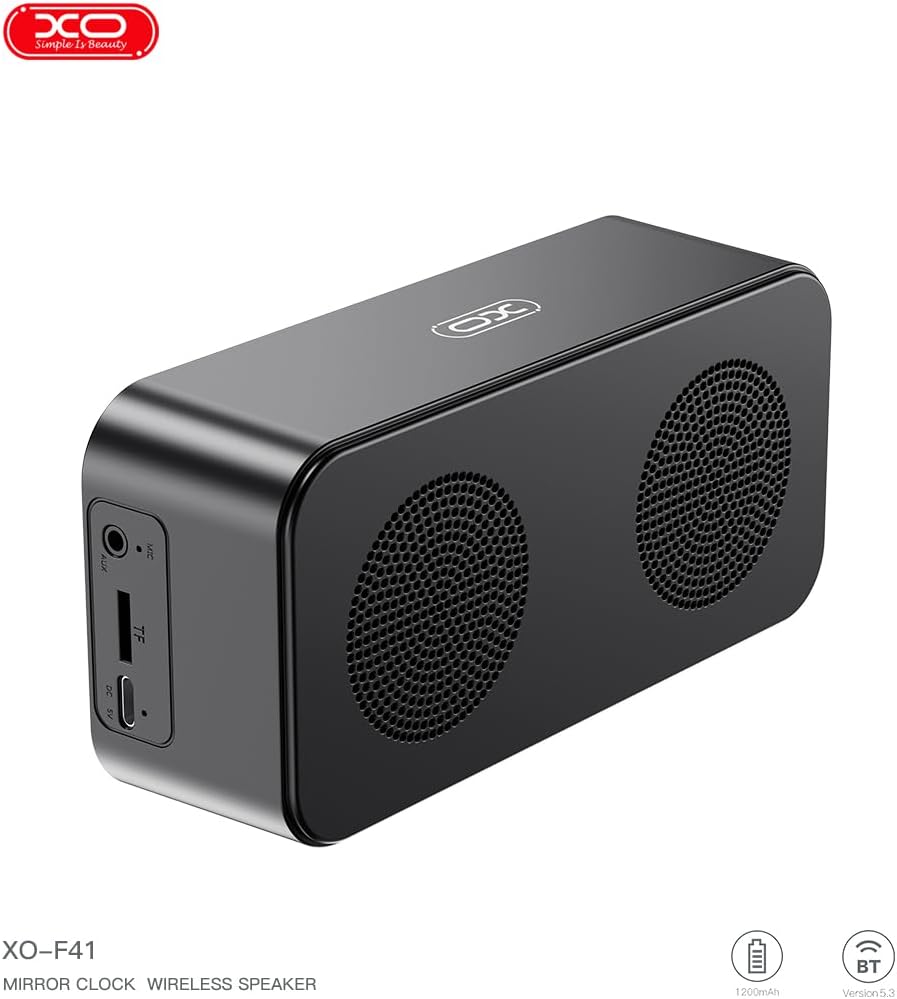
ຮູບພາບ 4.1: ຂ້າງ view of the XO F41 with ports labeled.
- ປຸ່ມເປີດປິດ: Press and hold to power on/off. Short press to switch modes.
- ປຸ່ມຫຼິ້ນ/ຢຸດຊົ່ວຄາວ: Play or pause audio. Answer/end calls.
- ເພີ່ມລະດັບສຽງຂຶ້ນ/ເພງຕໍ່ໄປ: ກົດສັ້ນເພື່ອປະລິມານຂຶ້ນ, ກົດຄ້າງໄວ້ສຳລັບເພງຕໍ່ໄປ.
- ຫຼຸດສຽງລົງ/ເພງກ່ອນ ໜ້າ: ກົດສັ້ນເພື່ອປະລິມານລົງ, ກົດຄ້າງໄວ້ສຳລັບເພງກ່ອນໜ້າ.
- ຜອດ USB-C: ສໍາລັບການສາກໄຟອຸປະກອນ.
- ສະລັອດຕິງບັດ TF: Insert a TF (MicroSD) card for local music playback.
- ພອດ AUX: ສຳລັບອິນພຸດສຽງແບບມີສາຍ.
5. ຕັ້ງຄ່າ
5.1 ກຳລັງສາກລຳໂພງ
- Connect the provided USB-C cable to the charging port on the speaker.
- ເຊື່ອມຕໍ່ອີກສົ້ນຂອງສາຍກັບອະແດັບເຕີໄຟ USB (ບໍ່ລວມ) ຫຼືພອດ USB ຂອງຄອມພິວເຕີ.
- The charging indicator will illuminate. It takes approximately 3 hours for a full charge.
- The indicator will turn off or change color once fully charged.
5.2 ເປີດ/ປິດ
- ເພື່ອເປີດເຄື່ອງ: ກົດປຸ່ມເປີດປິດຄ້າງໄວ້ປະມານ 3 ວິນາທີ. ທ່ານຈະໄດ້ຍິນສຽງແຈ້ງເຕືອນ.
- ປິດເຄື່ອງ: ກົດປຸ່ມເປີດປິດຄ້າງໄວ້ປະມານ 3 ວິນາທີ. ທ່ານຈະໄດ້ຍິນສຽງແຈ້ງເຕືອນ.
6. ຄໍາແນະນໍາການດໍາເນີນງານ
6.1 ການຈັບຄູ່ Bluetooth
- Ensure the speaker is powered on and in Bluetooth mode. If not, short press the Power button to cycle through modes until "BT" or a Bluetooth icon appears on the display.
- ໃນອຸປະກອນມືຖືຂອງທ່ານ, ເປີດໃຊ້ Bluetooth ແລະຊອກຫາອຸປະກອນທີ່ມີຢູ່.
- Select "XO-F41" from the list of devices.
- Once paired, the speaker will indicate a successful connection, and you can begin playing audio from your device.
ໂໝດບັດ 6.2 TF
- ໃສ່ບັດ TF (MicroSD) ທີ່ມີສຽງ MP3 files ເຂົ້າໄປໃນຊ່ອງໃສ່ບັດ TF.
- The speaker will automatically switch to TF card mode and begin playing music. If not, short press the Power button to cycle to TF card mode.
- Use the Volume Up/Down buttons for track navigation and the Play/Pause button for playback control.
ໂໝດວິທະຍຸ 6.3 FM
- Short press the Power button to switch to FM radio mode. The display will show the FM frequency.
- ກົດປຸ່ມຫຼິ້ນ/ຢຸດຊົ່ວຄາວຄ້າງໄວ້ເພື່ອສະແກນ ແລະ ບັນທຶກສະຖານີ FM ທີ່ມີຢູ່ໂດຍອັດຕະໂນມັດ.
- Short press the Volume Up/Down buttons to switch between saved stations.
6.4 Clock and Alarm Settings
The XO F41 features a digital clock display. Specific instructions for setting the time and alarm are typically found in the detailed manual included with the product. Generally, a dedicated 'M' (Mode) or 'Set' button is used to enter time/alarm setting mode, and volume buttons are used to adjust values.

Image 6.1: The XO F41 speaker functioning as a bedside clock.
6.5 ການປັບຄວາມສະຫວ່າງຂອງຈໍສະແດງຜົນ
The display brightness is adjustable. Look for a dedicated button (often labeled with a sun icon or similar) or a combination of button presses (e.g., double-pressing the Power button) to cycle through brightness levels. Refer to the included quick start guide for exact steps.
7. ບໍາລຸງຮັກສາ
- ທໍາຄວາມສະອາດ: ໃຊ້ຜ້າປຽກແຫ້ງເພື່ອເຮັດຄວາມສະອາດພື້ນຜິວຂອງລໍາໂພງ. ຢ່າໃຊ້ເຄື່ອງເຮັດຄວາມສະອາດຂັດຫຼືສານລະລາຍ.
- ການເກັບຮັກສາ: ເກັບຮັກສາລຳໂພງໄວ້ໃນບ່ອນທີ່ເຢັນ, ແຫ້ງ, ຫ່າງຈາກແສງແດດໂດຍກົງ ແລະ ອຸນຫະພູມສູງສຸດເມື່ອບໍ່ໄດ້ໃຊ້ເປັນເວລາດົນ.
- ຄວາມຕ້ານທານນ້ໍາ: ອຸປະກອນນີ້ບໍ່ສາມາດກັນນ້ຳໄດ້. ຫຼີກລ່ຽງການສຳຜັດກັບນ້ຳ ຫຼື ຄວາມຊຸ່ມຫຼາຍເກີນໄປ.
- ການດູແລຫມໍ້ໄຟ: ເພື່ອຍືດອາຍຸແບັດເຕີລີ, ຫຼີກເວັ້ນການຖອດແບດເຕີລີ່ເຕັມເລື້ອຍໆ. ສາກອຸປະກອນເປັນປົກກະຕິ, ເຖິງແມ່ນວ່າບໍ່ໄດ້ຢູ່ໃນການນໍາໃຊ້ຢ່າງຕໍ່ເນື່ອງ.
8. ການແກ້ໄຂບັນຫາ
| ບັນຫາ | ສາເຫດທີ່ເປັນໄປໄດ້ | ການແກ້ໄຂ |
|---|---|---|
| ລຳໂພງບໍ່ເປີດ. | ແບັດເຕີຣີຕໍ່າ. | ສາກລຳໂພງຢ່າງໜ້ອຍ 30 ນາທີ. |
| ບໍ່ສາມາດຈັບຄູ່ຜ່ານ Bluetooth ໄດ້. | Speaker not in pairing mode; Bluetooth disabled on device; too far from device. | Ensure speaker is in Bluetooth mode. Enable Bluetooth on your device. Move speaker closer to your device (within 10 meters). |
| ບໍ່ມີສຽງຈາກບັດ TF. | TF card not inserted correctly; unsupported file format; no audio files on card. | Reinsert TF card. Ensure files are in MP3 format. Verify audio files are present on the card. |
| ການຮັບວິທະຍຸ FM ບໍ່ດີ. | ສັນຍານອ່ອນ; ການແຊກແຊງສິ່ງແວດລ້ອມ. | Move the speaker to a different location. Re-scan for stations. |
9. ຂໍ້ມູນຈໍາເພາະ
| ຄຸນສົມບັດ | ລາຍລະອຽດ |
|---|---|
| ໝາຍເລກຕົວແບບ | XO-F41 |
| ລຸ້ນ Bluetooth | Bluetooth V5.3 |
| ຄວາມຖີ່ Bluetooth | 2.402GHz-2.480GHz |
| ຄວາມອາດສາມາດຫມໍ້ໄຟ | 1200mAh |
| ການປ້ອນຂໍ້ມູນການສາກໄຟ | USB-C, DC5V/0.5A |
| ເວລາສາກໄຟ | ປະມານ 3 ຊົ່ວໂມງ |
| ເວລາຫຼິ້ນ | 8H (50% volume); 5H (100% volume) |
| ໄລຍະທາງທີ່ມີປະສິດຕິຜົນ | ຫນ້ອຍກວ່າ 10 ແມັດ |
| ພະລັງງານສູງສຸດ | 5W |
| ໜ່ວຍລຳໂພງ | 52ມມ |
| ອັດຕາສ່ວນສັນຍານເຖິງສຽງດັງ | >80dB |
| ຂະໜາດສິນຄ້າ | 15 x 3.81 x 11 ຊມ (ປະມານ 150 x 45 x 72 ມມ) |
| ນ້ຳໜັກສິນຄ້າ | 320 g (approx. 0.28 kg) |
| ວັດສະດຸ | ພາດສະຕິກ |
| ຄຸນນະສົມບັດພິເສດ | ຄວາມສະຫວ່າງທີ່ສາມາດປັບໄດ້ |

ຮູບພາບ 9.1: ພາລາມິເຕີຜະລິດຕະພັນລະອຽດ.
10. ຂໍ້ມູນການຮັບປະກັນ
The XO F41 Mirror Bluetooth Speaker comes with a standard manufacturer's warranty. Please refer to the warranty card included in your package for specific terms, conditions, and duration. Keep your purchase receipt as proof of purchase for any warranty claims.
11. ການຊ່ວຍເຫຼືອລູກຄ້າ
For further assistance, technical support, or inquiries regarding your XO F41 Mirror Bluetooth Speaker, please contact the retailer or manufacturer's customer service department. Contact details are typically provided on the product packaging or the official brand webເວັບໄຊ.