
1. ບົດແນະນຳ
This manual provides essential information for the safe and efficient operation of your Meizu mblu 21 smartphone. Please read it thoroughly before using the device.
The Meizu mblu 21 features a Prism Edge Design with a radiant gradient and a large immersive 6.79-inch HD display. It is equipped with a 13MP main camera and an 8MP front camera, powered by Android 14. The device includes a 4900mAh battery for extended use and supports 4G LTE connectivity, Dual-Band Wi-Fi, and Bluetooth 5.0.
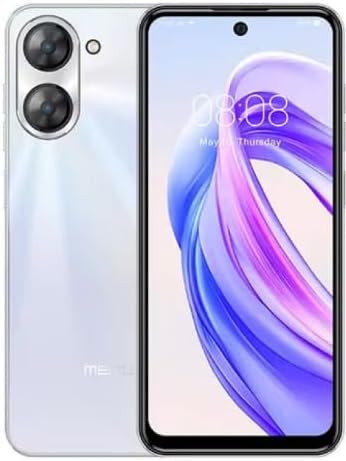
ຮູບ 1.1: ດ້ານຫນ້າແລະດ້ານຫລັງ view of the Meizu mblu 21 smartphone in White Diamond color.
2. ສິ່ງທີ່ຢູ່ໃນກ່ອງ
ກວດສອບວ່າລາຍການທັງຫມົດແມ່ນມີຢູ່ໃນຊຸດ:
- Meizu mblu 21 Smartphone
- Power Adapter
- ສາຍ USB
- SIM Ejector Tool
- ຄູ່ມືເລີ່ມຕົ້ນດ່ວນ

Figure 2.1: Meizu mblu 21 smartphone alongside its power adapter.
3. ຕັ້ງຄ່າ
3.1. ການໃສ່ແຜ່ນ SIM ແລະບັດ MicroSD
The Meizu mblu 21 supports Dual Nano SIM cards and a MicroSD card for expandable storage. Locate the SIM tray on the side of the device.
- Power off the device before inserting or removing SIM/MicroSD cards.
- ໃຊ້ເຄື່ອງມືຖອດຊິມທີ່ສະໜອງໃຫ້ເພື່ອເປີດຖາດຊິມ.
- Carefully place the Nano SIM cards and/or MicroSD card into the designated slots on the tray, ensuring correct orientation.
- ຄ່ອຍໆຍູ້ຖາດກັບເຂົ້າໄປໃນອຸປະກອນຈົນກ່ວາມັນ flush.
3.2. ເປີດເຄື່ອງເລີ່ມຕົ້ນ ແລະຕົວຊ່ວຍສ້າງການຕັ້ງຄ່າ
- Press and hold the Power button until the Meizu logo appears.
- Follow the on-screen instructions to complete the initial setup, including selecting your language, connecting to a Wi-Fi network, and setting up your Google account.
4. ປະຕິບັດການອຸປະກອນຂອງທ່ານ
4.1. ການສະແດງແລະການນໍາທາງ
The 6.79-inch HD display features a 90Hz adaptive refresh rate for smooth visuals. Navigate the interface using touch gestures: tap, swipe, pinch-to-zoom.
4.2. ຟັງຊັນກ້ອງຖ່າຍຮູບ
The device is equipped with a 13MP main camera and an 8MP front camera. Open the Camera application to capture photos and videos.
- 13MP Smart Camera: Ideal for capturing everyday moments with sharpness and true-to-life colors.
- ກ້ອງໜ້າ 8MP: Designed for clear selfies and video calls.
4.3. ຄຸນນະສົມບັດຄວາມປອດໄພ
- Side Unlock: A fast and secure fingerprint sensor integrated into the side power button for instant access.
- Smart Face Unlock: Use the front camera to unlock your device quickly and conveniently.
4.4. ການເຊື່ອມຕໍ່
Your mblu 21 supports various connectivity options:
- 4G LTE: For mobile data connectivity. In the USA, this device is compatible with T-Mobile. Outside the USA, it works with any carrier worldwide.
- Dual-Band Wi-Fi: Supports both 2.4GHz and 5GHz bands for seamless internet access.
- Bluetooth 5.0: For connecting wireless accessories with improved energy efficiency.
- VoLTE HD Calls: Enjoy sharper, clearer voice calls over LTE networks.

Figure 4.1: Key technology features of the Meizu mblu 21, including Android 14, Dual-Band Wi-Fi, Bluetooth 5.0, and VoLTE.
5. ບໍາລຸງຮັກສາ
5.1. ການດູແລຫມໍ້ໄຟ
The mblu 21 is equipped with a 4900mAh battery. To maximize battery lifespan:
- ຫຼີກເວັ້ນອຸນຫະພູມທີ່ຮຸນແຮງ.
- Use only the provided power adapter or certified compatible chargers.
- ຫຼີກລ້ຽງການປະຈຸຫມໍ້ໄຟຢ່າງເຕັມທີ່ເລື້ອຍໆ.

ຮູບທີ 5.1: ພາຍໃນ view of the Meizu mblu 21, showcasing the 4900mAh battery and internal components.
5.2. ການເຮັດຄວາມສະອາດອຸປະກອນຂອງທ່ານ
ໃຊ້ຜ້າແພທີ່ອ່ອນນຸ່ມ, ບໍ່ມີສານດ່າງເພື່ອເຮັດຄວາມສະອາດໜ້າຈໍ ແລະຕົວເຄື່ອງຂອງໂທລະສັບ. ຫຼີກເວັ້ນການນໍາໃຊ້ສານເຄມີທີ່ຮຸນແຮງຫຼືວັດສະດຸຂັດ.
5.3. ການປັບປຸງຊອບແວ
Regularly check for and install software updates to ensure optimal performance and security. Updates can be found in the device's settings menu.
6. ການແກ້ໄຂບັນຫາ
If you encounter issues with your Meizu mblu 21, try the following solutions:
- ອຸປະກອນບໍ່ຕອບສະໜອງ: ກົດປຸ່ມເປີດປິດຄ້າງໄວ້ປະມານ 10-15 ວິນາທີເພື່ອບັງຄັບໃຫ້ຣີສະຕາດ.
- ບັນຫາການເຊື່ອມຕໍ່ເຄືອຂ່າຍ:
- ໃຫ້ແນ່ໃຈວ່າໄດ້ໃສ່ຊິມກາດຢ່າງຖືກຕ້ອງແລ້ວ.
- ປິດ/ເປີດ ໂໝດຢູ່ໃນຍົນ.
- Check network settings (APN, preferred network type).
- ການລະບາຍຫມໍ້ໄຟຢ່າງໄວວາ:
- ປິດແອັບທີ່ບໍ່ໄດ້ໃຊ້ເຮັດວຽກຢູ່ໃນພື້ນຫຼັງ.
- ຫຼຸດຄວາມສະຫວ່າງໜ້າຈໍ.
- ປິດໃຊ້ງານຄຸນສົມບັດທີ່ບໍ່ຈຳເປັນເຊັ່ນ GPS ຫຼື Bluetooth ເມື່ອບໍ່ໄດ້ໃຊ້ງານ.
- ບັນຫາການປະຕິບັດ:
- Clear cache and data of problematic apps.
- ຂະຫຍາຍພື້ນທີ່ຈັດເກັບຂໍ້ມູນ.
- Consider a factory reset (Note: This will erase all data on your device. Back up important data first.).
7. ຂໍ້ມູນຈໍາເພາະ
| ຄຸນສົມບັດ | ລາຍລະອຽດ |
|---|---|
| ຊື່ຕົວແບບ | mblu 21 |
| ໝາຍເລກຕົວແບບ | M416L |
| ລະບົບປະຕິບັດການ | Android 14 |
| ຂະໜາດໜ້າຈໍ | 6.79 ນິ້ວ |
| ຄວາມອາດສາມາດເກັບຮັກສາຫນ່ວຍຄວາມຈໍາ | 64 GB |
| RAM ຂະຫນາດທີ່ຕິດຕັ້ງ | 4 GB |
| ຄວາມອາດສາມາດຫມໍ້ໄຟ | 4900 ລ້ານamp ຊົ່ວໂມງ |
| ກ້ອງຫຼັກ | 13 MP |
| ກ້ອງໜ້າ | 8 MP |
| ຜູ້ໃຫ້ບໍລິການໄຮ້ສາຍ (ສະຫະລັດອາເມລິກາ) | T-Mobile |
| ເຕັກໂນໂລຊີໂທລະສັບມືຖື | 4G LTE |
| ເຕັກໂນໂລຊີການເຊື່ອມຕໍ່ | 4G, Dual-Band Wi-Fi, Bluetooth 5.0 |
| ນ້ໍາຫນັກລາຍການ | 14 ອອນ |
| ຂະໜາດແພັກເກັດ | 7 x 4 x 2 ນິ້ວ |
| ສີ | White Diamond |
8. ການຮັບປະກັນແລະການສະຫນັບສະຫນູນ
Your Meizu mblu 21 smartphone comes with a manufacturer's warranty. Please refer to the warranty card included in your product packaging for specific terms and conditions.
For technical support, service, or further inquiries, please contact Meizu customer support through their official channels. Contact information can typically be found on the manufacturer's webສະຖານທີ່ຫຼືໃນເອກະສານຜະລິດຕະພັນ.