
1. ບົດແນະນຳ
Thank you for choosing the YZGWWIU Car Radio. This device is designed to upgrade your BMW E46 3 Series (1999-2005) with modern infotainment features, including wireless and wired Apple CarPlay and Android Auto, Bluetooth 5.0, and enhanced audio capabilities. This manual provides essential information for installation, operation, and maintenance to ensure optimal performance and user satisfaction.
2. ຂໍ້ມູນຄວາມປອດໄພທີ່ສໍາຄັນ
- ອ່ານຄໍາແນະນໍາທັງຫມົດຢ່າງລະອຽດກ່ອນທີ່ຈະຕິດຕັ້ງແລະການດໍາເນີນງານ.
- Professional installation is recommended to avoid damage to the vehicle or the product.
- ຫ້າມໃຊ້ອຸປະກອນໃນທາງທີ່ລົບກວນທ່ານຈາກການຂັບລົດ. ໃຫ້ຄວາມສຳຄັນຕໍ່ຄວາມປອດໄພທາງຖະໜົນສະເໝີ.
- ໃຫ້ແນ່ໃຈວ່າການເຊື່ອມຕໍ່ທັງຫມົດແມ່ນປອດໄພແລະຖືກ insulated ຢ່າງຖືກຕ້ອງເພື່ອປ້ອງກັນບໍ່ໃຫ້ວົງຈອນສັ້ນ.
- Keep the device away from water and excessive heat.
3. ຄວາມເຂົ້າກັນໄດ້
This car radio is specifically designed for BMW E46 3 Series models manufactured between 1999 and 2005. It is compatible with various sub-models including 323ci, 325ci, 330ci, 318i, 328i, 330xi, 335, 338, and M3.

Image: Product display indicating compatibility with BMW E46 3 Series models.
ຫມາຍເຫດຄວາມເຂົ້າກັນໄດ້ທີ່ສໍາຄັນ:
ກະລຸນາ Review the following conditions carefully before installation. This car stereo may ບໍ່ be compatible with your vehicle if any of these apply:
- If your car radio antenna interface is located in the rear of your car.
- If your car's original radio has a 17-pin plug and the connector shows 4 pins missing.
- If your car's original radio is a 4.3" or 7" screen with a 12-pin plug, or if you have a navigation drive located in the rear of your car.
- If there is a DSP button on your original radio, or if your car is equipped with a digital sound system like Harman Kardon or BOSE.

Image: Visual guide detailing specific wiring and system incompatibilities.
4. ສິ່ງທີ່ຢູ່ໃນກ່ອງ
ຊຸດປະກອບມີລາຍການຕໍ່ໄປນີ້:
- 1 x YZGWWIU Car Autoradio Unit
5. ການຕິດຕັ້ງແລະການຕິດຕັ້ງ
The YZGWWIU Car Radio features an integrated CAN bus and optimized cable connections for a plug-and-play installation process. While designed for ease of installation, professional assistance is recommended to ensure correct wiring and functionality.
ຂັ້ນຕອນການຕິດຕັ້ງ (ຄູ່ມືທົ່ວໄປ):
- ການກະກຽມ: ຖອດແບັດເຕີລີຂອງລົດກ່ອນເລີ່ມເຮັດວຽກໄຟຟ້າ.
- ຖອດໜ່ວຍເດີມອອກ: Carefully remove the existing car radio from the dashboard. Refer to your vehicle's service manual for specific instructions on removing trim panels and the original head unit.
- ເຊື່ອມຕໍ່ສາຍໄຟ: Connect the provided wiring harness from the new car radio to the vehicle's existing wiring. The integrated CAN bus system simplifies this process. Ensure all connectors are firmly seated.
- ການເຊື່ອມຕໍ່ເສົາອາກາດ: ເຊື່ອມຕໍ່ເສົາອາກາດວິທະຍຸ.
- ການທໍາງານຂອງການທົດສອບ: Before fully reassembling the dashboard, reconnect the battery and perform a basic test of the car radio's functions (power on, audio, touch screen response).
- ໜ່ວຍຄວາມໝັ້ນຄົງ: Mount the new car radio securely into the dashboard opening.
- ປະກອບຄືນໃໝ່: Reinstall any removed trim panels.
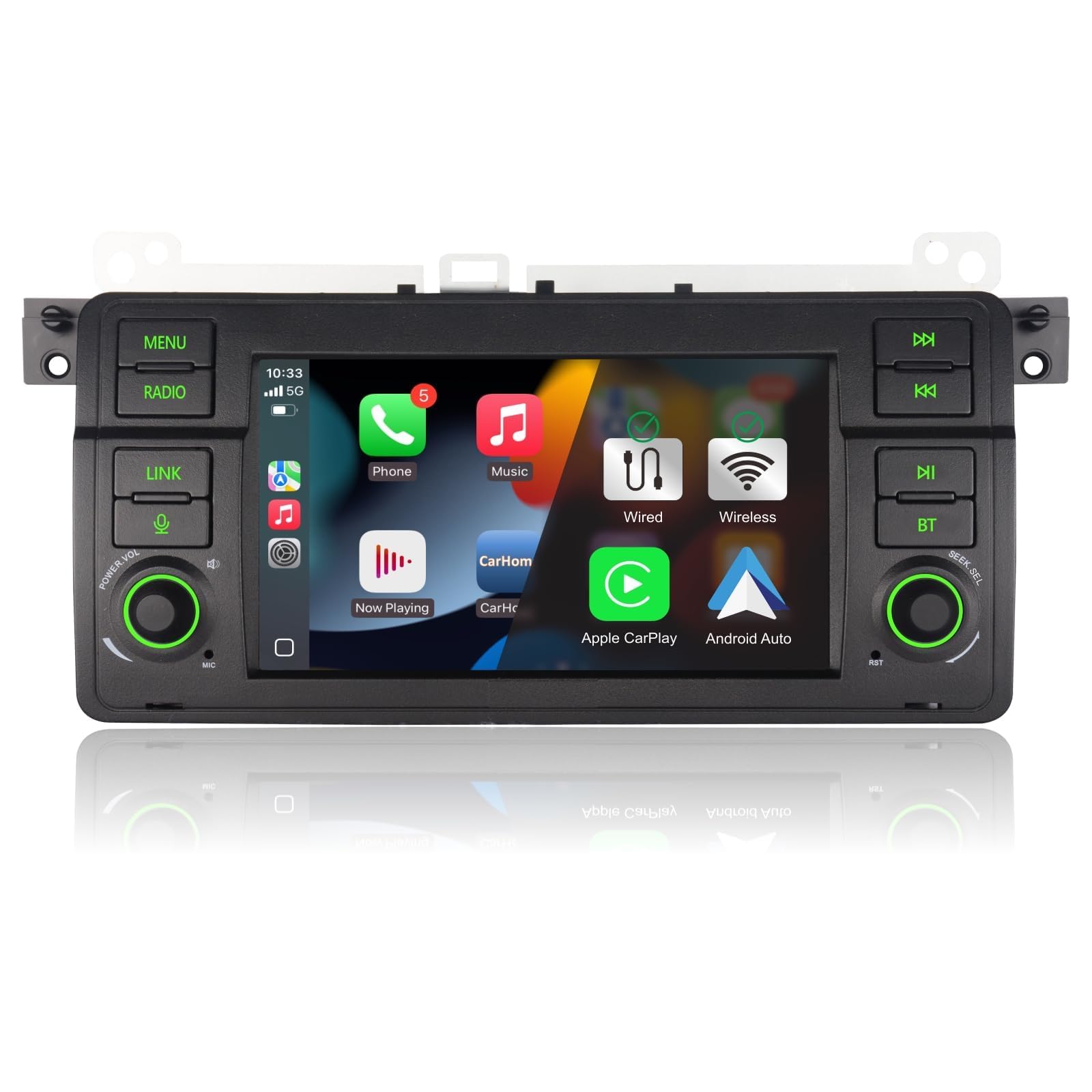
Image: The YZGWWIU Car Radio seamlessly integrated into a BMW E46 dashboard.
6. ຄໍາແນະນໍາການດໍາເນີນງານ
The car radio operates on a Linux system, designed for quick startup and stable performance without memory issues over time.

Image: The Linux system interface of the car radio, displaying application icons.
6.1. ແອັບເປິ້ນ ຄາເພລ ແລະ ແອນດຣອຍ ອໍໂຕ້
The unit supports both wireless and wired Apple CarPlay and Android Auto. This allows for seamless integration of your smartphone, providing access to navigation, music, messages, and voice assistants directly on the car radio's display.
- ການເຊື່ອມຕໍ່ໄຮ້ສາຍ: Enable Bluetooth and Wi-Fi on your smartphone. Follow the on-screen prompts on the car radio to pair your device.
- ການເຊື່ອມຕໍ່ສາຍ: Connect your smartphone to the car radio using a USB cable.

Image: Display showing both Apple CarPlay and Android Auto interfaces with wireless and wired connection indicators.
6.2. Bluetooth 5.0
The built-in Bluetooth 5.0 module enables hands-free calling, contact synchronization, and wireless music streaming from your smartphone. This feature enhances driving safety by allowing you to manage calls without holding your phone.
- ການຈັບຄູ່: Go to the Bluetooth settings on the car radio and your smartphone. ຊອກຫາ available devices and select the car radio's name to pair.
- ໂທຟຣີ: Once paired, you can make and receive calls directly through the car radio's interface.
- ການຫຼິ້ນເພງ: Stream audio from your phone's music library or streaming apps to the car's speakers.

Image: Bluetooth connection for hands-free calling and music streaming, alongside DSP audio settings.
6.3. Radio (FM/AM RDS)
The car radio supports FM/AM stations with RDS (Radio Data System) functionality, providing station information and enhanced radio experience.
- ປບັ: Use the touch screen controls to scan for stations or manually tune to a specific frequency.
- RDS: When available, RDS will display information such as station name, program type, and traffic announcements.

Image: Display showing FM/AM RDS interface.
6.4. Sound Quality (DSP)
Experience high-fidelity sound quality with the built-in DSP (Digital Signal Processor) chip. It offers 16 groups of equalization modes, allowing you to customize the audio output to your preference.
- ການຕັ້ງຄ່າ Equalizer: Access the equalizer settings through the audio menu to adjust bass, treble, and other frequency bands.
- ຮູບແບບທີ່ ກຳ ນົດໄວ້ກ່ອນ: Choose from various preset equalization modes for different music genres.

Image: HiFi 16 EQ settings interface with DSP chip details.
6.5. ການຄວບຄຸມພວງມາໄລ (SWC)
The unit supports your vehicle's original steering wheel controls, allowing you to manage audio functions (volume, track skip) without taking your hands off the wheel.
- ການຕັ້ງຄ່າ: Access the SWC settings in the system menu to map your steering wheel buttons to the desired functions.
Image: Steering Wheel Control configuration screen.
6.6. Mirror-Link
The Mirror-Link function allows you to mirror your smartphone's screen onto the car radio's display, providing access to apps and content not directly supported by CarPlay or Android Auto.
- ການເປີດໃຊ້ງານ: Select the Mirror-Link option from the main menu and follow the instructions to connect your smartphone.
Image: Mirror-Link function displaying a smartphone screen on the car radio.
6.7. ການປັບແຕ່ງອິນເຕີເຟດຜູ້ໃຊ້ (UI)
The car radio offers customization options for its user interface, including 8-color button lighting and 3 selectable UI themes, allowing you to personalize the look and feel of your system.

Image: UI customization options for button lighting and interface themes.
7. ບໍາລຸງຮັກສາ
To ensure the longevity and optimal performance of your YZGWWIU Car Radio, follow these maintenance guidelines:
- ທໍາຄວາມສະອາດ: ໃຊ້ຜ້າອ່ອນແລະແຫ້ງເພື່ອທຳຄວາມສະອາດໜ້າຈໍ ແລະ ພື້ນຜິວພາຍນອກ. ຫຼີກລ່ຽງນ້ຳຢາທຳຄວາມສະອາດທີ່ມີສີຂັດ ຫຼື ຕົວລະລາຍທີ່ອາດຈະທຳລາຍພື້ນຜິວໄດ້.
- ອັບເດດຊອບແວ: Periodically check for available software updates from the manufacturer to ensure you have the latest features and bug fixes.
- ເງື່ອນໄຂສິ່ງແວດລ້ອມ: ຫຼີກລ້ຽງການເປີດອຸນຫະພູມທີ່ຮ້າຍແຮງ, ແສງແດດໂດຍກົງສໍາລັບໄລຍະເວລາດົນນານ, ຫຼືຄວາມຊຸ່ມຊື່ນສູງ.
8. ການແກ້ໄຂບັນຫາ
If you encounter issues with your car radio, refer to the following common troubleshooting tips:
- ບໍ່ມີພະລັງງານ: ກວດສອບສາຍເຊື່ອມຕໍ່ໄຟຟ້າທັງໝົດ ແລະ ກ່ອງຟິວຂອງລົດ. ໃຫ້ແນ່ໃຈວ່າແບັດເຕີຣີຖືກເຊື່ອມຕໍ່ຢ່າງຖືກຕ້ອງ.
- ບໍ່ມີສຽງ: Verify speaker connections, volume levels, and audio source selection. Check DSP settings if applicable.
- ໜ້າຈໍສໍາຜັດບໍ່ຕອບສະໜອງ: Try restarting the unit. If the issue persists, perform a factory reset (refer to system settings).
- ບັນຫາການເຊື່ອມຕໍ່ Bluetooth/CarPlay/Android Auto: Ensure Bluetooth and Wi-Fi are enabled on your phone and the car radio. Try unpairing and re-pairing the device. Check for software updates.
- ການຄວບຄຸມພວງມາໄລບໍ່ເຮັດວຽກ: Verify the SWC wiring and configuration settings in the unit's menu.
For persistent issues or problems not covered here, please contact customer support.
9. ຂໍ້ມູນຈໍາເພາະ
| ຍີ່ຫໍ້ | YZGWWIU |
| ໝາຍເລກຕົວແບບ | IU-7005-L |
| ເຕັກໂນໂລຊີການເຊື່ອມຕໍ່ | Bluetooth, WiFi |
| ປະເພດການຄວບຄຸມ | ໜ້າຈໍສຳຜັດ |
| ຄຸນນະສົມບັດພິເສດ | Android Auto, Apple CarPlay (Wireless & Wired), DSP, FM/AM RDS, Mirror-Link, Steering Wheel Control |
| ອຸປະກອນທີ່ເຂົ້າກັນໄດ້ | ໂທລະສັບມືຖື |
| ຮູບແບບການອອກສຽງ | ສະເຕຣິໂອ |
| ການຕັ້ງຄ່າຊ່ອງສຽງອ້ອມຮອບ | 2 |
| ການເຂົ້າລະຫັດວິດີໂອ | AHD |
| ພອດ HDMI ທັງໝົດ | 1 |
| ປະເພດຕົວເຊື່ອມຕໍ່ | USB, Jack 3.5mm |
| ລະບົບປະຕິບັດການ | Linux |
10. ການຮັບປະກັນ
YZGWWIU products are covered by a ການຮັບປະກັນຫນຶ່ງປີ ນັບຈາກວັນທີ່ຊື້. ການຮັບປະກັນນີ້ກວມເອົາຂໍ້ບົກຜ່ອງຈາກການຜະລິດ ແລະ ການເຮັດວຽກຜິດປົກກະຕິພາຍໃຕ້ການນຳໃຊ້ປົກກະຕິ. ກະລຸນາເກັບຫຼັກຖານການຊື້ຂອງທ່ານໄວ້ເພື່ອການຮຽກຮ້ອງການຮັບປະກັນ. ການຮັບປະກັນບໍ່ໄດ້ກວມເອົາຄວາມເສຍຫາຍທີ່ເກີດຈາກການຕິດຕັ້ງທີ່ບໍ່ຖືກຕ້ອງ, ການໃຊ້ຜິດວິທີ, ອຸບັດຕິເຫດ, ຫຼື ການດັດແປງທີ່ບໍ່ໄດ້ຮັບອະນຸຍາດ.
11. ການຊ່ວຍເຫຼືອລູກຄ້າ
If you have any questions regarding installation, operation, troubleshooting, or product compatibility, please do not hesitate to contact YZGWWIU customer support. We are committed to providing assistance and ensuring your satisfaction.
You can typically find our contact information or a way to ask a question on the platform where you purchased the product, usually on the seller's storefront or product page.

Image: Guide on locating seller support contact information on Amazon.