
1. ບົດແນະນຳ
ຂອບໃຈສໍາລັບການຊື້asing the AODK L-Shaped Gaming Desk. This manual provides detailed instructions for the safe assembly, proper operation, and effective maintenance of your new desk. Please read this manual thoroughly before assembly and retain it for future reference.

Image: AODK L-Shaped Gaming Desk in a modern office setting, showcasing its spacious design and integrated monitor stand.
2. ຂໍ້ມູນຄວາມປອດໄພ
- ປະຕິບັດຕາມຄໍາແນະນໍາການປະກອບຢ່າງລະມັດລະວັງສະເໝີ. ການປະກອບທີ່ບໍ່ຖືກຕ້ອງສາມາດນໍາໄປສູ່ຄວາມບໍ່ໝັ້ນຄົງແລະການບາດເຈັບທີ່ອາດເກີດຂຶ້ນໄດ້.
- ໃຫ້ແນ່ໃຈວ່າ screws ແລະ fasteners ທັງຫມົດໄດ້ຖືກ tightened ຢ່າງປອດໄພກ່ອນທີ່ຈະນໍາໃຊ້. ກວດສອບເປັນໄລຍະ ແລະ ຮັດແໜ້ນຄືນໃໝ່ຕາມຄວາມຈຳເປັນ.
- Do not exceed the maximum load capacity of 50 kg (110 lbs) for the desktop.
- ຮັກສາເດັກນ້ອຍ ແລະສັດລ້ຽງໄວ້ໄກໃນລະຫວ່າງການຊຸມນຸມ. ຊິ້ນສ່ວນຂະຫນາດນ້ອຍສາມາດເປັນອັນຕະລາຍຕໍ່ການຫາຍໃຈ.
- Place the desk on a level surface to prevent wobbling. Use the adjustable feet to stabilize if needed.
- ຢ່າເຮັດໃຫ້ໂຕະເຮັດວຽກໃຫ້ມີຄວາມຊຸ່ມຊື່ນຫຼາຍເກີນໄປ ຫຼືຖືກແສງແດດໂດຍກົງ, ຊຶ່ງສາມາດທໍາລາຍວັດສະດຸໄດ້.
- When using the integrated power outlets, ensure devices are compatible with the specified voltage and current (2 AC outlets: 100-240V/15A; 2 USB ports: 5V-2A). Do not overload the outlets.
3. ເນື້ອໃນຊຸດ
ກ່ອນທີ່ຈະເລີ່ມຕົ້ນການປະກອບ, ກວດສອບວ່າອົງປະກອບທັງຫມົດທີ່ລະບຸໄວ້ຂ້າງລຸ່ມນີ້ແມ່ນປະຈຸບັນແລະບໍ່ເສຍຫາຍ. ຖ້າພາກສ່ວນໃດຂາດຫາຍໄປຫຼືເສຍຫາຍ, ກະລຸນາຕິດຕໍ່ຝ່າຍຊ່ວຍເຫຼືອລູກຄ້າ.
- Desktop panels (L-shaped sections)
- Monitor stand components
- ອົງປະກອບໂຄງໂລຫະ (ຂາ, ແຖບຮອງຮັບ)
- ຕູ້ເກັບມ້ຽນ 4 ອັນ
- Integrated power strip with 2 AC outlets and 2 USB ports
- ຫູຟັງ
- ຕີນສາມາດປັບໄດ້
- ຮາດແວປະກອບ ( screws , bolts , ແກ່ນ )
- Assembly tools (wrench, screwdriver)
- RGB LED strip with controller
- ຄູ່ມືການສອນ

ຮູບພາບ: ລະເບີດ view diagram illustrating all desk components and their respective dimensions for assembly reference.
4. ຄໍາແນະນໍາຂອງສະພາແຫ່ງ
Assembly typically requires two people. Follow the numbered steps in the included assembly guide. All necessary tools are provided.
4.1. ກອບການປະກອບ
- ຖອດຊິ້ນສ່ວນທັງໝົດອອກແລ້ວວາງໄວ້ເທິງພື້ນຜິວທີ່ສະອາດ, ອ່ອນນຸ້ມເພື່ອປ້ອງກັນຮອຍຂີດຂ່ວນ.
- Attach the main support beams to the desk legs using the provided hardware. Do not fully tighten screws until all parts are aligned.
- Connect the L-shaped sections of the frame. Ensure the cross-bracing is installed for stability.
- Install the adjustable feet onto the bottom of each leg.
4.2. Desktop and Storage Installation
- Carefully place the desktop panels onto the assembled frame. Secure them with the designated screws.
- Assemble the four storage drawers according to their specific instructions. The drawer unit can be installed on either the left or right side of the desk to suit your preference.
- Install the open shelving units into their designated positions.
- Attach the PC tower stand and the headphone hook as shown in the diagram.
4.3. Monitor Stand and Electrical Components
- Assemble the monitor stand. It is designed for 3-stage height adjustment (9cm, 12cm, 15cm). Choose your desired height during assembly.
- Mount the integrated power strip onto the designated area of the desk.
- Attach the RGB LED strip to the underside of the monitor stand or desktop edge as desired. Connect it to the power source.
- ເມື່ອອົງປະກອບທັງໝົດຢູ່ໃນບ່ອນທີ່ຖືກຕ້ອງແລ້ວ, ໃຫ້ຂັນສະກູ ແລະ ຕົວຍຶດທັງໝົດໃຫ້ແໜ້ນ.

Image: The desk fully assembled, highlighting the PC tower stand, headphone hook, and integrated storage options.
5. ຄໍາແນະນໍາການດໍາເນີນງານ
5.1. Integrated Power Outlets
The desk is equipped with a built-in power strip for convenience:
- 2 ປ່ຽງ AC: Provides 100-240V/15A power for your computer, monitor, and other AC-powered devices.
- 2 ພອດ USB: Provides 5V-2A power for charging smartphones, tablets, and other USB-powered accessories.
To use, simply plug the desk's main power cord into a wall outlet, then connect your devices to the integrated outlets.

ຮູບພາບ: ລາຍລະອຽດ view of the desk's integrated power outlets and USB ports, along with the RGB LED lighting.
5.2. ໄຟ LED RGB
The integrated RGB LED strip offers customizable lighting to enhance your environment:
- ໂໝດແສງ: Features 10 different illumination modes.
- ການປັບສີ: Offers 10 color adjustment modes.
- ຟັງຊັນຫນ່ວຍຄວາມຈໍາ: The LED system remembers your last selected mode when powered off and on.
Use the inline controller to cycle through modes and adjust colors. Refer to the controller's specific markings for function identification.
5.3. Adjustable Monitor Stand
The monitor stand can be adjusted to three different heights to promote ergonomic posture and reduce strain on your neck and shoulders:
- ຕົວເລືອກຄວາມສູງ: 9 cm, 12 cm, and 15 cm.
Adjust the height during assembly or by carefully re-positioning the stand according to the assembly instructions. Ensure monitors are stable after adjustment.
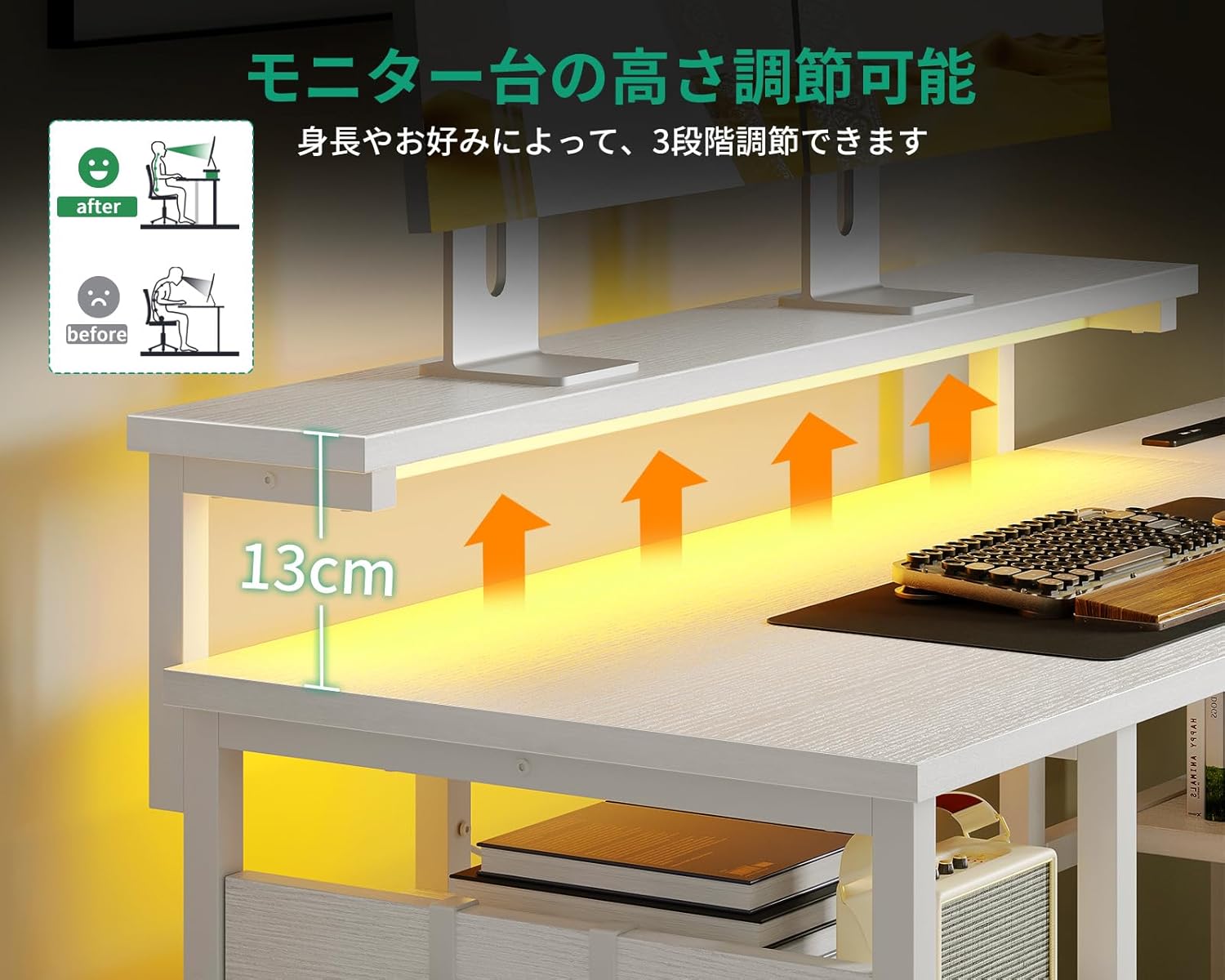
Image: Visual representation of the monitor stand's three adjustable height settings, designed to improve user posture.
5.4. ຄຸນສົມບັດການເກັບຮັກສາ
The desk is designed with multiple storage solutions:
- 4 ລິ້ນຊັກເກັບມ້ຽນ: Provides enclosed storage for documents, supplies, and personal items. The drawer unit is reversible and can be installed on either side.
- ເປີດ Shelves: Ideal for books, binders, or decorative items.
- PC Tower Stand: A dedicated space for your computer tower, keeping it off the floor and improving airflow.
- ຫູຟັງຫູຟັງ: Conveniently located for hanging headphones, keeping your desktop clear.

Image: The desk's storage areas, including drawers and shelves, are highlighted to show their capacity and organization potential.
6. ບໍາລຸງຮັກສາ
- ທໍາຄວາມສະອາດ: ເຊັດພື້ນຜິວຂອງໂຕະດ້ວຍຜ້າອ່ອນ, ງamp cloth. Avoid abrasive cleaners or harsh chemicals, as these can damage the melamine finish.
- ການຮົ່ວໄຫລ: Immediately wipe up any spills to prevent water damage or staining. The melamine surface is water-resistant but not waterproof.
- fasteners: Periodically check all screws and bolts to ensure they remain tight. Re-tighten as needed to maintain stability.
- ອົງປະກອບໄຟຟ້າ: Ensure the power cord and integrated outlets are free from damage. Do not attempt to repair electrical components yourself.
7. ການແກ້ໄຂບັນຫາ
7.1. Desk is Wobbly
- ກວດເບິ່ງ fasteners: ຮັບປະກັນວ່າສະກູ ແລະ ນັອດທັງໝົດໄດ້ຖືກຂັນແໜ້ນດີແລ້ວ.
- ພື້ນຜິວລະດັບ: Verify the desk is on a flat, level floor.
- ຕີນທີ່ສາມາດປັບໄດ້: Use the adjustable feet at the bottom of the legs to compensate for uneven flooring.
7.2. ໄຟ LED ບໍ່ເຮັດວຽກ
- ການເຊື່ອມຕໍ່ພະລັງງານ: Ensure the LED strip is properly connected to its power source and the desk's main power cord is plugged into a functional wall outlet.
- Controller Check: Verify the LED controller is not damaged and is set to an active mode.
7.3. Power Outlets Not Functioning
- ພະລັງງານຕົ້ນຕໍ: Confirm the desk's main power cord is securely plugged into a working wall outlet.
- ຄວາມເຂົ້າກັນໄດ້ຂອງອຸປະກອນ: Ensure the connected device is compatible with the outlet's voltage ແລະຂໍ້ມູນສະເພາະໃນປະຈຸບັນ.
- ໂຫຼດເກີນ: Check if the outlets are overloaded. Disconnect some devices and try again.
8. ຂໍ້ມູນຈໍາເພາະ
| ຍີ່ຫໍ້ | AODK |
| ໝາຍເລກຕົວແບບ | OKTB02020801002JP |
| ຮູບຮ່າງ | ຮູບຊົງ L |
| ປະເພດໂຕະ | Computer Desk, Desk with Shelves |
| ຂະໜາດສິນຄ້າ (ກວ້າງ x ຍາວ x ສູງ) | 110ຊມ x 135ຊມ x 76ຊມ |
| ສີ | ສີຂາວ |
| ວັດສະດຸ | Melamine Faced Particle Board, Metal Frame |
| ປະເພດສໍາເລັດຮູບ | Powder Coated (Frame) |
| ຄຸນນະສົມບັດພິເສດ | Built-in USB & AC Power Outlets, RGB LED Lighting, Adjustable Monitor Stand, 4 Storage Drawers, Headphone Hook, PC Tower Stand |
| ຈຳ ນວນຕູ້ແຕ້ມ | 4 |
| ຄວາມສາມາດໃນການໂຫຼດສູງສຸດ | 50 kg (Desktop) |
| ຕ້ອງການສະພາແຫ່ງ | Yes (Assembly tools and instructions included) |
| Power Outlet Specs | 2 AC Outlets (100-240V/15A), 2 USB Ports (5V-2A) |
9. ການຮັບປະກັນແລະການສະຫນັບສະຫນູນ
This AODK L-Shaped Gaming Desk comes with a limited warranty. Please refer to the warranty card included in your package for specific terms and conditions.
For technical assistance, missing parts, or any other inquiries, please contact AODK customer support through the retailer where you purchased the product. Please have your model number (OKTB02020801002JP) and purchase date ready when contacting support.