
ແນະນຳ
Welcome to the GUHUAVMI GT4 Pro Smartwatch user manual. This guide provides detailed instructions on how to set up, operate, and maintain your new smartwatch. The GT4 Pro combines advanced health monitoring, comprehensive fitness tracking, and smart connectivity features in a durable, stylish design. Please read this manual carefully to ensure optimal performance and longevity of your device.
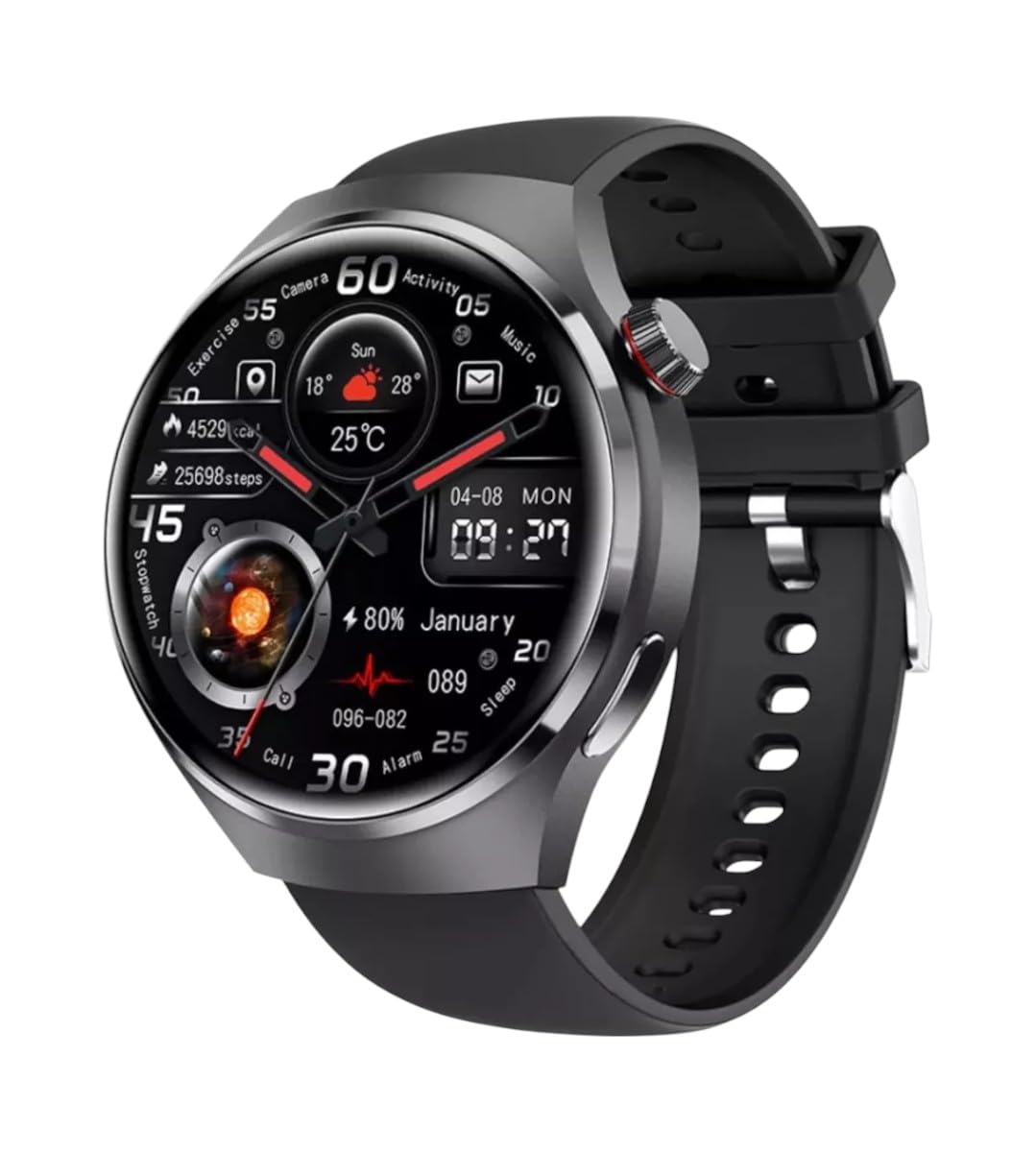
ຮູບພາບ: ທາງຫນ້າ view of the GUHUAVMI GT4 Pro Smartwatch, showcasing ການອອກແບບ sleek ແລະການສະແດງຂອງຕົນ.
ຕັ້ງຄ່າ
1. Unboxing ແລະອົງປະກອບ
ກ່ອນທີ່ທ່ານຈະເລີ່ມຕົ້ນ, ໃຫ້ແນ່ໃຈວ່າອົງປະກອບທັງຫມົດມີຢູ່ໃນຊຸດ:
- GUHUAVMI GT4 Pro Smartwatch
- ເຄື່ອງສາກໄຮ້ສາຍ
- ຄູ່ມືຜູ້ໃຊ້ (ເອກະສານນີ້)
2. ການສາກ Smartwatch
For first-time use, fully charge your GT4 Pro Smartwatch. Connect the wireless charger to a USB power adapter (not included) and place the smartwatch onto the magnetic charging base. The watch will indicate charging status on its screen.
- ເວລາສາກໄຟ: ປະມານ 3 ຊົ່ວໂມງສຳລັບການສາກເຕັມ.
- ຊີວິດຫມໍ້ໄຟ: Typical usage provides 5-7 days of battery life.

Image: The GUHUAVMI GT4 Pro Smartwatch placed on its magnetic wireless charger, displaying battery life and charging time information.
3. ເປີດ/ປິດ
- ເປີດ: ກົດປຸ່ມຂ້າງຄ້າງໄວ້ຈົນກວ່າໜ້າຈໍຈະສະຫວ່າງຂຶ້ນ.
- ປິດພະລັງງານ: ກົດປຸ່ມຂ້າງຄ້າງໄວ້, ຈາກນັ້ນເລືອກຕົວເລືອກ 'ປິດເຄື່ອງ' ໃນໜ້າຈໍ.
4. ການດາວໂຫຼດແອັບ ແລະ ການຈັບຄູ່
To unlock the full potential of your GT4 Pro, download the companion app on your smartphone. Scan the QR code provided in the watch's initial setup screen or search for the app name (usually indicated on the watch or packaging) in your phone's app store.
- ເປີດໃຊ້ Bluetooth ໃນໂທລະສັບສະຫຼາດຂອງທ່ານ.
- ເປີດແອັບຊ່ວຍເຫຼືອ ແລະ ປະຕິບັດຕາມຄຳແນະນຳໃນໜ້າຈໍເພື່ອສ້າງບັນຊີ ຫຼື ເຂົ້າສູ່ລະບົບ.
- In the app, select 'Add Device' or 'Pair Device' and choose 'GT4 Pro' from the list of available devices.
- ຢືນຢັນຄຳຮ້ອງຂໍການຈັບຄູ່ທັງໃນໂທລະສັບສະຫຼາດ ແລະ ໂມງອັດສະລິຍະຂອງທ່ານ.
ຄໍາແນະນໍາການດໍາເນີນງານ
1. ການນໍາທາງພື້ນຖານ
The GT4 Pro features a 1.6-inch HD AMOLED touchscreen and a side crown button for navigation.
- ປັດຂຶ້ນ/ລົງ: ເລື່ອນຜ່ານເມນູແລະການແຈ້ງເຕືອນ.
- ປັດຊ້າຍ/ຂວາ: ເຂົ້າເຖິງວິດເຈັດດ່ວນ ຫຼື ໜ້າປັດໂມງທີ່ແຕກຕ່າງກັນ.
- ແຕະ: ເລືອກລາຍການ ຫຼືເປີດແອັບພລິເຄຊັນ.
- ກົດປຸ່ມຂ້າງຄຽງ: ກັບໄປທີ່ໜ້າຈໍຫຼັກ ຫຼືເຂົ້າເຖິງລາຍການແອັບ.
2. AI Voice Assistant
Your GT4 Pro is equipped with an integrated AI voice assistant for hands-free operation.
- ການເປີດໃຊ້ງານ: Tap the voice assistant icon on the watch face or use a designated gesture/button press (refer to watch settings).
- ຄໍາສັ່ງ: Speak clearly to ask questions, set reminders, make calls, or control music.
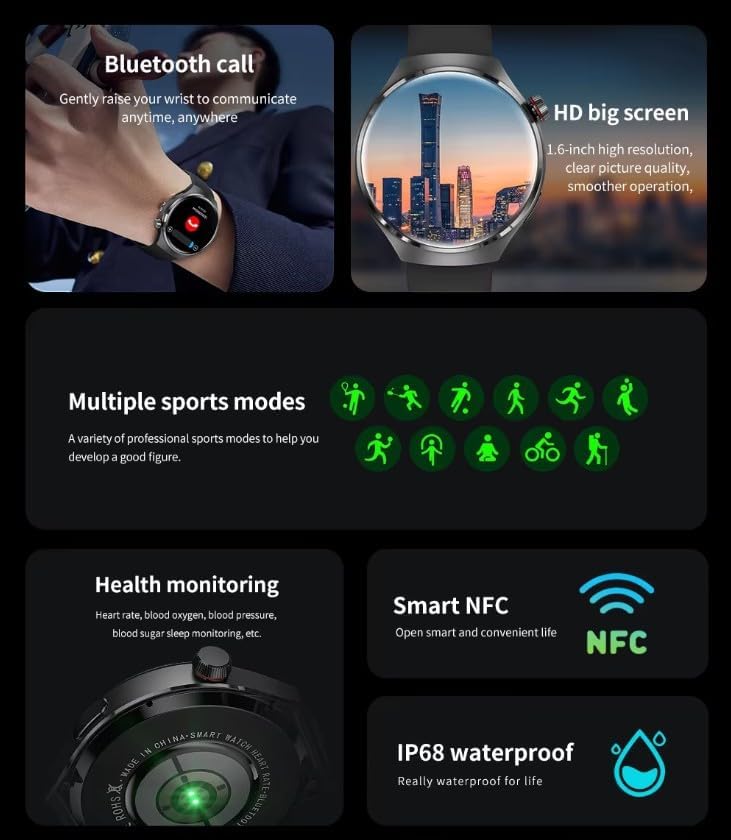
Image: The GUHUAVMI GT4 Pro Smartwatch displaying the AI voice assistant interface, showing exampຈຳນວນຄຳສັ່ງສຽງ.
3. ໂທ Bluetooth
Once paired with your smartphone, you can make and receive calls directly from your smartwatch.
- ໂທອອກ: Access the dialer or contacts list on your watch.
- ຮັບສາຍ: ຮັບສາຍ ຫຼື ປະຕິເສດສາຍໂທເຂົ້າໂດຍກົງຈາກໜ້າຈໍໂມງ.
4. ການຕິດຕາມສຸຂະພາບ
The GT4 Pro provides real-time health data to help you monitor your well-being.
- ອັດຕາການເຕັ້ນຫົວໃຈ: ຕິດຕາມກວດກາຢ່າງຕໍ່ເນື່ອງຕະຫຼອດມື້.
- ອົກຊີໃນເລືອດ (SpO2): ວັດແທກລະດັບຄວາມອີ່ມຕົວຂອງອົກຊີໃນເລືອດຂອງທ່ານ.
- Blood Sugar: Provides estimated blood sugar readings.
- ການຕິດຕາມການນອນ: ຈໍພາບນອນ stages ແລະຄຸນນະພາບ.
View detailed health reports in the companion app.
5. ຕິດຕາມການອອກກຳລັງກາຍ
ຕິດຕາມການອອກ ກຳ ລັງກາຍແລະກິດຈະ ກຳ ປະຈໍາວັນຂອງທ່ານດ້ວຍຄວາມແມ່ນຍໍາ.
- ໂໝດກິລາຫຼາຍຮູບແບບ: Select from various activities like running, cycling, swimming, and more for accurate data.
- GPS ໃນຕົວ: Records your route, distance, and pace during outdoor activities.
- ເຂັມທິດ: Provides directional guidance for outdoor adventures.

Image: The GUHUAVMI GT4 Pro Smartwatch showcasing icons for NFC, GPS, compass, heart rate, and Bluetooth call, highlighting its comprehensive features.
6. NFC Features
The GT4 Pro supports NFC for convenient interactions.
- ການຄວບຄຸມການເຂົ້າເຖິງ: Use your watch for compatible access systems.
- Find My iPhone: Utilize NFC to locate your paired iPhone.
7. Dynamic Island Function
Experience enhanced interactive displays for notifications, music, and charging status.
- Interactive Displays: Smart displays adapt to show relevant information dynamically.
- ອັບເກຣດ OTA: New functional interactive displays may be added through future over-the-air updates.
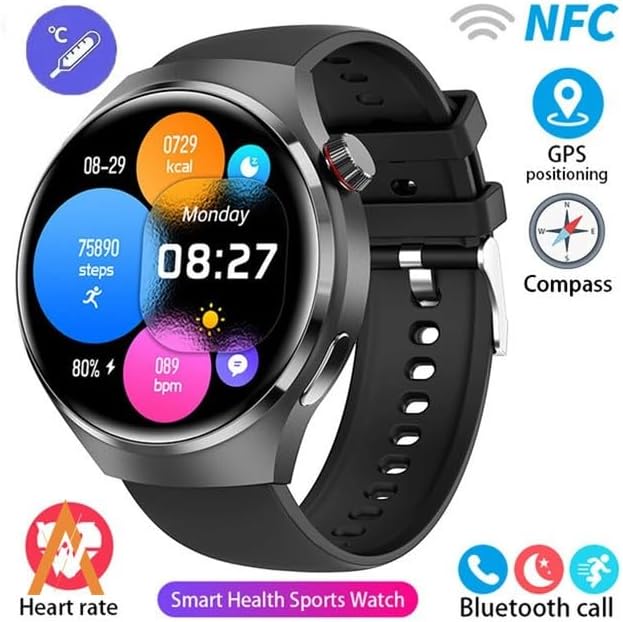
Image: The GUHUAVMI GT4 Pro Smartwatch screen demonstrating the Dynamic Island function, showing notifications and active processes.
8. Other Utility Features
The smartwatch includes several convenient tools:
- ກ້ອງຖ່າຍຮູບໄລຍະໄກ: Control your smartphone camera remotely.
- ໂມງປຸກ: ຕັ້ງຄ່າໂມງປຸກໂດຍກົງຈາກຂໍ້ມືຂອງທ່ານ.
- ໂມງຈັບເວລາ ແລະໂມງຈັບເວລາ: ສຳລັບການຈັບເວລາທີ່ຊັດເຈນ.
- ການວັດແທກອຸນຫະພູມ: Monitor ambient temperature.
- Multi-Time Zone Settings: Keep track of different time zones.
- ການຄວບຄຸມການຫຼິ້ນດົນຕີ: Manage music on your paired smartphone.
ບໍາລຸງຮັກສາ
1. ກັນນ້ຳ (IP68)
The GT4 Pro has an IP68 waterproof rating, meaning it is resistant to dust and can withstand immersion in water up to 1.5 meters for 30 minutes. It is suitable for swimming and use in rainy conditions.
- Do not use in hot water, saunas, or steam rooms.
- Avoid exposure to high-velocity water.
- After exposure to water, wipe the watch dry with a soft cloth.
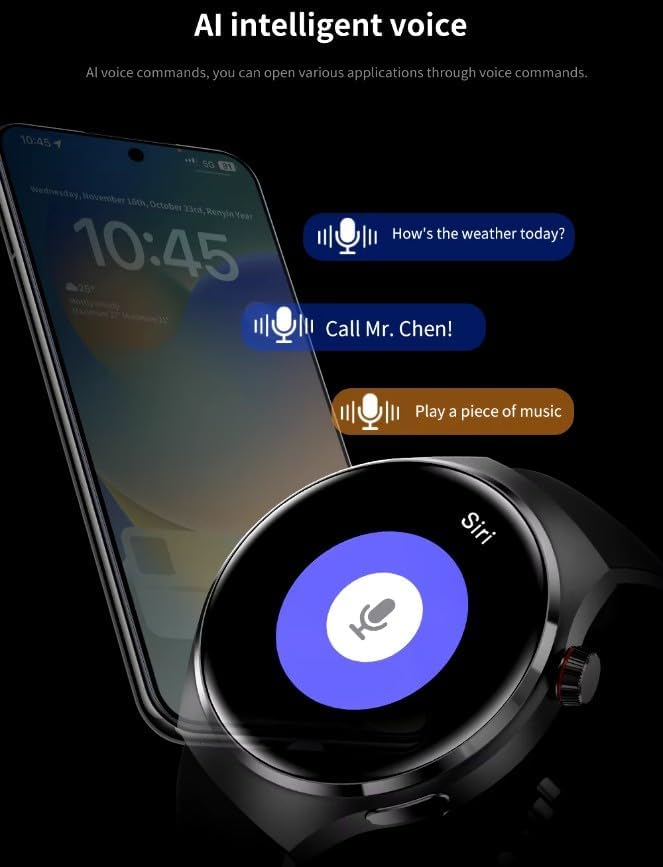
Image: Two GUHUAVMI GT4 Pro Smartwatches shown with water droplets, illustrating their IP68 waterproof capability.
2. ທໍາຄວາມສະອາດ
Regularly clean your smartwatch to maintain its appearance and sensor accuracy.
- ເຊັດໜ້າຈໍ ແລະ ຕົວເຄື່ອງດ້ວຍຜ້າອ່ອນໆ.amp, ຜ້າບໍ່ມີ lint.
- Clean the charging contacts and heart rate sensor on the back of the watch to ensure proper function.
- ຫຼີກເວັ້ນການນໍາໃຊ້ສານເຄມີທີ່ຮຸນແຮງຫຼືວັດສະດຸຂັດ.
3. ການປັບປຸງຊອບແວ
Periodically check for software updates through the companion app. Updates can provide new features, performance improvements, and bug fixes.
ການແກ້ໄຂບັນຫາ
- ໂມງບໍ່ເປີດ: ກວດໃຫ້ແນ່ໃຈວ່າໂມງຖືກສາກເຕັມແລ້ວ. ເຊື່ອມຕໍ່ມັນກັບເຄື່ອງສາກຢ່າງໜ້ອຍ 30 ນາທີ.
- ບໍ່ສາມາດຈັບຄູ່ກັບສະມາດໂຟນໄດ້:
- ກວດໃຫ້ແນ່ໃຈວ່າ Bluetooth ເປີດຢູ່ໃນໂທລະສັບ ແລະໂມງຂອງທ່ານ.
- ໃຫ້ແນ່ໃຈວ່າໂມງຢູ່ໃນຂອບເຂດຂອງໂທລະສັບຂອງທ່ານ.
- ຣີສະຕາດທັງໂມງ ແລະໂທລະສັບຂອງທ່ານ.
- ກວດເບິ່ງວ່າແອັບຄູ່ໄດ້ຮັບການອັບເດດເປັນເວີຊັນຫຼ້າສຸດຫຼືບໍ່.
- ຂໍ້ມູນສຸຂະພາບບໍ່ຖືກຕ້ອງ:
- ໃຫ້ແນ່ໃຈວ່າໂມງຖືກໃສ່ຢູ່ໃນຂໍ້ມືຂອງເຈົ້າຢ່າງສະບາຍ, ບໍ່ແຫນ້ນເກີນໄປຫຼືວ່າງເກີນໄປ.
- ເຮັດຄວາມສະອາດເຊັນເຊີຢູ່ດ້ານຫຼັງຂອງໂມງ.
- ຫຼີກເວັ້ນການເຄື່ອນໄຫວຫຼາຍເກີນໄປໃນລະຫວ່າງການວັດແທກ.
- ຊີວິດຫມໍ້ໄຟສັ້ນ:
- ຫຼຸດຄວາມສະຫວ່າງໜ້າຈໍ.
- ປິດການແຈ້ງເຕືອນ ຫຼື ຄຸນສົມບັດທີ່ບໍ່ຈຳເປັນ.
- ຈຳກັດການຕິດຕາມອັດຕາການເຕັ້ນຂອງຫົວໃຈຢ່າງຕໍ່ເນື່ອງຖ້າບໍ່ຈຳເປັນ.
ຂໍ້ມູນຈໍາເພາະ
| ຄຸນສົມບັດ | ລາຍລະອຽດ |
|---|---|
| ໝາຍເລກຕົວແບບ | GT4 Pro |
| ຈໍສະແດງຜົນ | 1.6-inch HD AMOLED, 360x360 resolution |
| ການເຊື່ອມຕໍ່ | Bluetooth 5.0 |
| ການປະເມີນກັນນ້ໍາ | IP68 |
| ການຕິດຕາມສຸຂະພາບ | Heart Rate, Blood Oxygen, Blood Sugar, Sleep Tracking |
| ຕິດຕາມການອອກກຳລັງກາຍ | Built-in GPS, Compass, Multiple Sports Modes |
| ຜູ້ຊ່ວຍສຽງ | AI Voice Assistant Integrated |
| NFC | Supported (e.g., Find My iPhone, Access Control) |
| ປະເພດການສາກໄຟ | ການສາກໄຟໄຮ້ສາຍແມ່ເຫຼັກ |
| ອາຍຸຫມໍ້ໄຟປົກກະຕິ | 5-7 ມື້ |
| ເວລາສາກໄຟ | ປະມານ. 3 ຊົ່ວໂມງ |
| ອົງປະກອບລວມ | Smartwatch, User Manual, Wireless Charger |
ການຮັບປະກັນແລະການສະຫນັບສະຫນູນ
ຂໍ້ມູນການຮັບປະກັນ
The GUHUAVMI GT4 Pro Smartwatch comes with a ຮັບປະກັນ 6 ເດືອນ ນັບຈາກວັນທີ່ຊື້. ການຮັບປະກັນນີ້ກວມເອົາຂໍ້ບົກພ່ອງຈາກການຜະລິດພາຍໃຕ້ການນໍາໃຊ້ປົກກະຕິ. ມັນບໍ່ກວມເອົາຄວາມເສຍຫາຍທີ່ເກີດຈາກການໃຊ້ຜິດ, ອຸບັດຕິເຫດ, ການດັດແປງທີ່ບໍ່ໄດ້ຮັບອະນຸຍາດ, ຫຼື ການສວມໃສ່ແລະການຈີກຂາດຕາມປົກກະຕິ.
ການຊ່ວຍເຫຼືອລູກຄ້າ
If you encounter any issues or have questions regarding your GUHUAVMI GT4 Pro Smartwatch, please refer to the troubleshooting section of this manual. For further assistance, contact your retailer or the manufacturer's customer support channel. Please have your purchase receipt and product model number (GT4 Pro) ready when contacting support.