
1. ຂໍ້ມູນຄວາມປອດໄພ
Please read all safety instructions carefully before using the LIJIANI SH-01 Pocket AM/FM Radio. Keep this manual for future reference.
- ຢ່າເຮັດໃຫ້ອຸປະກອນຢູ່ໃນອຸນຫະພູມທີ່ຮຸນແຮງ, ແສງແດດໂດຍກົງ, ຫຼືຄວາມຊຸ່ມຊື່ນສູງ.
- ຫຼີກລ້ຽງການຫຼຸດລົງຫຼືຖືກວິທະຍຸໄດ້ຮັບຜົນກະທົບທີ່ເຂັ້ມແຂງ.
- ຢ່າພະຍາຍາມຖອດປະກອບ ຫຼື ດັດແປງວິທະຍຸ. ການເຮັດແບບນີ້ຈະເຮັດໃຫ້ການຮັບປະກັນເປັນໂມຄະ ແລະ ອາດຈະເຮັດໃຫ້ເກີດຄວາມເສຍຫາຍໄດ້.
- Keep batteries away from children. If swallowed, seek immediate medical attention.
- ຖິ້ມbatteriesໍ້ໄຟທີ່ໃຊ້ແລ້ວໄປຕາມກົດລະບຽບທ້ອງຖິ່ນ.
- ໃຊ້ພຽງແຕ່ຫມໍ້ໄຟ AAA ຕາມທີ່ລະບຸ.
2. ອົງປະກອບຂອງຜະລິດຕະພັນ
The LIJIANI SH-01 Pocket AM/FM Radio package includes the following items:
- LIJIANI SH-01 Pocket AM/FM Radio Unit
- Stereo Earphones (3.5mm jack)
- ຄູ່ມືຜູ້ໃຊ້ (ເອກະສານນີ້)

ຮູບພາບ 2.1: ດ້ານໜ້າ view of the LIJIANI SH-01 Pocket AM/FM Radio with connected earphones. The radio features a large LCD screen displaying time and frequency, along with control buttons for volume, band selection, scanning, and alarm functions.
3. ຕັ້ງຄ່າ
3.1. ການຕິດຕັ້ງຫມໍ້ໄຟ
- ຊອກຫາຝາປິດຊ່ອງໃສ່ຫມໍ້ໄຟຢູ່ດ້ານຫຼັງຂອງວິທະຍຸ.
- ເລື່ອນcoverາປົກເປີດອອກໄປໃນທິດທາງທີ່ລູກສອນຊີ້ບອກ.
- Insert two (2) AAA batteries, ensuring correct polarity (+/-) as marked inside the compartment.
- ປິດຝາປິດຊ່ອງໃສ່ຫມໍ້ໄຟຢ່າງປອດໄພ.

ຮູບພາບ 3.1: ຫລັງ view of the LIJIANI SH-01 radio showing the open battery compartment. Two AAA batteries are inserted, demonstrating the correct orientation for power.
ໝາຍເຫດ: Batteries are not included and must be purchased separately. For optimal performance, use high-quality alkaline AAA batteries.
3.2. ການເຊື່ອມຕໍ່ຫູຟັງ
The included earphones serve as both the audio output and the FM antenna. For best FM reception, ensure the earphone cable is fully extended.
- Insert the 3.5mm jack of the earphones into the earphone port located on the top of the radio.

ຮູບພາບ 3.2: The LIJIANI SH-01 radio with earphones plugged into the top jack. This image highlights the compact size of the radio and its portability.
4. ການດໍາເນີນງານ
4.1. ເປີດ/ປິດ
- ເພື່ອເປີດເຄື່ອງ, ກົດປຸ່ມຄ້າງໄວ້ ພະລັງງານ button (usually located on the side or top).
- ເພື່ອປິດໄຟ, ກົດປຸ່ມແລະກົດປຸ່ມ ພະລັງງານ ປຸ່ມອີກເທື່ອຫນຶ່ງ.
4.2. ປັບລະດັບສຽງ
- ກົດ VOL+ ປຸ່ມເພື່ອເພີ່ມປະລິມານ.
- ກົດ VOL- ປຸ່ມເພື່ອຫຼຸດລະດັບສຽງ.
4.3. Selecting Radio Band (AM/FM)
- ກົດ BAND/PRE button to switch between AM and FM bands. The current band will be displayed on the LCD screen.
4.4. Tuning Stations
4.4.1. Automatic Scan
- ກົດຄ້າງໄວ້ SCAN/SLEEP button to automatically scan for available stations and save them as presets.
4.4.2. ການປັບດ້ວຍມື
- ກົດ UP or ລົງ buttons to manually tune the frequency step by step.
- ກົດຄ້າງໄວ້ UP or ລົງ to quickly scan to the next strong station.
4.5. Managing Presets
4.5.1. Saving a Preset
- ປບັກັບສະຖານີທີ່ຕ້ອງການ.
- ກົດຄ້າງໄວ້ M+ or M- button until the preset number flashes, then release.
- ໃຊ້ UP or ລົງ ປຸ່ມເພື່ອເລືອກຕົວເລກທີ່ກໍານົດໄວ້ກ່ອນທີ່ຕ້ອງການ.
- ກົດ M+ or M- ອີກຄັ້ງເພື່ອຢືນຢັນ ແລະ ບັນທຶກສະຖານີ.
4.5.2. Recalling a Preset
- ກົດ M+ or M- ປຸ່ມເພື່ອວົງຈອນຜ່ານສະຖານີ preset ທີ່ບັນທຶກໄວ້.
4.5.3. Deleting a Preset
- Recall the preset you wish to delete.
- ກົດ DEL/TIME ປຸ່ມ. ການຕັ້ງຄ່າລ່ວງໜ້າຈະຖືກລຶບອອກ.
4.6. Setting Time and Alarm
4.6.1. ກໍານົດເວລາ
- ເມື່ອວິທະຍຸປິດ, ໃຫ້ກົດຄ້າງໄວ້ DEL/TIME ກົດປຸ່ມຈົນກ່ວາຕົວເລກຊົ່ວໂມງກະພິບ.
- ໃຊ້ UP or ລົງ ປຸ່ມເພື່ອປັບຊົ່ວໂມງ.
- ກົດ DEL/TIME ອີກເທື່ອໜຶ່ງເພື່ອປ່ຽນໄປໃຊ້ການປັບນາທີ.
- ໃຊ້ UP or ລົງ ປຸ່ມເພື່ອປັບນາທີ.
- ກົດ DEL/TIME ເພື່ອຢືນຢັນ ແລະ ອອກຈາກການຕັ້ງເວລາ.
4.6.2. ການຕັ້ງຄ່າປຸກ
- ເມື່ອວິທະຍຸປິດ, ໃຫ້ກົດຄ້າງໄວ້ ປຸກ ກົດປຸ່ມຈົນກ່ວາຕົວເລກຊົ່ວໂມງປຸກກະພິບ.
- ໃຊ້ UP or ລົງ ປຸ່ມເພື່ອປັບໂມງປຸກ.
- ກົດ ປຸກ again to switch to alarm minute adjustment.
- ໃຊ້ UP or ລົງ ປຸ່ມເພື່ອປັບນາທີປຸກ.
- ກົດ ປຸກ ເພື່ອຢືນຢັນ ແລະ ເປີດໃຊ້ງານໂມງປຸກ. ໄອຄອນໂມງປຸກຈະປາກົດຢູ່ເທິງຈໍສະແດງຜົນ.
- ເພື່ອປິດການໃຊ້ງານໂມງປຸກ, ກົດປຸ່ມ ປຸກ button once when the radio is off. The alarm icon will disappear.

ຮູບພາບ 4.1: The LIJIANI SH-01 radio on a bedside table, with the display showing the time and an alarm icon. This illustrates the alarm clock functionality.
4.7. ຟັງຊັນຕັ້ງເວລານອນ
ໂມງຈັບເວລານອນອະນຸຍາດໃຫ້ວິທະຍຸປິດອັດຕະໂນມັດຫຼັງຈາກໄລຍະເວລາທີ່ກໍານົດໄວ້.
- While the radio is on, repeatedly press the SCAN/SLEEP button to cycle through available sleep timer options (e.g., 10, 15, 30, 45, 60, 90 minutes).
- The selected time will be displayed, and the radio will turn off automatically after the countdown.
- To cancel the sleep timer, press SCAN/SLEEP until "OFF" or no timer icon is displayed.

ຮູບພາບ 4.2: The LIJIANI SH-01 radio on a bedside table, illustrating the sleep countdown shutdown feature with options for 10, 15, 30, 45, 60, and 90 minutes.
4.8. ຟັງຊັນໜ້າຈໍລັອກ
The lock screen function prevents accidental button presses.
- To activate the lock, slide the ລັອກ switch (usually on the side of the radio) to the locked position. A key icon will appear on the display.
- To deactivate, slide the ລັອກ ສະຫຼັບກັບໄປຫາຕໍາແຫນ່ງປົດລັອກ. ໄອຄອນຫຼັກຈະຫາຍໄປ.
5. ບໍາລຸງຮັກສາ
- ທໍາຄວາມສະອາດ: Use a soft, dry cloth to clean the radio's exterior. Do not use abrasive cleaners, solvents, or harsh chemicals.
- ການດູແລຫມໍ້ໄຟ: ຖ້າວິທະຍຸຈະບໍ່ຖືກໃຊ້ເປັນເວລາດົນ, ໃຫ້ຖອດແບດເຕີຣີອອກເພື່ອປ້ອງກັນການຮົ່ວໄຫຼແລະຄວາມເສຍຫາຍ.
- ການເກັບຮັກສາ: ເກັບຮັກສາວິທະຍຸໃນບ່ອນທີ່ເຢັນ, ແຫ້ງ, ຫ່າງຈາກແສງແດດໂດຍກົງແລະອຸນຫະພູມທີ່ສຸດ.
6. ການແກ້ໄຂບັນຫາ
| ບັນຫາ | ສາເຫດທີ່ເປັນໄປໄດ້ | ການແກ້ໄຂ |
|---|---|---|
| ວິທະຍຸບໍ່ເປີດ. |
|
|
| ການຕ້ອນຮັບທີ່ບໍ່ດີຫຼືສະຖິດ. |
|
|
| ບໍ່ມີສຽງຈາກຫູຟັງ. |
|
|
| ປຸ່ມບໍ່ຕອບສະໜອງ. |
|
|
7. ຂໍ້ມູນຈໍາເພາະ
| ຄຸນສົມບັດ | ລາຍລະອຽດ |
|---|---|
| ໝາຍເລກຕົວແບບ | SH-01 |
| ຍີ່ຫໍ້ | LIJIANI |
| ເທກໂນໂລຍີ Tuner | FM, AM |
| ແຫຼ່ງພະລັງງານ | 2 x ຫມໍ້ໄຟ AAA (ບໍ່ລວມ) |
| ອາຍຸແບັດເຕີຣີ (ປະມານ) | 10-12 ຊົ່ວໂມງ (ໃຊ້ຕໍ່ເນື່ອງ) |
| ຈໍສະແດງຜົນ | 1.8-inch LCD with backlight |
| ການເຊື່ອມຕໍ່ | 3.5mm Earphone Jack (Auxiliary) |
| ຂະໜາດສິນຄ້າ | 2.3"L x 3.2"W x 1"H (approx. 58.4 x 81.3 x 25.4 mm) |
| ນ້ໍາຫນັກລາຍການ | 3.87 ອອນສ໌ (ປະມານ 110 ກຣາມ) |
| ຄຸນນະສົມບັດພິເສດ | Digital Tuning, Stereo Earphone Output, Alarm Clock, Sleep Timer, Lock Screen Function |
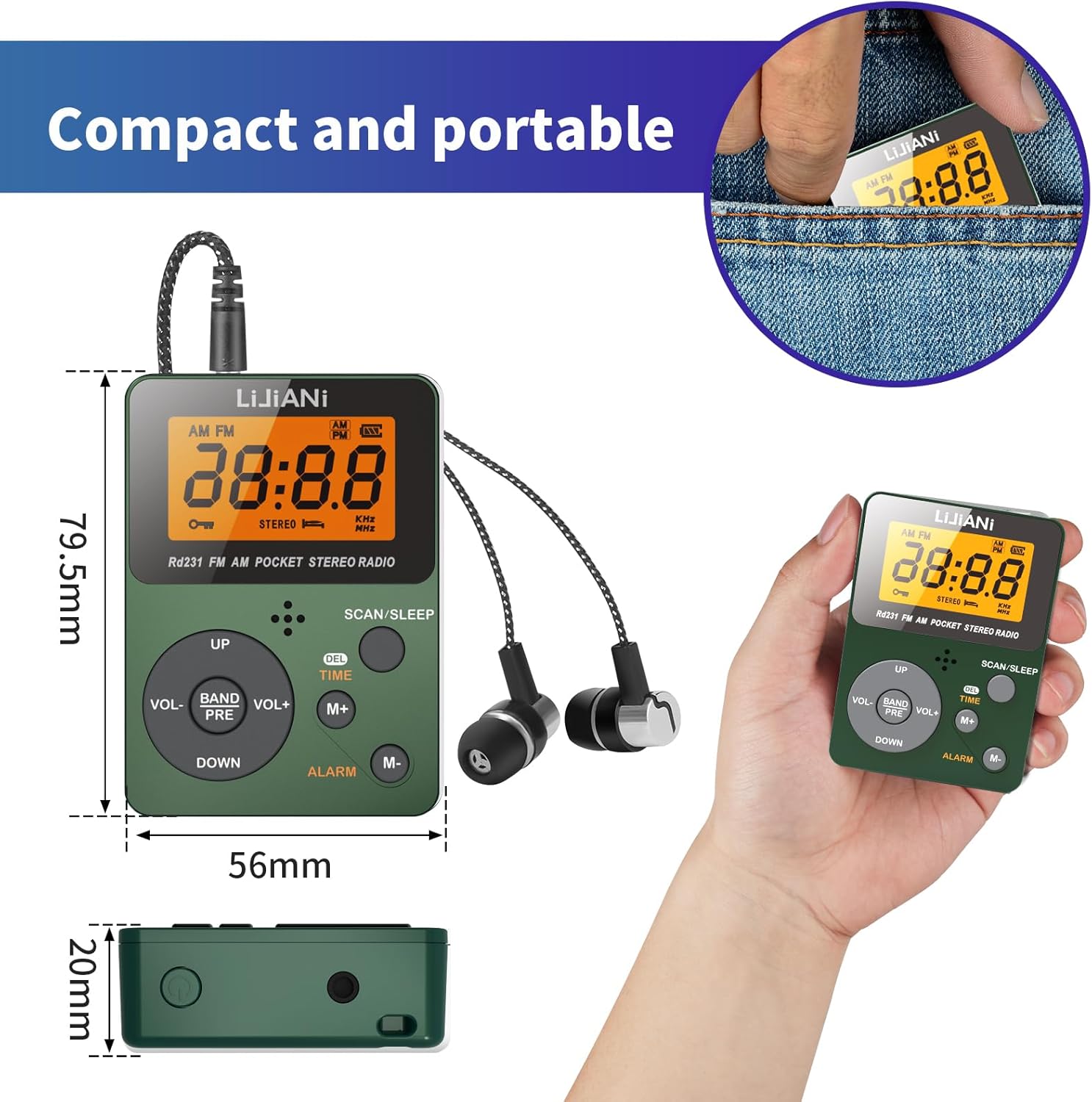
ຮູບພາບ 7.1: A visual comparison of the LIJIANI SH-01 radio's dimensions against a standard credit card, highlighting its compact and mini portable design.
8. ການຮັບປະກັນແລະການສະຫນັບສະຫນູນ
LIJIANI products are designed for reliability and performance. For warranty information and customer support, please refer to the contact details provided with your purchase or visit the official LIJIANI webເວັບໄຊ.
ກະລຸນາຮັກສາຫຼັກຖານການຊື້ຂອງທ່ານສໍາລັບການຮຽກຮ້ອງການຮັບປະກັນໃດໆ.