
SHARP KN-HW16H-B
SHARP Healsio Hot Cook KN-HW16H-B 1.6L Automatic Cooking Pot User Manual
Model: KN-HW16H-B
1. ບົດແນະນຳ
ຂອບໃຈສໍາລັບການຊື້asing the SHARP Healsio Hot Cook KN-HW16H-B Automatic Cooking Pot. This appliance is designed to simplify your cooking process by offering automatic, waterless cooking and various convenient features. Please read this manual thoroughly before use to ensure safe and optimal operation.
For more information and recipes, please visit the official SHARP website or consult the recipe book included with your product.

Image: The SHARP Healsio Hot Cook KN-HW16H-B Automatic Cooking Pot, black color.
2. ຂໍ້ຄວນລະວັງຄວາມປອດໄພ
ປະຕິບັດຕາມຄວາມລະມັດລະວັງດ້ານຄວາມປອດໄພຂັ້ນພື້ນຖານສະເໝີເມື່ອໃຊ້ເຄື່ອງໃຊ້ໄຟຟ້າເພື່ອຫຼຸດຜ່ອນຄວາມສ່ຽງຕໍ່ການເກີດອັກຄີໄພ, ໄຟໄໝ້, ແລະ/ຫຼື ການບາດເຈັບຕໍ່ຄົນ.
- ຢ່າເອົາຫົວຫນ່ວຍຫຼັກໄວ້ໃນນໍ້າ ຫຼືນໍ້າອື່ນໆ.
- ກວດໃຫ້ແນ່ໃຈວ່າໄດ້ສຽບສາຍໄຟເຂົ້າກັບປລັກສຽບສາຍໄຟຢ່າງປອດໄພ.
- ຮັກສາໃຫ້ໄກຈາກເດັກນ້ອຍ.
- Do not operate if the appliance or power cord is damaged.
- ຖອດປລັກເຄື່ອງທຸກຄັ້ງເມື່ອບໍ່ໄດ້ໃຊ້ ແລະກ່ອນທຳຄວາມສະອາດ.
3. ອົງປະກອບ ແລະ ຂະໜາດຂອງຜະລິດຕະພັນ
Familiarize yourself with the parts of your Healsio Hot Cook.
- Main Unit
- ຫມໍ້ໃນ
- ຝາປິດ
- Stirring Unit
- ສາຍໄຟ

Image: The SHARP Healsio Hot Cook KN-HW16H-B with dimensions indicated. Height: 24.0cm, Width: 33.0cm, Depth: 28.2cm.
4. ຕັ້ງຄ່າ
- ການຫຸ້ມຫໍ່: Carefully remove all packaging materials and accessories. Retain packaging for future transport if needed.
- ທໍາຄວາມສະອາດເບື້ອງຕົ້ນ: Before first use, wash the inner pot, lid, and stirring unit with warm soapy water. Rinse thoroughly and dry. Wipe the exterior of the main unit with a damp ຜ້າ.
- ການຈັດວາງ: Place the appliance on a stable, flat, heat-resistant surface, away from direct sunlight and heat sources. Ensure adequate ventilation around the unit.
- ການເຊື່ອມຕໍ່ພະລັງງານ: Connect the power cord to the appliance and then to a suitable electrical outlet.
5. ຄໍາແນະນໍາການດໍາເນີນງານ
5.1 Basic Automatic Cooking
The Healsio Hot Cook simplifies cooking by automatically adjusting heat and stirring. Simply add ingredients and seasonings, select a menu, and start cooking.
- Place ingredients and seasonings into the inner pot.
- ປິດຝາຢ່າງປອດໄພ.
- Select the desired cooking menu from the control panel.
- Press the Start button. The appliance will automatically cook the dish.

Image: The SHARP Healsio Hot Cook demonstrating automatic waterless cooking, with various dishes prepared.
5.2 Automatic Stirring Function
The built-in stirring unit ensures even cooking and prevents food from sticking. It stirs ingredients during heating, allowing flavors to penetrate thoroughly and resulting in a consistent, delicious finish.
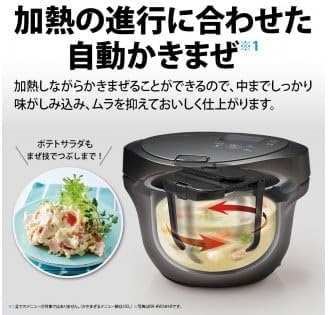
Image: Diagram showing the automatic stirring mechanism inside the SHARP Healsio Hot Cook, illustrating how it mixes ingredients.
5.3 Triple Sensor Technology
The appliance utilizes three sensors (temperature, steam, and load) to precisely monitor the cooking environment and the state of the ingredients. This allows for fine-tuned automatic heat adjustment, ensuring optimal cooking results.
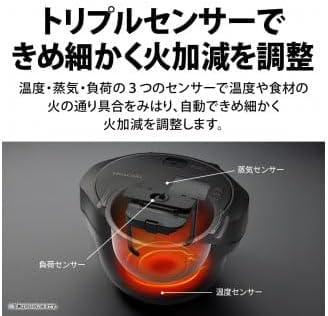
Image: Diagram illustrating the location of the three sensors (temperature, steam, and load) within the SHARP Healsio Hot Cook.
5.4 Reservation Cooking
The reservation cooking function allows you to set a delayed start time, so your meal is ready when you need it. This feature can be set for up to 15 hours, considering food hygiene.
- ກະກຽມສ່ວນປະກອບແລະວາງໄວ້ໃນຫມໍ້ພາຍໃນ.
- Select a menu that supports reservation cooking.
- Set the desired finish time using the control panel.
- Press the Start button. The appliance will begin cooking at the appropriate time to finish at your set time.
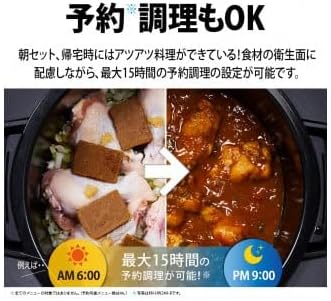
ຮູບພາບ: Example of reservation cooking on the SHARP Healsio Hot Cook, showing ingredients placed in the pot at 6:00 AM for a meal ready by 9:00 PM.
6. ການບໍາລຸງຮັກສາແລະການທໍາຄວາມສະອາດ
ການເຮັດຄວາມສະອາດເປັນປະຈຳຮັບປະກັນອາຍຸການໃຊ້ງານທີ່ຍາວນານ ແລະ ມີສຸຂະອະນາໄມຂອງເຄື່ອງໃຊ້ຂອງທ່ານ.
- ກ່ອນທໍາຄວາມສະອາດ: ຖອດປລັກເຄື່ອງທຸກຄັ້ງ ແລະປ່ອຍໃຫ້ມັນເຢັນຫມົດກ່ອນທໍາຄວາມສະອາດ.
- Inner Pot and Stirring Unit: These parts are removable and can be washed with warm soapy water or placed in a dishwasher (refer to specific instructions for dishwasher compatibility).
- ຝາປິດ: The lid can be detached and washed with warm soapy water. Ensure all food residues are removed.
- ໜ່ວຍບໍລິການຫຼັກພາຍນອກ: ເຊັດພາຍນອກດ້ວຍຜ້າອ່ອນ, ງamp ຜ້າ. ຫ້າມໃຊ້ເຄື່ອງເຮັດຄວາມສະອາດຂັດຫຼືຈຸ່ມຫົວໜ່ວຍຫຼັກໃນນ້ຳ.
- Easy-Clean Coat: The bottom heating plate of the main unit features an easy-clean coating, making it simple to wipe away spills and dirt with a damp ຜ້າ.

Image: A hand wiping the interior base of the SHARP Healsio Hot Cook, demonstrating the easy-clean coating.
7. ການແກ້ໄຂບັນຫາ
If you encounter issues with your Healsio Hot Cook, please refer to the following common problems and solutions:
| ບັນຫາ | ສາເຫດທີ່ເປັນໄປໄດ້ | ການແກ້ໄຂ |
|---|---|---|
| ເຄື່ອງໃຊ້ບໍ່ໄດ້ເປີດ. | ສາຍໄຟບໍ່ໄດ້ເຊື່ອມຕໍ່ຢ່າງຖືກຕ້ອງ. | Check if the power cord is securely plugged into both the appliance and the outlet. |
| ອາຫານບໍ່ໄດ້ແຕ່ງຢູ່ສະເຫມີ. | Ingredients not properly distributed or stirring unit not installed correctly. | Ensure ingredients are spread evenly. Verify the stirring unit is correctly attached. |
| ຂໍ້ຄວາມຜິດພາດສະແດງອອກ. | ສະພາບຄວາມຜິດພາດສະເພາະ. | Refer to the detailed error code list in the full product manual or contact customer support. |
ຖ້າບັນຫາຍັງຄົງຢູ່ຫຼັງຈາກພະຍາຍາມແກ້ໄຂບັນຫາເຫຼົ່ານີ້ແລ້ວ, ກະລຸນາຕິດຕໍ່ຫາຝ່າຍສະໜັບສະໜູນລູກຄ້າຂອງ SHARP.
8. ຂໍ້ມູນຈໍາເພາະ
| ຍີ່ຫໍ້ | ແຫຼມ |
| ໝາຍເລກຕົວແບບ | KN-HW16H-B |
| ຄວາມອາດສາມາດ | 1.6 ລິດ |
| ສີ | ດຳ |
| ຂະໜາດສິນຄ້າ (ກວ້າງ x ຍາວ x ສູງ) | 30.5ຊມ x 33.4ຊມ x 39.5ຊມ |
| ອົງປະກອບລວມ | ສາຍໄຟ |
| ປະເພດຜະລິດຕະພັນ | ເຄື່ອງປຸງແຕ່ງອາຫານ |
9. ການຮັບປະກັນແລະການສະຫນັບສະຫນູນ
This product comes with a manufacturer's warranty. Please refer to the warranty card included with your purchase for details on coverage and duration. For technical support, service, or inquiries, please contact SHARP customer service through their official webເວັບໄຊ ຫຼືຂໍ້ມູນຕິດຕໍ່ທີ່ສະໜອງໃຫ້ຢູ່ໃນເອກະສານຜະລິດຕະພັນຂອງທ່ານ.
SHARP Official Webເວັບໄຊ: https://jp.sharp/hotcook/
Ask a question about this manual
Ask about setup, troubleshooting, compatibility, parts, safety, or missing instructions. Manuals+ will review the question and use this page’s manual context to help answer it.