ແນະນຳ
This document provides essential instructions for the use and maintenance of your Generic replacement remote control. This remote is specifically designed to be compatible with Ridgeway QS-2821 and QS-855 portable stereo power amplifiers, offering a direct replacement for your original remote without requiring any programming.
Please read this manual thoroughly to ensure proper operation and longevity of your remote control.
ການຕັ້ງຄ່າ: ການຕິດຕັ້ງແບັດເຕີຣີ
The remote control requires batteries for operation. Batteries are not included in the package and must be purchased separately.
- ຊອກຫາຊ່ອງໃສ່ຫມໍ້ໄຟຢູ່ດ້ານຫຼັງຂອງການຄວບຄຸມໄລຍະໄກ.
- ເລື່ອນເປີດcoverາປົກຊ່ອງຂອງbatteryໍ້ໄຟ.
- ແຊກ ແບັດເຕີຣີ AAA ໜຶ່ງ (1) ກ້ອນ, ຮັບປະກັນວ່າຂົ້ວບວກ (+) ແລະ ຂົ້ວລົບ (-) ສອດຄ່ອງກັບເຄື່ອງໝາຍພາຍໃນຊ່ອງຢ່າງຖືກຕ້ອງ.
- ປິດຝາປິດຊ່ອງໃສ່ຫມໍ້ໄຟຢ່າງປອດໄພ.
Once new batteries are inserted, the remote control is ready for immediate use with your compatible Ridgeway ampມີຊີວິດຊີວາ.
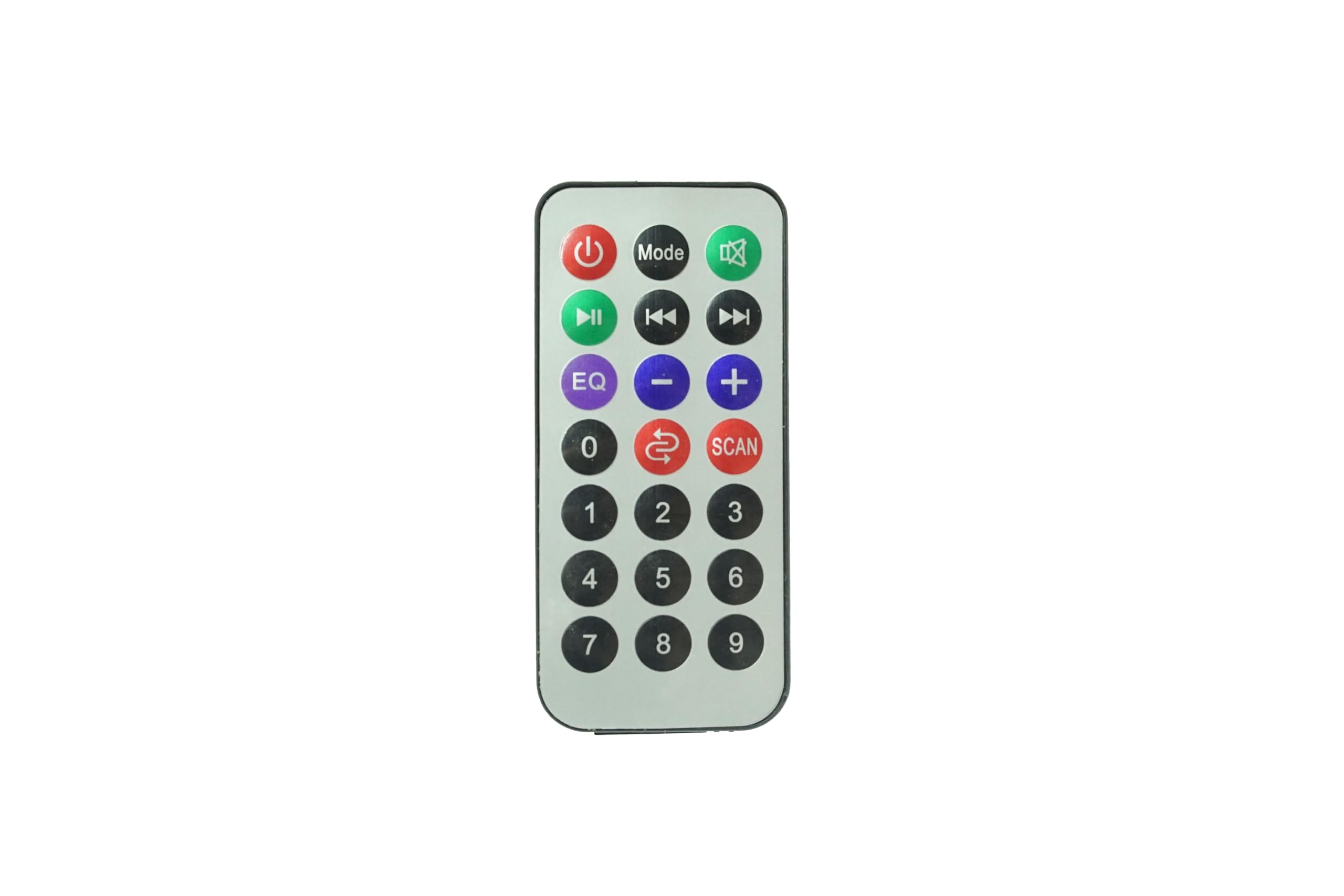
ຮູບພາບ: ທາງຫນ້າ view of the Generic Replacement Remote Control. This image displays the layout of buttons including power, volume, and navigation controls, designed for compatibility with Ridgeway QS-2821 and QS-855 ampຜູ້ຊ່ວຍຊີວິດ.
ຄໍາແນະນໍາການດໍາເນີນງານ
This replacement remote control is pre-programmed and requires no additional setup or coding. It functions identically to the original remote control for your Ridgeway QS-2821 or QS-855 ampມີຊີວິດຊີວາ.
To operate your ampມີຊີວິດຊີວາ:
- ເປີດ/ປິດ: ກົດ ພະລັງງານ ປຸ່ມເພື່ອຫັນ ampຊີວິດເປີດຫຼືປິດ.
- ການຄວບຄຸມລະດັບສຽງ: ໃຊ້ ປະລິມານ + ແລະ ປະລິມານ - ປຸ່ມເພື່ອປັບລະດັບສຽງ.
- ການຄັດເລືອກການປ້ອນຂໍ້ມູນ: ໃຊ້ ປ້ອນຂໍ້ມູນ or source buttons to switch between different audio inputs (e.g., AUX, USB, Bluetooth).
- ການຄວບຄຸມການຫຼິ້ນ: For media playback, use buttons such as ຫຼິ້ນ/ຢຸດຊົ່ວຄາວ, ຂ້າມໄປທາງ ໜ້າ, ແລະ ຂ້າມຄືນ.
- ປິດສຽງ: ກົດ ປິດສຽງ ປຸ່ມເພື່ອປິດສຽງຊົ່ວຄາວ.
Ensure there is a clear line of sight between the remote control and the infrared (IR) receiver on your amplifier ສໍາລັບການປະຕິບັດທີ່ດີທີ່ສຸດ.
ບໍາລຸງຮັກສາ
- ທໍາຄວາມສະອາດ: ເຊັດການຄວບຄຸມໄລຍະໄກດ້ວຍຜ້າອ່ອນ, ແຫ້ງ. ຢ່າໃຊ້ເຄື່ອງເຮັດຄວາມສະອາດຂອງແຫຼວຫຼືວັດສະດຸຂັດ, ເພາະວ່າພວກມັນອາດຈະທໍາລາຍພື້ນຜິວຫຼືອົງປະກອບພາຍໃນ.
- ການປ່ຽນແບັດເຕີຣີ: Replace batteries when the remote control's response becomes sluggish or stops working. Always replace with new batteries of the specified type (AAA).
- ການເກັບຮັກສາ: ເກັບຮັກສາຣີໂໝດຄວບຄຸມໄວ້ໃນບ່ອນທີ່ເຢັນ, ແຫ້ງ, ຫ່າງຈາກແສງແດດໂດຍກົງ ແລະ ອຸນຫະພູມທີ່ຮຸນແຮງ. ຖ້າບໍ່ໄດ້ໃຊ້ຣີໂໝດເປັນເວລາດົນ, ໃຫ້ຖອດແບັດເຕີຣີອອກເພື່ອປ້ອງກັນການຮົ່ວໄຫຼ.
- ຫຼີກລ້ຽງການຫຼຸດລົງ: Protect the remote from physical impact, as drops can damage internal circuitry.
ການແກ້ໄຂບັນຫາ
| ບັນຫາ | ສາເຫດທີ່ເປັນໄປໄດ້ | ການແກ້ໄຂ |
|---|---|---|
| ການຄວບຄຸມໄລຍະໄກບໍ່ເຮັດວຽກ. |
|
|
| ປຸ່ມບໍ່ຕອບສະໜອງ ຫຼືຊັກຊ້າ. |
|
|
| Remote works for some functions but not others. |
|
|
ຂໍ້ມູນຈໍາເພາະ
- ຍີ່ຫໍ້: ທົ່ວໄປ
- ອຸປະກອນທີ່ເຂົ້າກັນໄດ້: Ridgeway QS-2821, Ridgeway QS-855 Portable Stereo Power Ampຜູ້ຊ່ວຍຊີວິດ
- ຄຸນນະສົມບັດພິເສດ: ບໍ່ຈໍາເປັນຕ້ອງມີການຂຽນໂປລແກລມ
- ປະເພດຕົວເຊື່ອມຕໍ່: ອິນຟາເລດ (IR)
- ແບັດເຕີຣີທີ່ຕ້ອງການ: 1 x AAA (ບໍ່ລວມ)
- ຈຳນວນສູງສຸດຂອງອຸປະກອນທີ່ຮອງຮັບ: 1
- ສີ: ດັ່ງທີ່ສະແດງ
ການຮັບປະກັນແລະການສະຫນັບສະຫນູນ
Specific warranty information for this Generic replacement remote control is not provided in the product details. For any warranty claims, technical support, or inquiries regarding your purchase, please contact the seller directly through the platform where the item was purchased.
ກະລຸນາເກັບຫຼັກຖານການຊື້ຂອງທ່ານໄວ້ສຳລັບການຮ້ອງຂໍການຊ່ວຍເຫຼືອໃດໆ.