
1. ຂໍ້ມູນຄວາມປອດໄພທີ່ສໍາຄັນ
- ຫ້າມຖອດອອກ ຫຼື ດັດແປງຫູຟັງເອຍບັດ ຫຼື ກ່ອງສາກໄຟ.
- Keep the device away from extreme temperatures, humidity, and liquids.
- ຫຼີກເວັ້ນການສໍາຜັດກັບລະດັບສຽງສູງເປັນເວລາດົນນານເພື່ອປ້ອງກັນຄວາມເສຍຫາຍຂອງການໄດ້ຍິນ.
- ໃຊ້ພຽງແຕ່ສາຍສາກທີ່ສະໜອງໃຫ້ ຫຼືໄດ້ຮັບການຮັບຮອງເທົ່ານັ້ນ.
- ກໍາຈັດຜະລິດຕະພັນຢ່າງມີຄວາມຮັບຜິດຊອບຕາມລະບຽບການທ້ອງຖິ່ນ.
2. ເນື້ອໃນຊຸດ
ກະລຸນາກວດເບິ່ງເນື້ອໃນຂອງແພັກເກດເມື່ອເປີດ:
- ຫູຟັງໄຮ້ສາຍ (2)
- ຕູ້ສາກໄຟ (1)
- ສາຍສາກ Type-C (1)
- ຄູ່ມືຜູ້ໃຊ້ (1)

Image: Contents of the Jxrev J51 Wireless Earbuds package.
3. ຜະລິດຕະພັນເກີນview
The Jxrev J51 Wireless Earbuds offer a high-quality audio experience with advanced features. They are designed for comfort and convenience, suitable for various activities.
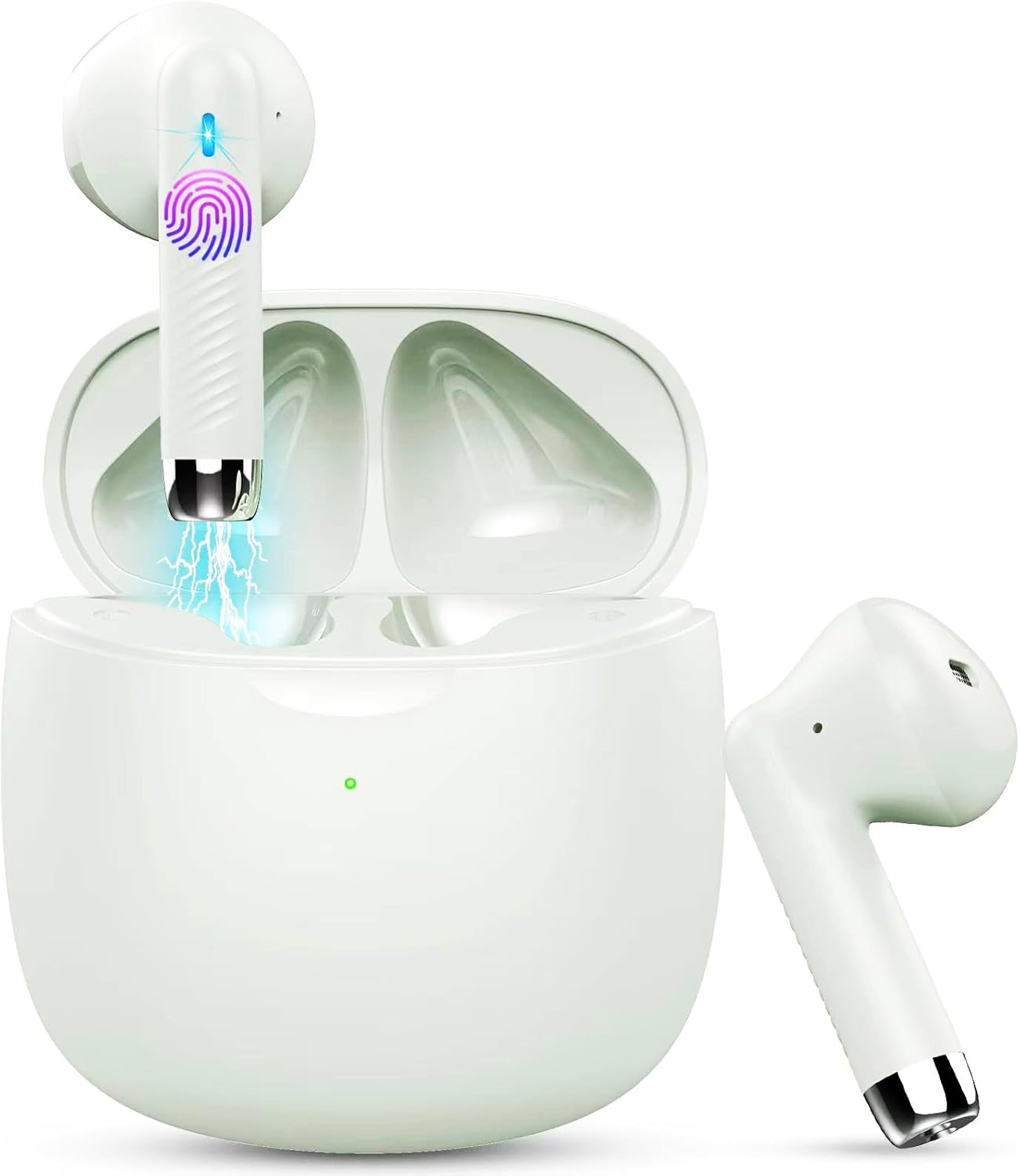
Image: Jxrev J51 Wireless Earbuds and their charging case.
ຄຸນນະສົມບັດທີ່ສໍາຄັນ:
- ເທັກໂນໂລຍີ Bluetooth 5.4: Provides a stable and fast wireless connection.
- 13mm Dynamic Drivers: Delivers clear audio with enhanced bass.
- IP7 ລະດັບກັນນ້ໍາ: Resistant to sweat and splashes, ideal for sports.
- ການຄວບຄຸມການສໍາພັດ: Intuitive control for music, calls, and voice assistant.
- ການອອກແບບນ້ຳໜັກເບົາ: ຫູຟັງເອຍບັດແຕ່ລະອັນມີນໍ້າໜັກປະມານ 3g ສຳລັບການສວມໃສ່ທີ່ສະດວກສະບາຍ.

Image: Illustration of the 13mm dynamic driver for audio quality.

ຮູບພາບ: ພາຍໃນ view of an earbud showcasing the Bluetooth chip for stable connectivity.
4. ການຕິດຕັ້ງແລະການນໍາໃຊ້ຄັ້ງທໍາອິດ
4.1 ການສາກແບັດ ແລະຫູຟັງ
- ຄ່າ ທຳ ນຽມ: ກ່ອນທີ່ຈະໃຊ້ຄັ້ງທຳອິດ, ໃຫ້ສາກຊ່ອງສາກ ແລະຫູຟັງຫູຟັງໃຫ້ເຕັມ.
- ເຊື່ອມຕໍ່ສາຍ: Insert the Type-C charging cable into the charging port on the case and connect the other end to a USB power source.
- ຕົວຊີ້ບອກການສາກໄຟ: The indicator light on the charging case will show the charging status. A full charge typically takes about 1 hour for the case.
- ການສາກຫູຟັງ: ວາງຫູຟັງໃສ່ກະເປົ໋າສາກໄຟ. ພວກເຂົາຈະເລີ່ມສາກໄຟໂດຍອັດຕະໂນມັດ.

Image: Charging case with earbuds, illustrating USB-C charging and battery capacity.
4.2 ການຈັບຄູ່ກັບອຸປະກອນຂອງທ່ານ
ຫູຟັງມີການຈັບຄູ່ຂັ້ນຕອນດຽວເພື່ອຄວາມສະດວກສະບາຍ.
- ເປີດ: ເປີດກ່ອງສາກໄຟ. ຫູຟັງເອຍບັດຈະເປີດເຄື່ອງອັດຕະໂນມັດ ແລະເຂົ້າສູ່ໂໝດຈັບຄູ່.
- ເປີດໃຊ້ Bluetooth: ໃນສະມາດໂຟນຂອງທ່ານ ຫຼືອຸປະກອນທີ່ເປີດໃຊ້ Bluetooth, ໃຫ້ໄປທີ່ການຕັ້ງຄ່າ Bluetooth ແລະເປີດ Bluetooth.
- ເລືອກອຸປະກອນ: Look for 'J51' in the list of available devices and select it to connect.
- ການຢືນຢັນ: ເມື່ອເຊື່ອມຕໍ່ແລ້ວ, ທ່ານຈະໄດ້ຍິນສຽງເຕືອນ, ແລະຫູຟັງເອຍບັດຈະພ້ອມໃຫ້ໃຊ້.
- ເຊື່ອມຕໍ່ຄືນໃໝ່ອັດຕະໂນມັດ: ຫຼັງຈາກການຈັບຄູ່ເບື້ອງຕົ້ນ, ຫູຟັງເອຍບັດຈະເຊື່ອມຕໍ່ກັບອຸປະກອນທີ່ຈັບຄູ່ສຸດທ້າຍໂດຍອັດຕະໂນມັດເມື່ອເອົາອອກຈາກເຄສ.

Image: Visual guide for one-step Bluetooth pairing with a smartphone.
5. ຄໍາແນະນໍາການດໍາເນີນງານ
5.1 ການໃສ່ຫູຟັງ
The J51 earbuds are designed for an ergonomic and secure fit.
- ລະບຸຊ້າຍ/ຂວາ: Locate the 'L' and 'R' markings on each earbud.
- ແຊກ: ສຽບຫູຟັງໃສ່ຊ່ອງຫູຂອງເຈົ້າຄ່ອຍໆ.
- ປັບ: Rotate the earbud slightly until it feels comfortable and secure. The lightweight design ensures minimal pressure.

Image: Demonstrating the lightweight and ergonomic fit of the earbuds.
5.2 ແຕະການຄວບຄຸມ
The earbuds feature touch-sensitive areas for easy control of various functions.

Image: Comprehensive guide to earbud touch controls.
| ການປະຕິບັດ | ຫູຟັງຊ້າຍ (L) | ຫູຟັງຂວາ (R) |
|---|---|---|
| ຫຼິ້ນ/ຢຸດຊົ່ວຄາວ | ຄລິກສອງຄັ້ງ | ຄລິກສອງຄັ້ງ |
| ເພງຕໍ່ໄປ | ບໍ່ມີ | ຖື 2 ວິນາທີ |
| ເພງກ່ອນໜ້າ | ຖື 2 ວິນາທີ | ບໍ່ມີ |
| ປະລິມານລົງ | ຄລິກດຽວ | ບໍ່ມີ |
| ປະລິມານຂຶ້ນ | ບໍ່ມີ | ຄລິກດຽວ |
| ຕອບ/ວາງສາຍ | ຄລິກສອງຄັ້ງ | ຄລິກສອງຄັ້ງ |
| ປະຕິເສດການໂທ | ຖື 2 ວິນາທີ | ຖື 2 ວິນາທີ |
| ເປີດໃຊ້ຜູ້ຊ່ວຍສຽງ | ກົດສາມເທື່ອ | ກົດສາມເທື່ອ |
5.3 Mono Mode (Single Earbud Use)
You can use either the left or right earbud independently. Simply take one earbud out of the charging case, and it will automatically connect to your device. The other earbud can remain in the case or be used by another person in 'Sharing mode' if desired.
5.4 Binaural Mode (Both Earbuds Use)
For stereo sound, use both earbuds. They will automatically pair with each other and your device when removed from the charging case.

Image: Depiction of Mono and Twin (Binaural) usage modes.
5.5 ຜູ້ຊ່ວຍສຽງ
Triple-click either earbud to activate your device's voice assistant (e.g., Siri, Google Assistant).

Image: Activating the voice assistant feature.
6. ການບໍາລຸງຮັກສາແລະການດູແລ
6.1 ການທໍາຄວາມສະອາດ
- ອະນາໄມຫູຟັງຫູຟັງ ແລະກະເປົ໋າສາກໄຟເປັນປະຈຳດ້ວຍຜ້າແພທີ່ອ່ອນ, ແຫ້ງ, ບໍ່ມີສານຂັດ.
- ຢ່າໃຊ້ເຄື່ອງເຮັດຄວາມສະອາດຂັດ, ເຫຼົ້າ, ຫຼືສານລະລາຍສານເຄມີ.
- ໃຫ້ແນ່ໃຈວ່າຈຸດສາກໄຟຢູ່ຫູຟັງທັງສອງຂ້າງ ແລະ ກ່ອງແມ່ນສະອາດ ແລະ ແຫ້ງເພື່ອການສາກໄຟທີ່ດີທີ່ສຸດ.
6.2 ກັນນ້ຳ (IP7)
The Jxrev J51 earbuds are IP7 waterproof, meaning they are protected against temporary immersion in water. This makes them suitable for workouts and use in light rain.
- ຢ່າຈຸ່ມຫູຟັງລົງໃນນໍ້າໂດຍເຈດຕະນາເປັນເວລາດົນ.
- ກະເປົ໋າສາກໄຟບໍ່ໄດ້ກັນນໍ້າ. ຮັກສາມັນໃຫ້ແຫ້ງ.
- ກວດໃຫ້ແນ່ໃຈວ່າຫູຟັງເອຍບັດແຫ້ງໝົດກ່ອນທີ່ຈະເອົາມັນກັບໃສ່ກ່ອງສາກເພື່ອປ້ອງກັນຄວາມເສຍຫາຍ.

Image: Earbuds demonstrating IP7 waterproof capability.
6.3 ການເກັບຮັກສາ
ເມື່ອບໍ່ໄດ້ໃຊ້, ໃຫ້ເກັບຫູຟັງເອຍບັດໃສ່ໃນກະເປົ໋າສາກໄຟເພື່ອປົກປ້ອງພວກມັນ ແລະ ສືບຕໍ່ສາກໄຟ.
7. ການແກ້ໄຂບັນຫາ
ຖ້າຫາກທ່ານພົບບັນຫາໃດຫນຶ່ງ, ກະລຸນາເບິ່ງວິທີແກ້ໄຂທົ່ວໄປດັ່ງຕໍ່ໄປນີ້:
- ຫູຟັງຫູຟັງບໍ່ໄດ້ຈັບຄູ່ກັນ: Place both earbuds back into the charging case, close the lid for a few seconds, then open it again. They should automatically re-sync.
- Earbuds ບໍ່ເຊື່ອມຕໍ່ກັບອຸປະກອນ:
- ໃຫ້ແນ່ໃຈວ່າ Bluetooth ຖືກເປີດໃຊ້ຢູ່ໃນອຸປະກອນຂອງທ່ານ.
- Delete 'J51' from your device's Bluetooth history and try pairing again.
- ກວດໃຫ້ແນ່ໃຈວ່າໄດ້ສາກຫູຟັງຫູຟັງແລ້ວ.
- ບໍ່ມີສຽງຈາກຫູຟັງອັນໜຶ່ງ: Place both earbuds back in the case, close the lid, then open it again. Check if both are connected.
- ບັນຫາການສາກໄຟ:
- ກວດສອບສາຍສາກໄຟ ແລະ ອະແດບເຕີ.
- Ensure the charging contacts on the earbuds and case are clean and free of debris.
- ການຄວບຄຸມການສໍາພັດທີ່ບໍ່ຕອບສະໜອງ: ໃຫ້ແນ່ໃຈວ່ານິ້ວມືຂອງທ່ານສະອາດແລະແຫ້ງ. ລອງຣີສະຕາດຫູຟັງເອຍບັດໂດຍການວາງໃສ່ໃນກໍລະນີ ແລະຖອດມັນອອກອີກຄັ້ງ.
8. ຂໍ້ມູນຈໍາເພາະ
| ຊື່ຕົວແບບ | J51 |
| ເຕັກໂນໂລຊີການເຊື່ອມຕໍ່ | ໄຮ້ສາຍ (Bluetooth) |
| ລຸ້ນ Bluetooth | 5.4 |
| ຊ່ວງ Bluetooth | ເຖິງ 15 ແມັດ |
| ຂະໜາດໄດເວີສຽງ | 13 ມິນລິແມັດ |
| ຊ່ວງຄວາມຖີ່ | 20Hz - 20,000Hz |
| impedance | 40 ໂອມ |
| ລະດັບຄວາມຕ້ານທານນ້ໍາ | ກັນນໍ້າ IP7 |
| ນ້ ຳ ໜັກ ຕຸ້ມຫູ | Approx. 3 Grams (each) |
| ອາຍຸການສາກແບັດ | ສູງສຸດ 32 ຊົ່ວໂມງ (ພ້ອມກ່ອງ) |
| ເວລາຫຼິ້ນດຽວ | 6-8 ຊົ່ວໂມງ |
| ເວລາສາກໄຟ (ກໍລະນີ) | Approx. 1 Hour (USB-C) |
| ປະເພດການຄວບຄຸມ | ແຕະການຄວບຄຸມ |
| ອຸປະກອນທີ່ເຂົ້າກັນໄດ້ | Cellphones, PCs, Tablets, Laptops, TVs |
9. ການຮັບປະກັນແລະການສະຫນັບສະຫນູນ
Jxrev products are designed for reliability and performance. For specific warranty details, please refer to the warranty card included in your product packaging or contact Jxrev customer support.
ການຊ່ວຍເຫຼືອລູກຄ້າ:
If you have any questions, concerns, or require technical assistance, please contact Jxrev customer support through the official webເວັບໄຊ ຫຼືຂໍ້ມູນຕິດຕໍ່ທີ່ສະໜອງໃຫ້ຢູ່ໃນເອກະສານຜະລິດຕະພັນຂອງທ່ານ.