
1. ການແນະນໍາ ແລະຫຼາຍກວ່າview
This manual provides essential information for the setup, operation, and maintenance of your CHUWI Hi10 X2 Tablet Keyboard with Touchpad. Designed specifically for the CHUWI Hi10 X2 and Hi10 X1 Windows tablets, this 2-in-1 magnetic keyboard transforms your tablet into a versatile laptop, enhancing productivity and convenience.
The keyboard features a magnetic docking interface for seamless connection, eliminating the need for separate charging or Bluetooth pairing. Its ultra-slim and portable design makes it ideal for various uses, from business and education to everyday tasks and gaming.
2. ຄຸນລັກສະນະຂອງຜະລິດຕະພັນ
- Magnetic Docking Interface: Designed for CHUWI Hi10 X2 / Hi10 X1 Windows tablets, ensuring easy and stable connection.
- No Charging or Pairing Required: The docking magnetic suction design provides energy efficiency and a faster input response time compared to Bluetooth keyboards.
- ແຜງສຳຜັດປະສົມປະສານ: Supports multi-touch gestures for responsive navigation and control.
- ປະສົບການການພິມທີ່ປັບປຸງ: Features a borderless keyboard with well-spaced keys and optimized key travel for accuracy and comfort.
- ຟັງຊັນ 2-in-1: Transforms your tablet into a versatile laptop instantly, complete with a sturdy stand for optimal viewມຸມ.
- Ultra Slim and Portable: Lightweight and easy to attach or remove, making it convenient for travel and daily use.

Image: The CHUWI Hi10 X2 Tablet Keyboard provides an enhanced typing experience with its well-spaced keys, designed for comfort and precision.

Image: The high-precision touchpad supports multi-touch gestures for responsive navigation and control.
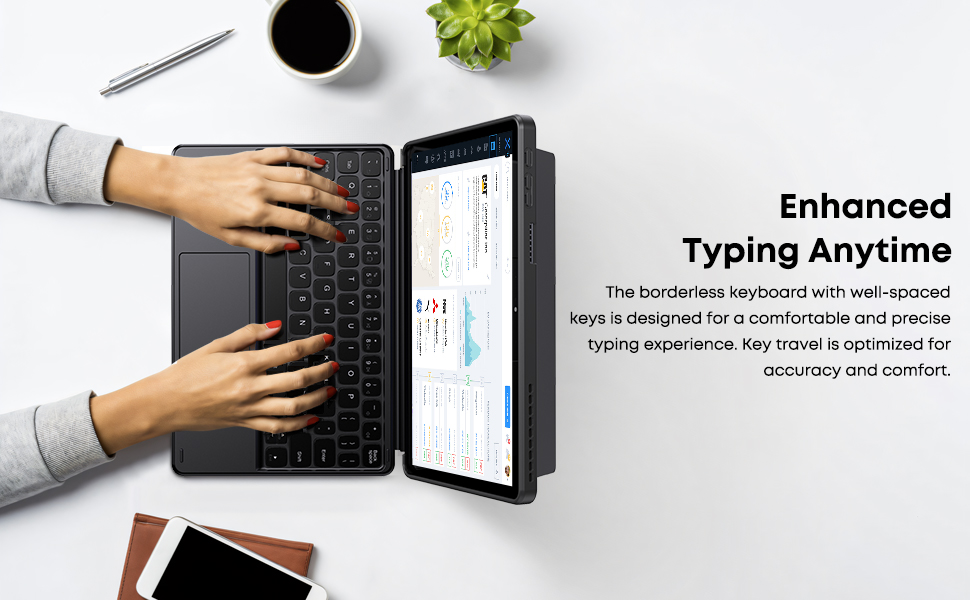
Image: The Smart Keyboard attaches magnetically to the Hi10 X1/X2 tablet, providing instant power and a great typing experience without needing charging or pairing.
3. ຕັ້ງຄ່າ
- ຕິດແປ້ນພິມ: Align the magnetic docking interface of the keyboard with the corresponding pins on your CHUWI Hi10 X2 or Hi10 X1 tablet. The magnets will guide the keyboard into place, establishing an instant connection.
- Using the Kickstand: The keyboard case includes a built-in stand. Fold out the stand from the back of the case to prop up your tablet at a comfortable viewing or typing angle.
- ການນໍາໃຊ້ເບື້ອງຕົ້ນ: No initial charging or Bluetooth pairing is required for the keyboard to function with your compatible CHUWI tablet once magnetically docked.
Video: This video demonstrates the installation of the CHUWI Hi10 X1 keyboard and showcases the protective case. It illustrates how to attach the tablet to the keyboard and utilize the case's features.
4. ຄໍາແນະນໍາການດໍາເນີນງານ
- ພິມ: Begin typing immediately after docking your tablet. The keyboard provides a familiar layout for efficient text input.
- ການໃຊ້ແຜ່ນສຳຜັດ: The integrated touchpad supports standard mouse functions and multi-touch gestures.
- ແຕະນິ້ວມືດຽວ: ຄລິກຊ້າຍ.
- ແຕະດ້ວຍສອງນິ້ວ: ຄລິກຂວາ.
- ເລື່ອນສອງນິ້ວ: ເລື່ອນຂຶ້ນ ຫຼື ລົງ.
- Pinch-to-zoom: ໃຊ້ສອງນິ້ວເພື່ອຊູມເຂົ້າ ຫຼືອອກ.
- Detaching the Keyboard: Gently pull the tablet away from the magnetic docking interface to detach the keyboard.
5. ບໍາລຸງຮັກສາ
- ທໍາຄວາມສະອາດ: Use a soft, dry, lint-free cloth to clean the keyboard and touchpad surfaces. For stubborn marks, slightly dampen ຜ້າທີ່ມີນ້ໍາ. ຫຼີກເວັ້ນການສານເຄມີທີ່ຮຸນແຮງຫຼືວັດສະດຸຂັດ.
- ການເກັບຮັກສາ: When not in use, keep the keyboard attached to the tablet to protect the screen and keys. Store in a cool, dry place away from direct sunlight and extreme temperatures.
- ການຈັດການ: Avoid placing heavy objects on the keyboard or bending it excessively to prevent damage to the keys or internal components.
6. ການແກ້ໄຂບັນຫາ
- ແປ້ນພິມບໍ່ຕອບສະໜອງ:
- Ensure the tablet is correctly docked to the magnetic interface.
- ຖອດແປ້ນພິມອອກ ແລະ ຕິດມັນຄືນໃໝ່ເພື່ອຕັ້ງຄ່າການເຊື່ອມຕໍ່ຄືນໃໝ່.
- Restart your CHUWI tablet.
- Touchpad Not Working:
- Check if the touchpad has been accidentally disabled (refer to your tablet's settings for input devices).
- Ensure the touchpad surface is clean and free from obstructions.
- Try detaching and reattaching the keyboard.
- ປຸ່ມຕິດ ຫຼື ບໍ່ຕອບສະໜອງ:
- Clean around the affected keys with a soft, dry brush or compressed air to remove any debris.
- ຫຼີກເວັ້ນການຮົ່ວໄຫລຂອງຂອງແຫຼວໃສ່ແປ້ນພິມ.
7. ຂໍ້ມູນຈໍາເພາະ
| ຍີ່ຫໍ້: | ຈູວີ |
| ໝາຍເລກຕົວແບບ: | CHUWI Hi10 X1 Tablet Keyboard (Compatible with Hi10 X2) |
| ອຸປະກອນທີ່ເຂົ້າກັນໄດ້: | Hi10 X1 tablet, Hi10 X2 tablet |
| ເຕັກໂນໂລຍີການເຊື່ອມຕໍ່: | Magnetic Docking Interface (faster than Bluetooth) |
| ລາຍລະອຽດແປ້ນພິມ: | Numeric (Standard QWERTY layout with touchpad) |
| ຄຸນນະສົມບັດພິເສດ: | Foldable, Lightweight, Portable, Integrated Touchpad, Magnetic Connection |
| ສີ: | ດຳ |
| ວັດສະດຸ: | ຊິລິໂຄນ |
| ນ້ໍາຫນັກລາຍການ: | 9.9 ອອນ |
| ຂະໜາດແພັກເກດ: | 9.88 x 7.8 x 0.67 ນິ້ວ |
| ອົງປະກອບລວມ: | Hi10 X1 Tablet Keyboard |
8. ການຮັບປະກັນແລະການສະຫນັບສະຫນູນ
Your CHUWI Hi10 X2 Tablet Keyboard is covered by a 1-year service period, valid immediately after purchase. CHUWI is committed to providing high-quality products and excellent service.
For any questions or support needs, CHUWI offers lifetime factory professional support and 24-hour online assistance. Please refer to the contact information provided with your tablet or visit the official CHUWI webເວັບໄຊທ for ສໍາລັບລາຍລະອຽດເພີ່ມເຕີມ.