
1. ບົດແນະນຳ
This manual provides detailed instructions for the installation, operation, and maintenance of your Inefala 1 DIN Android 13 Car Radio. This device features a 10.36-inch HD screen, 2GB RAM, 64GB ROM, wireless CarPlay, Android Auto, GPS navigation, Bluetooth 4.0, FM/RDS radio, and support for a backup camera. Please read this manual thoroughly before use to ensure proper functionality and safety.
2. ເນື້ອໃນຊຸດ
ກວດສອບວ່າລາຍການທັງຫມົດທີ່ລະບຸໄວ້ຂ້າງລຸ່ມນີ້ແມ່ນລວມຢູ່ໃນຊຸດຂອງທ່ານ. ຖ້າລາຍການໃດຂາດຫາຍໄປຫຼືເສຍຫາຍ, ກະລຸນາຕິດຕໍ່ຝ່າຍຊ່ວຍເຫຼືອລູກຄ້າ.
- 1 x Car Player Unit
- 1 x ສາຍໄຟ
- 2 x USB Data Cables
- ສາຍເຂົ້າກ້ອງຖ່າຍຮູບ 1 x
- ສາຍເຂົ້າ/ອອກ 1 x RCA
- ວົງແຫວນຂະ ໜາດ 1 x
- 1 x ເສົາອາກາດ GPS
- 1 x ຄູ່ມືຜູ້ໃຊ້
- 1 x ກ້ອງຖ່າຍຮູບສຳຮອງ
- 1 x ໄມໂຄຣໂຟນພາຍນອກ

Figure 2.1: Package Contents. This image displays the main car radio unit along with its various accessories, including cables, antenna, and camera.
3. ການຕິດຕັ້ງແລະການຕິດຕັ້ງ
3.1 ແຜນວາດສາຍ
Refer to the wiring diagram for correct connection of the car radio to your vehicle's electrical system. Incorrect wiring can cause damage to the unit or vehicle.
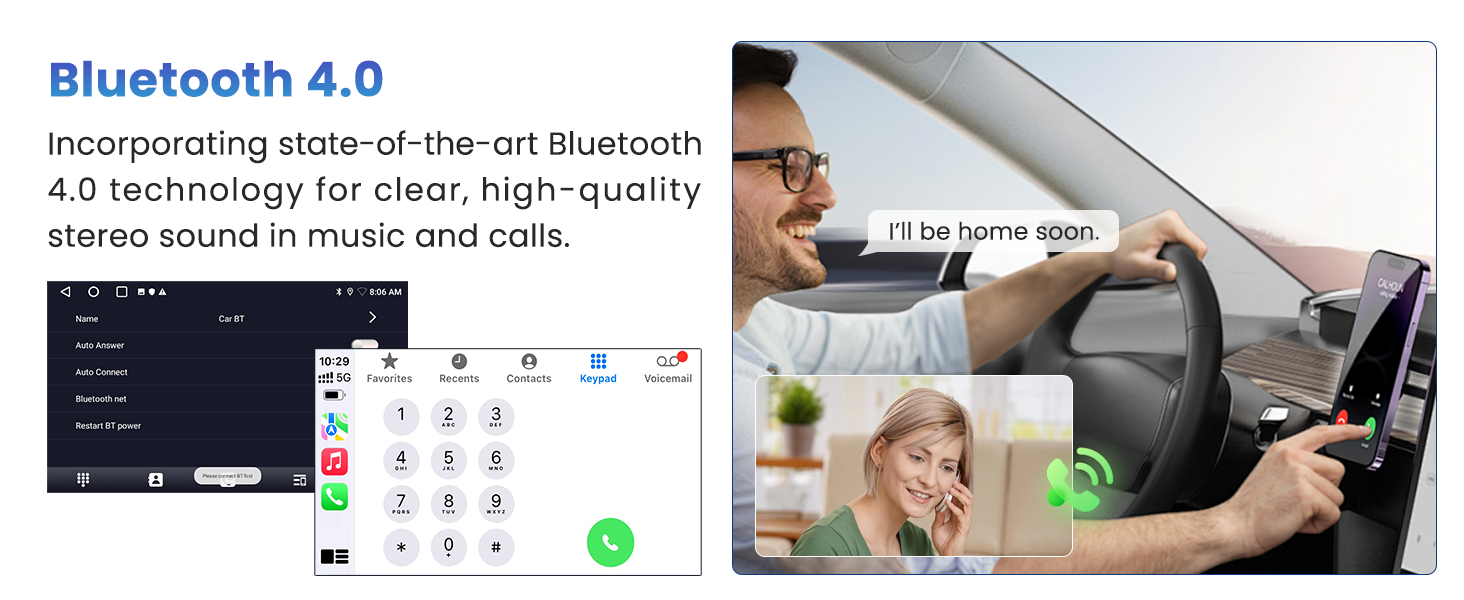
Figure 3.1: Stereo Wiring Diagram. This diagram illustrates the connections for the power cable, RCA cables, GPS antenna, USB cables, rear camera cable, and other audio inputs/outputs.
3.2 ການຕິດຕັ້ງ
Use the provided mounting bracket to secure the 1 DIN unit in your vehicle's dashboard. Ensure the unit is firmly in place to prevent movement during driving.
3.3 Original Car Feature Compatibility
The car radio is designed to integrate with certain original car features. Note that features not present in the original car will not be added by installing this unit.

Figure 3.2: Original Car Feature Compatibility. This image highlights features like steering wheel control, door open hint, factory amplifier, factory USB/AUX port, fuel information, and 360 camera/radar integration.
4. ຄໍາແນະນໍາການດໍາເນີນງານ
4.1 ເປີດ/ປິດ ແລະການໂຕ້ຕອບພື້ນຖານ
Press the power button to turn the unit on or off. The device runs on Android 13 with 2GB RAM and 64GB ROM, providing a smooth user experience.

Figure 4.1: Android OS Interface. This image displays multiple screens of the Android operating system, including music player, navigation, and app icons.
4.2 10.36-inch HD Touch Screen
The unit features a 10.36-inch 2.5D HD touch screen with a resolution of 1600*720, offering clear visuals and responsive touch control. The screen can also rotate for optimal viewing.

Figure 4.2: 10.36-inch HD Touch Screen. This image shows the car radio's large display with a vibrant landscape, emphasizing its high-definition capabilities.

Figure 4.3: Rotatable Screen. This image demonstrates the screen's ability to rotate, providing flexible viewມຸມ.
CarPlay ໄຮ້ສາຍ 4.3 ແລະ Android Auto
Connect your smartphone wirelessly or via USB to access CarPlay (for iOS) or Android Auto (for Android devices). This allows for seamless integration of phone functions like navigation, music, calls, and messages.

Figure 4.4: CarPlay and Android Auto. This image shows the user interfaces for both CarPlay and Android Auto, displaying common applications like Spotify, Waze, and phone functions.

Figure 4.5: CarPlay/Android Auto Connectivity. This image illustrates the USB and WiFi connection methods for CarPlay and Android Auto, along with examples of features like GPS navigation and hands-free calling.
4.4 GPS Navigation
The unit includes a built-in GPS module supporting online navigation via Wi-Fi and offline maps. Connect to a Wi-Fi hotspot for real-time traffic updates and online map services.

Figure 4.6: GPS Navigation. This image shows the car radio displaying a navigation map with a route, indicating accurate positioning.
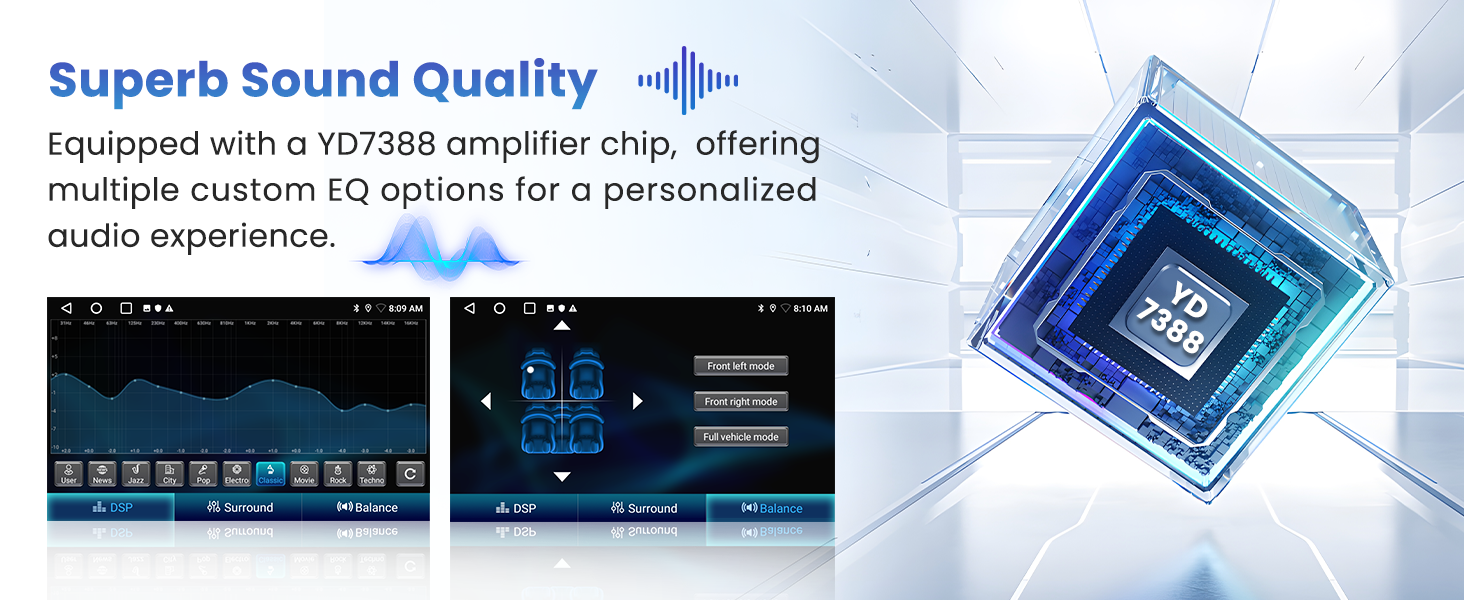
Figure 4.7: Offline and Online Navigation. This image differentiates between offline navigation (useful in tunnels, remote areas, or without signal) and online navigation (for live traffic updates and points of interest).
4.5 Bluetooth Hands-Free Calling and Music
Utilize Bluetooth 4.0 for hands-free calling and audio streaming. The included external microphone ensures clear call quality, even in noisy environments.

Figure 4.8: Bluetooth Hands-Free. This image displays the car radio's Bluetooth menu and an external microphone, emphasizing clear communication.

Figure 4.9: Bluetooth 4.0. This image shows a person making a hands-free call using the car radio's Bluetooth feature, highlighting the clear audio quality.
4.6 ວິທະຍຸ FM/RDS
The integrated FM/RDS radio allows you to listen to your favorite stations. It supports automatic channel search and allows for presetting up to 30 stations.

Figure 4.10: FM/RDS Radio. This image displays the radio interface with frequency display and preset station options.
4.7 ການຄວບຄຸມພວງມາໄລ (SWC)
The unit supports steering wheel controls, allowing you to manage audio functions without taking your hands off the wheel. This enhances driving safety.
Figure 4.11: Steering Wheel Control. This image illustrates how the car radio integrates with existing steering wheel controls for convenient operation.
4.8 ຂາເຂົ້າກ້ອງຖອຍຫຼັງ
When connected to a backup camera (included), the unit automatically displays the rear view when the vehicle is in reverse gear, improving parking safety. The camera provides HD rear view with line guides and night vision capabilities.

Figure 4.12: Backup Camera. This image shows the rear view displayed on the car radio screen with parking assistance lines, along with the waterproof backup camera.
4.9 EQ Functionality and Sound Quality
The car radio is equipped with a YD7388 amplifier chip and offers extensive EQ functionality. Customize audio settings for personalized sound profiles and optimized quality, tailored to individual preferences.

Figure 4.13: EQ Functionality and Sound Quality. This image displays the digital sound processing (DSP) and audio balance settings, along with the YD7388 amplifier chip, indicating superb sound customization.
4.10 Mirror Link
The Mirror Link feature allows you to mirror your iOS or Android smartphone screen onto the car radio display via USB or Wi-Fi connection.

Figure 4.14: Mirror Link. This image illustrates the screen mirroring capability between a smartphone and the car radio.
4.11 Wi-Fi Connectivity and App Downloads
Connect the unit to a Wi-Fi network or mobile hotspot to download and use various applications from the app store, enhancing your in-car entertainment and utility.
Figure 4.15: Wi-Fi Connectivity. This image highlights the Wi-Fi feature, enabling users to download and access various online applications.
4.12 Multitasking
The Android 13 system allows for effortless multitasking, such as listening to music while using navigation simultaneously.
Figure 4.16: Multitasking. This image shows the car radio running two applications side-by-side, such as a music player and a navigation app.
4.13 Customizable Homepage and Wallpaper
Personalize your user experience with 28 UI desktop themes and customizable wallpapers.
Figure 4.17: Customizable Homepage and Wallpaper. This image displays a variety of user interface themes and wallpaper options available for personalization.
5. ບໍາລຸງຮັກສາ
To ensure the longevity and optimal performance of your Inefala car radio, follow these maintenance guidelines:
- ທໍາຄວາມສະອາດຫນ້າຈໍ: ໃຊ້ຜ້າທີ່ອ່ອນນຸ່ມ, ບໍ່ມີສານດ່າງເພື່ອເຊັດໜ້າຈໍຢ່າງຄ່ອຍໆ. ສໍາລັບ smudges stubborn, ເລັກນ້ອຍ dampໃສ່ຜ້າດ້ວຍນ້ໍາຫຼືເຄື່ອງເຮັດຄວາມສະອາດຫນ້າຈໍທີ່ປອດໄພ. ຫຼີກເວັ້ນການສານເຄມີທີ່ຮຸນແຮງຫຼືວັດສະດຸຂັດ.
- ອັບເດດຊອບແວ: Periodically check for available software updates through the system settings. Keeping the software updated can improve performance and add new features.
- ການເຊື່ອມຕໍ່ສາຍ: Ensure all cables are securely connected. Loose connections can lead to intermittent functionality or poor audio/video quality.
- ເງື່ອນໄຂສິ່ງແວດລ້ອມ: ຫຼີກລ້ຽງການເປີດເຄື່ອງໃຫ້ຢູ່ໃນອຸນຫະພູມທີ່ຮ້າຍແຮງ, ແສງແດດໂດຍກົງເປັນເວລາດົນນານ, ຫຼືຄວາມຊຸ່ມເກີນໄປ.
- ຣີເຊັດລະບົບ: If the unit experiences persistent issues, a factory reset option is available in the system settings. Back up any important data before performing a reset.
6. ການແກ້ໄຂບັນຫາ
If you encounter issues with your Inefala car radio, refer to the following common troubleshooting steps:
- ບໍ່ມີພະລັງງານ: Check the power cable connection and the vehicle's fuse box. Ensure the ignition is on.
- ບໍ່ມີສຽງ: Verify speaker connections, check volume levels, and ensure the mute function is not activated. Confirm audio output settings.
- ໜ້າຈໍສໍາຜັດບໍ່ຕອບສະໜອງ: Try restarting the unit. If the issue persists, perform a system reset (refer to Maintenance section).
- GPS ບໍ່ເຮັດວຽກ: ໃຫ້ແນ່ໃຈວ່າເສົາອາກາດ GPS ຖືກເຊື່ອມຕໍ່ຢ່າງຖືກຕ້ອງແລະມີຄວາມຊັດເຈນ view ຂອງທ້ອງຟ້າ. ກວດເບິ່ງການຕັ້ງຄ່າ GPS ໃນລະບົບ.
- ບັນຫາການເຊື່ອມຕໍ່ Bluetooth: Ensure Bluetooth is enabled on both the car radio and your smartphone. Delete previous pairings and try reconnecting.
- CarPlay/Android Auto ບໍ່ເຊື່ອມຕໍ່: Verify USB cable integrity (if wired) or Wi-Fi connection (if wireless). Ensure the phone's operating system is compatible and updated.
- ກ້ອງຖ່າຍຮູບສຳຮອງບໍ່ສະແດງ: Check the camera input cable connection. Ensure the vehicle is in reverse gear.
If these steps do not resolve the issue, please contact Inefala customer support.
7. ຂໍ້ມູນຈໍາເພາະ
| ໝາຍເລກຕົວແບບ | Inefala-A3968A4MI2-EU60 |
| ຂະໜາດໜ້າຈໍ | 10.36 ນິ້ວ |
| ຄວາມລະອຽດໜ້າຈໍ | 1600*720 |
| ລະບົບປະຕິບັດການ | Android 13 |
| RAM | 2GB |
| ROM | 64GB |
| ການເຊື່ອມຕໍ່ | ບລູທູດ 4.0, USB, Wi-Fi |
| ຄຸນນະສົມບັດພິເສດ | Wireless CarPlay, Android Auto, GPS Navigation, RDS, Backup Camera Support |
| ຮູບແບບການອອກສຽງ | ສະເຕຣິໂອ |
| ຊ່ອງສຽງອ້ອມຮອບ | 4.0 |
| ພະລັງງານຜົນຜະລິດ | 180 ວັດ |
| ວິທີການຄວບຄຸມ | ແຕະ |
| ຂະໜາດສິນຄ້າ (ກວ້າງ x ຍາວ x ສູງ) | 11.4 x 27.3 x 14.6 cm |
| ນ້ຳໜັກສິນຄ້າ | 1.36 ກິໂລ |
8. ຂໍ້ມູນການຮັບປະກັນ
This Inefala car radio comes with a ຮັບປະກັນ 24 ເດືອນ from the date of purchase. This warranty covers manufacturing defects and malfunctions under normal use. For warranty claims or technical assistance, please refer to the support section below.
9. ສະຫນັບສະຫນູນ
For technical support, troubleshooting assistance, or warranty inquiries, please contact Inefala customer service. We offer online consultation support with responses typically within 24 hours.

Figure 9.1: 24/7 Technical Assistance. This image outlines a two-step process for obtaining support, including sending an email for assistance.
You can also visit the official Inefala store on Amazon for more information and product updates: Inefala Amazon Store