
NOILLER ZY-BB2
NOILLER 4.3" Video Baby Monitor User Manual
Model: ZY-BB2
ແນະນຳ
Thank you for choosing the NOILLER 4.3" Video Baby Monitor. This device is designed to provide a reliable and convenient way to monitor your baby, offering both a dedicated monitor unit and smartphone app connectivity. Please read this manual thoroughly before use to ensure proper operation and safety.
ເນື້ອໃນຊຸດ
- ກ້ອງຖ່າຍເດັກນ້ອຍ
- 4.3" LCD Monitor Unit
- Power Adapter for Camera
- Power Adapter ສໍາລັບ Monitor
- ສາຍສາກ USB
- ຄູ່ມືຜູ້ໃຊ້ (ເອກະສານນີ້)
ສິນຄ້າເກີນview
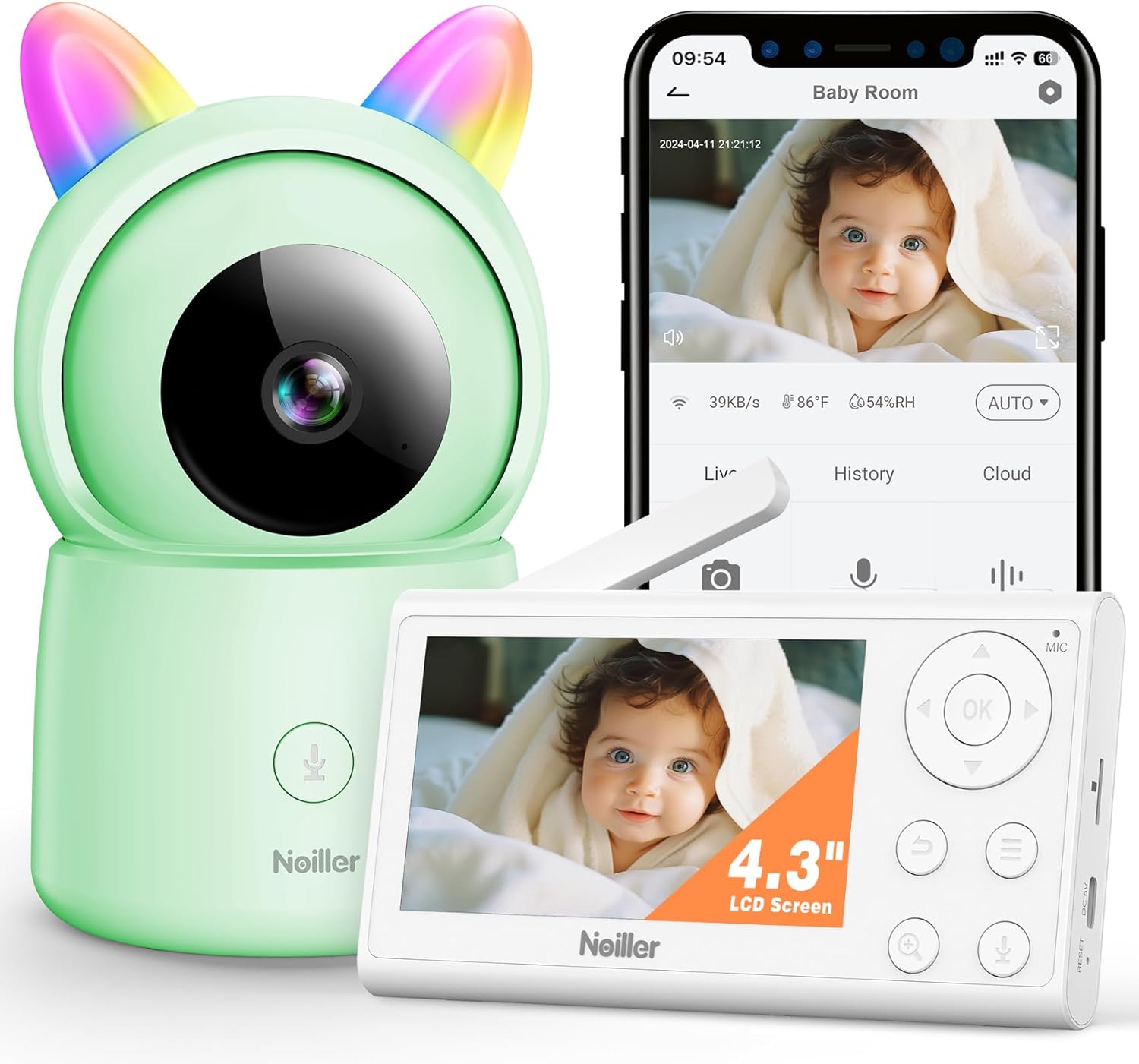
ຮູບພາບ: The NOILLER 4.3" Video Baby Monitor system, featuring the green camera unit with rainbow ears, the white 4.3-inch LCD monitor, and a smartphone displaying the "Safeview" app interface with a live baby feed. The monitor shows control buttons for navigation, microphone, and zoom. The camera has a microphone button on its base.
The NOILLER Baby Video Monitor system consists of two main components: the Camera Unit and the Monitor Unit. It also supports a smartphone application for remote viewing.
Camera Unit Features:
- ເລນກ້ອງ HD 1080P
- ໄຟ LED ອິນຟາເຣດສໍາລັບການເບິ່ງເຫັນກາງຄືນ
- ໄມໂຄຣໂຟນ ແລະ ລຳໂພງສຳລັບການສົນທະນາສອງທາງ
- ເຊັນເຊີອຸນຫະພູມແລະຄວາມຊຸ່ມຊື່ນ
- RGB Night Lights (on ears)
- ພອດການປ້ອນພະລັງງານ
- ປຸ່ມຣີເຊັດ
Monitor Unit Features:
- ຈໍສະແດງຜົນ LCD 4.3"
- Navigation Buttons (Up, Down, Left, Right, OK)
- ໄມໂຄຣໂຟນ ແລະ ລຳໂພງ
- ການຄວບຄຸມປະລິມານ
- Function ຊູມ
- ປຸ່ມເມນູ
- Two-Way Talk Button
- ພອດການປ້ອນພະລັງງານ
- ເສົາອາກາດ
ຄູ່ມືການຕິດຕັ້ງ
1. Powering On the Units
- Connect the camera unit to a power outlet using its dedicated power adapter. Ensure the adapter is securely plugged in.
- Connect the monitor unit to a power outlet using its dedicated power adapter. The monitor unit has a built-in rechargeable battery for portable use, but it is recommended to charge it fully before first use.
- Press and hold the power button on the monitor unit to turn it on.
2. Pairing the Camera and Monitor
The camera and monitor units are pre-paired at the factory. If they do not connect automatically, or if you need to add another camera (sold separately), follow these steps:
- On the monitor unit, press the ເມນູ ປຸ່ມ.
- ທ່ອງໄປຫາ ກ້ອງຖ່າຍຮູບ icon and select it.
- Choose an available camera channel (e.g., Camera 1, Camera 2).
- ເລືອກ ການຈັບຄູ່ option. The monitor will begin searching for a camera.
- ພາຍໃນ 30 ວິນາທີ, ກົດປຸ່ມ ການຈັບຄູ່ button on the back of the camera unit.
- Once paired, the monitor will display the camera's live feed.
3. Smartphone App Setup (Optional)
ສໍາລັບໄລຍະໄກ viewing and additional features, download the "Safeview" app:
- Scan the QR code provided in the package or search for "Safeview" in your smartphone's app store (iOS/Android).
- ລົງທະບຽນສຳລັບບັນຊີໃໝ່ ຫຼື ເຂົ້າສູ່ລະບົບຖ້າທ່ານມີບັນຊີແລ້ວ.
- Follow the in-app instructions to add your camera device. This typically involves connecting the camera to your 2.4G Wi-Fi network.
- Ensure your smartphone is connected to a 2.4G Wi-Fi network during the initial setup process.
4. ການຈັດວາງກ້ອງຖ່າຍຮູບ
Place the camera on a flat, stable surface such as a dresser or shelf, ensuring it has a clear, unobstructed view of the baby's crib or play area. Keep the camera and its power cord out of reach of children (at least 3 feet / 1 meter away from the crib).
ຄໍາແນະນໍາການດໍາເນີນງານ
ດໍາລົງຊີວິດ View
Once the camera and monitor are paired, the monitor will automatically display the live video feed. On the smartphone app, select the camera from your device list to view ອາຫານສົດ.
ການສົນທະນາສອງຝ່າຍ
- ໜ່ວຍ ຕິດຕາມກວດກາ: Press and hold the microphone button on the monitor unit to speak. Release the button to hear your baby.
- ແອັບໂທລະສັບສະຫຼາດ: Tap the microphone icon on the app interface to speak.
ວິໄສທັດກາງຄືນ
The camera automatically switches to infrared night vision in low-light conditions, providing clear black and white images. No manual adjustment is required.
Function ຊູມ
On the monitor unit, press the ຊູມ button to digitally zoom in or out on the video feed.
ບົດເພງລູກທຸ່ງ
The monitor unit allows you to play pre-programmed lullabies through the camera's speaker. Access this feature via the ເມນູ on the monitor unit.
ໄຟກາງຄືນ RGB
The camera unit features RGB night lights on its "ears." These can be controlled via the monitor unit's menu or the smartphone app to provide a soothing glow in the baby's room.
ການຕິດຕາມອຸນຫະພູມແລະຄວາມຊຸ່ມຊື່ນ
The monitor unit and smartphone app display the real-time temperature and humidity of the baby's room, as detected by the camera's sensors.
VOX Mode (Voice Activated)
The monitor can be set to VOX mode, where the screen and audio activate only when sound is detected from the baby's room. You can adjust the sensitivity level in the monitor's settings.
ບໍາລຸງຮັກສາ
ທໍາຄວາມສະອາດ
Wipe the camera and monitor units with a soft, dry, lint-free cloth. Do not use cleaning agents, solvents, or abrasive cleaners. Avoid getting moisture into any openings.
Battery Care (Monitor Unit)
- ເພື່ອຍືດອາຍຸແບັດເຕີລີ, ຫຼີກເວັ້ນການຖອດແບດເຕີລີ່ເຕັມເລື້ອຍໆ.
- Charge the monitor unit regularly, especially if it will not be used for an extended period.
- ເກັບຮັກສາເຄື່ອງໄວ້ໃນບ່ອນທີ່ເຢັນ, ແຫ້ງເມື່ອບໍ່ໄດ້ໃຊ້.
ການເກັບຮັກສາ
If storing the device for a long period, ensure both units are powered off and stored in a dry, dust-free environment.
ການແກ້ໄຂບັນຫາ
| ບັນຫາ | ສາເຫດທີ່ເປັນໄປໄດ້ | ການແກ້ໄຂ |
|---|---|---|
| No image/signal on monitor |
|
|
| ຄຸນນະພາບຮູບພາບບໍ່ດີ |
|
|
| ບໍ່ມີສຽງຫລືສຽງທີ່ບິດເບືອນ |
|
|
| App cannot connect to camera |
|
|
ຂໍ້ມູນຈໍາເພາະ
| ຄຸນສົມບັດ | ລາຍລະອຽດ |
|---|---|
| ຊື່ຕົວແບບ | ZY-BB2 |
| ຈໍສະແດງຜົນຂະຫນາດ | ຈໍ LCD 4.3 ນິ້ວ |
| ຄວາມລະອຽດການຖ່າຍວິດີໂອ | 1080p |
| ເຕັກໂນໂລຊີການເຊື່ອມຕໍ່ | Wireless Monitor & 2.4G WiFi Smartphone APP |
| ແຫຼ່ງພະລັງງານ | Battery Powered Monitor & Corded Electric Camera |
| ການນຳໃຊ້ພາຍໃນ/ນອກ | ພາຍໃນ |
| ປະເພດການຄວບຄຸມ | Mobile Phone APP, LCD Monitor |
| ປະເພດການຕິດຕັ້ງ | ພູຕັ້ງໂຕະ |
| ຂະໜາດລາຍການ (L x W x H) | 5 x 3 x 2 ນິ້ວ |
| ນ້ໍາຫນັກລາຍການ | 1.43 ປອນ |
| ໝໍ້ໄຟ | 1 ຫມໍ້ໄຟ Lithium Ion ຕ້ອງການ (ລວມ) |
| UPC | 750961862307 |
ການຮັບປະກັນແລະການສະຫນັບສະຫນູນ
NOILLER products are designed for reliability and performance. For warranty information, please refer to the warranty card included in your product packaging or visit the official NOILLER website. If you encounter any issues or have questions regarding your product, please contact our customer support team:
- ອີເມວ: support@noiller.com
- Webເວັບໄຊ: www.noiller.com
- Please have your model number (ZY-BB2) and purchase details ready when contacting support.
Ask a question about this manual
Ask about setup, troubleshooting, compatibility, parts, safety, or missing instructions. Manuals+ will review the question and use this page’s manual context to help answer it.