
1. ບົດແນະນຳ
ຂອບໃຈສໍາລັບການຊື້asing the Max Power MPD437 Ultra PRO M2 Portable Bluetooth Speaker. This speaker is designed to provide high-quality audio in various environments, featuring water resistance and dust-proof capabilities for outdoor use. Please read this manual carefully before using the product to ensure proper operation and to maximize its lifespan.
ຂໍ້ມູນຄວາມປອດໄພ
- ຢ່າເຮັດໃຫ້ລຳໂພງຖືກອຸນຫະພູມທີ່ຮຸນແຮງ ຫຼືຖືກແສງແດດໂດຍກົງເປັນເວລາດົນ.
- ຫຼີກລ່ຽງການລຸດລົງ ຫຼື ວາງລຳໂພງຕໍ່ກັບຜົນກະທົບທີ່ຮຸນແຮງ.
- ຢ່າພະຍາຍາມຖອດປະກອບ ຫຼືດັດແປງລຳໂພງ. ນີ້ຈະເປັນການຍົກເລີກການຮັບປະກັນ.
- ຮັກສາລຳໂພງໃຫ້ຫ່າງຈາກອຸປະກອນການແພດ.
- ໃຊ້ພຽງແຕ່ສາຍສາກທີ່ໃຫ້ມາ.
2. ເນື້ອໃນຊຸດ
ໃຫ້ແນ່ໃຈວ່າທຸກລາຍການຢູ່ໃນຊຸດ:
- Max Power MPD437 Ultra PRO M2 Portable Bluetooth Speaker
- ສາຍໄຟ
- ສາຍ AUX
- ຄູ່ມືຜູ້ໃຊ້ (ເອກະສານນີ້)
3. ຜະລິດຕະພັນເກີນview
Familiarize yourself with the components of your Max Power MPD437 Ultra PRO M2 speaker.
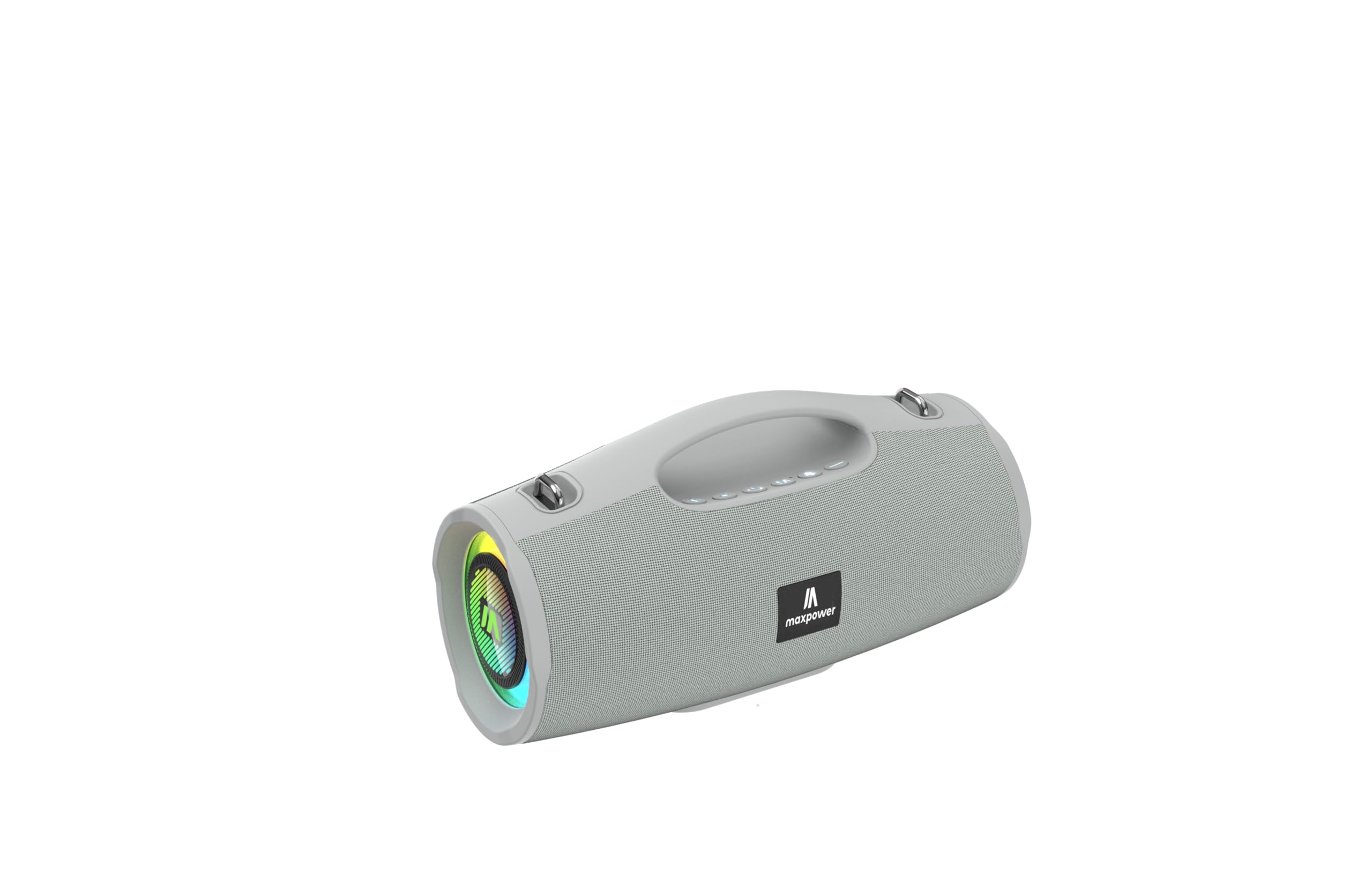
This image displays the Max Power MPD437 Ultra PRO M2 speaker. It features a robust grey casing, an integrated carrying handle at the top, and a series of control buttons. One end of the speaker is equipped with an LED light ring, indicating its operational status and adding visual effects.
ອົງປະກອບທີ່ສໍາຄັນ:
- ມືຖືແບບປະສົມປະສານ: ສໍາລັບການພົກພາງ່າຍ.
- ປຸ່ມຄວບຄຸມ: For power, volume, playback, and mode selection.
- Grille ລໍາໂພງ: Protects the speaker drivers.
- ວົງແຫວນໄຟ LED: Provides visual effects and indicates status.
- ຊ່ອງສາກໄຟ: ສໍາລັບການເຊື່ອມຕໍ່ສາຍໄຟ.
- AUX Input: ສໍາລັບການເຊື່ອມຕໍ່ສຽງມີສາຍ.
4. ຕັ້ງຄ່າ
4.1 ກຳລັງສາກລຳໂພງ
- Connect the provided Power Cable to the charging port on the speaker.
- Plug the other end of the Power Cable into a suitable power source.
- ຕົວຊີ້ວັດ LED ຈະສະແດງສະຖານະການສາກໄຟ. ການສາກເຕັມໃຊ້ເວລາປະມານ 3 ຊົ່ວໂມງ.
- ຖອດສາຍສາກອອກເມື່ອສາກເຕັມແລ້ວ.
4.2 ການຈັບຄູ່ Bluetooth
- Press and hold the Power button to turn on the speaker. The speaker will enter Bluetooth pairing mode, indicated by a flashing LED light.
- ໃນອຸປະກອນຂອງທ່ານ (ໂທລະສັບສະຫຼາດ, ແທັບເລັດ, ແລັບທັອບ), ເປີດໃຊ້ Bluetooth ແລະຊອກຫາອຸປະກອນທີ່ມີຢູ່.
- Select "MPD437 Ultra PRO M2" from the list of devices.
- ເມື່ອຈັບຄູ່ແລ້ວ, ລຳໂພງຈະປ່ອຍສຽງຢືນຢັນ, ແລະໄຟ LED ຈະຢຸດກະພິບ.
- ລຳໂພງຈະພະຍາຍາມເຊື່ອມຕໍ່ໃໝ່ກັບອຸປະກອນທີ່ຈັບຄູ່ສຸດທ້າຍໂດຍອັດຕະໂນມັດເມື່ອເປີດເຄື່ອງ.
4.3 ການເຊື່ອມຕໍ່ AUX
- Connect one end of the provided AUX Cable to the AUX input port on the speaker.
- Connect the other end of the AUX Cable to the audio output jack of your device.
- ລຳໂພງຈະປ່ຽນເປັນໂໝດ AUX ໂດຍອັດຕະໂນມັດ.
5. ຄໍາແນະນໍາການດໍາເນີນງານ
5.1 ເປີດ/ປິດ
- ເປີດ: ກົດປຸ່ມເປີດປິດຄ້າງໄວ້ 2-3 ວິນາທີ.
- ປິດພະລັງງານ: ກົດປຸ່ມເປີດປິດຄ້າງໄວ້ 2-3 ວິນາທີ.
5.2 ການຄວບຄຸມປະລິມານ
- ເພີ່ມປະລິມານ: ກົດປຸ່ມ '+'.
- ຫຼຸດລະດັບສຽງລົງ: ກົດປຸ່ມ '-'.
5.3 Playback Control (Bluetooth/AUX Mode)
- ຫຼິ້ນ/ຢຸດ: ກົດປຸ່ມຫຼິ້ນ/ຢຸດຊົ່ວຄາວ.
- ເພງຕໍ່ໄປ: ກົດປຸ່ມ '+' ຄ້າງໄວ້.
- ຕິດຕາມກ່ອນ ໜ້າ ນີ້: ກົດປຸ່ມ '-' ຄ້າງໄວ້.
5.4 ການເລືອກໂໝດ
Press the 'M' (Mode) button to switch between Bluetooth, AUX, and FM Radio modes.
5.5 ການດໍາເນີນງານວິທະຍຸ FM
- ສະລັບໄປໃຊ້ໂໝດວິທະຍຸ FM ໂດຍໃຊ້ປຸ່ມ 'M'.
- ກົດປຸ່ມຫຼິ້ນ/ຢຸດຊົ່ວຄາວເພື່ອສະແກນ ແລະບັນທຶກສະຖານີ FM ທີ່ມີຢູ່ໂດຍອັດຕະໂນມັດ.
- ໃຊ້ປຸ່ມ '+' ແລະ '-' ເພື່ອນຳທາງລະຫວ່າງສະຖານີທີ່ບັນທຶກໄວ້.
5.6 ໂໝດໄຟ LED
The speaker features vibrant LED lights. Press the dedicated LED button (if available, or a long press on a specific button) to cycle through different light modes or turn them off.
6. ບໍາລຸງຮັກສາ
6.1 ການທໍາຄວາມສະອາດ
- ເຊັດລໍາໂພງດ້ວຍສຽງອ່ອນ, ງamp ຜ້າ.
- ຢ່າໃຊ້ເຄື່ອງເຮັດຄວາມສະອາດຂັດ, ເຫຼົ້າ, ຫຼືສານລະລາຍສານເຄມີ.
- ໃຫ້ແນ່ໃຈວ່າທຸກຜອດແຫ້ງກ່ອນທີ່ຈະສາກໄຟ ຫຼືເຊື່ອມຕໍ່ສາຍ.
6.2 ການເກັບຮັກສາ
- ເກັບຮັກສາລຳໂພງໄວ້ໃນບ່ອນທີ່ເຢັນ, ແຫ້ງ ແລະ ຫຼີກລ່ຽງແສງແດດໂດຍກົງ.
- ຖ້າເກັບຮັກສາໄວ້ເປັນໄລຍະເວລາ, ສາກແບັດເຕີຣີໃຫ້ເຫຼືອປະມານ 50% ທຸກໆສອງສາມເດືອນເພື່ອຮັກສາສຸຂະພາບຂອງແບັດເຕີຣີ.
7. ການແກ້ໄຂບັນຫາ
| ບັນຫາ | ສາເຫດທີ່ເປັນໄປໄດ້ | ການແກ້ໄຂ |
|---|---|---|
| ລຳໂພງບໍ່ເປີດ. | ແບັດເຕີຣີໝົດ. | ສາກລຳໂພງໂດຍໃຊ້ສາຍໄຟທີ່ໃຫ້ມາ. |
| ບໍ່ມີສຽງຈາກ ລຳ ໂພງ. | ລະດັບສຽງຕໍ່າເກີນໄປ ຫຼື ປິດສຽງໄວ້. ອຸປະກອນບໍ່ໄດ້ຈັບຄູ່ຢ່າງຖືກຕ້ອງ. ສາຍ AUX ບໍ່ໄດ້ສຽບເຂົ້າຄົບຖ້ວນ. | Increase volume on both speaker and connected device. Re-pair Bluetooth. Ensure AUX cable is securely connected. |
| ບໍ່ສາມາດຈັບຄູ່ຜ່ານ Bluetooth ໄດ້. | ລຳໂພງບໍ່ໄດ້ຢູ່ໃນໂໝດຈັບຄູ່. Bluetooth ຂອງອຸປະກອນປິດຢູ່. ລຳໂພງຢູ່ໄກຈາກອຸປະກອນເກີນໄປ. | Ensure speaker is in pairing mode (flashing LED). Turn on Bluetooth on your device. Move speaker closer to your device (within 35 feet). |
| ການຮັບວິທະຍຸ FM ບໍ່ດີ. | ສັນຍານອ່ອນໃນສະຖານທີ່ປະຈຸບັນ. | ຍ້າຍລຳໂພງໄປບ່ອນທີ່ຮັບສັນຍານໄດ້ດີກວ່າ. |
8. ຂໍ້ມູນຈໍາເພາະ
| ຊື່ຕົວແບບ | Ultra Pro M2 |
| ໝາຍເລກຕົວແບບ | MPD437 |
| ຍີ່ຫໍ້ | ພະລັງງານສູງສຸດ |
| ປະເພດລຳໂພງ | ລຳ ໂພງແບບພະກະພາ |
| ເຕັກໂນໂລຊີການເຊື່ອມຕໍ່ | Bluetooth, ຕົວຊ່ວຍ |
| ເຕັກໂນໂລຊີການສື່ສານໄຮ້ສາຍ | Bluetooth |
| ຊ່ວງ Bluetooth | 35 ຟຸດ |
| ຄຸນນະສົມບັດພິເສດ | Dustproof, FM Radio, LED Light, Water Resistant |
| ລະດັບຄວາມຕ້ານທານນ້ໍາ | ກັນນ້ຳ |
| ແຫຼ່ງພະລັງງານ | ພະລັງງານຫມໍ້ໄຟ |
| ຄວາມອາດສາມາດຫມໍ້ໄຟ | 3000 ລ້ານamp ຊົ່ວໂມງ |
| ເວລາສາກໄຟ | 3 ຊົ່ວໂມງ |
| ຮູບແບບການອອກສຽງ | ສະເຕຣິໂອ |
| ອັດຕາສ່ວນສັນຍານເຖິງສຽງດັງ | 85 dB |
| ວິທີການຄວບຄຸມ | ແຕະ |
| ຂະໜາດສິນຄ້າ | 4.5"D x 5"W x 9.9"H |
| ນ້ໍາຫນັກລາຍການ | 2.65 ປອນ |
| ອົງປະກອບລວມ | AUX Cable, Power Cable |
| UPC | 785571466584 |
| GTIN | 785571466584 |
9. ການຮັບປະກັນແລະການສະຫນັບສະຫນູນ
9.1 ການຮັບປະກັນຈໍາກັດ
The Max Power MPD437 Ultra PRO M2 Portable Bluetooth Speaker comes with a limited warranty. Please refer to the warranty card included in your package or contact Max Power customer support for detailed warranty terms and conditions.
9.2 ສະຫນັບສະຫນູນລູກຄ້າ
For technical assistance, troubleshooting, or warranty inquiries, please contact Max Power customer support. Contact information can typically be found on the product packaging or the official Max Power webເວັບໄຊ.