
1. ບົດແນະນຳ
ຂອບໃຈສໍາລັບການຊື້asing the Generic APAYADO-M70 Wired Mini Low Profile Keyboard. This manual provides essential information for setting up, operating, and maintaining your new keyboard. Please read this manual thoroughly before use to ensure proper function and longevity of your device.
2. ຜະລິດຕະພັນເກີນview
2.1 ລັກສະນະທີ່ສໍາຄັນ
- ຂະໜາດກະທັດຮັດ: Slim and lightweight design (29×12×3.5cm; 220g) with a 78-key mini layout, saving desk space and enhancing portability.
- Pro ຕໍ່າfile ການອອກແບບ: Keys feature a short travel distance for responsive keystrokes and a comfortable typing experience.
- Chocolate Keycaps: Alphanumeric translucent keycaps ensure letters and numbers are clearly visible.
- Backlighting RGB: Integrated LED backlighting for enhanced visibility and aesthetics.
- ຄີງຽບ: Bass buttons are designed for quiet operation, reducing typing noise.
2.2 ເນື້ອໃນຊຸດ
ກະລຸນາກວດເບິ່ງຊຸດສຳລັບລາຍການຕໍ່ໄປນີ້:
- APAYADO-M70 Wired Mini Low Profile ແປ້ນພິມ
- ສາຍ USB (ປະສົມປະສານ)
- ຄູ່ມືຜູ້ໃຊ້ (ເອກະສານນີ້)
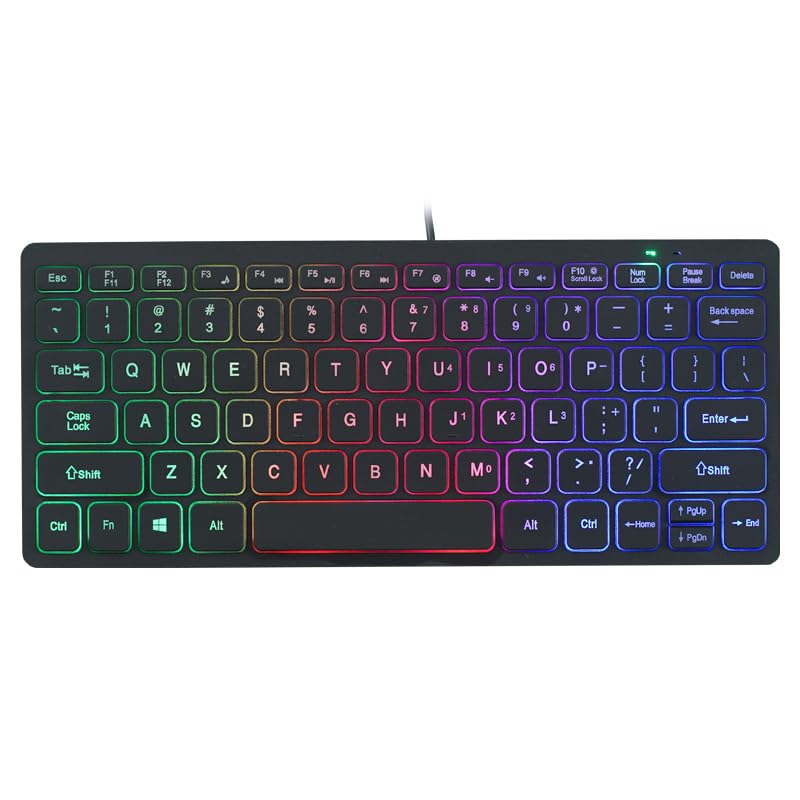
Image: The APAYADO-M70 Wired Mini Low Profile Keyboard, illustrating its compact form factor and illuminated keys.
3. ຄໍາແນະນໍາການຕິດຕັ້ງ
- ຖອດແປ້ນພິມ: ເອົາແປ້ນພິມອອກຈາກເຄື່ອງຫຸ້ມຫໍ່ຂອງມັນຢ່າງລະມັດລະວັງ.
- ເຊື່ອມຕໍ່ກັບຄອມພິວເຕີ: Locate an available USB port on your computer (PC or Laptop). Insert the USB connector of the keyboard into the USB port.
- ການຕິດຕັ້ງໄດເວີ: ແປ້ນພິມສາມາດໃຊ້ງານໄດ້ແບບ plug-and-play. ລະບົບປະຕິບັດການຂອງທ່ານ (Windows, macOS, Linux) ຄວນກວດຫາ ແລະ ຕິດຕັ້ງໄດຣເວີທີ່ຈຳເປັນໂດຍອັດຕະໂນມັດ. ໂດຍປົກກະຕິແລ້ວບໍ່ຈຳເປັນຕ້ອງຕິດຕັ້ງຊອບແວເພີ່ມເຕີມ.
- ກວດສອບການທໍາງານ: Open a text editor or word processor and type to ensure the keyboard is functioning correctly.
4. ຄໍາແນະນໍາການດໍາເນີນງານ
4.1 ການພິມພື້ນຖານ
The APAYADO-M70 functions as a standard US English layout keyboard. Simply press the desired keys to input characters.
4.2 ການຄວບຄຸມໄຟ Backlighting RGB
The keyboard features integrated RGB backlighting. To control the backlighting:
- Turn On/Off Backlighting: ກົດ FN ຄີພ້ອມໆກັນກັບ F10 ກະແຈ (FN + F10) to toggle the LED lights on or off.
- Note: Specific RGB modes or brightness adjustments are not detailed in the product information. The FN+F10 combination is for basic on/off functionality.
5. ບໍາລຸງຮັກສາ
ການບໍາລຸງຮັກສາທີ່ເຫມາະສົມຮັບປະກັນຄວາມທົນທານແລະການປະຕິບັດຂອງແປ້ນພິມຂອງທ່ານ.
- ທໍາຄວາມສະອາດ:
- ຕັດການເຊື່ອມຕໍ່ແປ້ນພິມຈາກຄອມພິວເຕີຂອງທ່ານກ່ອນທີ່ຈະທໍາຄວາມສະອາດ.
- ໃຊ້ຜ້າແພທີ່ອ່ອນໆ ທີ່ບໍ່ມີເສັ້ນດ່າງ dampຖອກໃສ່ດ້ວຍນ້ໍາຫຼືການແກ້ໄຂການເຮັດຄວາມສະອາດອ່ອນໆເພື່ອເຊັດຄີບອດແລະພື້ນຜິວ.
- ຫຼີກລ້ຽງການໃຊ້ສານເຄມີທີ່ຮຸນແຮງ, ເຄື່ອງຂັດຂັດ, ຫຼືສານລະລາຍ.
- ໃຊ້ອາກາດບີບອັດເພື່ອເອົາຂີ້ຝຸ່ນ ແລະສິ່ງເສດເຫຼືອອອກຈາກລະຫວ່າງກະແຈ.
- ການເກັບຮັກສາ: ເກັບຮັກສາແປ້ນພິມໄວ້ໃນສະພາບແວດລ້ອມທີ່ສະອາດ, ແຫ້ງ, ຫ່າງຈາກອຸນຫະພູມສູງສຸດ ແລະ ແສງແດດໂດຍກົງ.
- ການຈັດການ: Avoid dropping the keyboard or exposing it to liquids. Do not attempt to disassemble the keyboard, as this will void any warranty.
6. ການແກ້ໄຂບັນຫາ
| ບັນຫາ | ສາເຫດທີ່ເປັນໄປໄດ້ | ການແກ້ໄຂ |
|---|---|---|
| ແປ້ນພິມບໍ່ຕອບສະໜອງ | ການເຊື່ອມຕໍ່ USB ວ່າງ, ພອດ USB ຜິດພາດ, ບັນຫາໄດເວີ. |
|
| Backlighting ບໍ່ເຮັດວຽກ | Backlight turned off, power issue. |
|
| ປຸ່ມໜຽວ ຫຼື ບໍ່ຕອບສະໜອງ | Debris under keycaps, liquid spill. |
|
7. ຂໍ້ມູນຈໍາເພາະ
| ຕົວແບບ | APAYADO-M70 |
| ຜູ້ຜະລິດ | APAYADO |
| ຍີ່ຫໍ້ | ທົ່ວໄປ |
| ເຕັກໂນໂລຊີການເຊື່ອມຕໍ່ | USB ມີສາຍ |
| ຄຳອະທິບາຍແປ້ນພິມ | Membrane, Low-Profile |
| ຄຸນນະສົມບັດພິເສດ | Backlit, Lightweight, Low-Profile ກະແຈ |
| ຂະໜາດ (L x W x H) | 29 × 12 × 3.5 cm (approx.) |
| ນ້ຳໜັກ | 220 g (ປະມານ) |
| ອຸປະກອນທີ່ເຂົ້າກັນໄດ້ | ແລັບທັອບ, PC |
| Color/Backlight | Mixed Light (RGB) |
8. ການຮັບປະກັນແລະການສະຫນັບສະຫນູນ
This product is covered by a standard manufacturer's warranty. Please refer to the retailer's return policy or contact the seller for specific warranty terms and conditions. For technical support or inquiries, please contact your point of purchase or the manufacturer directly.
ຮັກສາໃບຮັບເງິນການຊື້ຂອງທ່ານໄວ້ເປັນຫຼັກຖານການຊື້ສໍາລັບການຮ້ອງຂໍການຮັບປະກັນ.