ແນະນຳ
The Walker's Razor Walkie Talkie Attachment is designed to provide seamless, hands-free communication when integrated with compatible Walker's Razor RSEM Series shooting muffs. This device offers 22 channels and 99 sub-channels for clear, reliable communication over a range of up to 3 miles, enhancing coordination and safety during various activities.
ຂໍ້ມູນຄວາມປອດໄພ
- ຄວາມປອດໄພຫມໍ້ໄຟ: Use only specified AAA batteries. Do not mix old and new batteries, or different types of batteries. Dispose of used batteries responsibly.
- ລະດັບສຽງ: Avoid prolonged exposure to high volume levels, especially when using with hearing protection muffs, to prevent hearing damage.
- ເງື່ອນໄຂສິ່ງແວດລ້ອມ: While weather-resistant, avoid submerging the device in water. Protect from extreme temperatures.
- ແຊກແຊງ: This device operates on radio frequencies. Be aware of potential interference with other electronic devices.
ເນື້ອໃນຊຸດ
ກວດສອບວ່າລາຍການທັງຫມົດແມ່ນມີຢູ່ໃນຊຸດຂອງທ່ານ:
- Walker's Razor Walkie Talkie Attachment
- 3 x ຫມໍ້ໄຟ AAA
ສິນຄ້າເກີນview


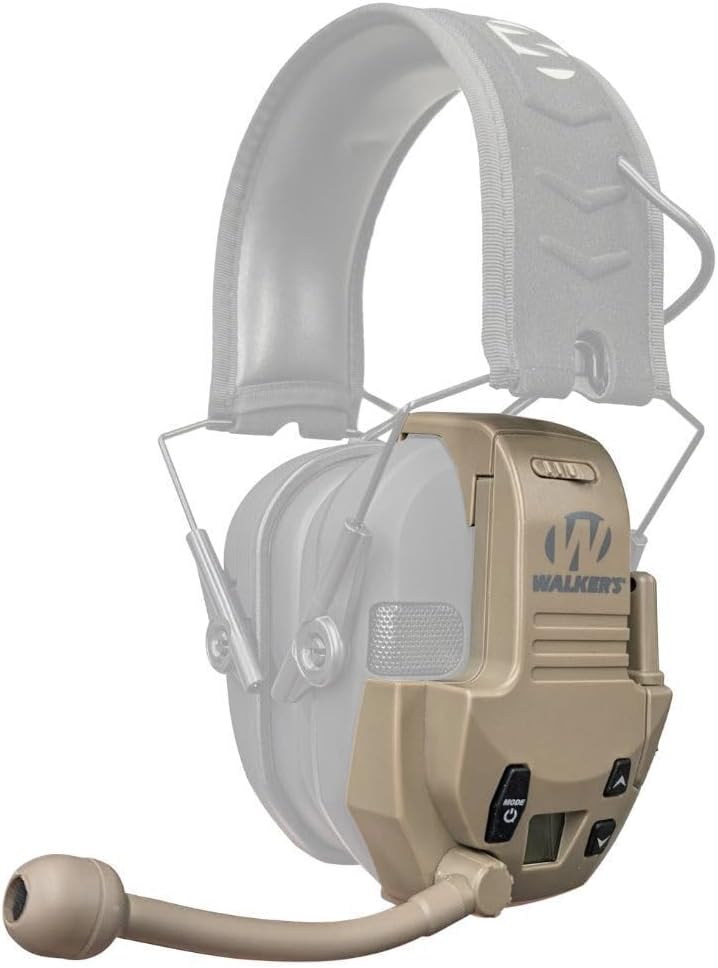
The attachment features tactile rubber buttons for control, an LCD screen for channel and setting display, a wind-proof microphone, and a short-range antenna. It is designed to clip directly onto compatible Walker's Razor series earmuffs.
ຕັ້ງຄ່າ
- ຕິດຕັ້ງ ໝໍ້ ໄຟ: Open the battery compartment on the back of the walkie-talkie attachment. Insert the 3 AAA batteries, ensuring correct polarity (+/-). Close the compartment securely.
- Attach to Muffs: Align the attachment's clip with the side of your Walker's Razor RSEM Series muff that has an audio input jack. Securely clip the walkie-talkie onto the muff.
- ເຊື່ອມຕໍ່ສາຍສຽງ: Insert the audio cable from the walkie-talkie attachment into the audio input jack of your Walker's Razor muff. This connects the communication audio to your muff's speakers.
ຄໍາແນະນໍາການດໍາເນີນງານ
ເປີດ/ປິດ
- ເພື່ອເປີດເຄື່ອງ: ກົດຄ້າງໄວ້ ໂໝດ/ພະລັງງານ ກົດປຸ່ມຈົນກວ່າໜ້າຈໍ LCD ຈະສະຫວ່າງຂຶ້ນ.
- ປິດເຄື່ອງ: ກົດຄ້າງໄວ້ ໂໝດ/ພະລັງງານ ປຸ່ມຈົນກ່ວາ ໜ້າ ຈໍ LCD ປິດ. Caution: A loud beep may occur when powering on/off. It is recommended to remove muffs before powering on/off.
Channel and Sub-Channel Selection
- ກົດ ໂໝດ/ພະລັງງານ button briefly to cycle through settings (Channel, Sub-Channel, VOX Sensitivity).
- When "Channel" is displayed, use the Up ແລະ ລົງ arrow buttons to select one of the 22 available channels.
- ກົດ ໂໝດ/ພະລັງງານ button again to move to "Sub-Channel" selection. Use the Up ແລະ ລົງ arrow buttons to select one of the 99 sub-channels. All communicating parties must be on the same channel and sub-channel.
Voice-Activated Transmission (VOX)
- The VOX feature allows for hands-free communication. When enabled, the device transmits automatically when it detects your voice.
- To adjust VOX sensitivity: Press the ໂໝດ/ພະລັງງານ button until "VOX" is displayed. Use the Up ແລະ ລົງ arrow buttons to set the sensitivity level (e.g., higher sensitivity for quiet environments, lower for noisy ones to prevent false activations).
Push-to-Talk (PTT) Operation
For direct control over transmissions, use the Push-to-Talk (PTT) button.
- Press and hold the PTT button (typically located on the side of the unit) to transmit your voice.
- Release the PTT button to stop transmitting and listen for incoming messages.
ບໍາລຸງຮັກສາ
- ທໍາຄວາມສະອາດ: ເຊັດອຸປະກອນດ້ວຍຄວາມອ່ອນ, ງamp ຜ້າ. ຢ່າໃຊ້ສານເຄມີທີ່ຮຸນແຮງຫຼືເຄື່ອງເຮັດຄວາມສະອາດຂັດ.
- ການປ່ຽນແບັດເຕີຣີ: Replace all 3 AAA batteries when the low battery indicator appears on the LCD screen or when performance degrades.
- ການເກັບຮັກສາ: When not in use for extended periods, remove batteries to prevent leakage. Store in a cool, dry place.
ການແກ້ໄຂບັນຫາ
| ບັນຫາ | ສາເຫດທີ່ເປັນໄປໄດ້ | ການແກ້ໄຂ |
|---|---|---|
| ບໍ່ມີໄຟ/ອຸປະກອນບໍ່ເປີດ. | ແບັດເຕີຣີຕາຍ ຫຼື ຕິດຕັ້ງບໍ່ຖືກຕ້ອງ. | ກວດສອບຂົ້ວຂອງແບັດເຕີຣີ. ປ່ຽນດ້ວຍແບັດເຕີຣີ AAA ໃໝ່. |
| Cannot communicate with other users. | Incorrect channel/sub-channel; Out of range; Audio cable disconnected. | Ensure all devices are on the same channel and sub-channel. Move closer to other users. Verify audio cable connection to muffs. |
| ຄຸນນະພາບສຽງບໍ່ດີ ຫຼືຄົງທີ່. | Weak signal; Interference; Low battery. | Move to an open area. Avoid sources of electronic interference. Replace batteries. |
| VOX activates unintentionally or not at all. | VOX sensitivity set incorrectly for environment. | Adjust VOX sensitivity (higher for quiet, lower for noisy environments). |
ຂໍ້ມູນຈໍາເພາະ
- ຕົວແບບ: GWP-RZRWT-FDE
- ຊ່ອງ: 22
- Sub-Channels: 99
- ຊ່ວງ: Up to 3 miles (actual range may vary based on terrain and conditions)
- ແຫຼ່ງພະລັງງານ: ແບດເຕີຣີ້ AAA 3 x (ລວມ)
- ຊີວິດຫມໍ້ໄຟ: ປະມານ 12 ຊົ່ວໂມງ
- ຄຸນນະສົມບັດພິເສດ: VOX (Voice-Activated Transmission), Push-to-Talk (PTT), LCD Screen, Weather Resistant
- ຄວາມເຂົ້າກັນໄດ້: Walker's Razor RSEM Series Muffs with audio input jack (muffs sold separately)
- ຊ່ວງຄວາມຖີ່: 400-470 MHz
- ສະບັບtage: 4.5 ໂວນ
- ນ້ໍາຫນັກລາຍການ: 6.9 ອອນ
- ຂະໜາດຜະລິດຕະພັນ: 5 x 10 x 10 ນິ້ວ (ໂດຍປະມານ)
ການຮັບປະກັນແລະການສະຫນັບສະຫນູນ
For warranty information or technical support, please refer to the official Walker's webເວັບໄຊ ຫຼືຕິດຕໍ່ພະແນກບໍລິການລູກຄ້າຂອງເຂົາເຈົ້າ. ຮັກສາໃບຮັບເງິນການຊື້ຂອງທ່ານໄວ້ເປັນຫຼັກຖານການຊື້.
Visit the Walker's Store on Amazon ສໍາລັບຜະລິດຕະພັນແລະຂໍ້ມູນເພີ່ມເຕີມ.