
ແນະນຳ
Thank you for choosing the SUNITEC BH880 Wireless Headset. This manual provides detailed instructions for setting up, operating, and maintaining your headset to ensure optimal performance and longevity. The BH880 headset is designed for clear communication and comfortable use in various environments, featuring advanced noise-cancelling technology and multiple connectivity options.

Image: SUNITEC BH880 Wireless Headset, showcasing its design with an adjustable microphone boom.
ແມ່ນຫຍັງຢູ່ໃນກ່ອງ
ກວດສອບວ່າລາຍການທັງຫມົດແມ່ນມີຢູ່ໃນຊຸດ:
- 1 x SUNITEC BH880 Bluetooth Computer Headset with Microphone
- 1 x ສາຍສາກ Type-C
- 1 x Bluetooth Audio USB-A Dongle Adapter
- ສາຍສຽງ 1 x 3.5 ມມ
- 1 x ຄູ່ມືຜູ້ໃຊ້ (ເອກະສານນີ້)

Image: The SUNITEC BH880 headset, USB-C charging cable, USB-A dongle, and 3.5mm audio cable, illustrating the package contents.
ສິນຄ້າເກີນview
Familiarize yourself with the components and controls of your SUNITEC BH880 headset.
ຄຸນນະສົມບັດທີ່ສໍາຄັນ:
- AI Noise Cancelling Microphone: Blocks 99% of ambient noise for clear voice transmission.
- ຊິບເຊັດ Qualcomm QCC3034: Provides stable and fast Bluetooth transmission with aptX HD and aptX LL support.
- ການອອກແບບທີ່ສະດວກສະບາຍ: Soft dual ear pads and an adjustable headband for extended wear.
- 270° Rotatable Boom Microphone: Can be positioned on either the left or right side.
- ຊີວິດຫມໍ້ໄຟຍາວ: ເວລາລົມໄດ້ເຖິງ 45 ຊົ່ວໂມງດ້ວຍການສາກຄັ້ງດຽວ.
- ການເຊື່ອມຕໍ່ຫຼາຍ: Bluetooth, USB Dongle, and 3.5mm wired connection.

Image: Close-up of the memory foam earpads, highlighting the comfort feature of the headset.

Image: Detail of the individual mute button located on the microphone boom.

ຮູບພາບ: ພາຍໃນ view highlighting the Qualcomm QCC3034 chipset, responsible for stable and fast connections.
ຕັ້ງຄ່າ
1. ການສາກຫູຟັງ
Before first use, fully charge the headset. Connect the Type-C charging cable to the headset's charging port and the other end to a USB power source (e.g., computer USB port, wall adapter). The LED indicator will show charging status. A full charge takes approximately 2 hours and provides up to 45 hours of talk time or 400 hours of standby time.
2. ເປີດ/ປິດ
- ເປີດ: ກົດປຸ່ມເປີດປິດຄ້າງໄວ້ສອງສາມວິນາທີຈົນກວ່າໄຟ LED ຈະສະຫວ່າງຂຶ້ນ.
- ປິດພະລັງງານ: ກົດປຸ່ມເປີດ/ປິດຄ້າງໄວ້ສອງສາມວິນາທີຈົນກວ່າໄຟ LED ຈະດັບ.
3. ຕົວເລືອກການເຊື່ອມຕໍ່
The SUNITEC BH880 offers three ways to connect to your devices:
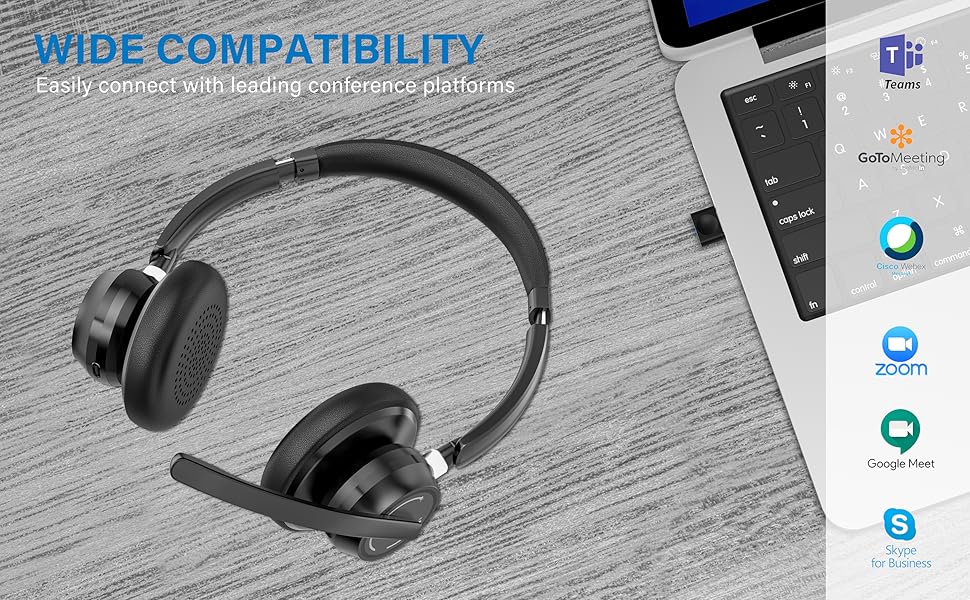
Image: Visual representation of Bluetooth, USB Dongle, and Wired connection methods for the headset.
ການເຊື່ອມຕໍ່ບູທູດ:
- ຮັບປະກັນຫູຟັງຖືກປິດໃຊ້ງານ.
- ກົດປຸ່ມເປີດປິດຄ້າງໄວ້ຈົນກວ່າໄຟ LED ຈະກະພິບເປັນສີຟ້າ ແລະ ສີແດງສະຫຼັບກັນ, ເຊິ່ງຊີ້ບອກເຖິງໂໝດການຈັບຄູ່.
- ໃນອຸປະກອນຂອງທ່ານ (ໂທລະສັບສະຫຼາດ, ແທັບເລັດ, ຄອມພິວເຕີ), ເປີດ Bluetooth ແລະຊອກຫາອຸປະກອນໃຫມ່.
- Select "SUNITEC BH880" from the list of available devices.
- ເມື່ອເຊື່ອມຕໍ່ແລ້ວ, ຕົວຊີ້ວັດ LED ຈະກະພິບເປັນສີຟ້າຊ້າ slowly.
ການເຊື່ອມຕໍ່ USB Dongle:
This method is ideal for computers without built-in Bluetooth or for a more stable connection.
- Plug the USB-A Dongle Adapter into an available USB port on your computer.
- Power on the SUNITEC BH880 headset. It will automatically attempt to connect to the dongle.
- The LED indicator on the dongle and headset will show a solid blue light once connected.
- You may need to select the "SUNITEC BH880" as the audio input/output device in your computer's sound settings.

Image: A USB dongle being inserted into a laptop's USB port, demonstrating the dongle connection method.
ການເຊື່ອມຕໍ່ສາຍ:
Use the included 3.5mm audio cable to connect the headset directly to devices with a 3.5mm audio jack. Note that the microphone function is not available when using the 3.5mm wired connection; the headset will function as headphones only.

Image: The headset shown with logos of popular communication platforms like Teams, Zoom, Google Meet, and Skype, indicating wide compatibility.
ຄໍາແນະນໍາການດໍາເນີນງານ
ຟັງຊັນພື້ນຖານ:
- ປະລິມານຂຶ້ນ/ລົງ: Use the dedicated volume buttons on the earcup.
- ຫຼິ້ນ/ຢຸດ: ກົດປຸ່ມ Multi-function ຄັ້ງດຽວ.
- ເພງຕໍ່ໄປ: ກົດປຸ່ມເພີ່ມສຽງຄ້າງໄວ້.
- ຕິດຕາມກ່ອນ ໜ້າ ນີ້: ກົດປຸ່ມປະລິມານລົງຄ້າງໄວ້.
ຟັງຊັນການໂທ:
- ຮັບ/ສາຍໂທ: ກົດປຸ່ມ Multi-function ຄັ້ງດຽວ.
- ປະຕິເສດການໂທ: ກົດປຸ່ມຫຼາຍຟັງຊັນຄ້າງໄວ້ 2 ວິນາທີ.
- ໂທຫາເບີສຸດທ້າຍ: ກົດປຸ່ມຫຼາຍຟັງຊັນສອງເທື່ອ.
ຟັງຊັນປິດສຽງໄມໂຄຣໂຟນ:
The headset features an individual mute button on the microphone boom for quick privacy control.
- ປິດສຽງ/ປິດສຽງ: Press the mute button on the microphone boom. The LED indicator on the microphone will show red when muted.
- ໝາຍເຫດ: For PC platforms, microphone mute functionality may also be controlled via the software application (e.g., Zoom, Teams).
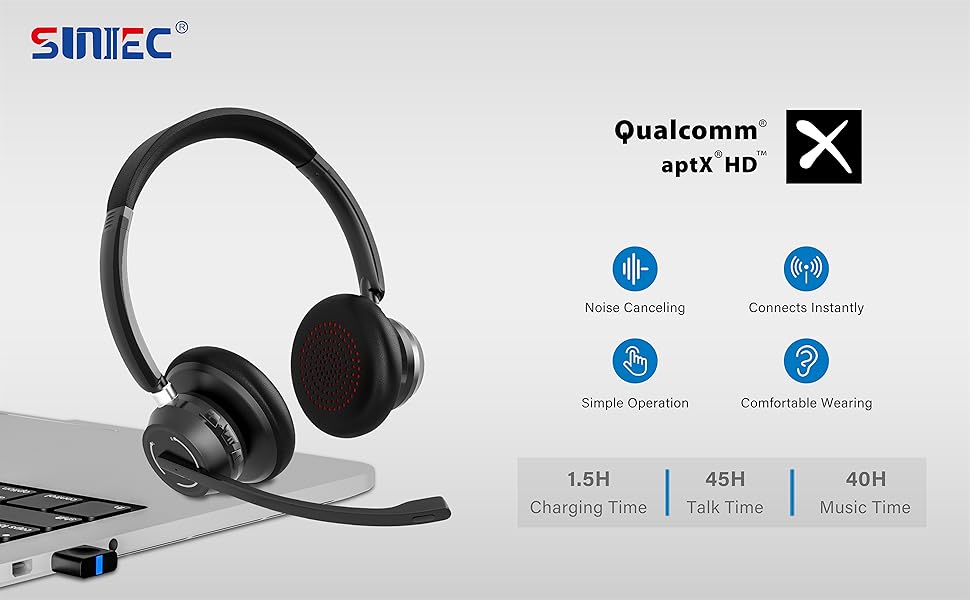
Image: A graphic demonstrating how the noise-cancelling microphone filters out background noise for clearer audio output.
ບໍາລຸງຮັກສາ
Proper care ensures the longevity of your SUNITEC BH880 headset.
- ທໍາຄວາມສະອາດ: ໃຊ້ຜ້າປຽກແຫ້ງເພື່ອເຮັດຄວາມສະອາດຊຸດຫູຟັງ. ຢ່າໃຊ້ເຄື່ອງເຮັດຄວາມສະອາດຂັດຫຼືສານລະລາຍ.
- ການເກັບຮັກສາ: ເກັບຮັກສາຊຸດຫູຟັງໄວ້ໃນບ່ອນທີ່ເຢັນ, ແຫ້ງ, ຫ່າງຈາກແສງແດດໂດຍກົງ ແລະອຸນຫະພູມທີ່ຮຸນແຮງ.
- ການດູແລຫມໍ້ໄຟ: ເພື່ອຮັກສາອາຍຸແບັດເຕີຣີ, ຫຼີກເວັ້ນການຖອດຫູຟັງອອກເຕັມທີ່ເລື້ອຍໆ. ສາກໄຟເປັນປະຈຳ, ເຖິງແມ່ນວ່າບໍ່ໄດ້ໃຊ້ເປັນເວລາດົນກໍຕາມ.
- ຫຼີກເວັ້ນຄວາມຊຸ່ມ: The headset is not water-resistant. Keep it away from liquids and high humidity.
ການແກ້ໄຂບັນຫາ
If you encounter issues with your SUNITEC BH880 headset, refer to the following common solutions:
| ບັນຫາ | ການແກ້ໄຂ |
|---|---|
| ຊຸດຫູຟັງບໍ່ເປີດ. | Ensure the headset is charged. Connect it to a power source using the Type-C cable. |
| ບໍ່ສາມາດຈັບຄູ່ຜ່ານ Bluetooth ໄດ້. |
|
| ບໍ່ມີສຽງຫຼືຄຸນນະພາບສຽງທີ່ບໍ່ດີ. |
|
| ໄມໂຄຣໂຟນບໍ່ເຮັດວຽກ. |
|
| USB Dongle not connecting. |
|
ຂໍ້ມູນຈໍາເພາະ
| ຄຸນສົມບັດ | ລາຍລະອຽດ |
|---|---|
| ຊື່ຕົວແບບ | BH880 |
| ເຕັກໂນໂລຊີການເຊື່ອມຕໍ່ | Wireless (Bluetooth), Wired (3.5mm), USB Dongle |
| ເຕັກໂນໂລຊີການສື່ສານໄຮ້ສາຍ | Bluetooth 5.1 |
| ຊ່ວງ Bluetooth | ສູງເຖິງ 15 ແມັດ (49 ຟຸດ) |
| ການຄວບຄຸມສິ່ງລົບກວນ | Adaptive Noise Cancellation (Microphone) |
| ຂະໜາດໄດເວີສຽງ | 40 ມິນລິແມັດ |
| ປະເພດໄດເວີສຽງ | ໄດນາມິກໄດເວີ |
| impedance | 32 ໂອມ |
| ຮູບຮ່າງຫູຫູ | ຫູເກີນ |
| ອາຍຸແບັດເຕີຣີ (ເວລາລົມ) | ສູງສຸດ 45 ຊົ່ວໂມງ |
| ເວລາສາກໄຟ | Approximately 2 Hours (Type-C) |
| ນ້ໍາຫນັກລາຍການ | 280 ກຣາມ (9.9 ອອນສ໌) |
| ຂະໜາດສິນຄ້າ | 5.91 x 3.94 x 1.96 ນິ້ວ |
| ວັດສະດຸ | ພາດສະຕິກ |
| ອຸປະກອນທີ່ເຂົ້າກັນໄດ້ | Computers, Communication Software (Skype, Zoom, MS Teams, Google Meet) |
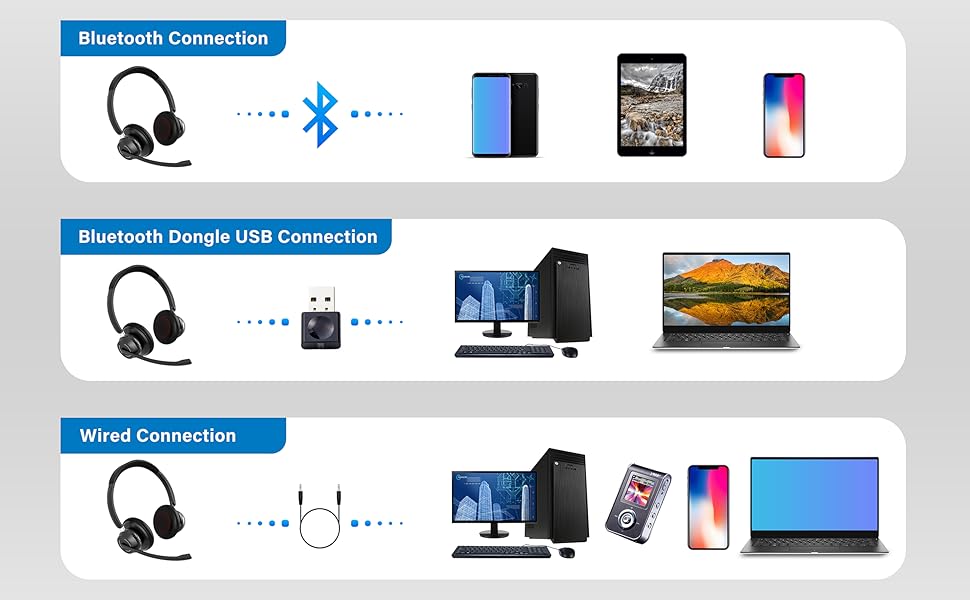
Image: An illustration highlighting the headset's battery performance, indicating up to 45 hours of wireless talk time.
ການຮັບປະກັນແລະການສະຫນັບສະຫນູນ
SUNITEC products are designed for reliability and performance. For warranty information or technical support, please refer to the contact details provided with your purchase or visit the official SUNITEC webເວັບໄຊ. ຮັກສາໃບຮັບເງິນການຊື້ຂອງທ່ານໄວ້ເປັນຫຼັກຖານການຊື້ສໍາລັບການຮ້ອງຂໍການຮັບປະກັນ.
For further assistance, you may contact SUNITEC customer service through their official channels.