
1. ບົດແນະນຳ
This manual provides essential instructions for the safe and efficient use of your DALI IO-8 Wireless/Wired Hi-Fi Headphones. Please read this manual thoroughly before using the product and retain it for future reference. The DALI IO-8 headphones are designed to deliver a high-fidelity audio experience with advanced features such as Active Noise Cancellation (ANC), Bluetooth AptX Adaptive connectivity, and a long-lasting battery.
2. ຜະລິດຕະພັນເກີນview
Familiarize yourself with the components and controls of your DALI IO-8 headphones.

ຮູບທີ 2.1: ດ້ານໜ້າ view of the DALI IO-8 headphones, showcasing the caramel and white color scheme and overall design.

ຮູບທີ 2.2: ລົງລຸ່ມ view of the DALI IO-8 headphones, highlighting the earcups and visible control buttons on the side.
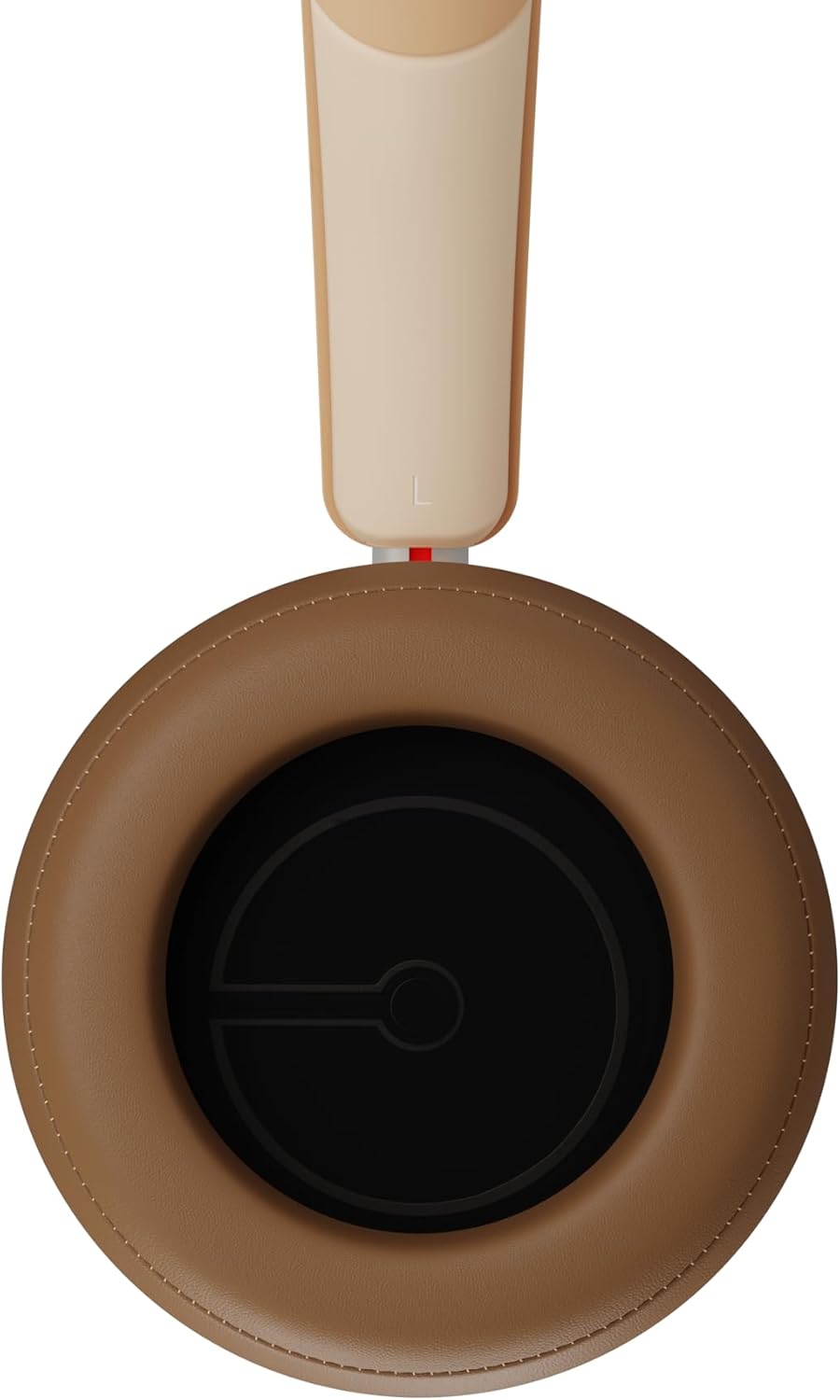
ຮູບທີ 2.3: ພາຍໃນ view of a DALI IO-8 earcup, showing the soft padding and driver grille, designed for comfort and sound delivery.

ຮູບທີ 2.4: ໃກ້ຊິດ view of the DALI IO-8 earcup, showing the USB-C charging port and other control buttons.
2.1 ເນື້ອໃນຊຸດ
- ຫູຟັງ DALI IO-8
- ສາຍສາກ USB-C
- ສາຍສຽງ 3.5 ມມ
- Travel Case (if included)
- ຄູ່ມືຜູ້ໃຊ້ (ເອກະສານນີ້)
2.2 ອົງປະກອບຂອງຫູຟັງ

ຮູບທີ 2.5: ລະເບີດ view illustrating the internal components of the DALI IO-8 headphones, including the 50mm driver, circuitry, and earcup structure.
- Headband (Adjustable)
- Earcups (Over-ear design with genuine leather)
- 50mm Driver (SMC Driver Technology)
- Control Buttons (Power, Volume, ANC, Multifunction)
- USB-C Port (Charging and Wired Audio)
- 3.5mm Audio Jack (Wired Audio)
- Microphones (for ANC and calls)
3. ຕັ້ງຄ່າ
3.1 ການສາກຫູຟັງ
Before initial use, fully charge your DALI IO-8 headphones.
- Connect the supplied USB-C cable to the USB-C port on the headphone earcup.
- Connect the other end of the USB-C cable to a compatible USB power source (e.g., computer USB port, USB wall adapter).
- The LED indicator will show charging status. A full charge provides up to 35 hours of playback with ANC enabled.
- ເມື່ອສາກເຕັມແລ້ວ, ໃຫ້ຖອດສາຍອອກ.
3.2 ເປີດ/ປິດ
- ເພື່ອເປີດເຄື່ອງ: ກົດປຸ່ມເປີດ/ປິດຄ້າງໄວ້ປະມານ 2 ວິນາທີ ຈົນກວ່າໄຟ LED ຈະສະຫວ່າງຂຶ້ນ.
- ປິດເຄື່ອງ: ກົດປຸ່ມເປີດປິດຄ້າງໄວ້ປະມານ 3 ວິນາທີຈົນກວ່າຕົວຊີ້ LED ຈະປິດ.
3.3 ການຈັບຄູ່ Bluetooth
The DALI IO-8 supports Bluetooth AptX Adaptive for high-quality wireless audio.
- ກວດໃຫ້ແນ່ໃຈວ່າປິດຫູຟັງແລ້ວ.
- Press and hold the Power button for approximately 5 seconds until the LED indicator flashes blue rapidly. This indicates pairing mode.
- ໃນອຸປະກອນສຽງຂອງທ່ານ (ໂທລະສັບສະຫຼາດ, ແທັບເລັດ, ຄອມພິວເຕີ), ເປີດໃຊ້ Bluetooth ແລະຊອກຫາອຸປະກອນທີ່ມີຢູ່.
- Select "DALI IO-8" from the list of found devices.
- Once paired, the LED indicator will glow solid blue or flash slowly.
- ຫູຟັງຈະພະຍາຍາມເຊື່ອມຕໍ່ໃໝ່ກັບອຸປະກອນທີ່ຈັບຄູ່ສຸດທ້າຍໂດຍອັດຕະໂນມັດເມື່ອເປີດເຄື່ອງ.
3.4 ສາຍເຊື່ອມຕໍ່
The DALI IO-8 can be used with a wired connection via the 3.5mm audio jack or USB-C.
- ສາຍສຽງ 3.5mm: Connect one end of the supplied 3.5mm audio cable to the headphone's 3.5mm jack and the other end to your audio source's headphone output. The headphones can be used passively in this mode, or actively with ANC and amplification if powered on.
- ສຽງ USB-C: Connect the supplied USB-C cable to the headphone's USB-C port and the other end to a compatible USB audio output on your computer or device. This mode allows for digital audio transmission and charging simultaneously.
4. ປະຕິບັດການຂອງຫູຟັງ
4.1 Active Noise Cancellation (ANC)
The DALI IO-8 features three distinct ANC modes and wind noise suppression.
- Press the dedicated ANC button to cycle through the available modes:
- ANC ເປີດ: ການຕັດສຽງລົບກວນສູງສຸດ.
- ໂໝດຄວາມໂປ່ງໃສ: Allows ambient sounds to pass through for situational awareness.
- ANC ປິດ: Active noise cancellation is disabled.
- Wind noise suppression is automatically engaged in ANC modes to reduce interference from wind.
4.2 ໂໝດສຽງ
Customize your listening experience with two sound profiles.
- Press the Sound Mode button (if available, or refer to specific button on device) to switch between:
- ໂໝດ Hi-Fi: Delivers a balanced and neutral sound signature.
- ໂໝດເບດ: Enhances low-frequency response for a more impactful bass.
4.3 Playback and Volume Control
Use the control buttons on the earcup for media playback and volume adjustments.
- ປະລິມານຂຶ້ນ: ກົດປຸ່ມ '+'.
- ປະລິມານລົງ: ກົດປຸ່ມ '-'.
- ຫຼິ້ນ/ຢຸດ: ກົດປຸ່ມ Multifunction ຄັ້ງດຽວ.
- ເພງຕໍ່ໄປ: Double-press the Multifunction button.
- ຕິດຕາມກ່ອນ ໜ້າ ນີ້: Triple-press the Multifunction button.
4.4 ການຄຸ້ມຄອງການໂທ
Manage phone calls when connected via Bluetooth.
- ຮັບ/ສາຍໂທ: ກົດປຸ່ມ Multifunction ຄັ້ງດຽວ.
- ປະຕິເສດການໂທ: ກົດປຸ່ມ Multifunction ຄ້າງໄວ້ 2 ວິນາທີ.
- ກະຕຸ້ນຜູ້ຊ່ວຍສຽງ: Press and hold the Multifunction button for 2 seconds (when not on a call).
5. ບໍາລຸງຮັກສາ
5.1 ການທໍາຄວາມສະອາດ
- ເຊັດຫູຟັງດ້ວຍຜ້າອ່ອນໆ, ແຫ້ງ, ບໍ່ມີເສັ້ນດ່າງ.
- ຢ່າໃຊ້ເຄື່ອງເຮັດຄວາມສະອາດຂັດ, ສານລະລາຍ, ຫຼືສີດສານເຄມີ.
- ສຳລັບຫູຟັງ, ເຊັດຄ່ອຍໆດ້ວຍຜ້າເຊັດຫູເລັກນ້ອຍamp ຖ້າຈໍາເປັນ, ຫຼັງຈາກນັ້ນໃຫ້ແຫ້ງທັນທີ.
- ຮັບປະກັນວ່າບໍ່ມີຄວາມຊຸ່ມຊື່ນເຂົ້າໄປໃນຮູ ຫຼື ຮູເປີດ.
5.2 ການເກັບຮັກສາ
- When not in use, store the headphones in their protective travel case to prevent damage.
- ຫຼີກເວັ້ນການເປີດຫູຟັງກັບອຸນຫະພູມທີ່ຮຸນແຮງ, ຄວາມຊຸ່ມຊື່ນ, ຫຼືແສງແດດໂດຍກົງ.
6. ການແກ້ໄຂບັນຫາ
| ບັນຫາ | ສາເຫດທີ່ເປັນໄປໄດ້ | ການແກ້ໄຂ |
|---|---|---|
| ບໍ່ມີພະລັງງານ | ແບັດເຕີຣີໝົດ. | ສາກຫູຟັງໂດຍໃຊ້ສາຍ USB-C ທີ່ໃຫ້ມາ. |
| ບໍ່ສາມາດຈັບຄູ່ຜ່ານ Bluetooth ໄດ້ | ຫູຟັງບໍ່ຢູ່ໃນໂໝດຈັບຄູ່; ອຸປະກອນ Bluetooth ປິດ; ໄກຈາກອຸປະກອນ. | Ensure headphones are in pairing mode (rapid blue LED flash). Turn on Bluetooth on your device. Move headphones closer to the device. Forget "DALI IO-8" on your device and re-pair. |
| ບໍ່ມີສຽງ | Volume too low; incorrect input source; headphones not connected. | Increase volume on headphones and source device. Check Bluetooth connection or wired cable. Ensure the correct audio output is selected on your device. |
| ANC ບໍ່ເຮັດວຽກຢ່າງມີປະສິດທິພາບ | ANC mode off; poor earcup seal. | Ensure ANC is enabled. Adjust headphones for a proper seal around your ears. |
7. ຂໍ້ມູນຈໍາເພາະ
| ຄຸນສົມບັດ | ລາຍລະອຽດ |
|---|---|
| ຊື່ຕົວແບບ | DALI IO-8 |
| ຍີ່ຫໍ້ | ດາລີ |
| ເຕັກໂນໂລຊີການເຊື່ອມຕໍ່ | ມີສາຍ, ໄຮ້ສາຍ (Bluetooth) |
| ເຕັກໂນໂລຊີການສື່ສານໄຮ້ສາຍ | Bluetooth (AptX Adaptive) |
| ການຍົກເລີກສິ່ງລົບກວນ | Active Noise Suppression (ANC) with Wind Noise Suppression |
| ການຈັດວາງຫູ | ເກີນຫູ |
| ຂະໜາດຄົນຂັບ | 50mm (SMC Driver Technology) |
| impedance | 25 ໂອມ |
| Jack ຫູຟັງ | 3.5 ມມ |
| ຊີວິດຫມໍ້ໄຟ | ສູງສຸດ 35 ຊົ່ວໂມງ (ກັບ ANC) |
| ວັດສະດຸ | Genuine Leather (earcups) |
8. ຂໍ້ມູນຄວາມປອດໄພ
Please observe the following safety guidelines to ensure safe operation and prevent damage to your headphones or injury to yourself.
- Do not expose the headphones to water, rain, or moisture.
- ຫຼີກເວັ້ນອຸນຫະພູມທີ່ຮຸນແຮງ.
- Do not disassemble, repair, or modify the headphones. This voids the warranty.
- ຟັງໃນລະດັບສຽງປານກາງເພື່ອປ້ອງກັນຄວາມເສຍຫາຍຂອງການໄດ້ຍິນ.
- ຮັກສາໃຫ້ໄກຈາກເດັກນ້ອຍ.
- ກໍາຈັດຜະລິດຕະພັນຢ່າງມີຄວາມຮັບຜິດຊອບຕາມລະບຽບການທ້ອງຖິ່ນ.
9. ການຮັບປະກັນແລະການສະຫນັບສະຫນູນ
DALI products are manufactured to high standards and are covered by a limited warranty. For specific warranty terms and conditions, please refer to the warranty card included with your product or visit the official DALI website. For technical support, troubleshooting assistance, or service inquiries, please contact your authorized DALI dealer or DALI customer support.

ຮູບທີ 9.1: A person wearing the DALI IO-8 headphones, demonstrating their comfortable fit and use in a real-world environment.