
ແນະນຳ
This manual provides detailed instructions for the DALI IO-8 Over-The-Ear Wireless/Wired Hi-Fi Headphones. Please read this manual thoroughly before using your headphones to ensure proper operation and to maximize your listening experience. The DALI IO-8 headphones are designed to deliver high-fidelity audio with advanced features such as Active Noise Cancellation (ANC), Bluetooth AptX Adaptive connectivity, and versatile wired options.
ເນື້ອໃນຊຸດ
ກວດສອບວ່າລາຍການທັງຫມົດແມ່ນມີຢູ່ໃນຊຸດ:
- DALI IO-8 Over-The-Ear Headphones
- USB-C Cable (for charging and digital audio)
- 3.5mm Stereo Cable (for analog audio)
- ກໍລະນີການເດີນທາງ
- ຄູ່ມືການສອນນີ້
ສິນຄ້າເກີນview
Familiarize yourself with the components and controls of your DALI IO-8 headphones.
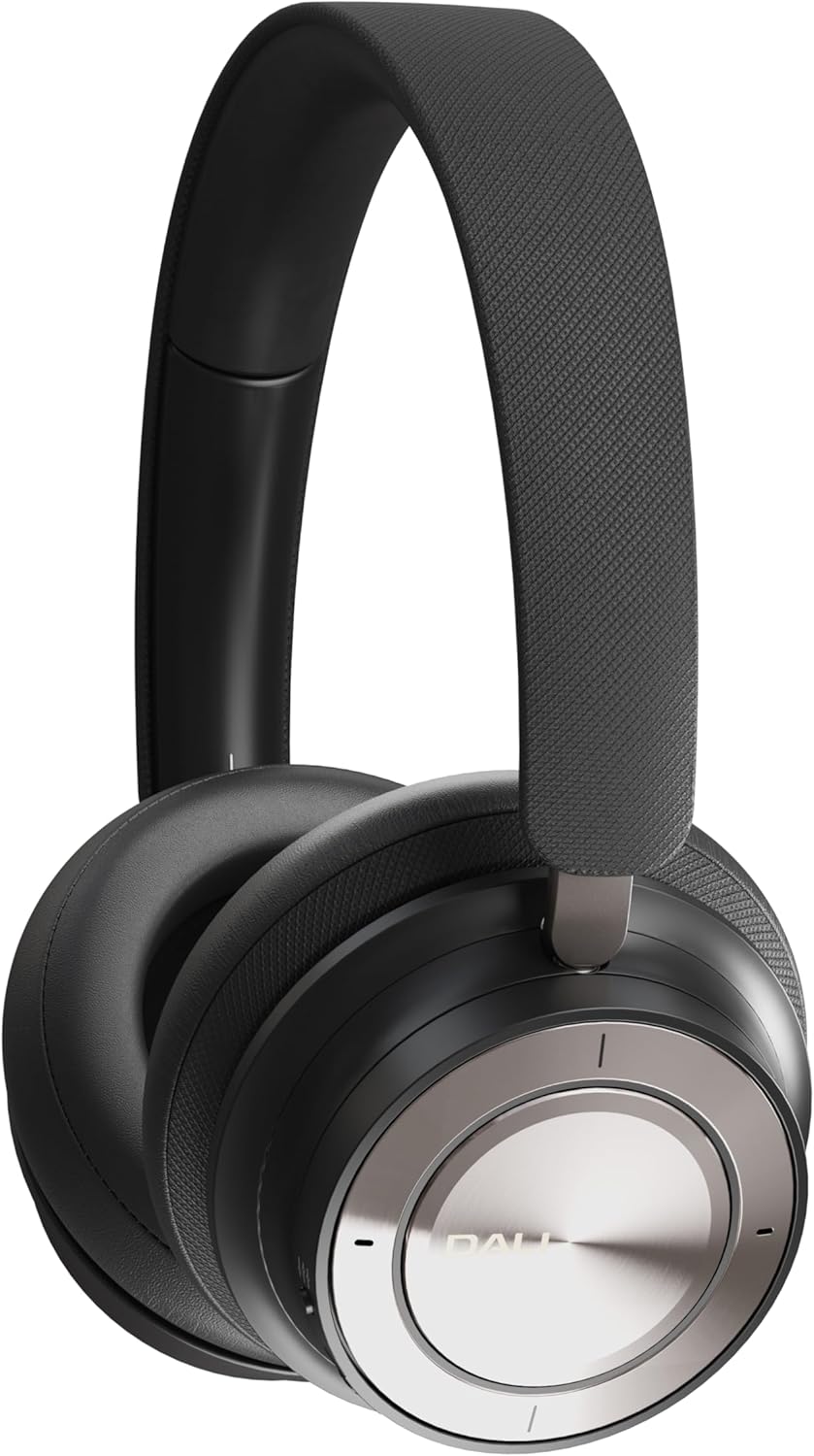
Figure 1: DALI IO-8 Headphones (Iron Black)

ຮູບ 2: ເທິງລົງລຸ່ມ view of DALI IO-8 headphones, highlighting the control layout on the earcups.

Figure 3: Close-up of the right earcup, showing the power button, ANC button, and USB-C port.
ການຄວບຄຸມ ແລະພອດ:
- ປຸ່ມ Power/Bluetooth: Located on the right earcup. Used for powering on/off and initiating Bluetooth pairing.
- ປຸ່ມ ANC: Located on the right earcup. Cycles through Active Noise Cancellation modes.
- Volume/Track Control Ring: A ring on the right earcup for adjusting volume and skipping tracks.
- ປຸ່ມຫຼິ້ນ/ຢຸດຊົ່ວຄາວ: Central button on the right earcup.
- ຜອດ USB-C: For charging and digital audio connection.
- Jack ສຽງ 3.5mm: For analog audio connection.
- ຕົວຊີ້ວັດ LED: Provide status for power, battery, and Bluetooth connection.
ຕັ້ງຄ່າ
1. ການສາກຫູຟັງ
Before first use, fully charge your DALI IO-8 headphones.
- Connect the supplied USB-C cable to the USB-C port on the right earcup.
- Connect the other end of the USB-C cable to a compatible USB power source (e.g., computer USB port, USB wall adapter).
- The LED indicator will show charging status. A full charge provides up to 35 hours of playback with ANC enabled.
2. ເປີດ/ປິດ
- ເພື່ອເປີດເຄື່ອງ: Press and hold the Power button on the right earcup until the LED indicator illuminates.
- ປິດເຄື່ອງ: ກົດປຸ່ມເປີດປິດຄ້າງໄວ້ຈົນກ່ວາຕົວຊີ້ວັດ LED ປິດ.
3. ການຈັບຄູ່ Bluetooth
Pair your DALI IO-8 headphones with a Bluetooth-enabled device.
- ກວດໃຫ້ແນ່ໃຈວ່າປິດຫູຟັງແລ້ວ.
- ກົດປຸ່ມເປີດປິດຄ້າງໄວ້ປະມານ 5 ວິນາທີ ຈົນກວ່າໄຟ LED ຈະກະພິບສີຟ້າ ແລະສີແດງ, ສະແດງເຖິງໂໝດການຈັບຄູ່.
- On your device (smartphone, tablet, laptop), navigate to the Bluetooth settings and enable Bluetooth.
- Select "DALI IO-8" from the list of available devices.
- ເມື່ອເຊື່ອມຕໍ່ແລ້ວ, ຕົວຊີ້ວັດ LED ຈະສະແດງແສງສະຫວ່າງສີຟ້າແຂງ.
4. ການເຊື່ອມຕໍ່ສາຍ
The DALI IO-8 headphones support both 3.5mm analog and USB-C digital wired connections.
- 3.5mm Stereo Cable: Connect one end of the 3.5mm stereo cable to the audio jack on the left earcup and the other end to your audio source's 3.5mm output. The headphones can be used passively in this mode, even if powered off.
- ສາຍ USB-C: Connect the supplied USB-C cable to the USB-C port on the right earcup and the other end to a compatible USB-C audio output on your device. This provides a digital audio connection and can also charge the headphones simultaneously.
ຄໍາແນະນໍາການດໍາເນີນງານ
1. ການຄວບຄຸມສຽງພື້ນຖານ
- ຫຼິ້ນ/ຢຸດ: Press the central Play/Pause button once.
- ປະລິມານຂຶ້ນ: Rotate the outer control ring upwards.
- ປະລິມານລົງ: Rotate the outer control ring downwards.
- ເພງຕໍ່ໄປ: Rotate the outer control ring forward (clockwise).
- ຕິດຕາມກ່ອນ ໜ້າ ນີ້: Rotate the outer control ring backward (counter-clockwise).
2. Active Noise Cancellation (ANC)
The DALI IO-8 features multiple ANC modes to adapt to your environment.
- Press the ANC button on the right earcup to cycle through the available modes:
- ANC ເປີດ: ຫຼຸດຜ່ອນສິ່ງລົບກວນສະພາບແວດລ້ອມ.
- ໂໝດຄວາມໂປ່ງໃສ: Allows external sounds to be heard, useful for situational awareness.
- ANC ປິດ: ປິດການຍົກເລີກສຽງລົບກວນ.
3. ໂໝດສຽງ
The headphones offer two distinct sound profiles.
- Press the EQ button (if present, or refer to specific button for sound modes) to switch between:
- ໂໝດ Hi-Fi: Provides a balanced and neutral sound signature.
- ໂໝດເບດ: Enhances low-frequency response for a more pronounced bass.
4. ເຮັດ ແລະ ຮັບສາຍ
When connected via Bluetooth, the DALI IO-8 headphones can be used for phone calls.
- ຮັບ/ສາຍໂທ: ກົດປຸ່ມຫຼິ້ນ/ຢຸດຊົ່ວຄາວໜຶ່ງຄັ້ງ.
- ປະຕິເສດການໂທ: ກົດປຸ່ມຫຼິ້ນ/ຢຸດຄ້າງໄວ້ 2 ວິນາທີ.
- ກະຕຸ້ນຜູ້ຊ່ວຍສຽງ: ກົດປຸ່ມຫຼິ້ນ/ຢຸດຊົ່ວຄາວສອງຄັ້ງ (ໜ້າທີ່ອາດແຕກຕ່າງກັນໄປຕາມອຸປະກອນ).
ບໍາລຸງຮັກສາ
ທໍາຄວາມສະອາດ
- ເຊັດຫູຟັງດ້ວຍຜ້າອ່ອນໆ, ແຫ້ງ, ບໍ່ມີເສັ້ນດ່າງ.
- ຢ່າໃຊ້ເຄື່ອງເຮັດຄວາມສະອາດຂັດ, ເຫຼົ້າ, ຫຼືສານລະລາຍສານເຄມີ.
- ຫຼີກເວັ້ນການໄດ້ຮັບຄວາມຊຸ່ມຊື່ນເຂົ້າໄປໃນຊ່ອງເປີດໃດໆ.
ການເກັບຮັກສາ
- When not in use, store the headphones in the provided travel case to protect them from dust and damage.
- ເກັບຮັກສາໄວ້ໃນບ່ອນທີ່ເຢັນ, ແຫ້ງ, ຫ່າງຈາກແສງແດດໂດຍກົງແລະອຸນຫະພູມທີ່ສຸດ.
ການແກ້ໄຂບັນຫາ
If you encounter issues with your DALI IO-8 headphones, refer to the following common solutions:
| ບັນຫາ | ການແກ້ໄຂທີ່ເປັນໄປໄດ້ |
|---|---|
| ບໍ່ມີພະລັງງານ | ກວດໃຫ້ແນ່ໃຈວ່າໄດ້ສາກຫູຟັງແລ້ວ. ເຊື່ອມຕໍ່ຫາແຫຼ່ງພະລັງງານໂດຍໃຊ້ສາຍ USB-C. |
| ບໍ່ສາມາດຈັບຄູ່ຜ່ານ Bluetooth ໄດ້ | Ensure headphones are in pairing mode (flashing blue/red LED). Turn off and on your device's Bluetooth. Move closer to the device. |
| ບໍ່ມີສຽງໃນໂໝດໄຮ້ສາຍ | Check if headphones are paired and connected. Adjust volume on both headphones and source device. Ensure media is playing. |
| ບໍ່ມີສຽງໃນໂໝດໃຊ້ສາຍ | Ensure cables are securely connected. Test with a different cable or audio source. |
| ANC ບໍ່ມີປະສິດທິພາບ | Ensure ANC mode is active. Check earcup fit for a proper seal around your ears. |
ຂໍ້ມູນຈໍາເພາະ
| ຄຸນສົມບັດ | ລາຍລະອຽດ |
|---|---|
| ຊື່ຕົວແບບ | DALI IO-8 |
| ເຕັກໂນໂລຊີການເຊື່ອມຕໍ່ | ມີສາຍ, ໄຮ້ສາຍ (Bluetooth) |
| ເຕັກໂນໂລຊີການສື່ສານໄຮ້ສາຍ | Bluetooth 5.2 with AptX Adaptive |
| Jack ຫູຟັງ | Jack ຂະ ໜາດ 3.5 ມມ |
| ປະເພດໄດເວີສຽງ | ໄດເວີໄດນາມິກ (50 ມມ) |
| ຊ່ວງຄວາມຖີ່ | 10 - 43,000 Hz |
| ການຄວບຄຸມສິ່ງລົບກວນ | ການຍົກເລີກສິ່ງລົບກວນທີ່ໃຊ້ວຽກ (ANC) |
| ຊີວິດຫມໍ້ໄຟ | ສູງສຸດ 35 ຊົ່ວໂມງ (ພ້ອມ ANC) |
| ວັດສະດຸ | ຫນັງ |
| ຮູບຮ່າງຫູຫູ | ເກີນຫູ |
| ລະດັບຄວາມຕ້ານທານນ້ໍາ | ກັນນ້ຳ |
| ໝາຍເລກຕົວແບບ | 203081 |
| ຜູ້ຜະລິດ | ດາລີ |
ການຮັບປະກັນແລະການສະຫນັບສະຫນູນ
For warranty information and technical support, please refer to the official DALI website or contact your authorized DALI retailer. Keep your proof of purchase for warranty claims.