
1. ບົດແນະນຳ
Thank you for choosing the Candy Wave 600 Built-in Microwave. This manual provides essential information for the safe and efficient operation, installation, and maintenance of your appliance. Please read these instructions carefully before using the microwave oven and keep them for future reference.
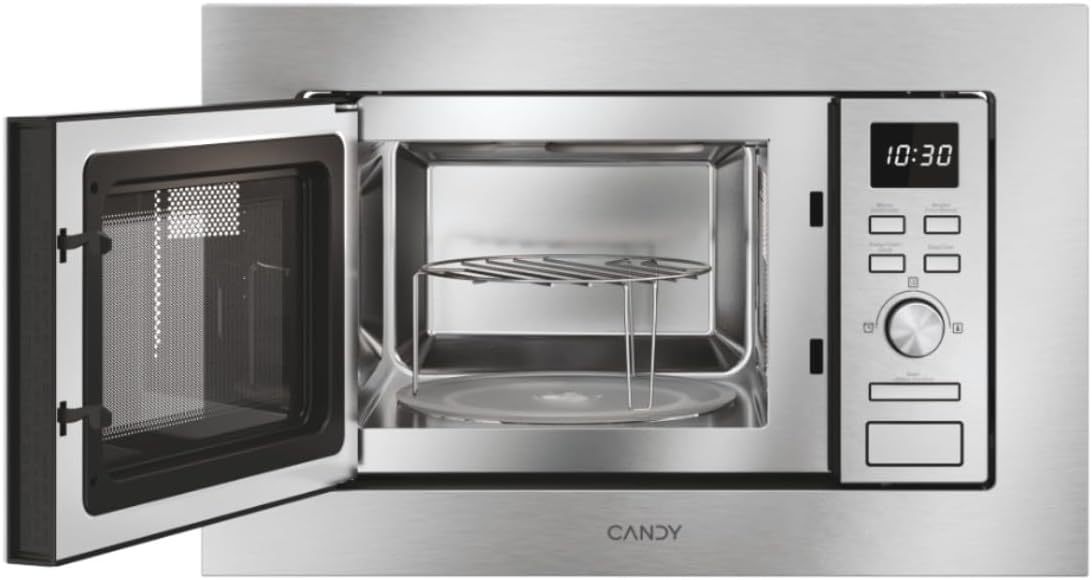
ຮູບ 1: ດ້ານຫນ້າ view of the Candy Wave 600 Built-in Microwave.
2. ຂໍ້ມູນຄວາມປອດໄພ
ປະຕິບັດຕາມຄວາມລະມັດລະວັງດ້ານຄວາມປອດໄພຂັ້ນພື້ນຖານສະເໝີເມື່ອໃຊ້ເຄື່ອງໃຊ້ໄຟຟ້າເພື່ອຫຼຸດຜ່ອນຄວາມສ່ຽງຕໍ່ການເກີດອັກຄີໄພ, ໄຟຟ້າຊອດ, ການບາດເຈັບຕໍ່ຄົນ, ຫຼືການໄດ້ຮັບພະລັງງານໄມໂຄເວຟຫຼາຍເກີນໄປ.
- ອ່ານຄໍາແນະນໍາທັງຫມົດ ກ່ອນທີ່ຈະໃຊ້ເຄື່ອງໃຊ້.
- ຢ່າພະຍາຍາມເປີດເຕົາອົບນີ້ດ້ວຍການເປີດປະຕູ ເພາະອາດສົ່ງຜົນໃຫ້ເກີດອັນຕະລາຍຕໍ່ພະລັງງານໄມໂຄເວຟໄດ້.
- ຫ້າມບໍ່ໃຫ້ຄວາມຮ້ອນຂອງນໍ້າ ຫຼືອາຫານອື່ນໆຢູ່ໃນຖັງທີ່ຜະນຶກເຂົ້າກັນ ເພາະມັນມີຄວາມຜິດທີ່ຈະລະເບີດ.
- ພຽງແຕ່ອະນຸຍາດໃຫ້ເດັກນ້ອຍໃຊ້ເຕົາອົບໂດຍບໍ່ມີການຄວບຄຸມໃນເວລາທີ່ໄດ້ຮັບຄໍາແນະນໍາຢ່າງພຽງພໍເພື່ອໃຫ້ເດັກສາມາດນໍາໃຊ້ເຕົາອົບໄດ້ຢ່າງປອດໄພແລະເຂົ້າໃຈເຖິງອັນຕະລາຍຂອງການນໍາໃຊ້ທີ່ບໍ່ຖືກຕ້ອງ.
- ຫ້າມໃຊ້ສານເຄມີຫຼືສານລະເຫີຍທີ່ລະລາຍໃນເຄື່ອງໃຊ້ນີ້.
- ຖ້າປະທັບຕາຂອງປະຕູຫຼືປະຕູໄດ້ຮັບຄວາມເສຍຫາຍ, ເຕົາອົບຕ້ອງບໍ່ຖືກດໍາເນີນການຈົນກ່ວາມັນໄດ້ຮັບການສ້ອມແປງໂດຍຜູ້ມີອໍານາດ.
- ເຄື່ອງໃຊ້ຕ້ອງຖືກດິນ. ເຊື່ອມຕໍ່ພຽງແຕ່ກັບເຕົ້າສຽບທີ່ມີດິນຢ່າງຖືກຕ້ອງ.
3. ການຕິດຕັ້ງແລະການຕິດຕັ້ງ
Proper installation is crucial for the performance and safety of your microwave oven. This appliance is designed for built-in installation.
3.1 ການຫຸ້ມຫໍ່
- ເອົາອຸປະກອນການຫຸ້ມຫໍ່ທັງຫມົດອອກຈາກພາຍໃນຝາເຕົາອົບແລະຈາກປະຕູ.
- ກວດເບິ່ງເຕົາອົບສໍາລັບຄວາມເສຍຫາຍໃດໆ, ເຊັ່ນ: ຮອຍແຕກຫຼືປະຕູທີ່ແຕກຫັກ. ຢ່າຕິດຕັ້ງຖ້າເສຍຫາຍ.
- Ensure all accessories are present: turntable, turntable support, and grill rack.
3.2 ຕຳແໜ່ງ ແລະ ຂະໜາດ
The microwave must be installed in a cabinet opening that meets the specified dimensions. Ensure adequate ventilation around the appliance.

Figure 2: Installation dimensions for the Candy Wave 600 Built-in Microwave.
- The cabinet opening should be 560mm wide and 362mm high.
- The microwave itself measures 59.5 cm (width) x 34.4 cm (depth) x 38.2 cm (height).
- Ensure a minimum depth of 500mm for the cabinet.
3.3 ການເຊື່ອມຕໍ່ໄຟຟ້າ
- Connect the microwave to a properly earthed 230V AC power outlet.
- ຫ້າມໃຊ້ສາຍຕໍ່ ຫຼືຊັອກເກັດຫຼາຍອັນ.
- The power cord should be easily accessible after installation.
3.4 ການທໍາຄວາມສະອາດເບື້ອງຕົ້ນ
ກ່ອນການນຳໃຊ້ຄັ້ງທຳອິດ, ໃຫ້ເຊັດພາຍໃນ ແລະ ພາຍນອກຂອງໄມໂຄເວຟດ້ວຍຜ້າເຊັດໂຕ.amp cloth. Ensure the turntable and support are clean and correctly placed.

ຮູບ 3: ພາຍໃນ view with turntable and grill rack.
4. ຄໍາແນະນໍາການດໍາເນີນງານ
Your Candy Wave 600 microwave offers various functions for convenient cooking. Familiarize yourself with the control panel for optimal use.
4.1 ກະດານຄວບຄຸມຫຼາຍກວ່າview
The microwave features an integrated screen and touch controls for easy operation. A rotary knob is used for setting time and selecting options.
4.2 ການຕັ້ງໂມງ
- When the oven is plugged in, the display will show '0:00'.
- Press the clock button (usually indicated by a clock icon).
- Use the rotary knob to set the hour, then press the clock button again.
- Use the rotary knob to set the minutes, then press the clock button to confirm.
4.3 Microwave Cooking (Power Levels)
The microwave offers 5 power levels. To cook with microwave power:
- ເອົາອາຫານໃສ່ເຕົາອົບແລະປິດປະຕູ.
- Press the 'Microwave' button repeatedly to select the desired power level (e.g., P100 for 100% power).
- ໃຊ້ລູກບິດ rotary ເພື່ອກໍານົດເວລາປຸງແຕ່ງອາຫານ.
- ກົດປຸ່ມ 'ເລີ່ມຕົ້ນ' ເພື່ອເລີ່ມຕົ້ນການປຸງແຕ່ງອາຫານ.
4.4 ຟັງຊັນປີ້ງ
ຟັງຊັນປີ້ງແມ່ນເຫມາະສົມສໍາລັບອາຫານທີ່ມີສີນ້ໍາຕານແລະຈືດໆ.
- Place food on the grill rack (if provided) directly on the turntable.
- ກົດປຸ່ມ 'ປີ້ງ'.
- ໃຊ້ລູກບິດ rotary ເພື່ອກໍານົດເວລາການປີ້ງ.
- ກົດປຸ່ມ 'Start'.
4.5 ໂຄງການປຸງແຕ່ງອາຫານອັດຕະໂນມັດ
The microwave features 7 automatic cooking programs for various food types. These programs automatically adjust cooking time and power.
- Press the 'Auto Menu' button.
- Use the rotary knob to select the desired program number.
- Enter the food weight (if prompted) using the rotary knob.
- ກົດ 'ເລີ່ມຕົ້ນ'.
4.6 Easy Touch Controls
The Easy Touch controls allow you to select the food weight, and the microwave will automatically adjust the cooking time and power.
- Select the desired cooking function (e.g., Microwave).
- Press the 'Easy Touch' button (or similar icon).
- Use the rotary knob to input the food weight.
- ກົດ 'ເລີ່ມຕົ້ນ'.
4.7 Start Express Function
The Start Express button provides quick cooking at maximum power.
- Press the 'Start Express' button once for 30 seconds of cooking at maximum power.
- Each subsequent press adds another 30 seconds.
4.8 ໂປຣແກຣມ Defrost
The defrost program thaws food based on weight.
- ກົດປຸ່ມ 'Defrost'.
- Use the rotary knob to select the food weight.
- ກົດ 'ເລີ່ມຕົ້ນ'. ເຕົາອົບຈະຄິດໄລ່ເວລາລະລາຍນ້ຳກ້ອນໂດຍອັດຕະໂນມັດ.
4.9 ຟັງຊັນລັອກເດັກ
The Child Lock prevents accidental operation, especially by children.
- To activate: Press and hold the 'Stop/Cancel' button for approximately 3 seconds until a 'beep' sounds and a lock indicator appears on the display.
- To deactivate: Press and hold the 'Stop/Cancel' button again for approximately 3 seconds until the lock indicator disappears.
5. ການບໍາລຸງຮັກສາແລະການທໍາຄວາມສະອາດ
ການທໍາຄວາມສະອາດແລະການບໍາລຸງຮັກສາເປັນປົກກະຕິຈະຮັບປະກັນອາຍຸຍືນແລະປະສິດທິພາບທີ່ດີທີ່ສຸດຂອງເຕົາອົບໄມໂຄເວຟຂອງທ່ານ.
5.1 ການທໍາຄວາມສະອາດພາຍໃນ
- ເຮັດຄວາມສະອາດຊ່ອງເຕົາອົບຫຼັງຈາກໃຊ້ແຕ່ລະຄັ້ງດ້ວຍໂຄສະນາamp ຜ້າ.
- ສໍາລັບຮອຍເປື້ອນທີ່ແຂງກະດ້າງ, ໃຫ້ໃຊ້ຝຸ່ນຊັກຟອກອ່ອນໆຫຼືເຄື່ອງເຮັດຄວາມສະອາດທີ່ປອດໄພຈາກໄມໂຄເວຟ.
- ຢ່າໃຊ້ເຄື່ອງເຮັດຄວາມສະອາດທີ່ມີຮອຍຂີດຂ່ວນຫຼືແຜ່ນຮອງແຜ່ນໂລຫະ.
- Remove and wash the glass turntable and turntable support in warm soapy water.
5.2 ການທໍາຄວາມສະອາດພາຍນອກ
- ເຊັດພື້ນຜິວພາຍນອກດ້ວຍຜ້າອ່ອນໆ, ງamp ຜ້າ.
- ທຳຄວາມສະອາດປະຕູ ແລະ ປະທັບຕາປະຕູເປັນປະຈຳເພື່ອຮັບປະກັນການປິດທີ່ຖືກຕ້ອງ.
- Avoid excessive moisture near the control panel.
6. ການແກ້ໄຂບັນຫາ
ຖ້າທ່ານພົບບັນຫາກັບໄມໂຄເວຟຂອງທ່ານ, ໃຫ້ອ້າງອີງເຖິງບັນຫາທົ່ວໄປຕໍ່ໄປນີ້ ແລະວິທີແກ້ໄຂບັນຫາກ່ອນທີ່ຈະຕິດຕໍ່ບໍລິການ.
| ບັນຫາ | ສາເຫດທີ່ເປັນໄປໄດ້ | ການແກ້ໄຂ |
|---|---|---|
| ເຕົາອົບຈະບໍ່ເລີ່ມຕົ້ນ | ສາຍໄຟບໍ່ໄດ້ສຽບ; ປະຕູປິດບໍ່ຖືກຕ້ອງ; ຟິວເປົ່າ ຫຼືຕົວຕັດວົງຈອນຕິດ. | ໃຫ້ແນ່ໃຈວ່າປລັກສຽບຢູ່ໃນປລັກຢ່າງແໜ້ນໜາ; ປິດປະຕູໃຫ້ແໜ້ນ; ກວດສອບຟິວໃນຄົວເຮືອນ ຫຼື ຕັ້ງຄ່າເບຣກເກີຄືນໃໝ່. |
| No microwave power | Incorrect power level selected; Technical malfunction. | Verify power level setting; Contact customer support if issue persists. |
| ອາຫານບໍ່ຮ້ອນເທົ່າທຽມກັນ | ອາຫານບໍ່ໄດ້ຄົນ ຫຼື ຈັດລຽງໃໝ່; ໂຕະໝຸນບໍ່ໄດ້ໝຸນ. | Stir or rearrange food during cooking; Check if turntable is correctly placed and rotating. |
| ໄຟບໍ່ເຮັດວຽກ | Bulb ຕ້ອງການປ່ຽນແທນ. | ຕິດຕໍ່ພະນັກງານບໍລິການທີ່ມີຄຸນວຸດທິສໍາລັບການປ່ຽນຫລອດໄຟ. |
7. ຂໍ້ມູນຈໍາເພາະ
Technical details for the Candy Wave 600 Built-in Microwave (Model CA20FMW7NG).
| ຄຸນສົມບັດ | ຂໍ້ມູນຈໍາເພາະ |
|---|---|
| ໝາຍເລກຕົວແບບ | CA20FMW7NG |
| ຍີ່ຫໍ້ | ເຂົ້າຫນົມ |
| ຄວາມອາດສາມາດ | 20 ລິດ |
| ພະລັງງານໄມໂຄເວຟ | 800 ວັດ |
| ສະບັບtage | 230 ໂວນ (AC) |
| ປະເພດການຄວບຄຸມ | ແຕະການຄວບຄຸມ |
| ວັດສະດຸ | ສະແຕນເລດ |
| ຂະ ໜາດ (D x W x H) | 34.4ຊມ x 59.5ຊມ x 38.2ຊມ |
| ນ້ຳໜັກ | 15 ກິໂລກຣາມ |
| ວິທີການເຮັດຄວາມຮ້ອນ | Radiant and Grill |
| ອົງປະກອບລວມ | Rack ປີ້ງ |
8. ການຮັບປະກັນແລະການສະຫນັບສະຫນູນ
Your Candy Wave 600 Built-in Microwave comes with a ຮັບປະກັນສິນຄ້າ 2 ປີ.
For warranty claims, technical assistance, or to purchase spare parts, please contact Candy customer support. Refer to the contact information provided with your purchase documentation or visit the official Candy webເວັບໄຊ.
Please have your model number (CA20FMW7NG) and proof of purchase ready when contacting support.