
1. ບົດແນະນຳ
This manual provides essential information for the installation, operation, and maintenance of your ANTEC GSK750 ATX3.1 80PLUS GOLD Power Supply Unit (PSU). Please read this manual thoroughly before installing and using the product to ensure proper function and safety. The ANTEC GSK750 is a high-efficiency, durable power supply designed for modern PC systems.
2. ຄຸນສົມບັດ
- 80PLUS GOLD certification for high efficiency.
- Full modular design for improved cable management.
- Compact design with a depth of 140 mm.
- Active PFC and universal AC input support.
3. ການຕິດຕັ້ງແລະການຕິດຕັ້ງ
3.1. ເນື້ອໃນຊຸດ
ກວດສອບວ່າອົງປະກອບທັງໝົດມີຢູ່ໃນຊຸດ:
- ANTEC GSK750 ATX3.1 80PLUS GOLD PSU
- ຊຸດສາຍໂມດູນ
- ສາຍໄຟ AC
- ສະກູຕິດ
- ຄູ່ມືຜູ້ໃຊ້ (ເອກະສານນີ້)
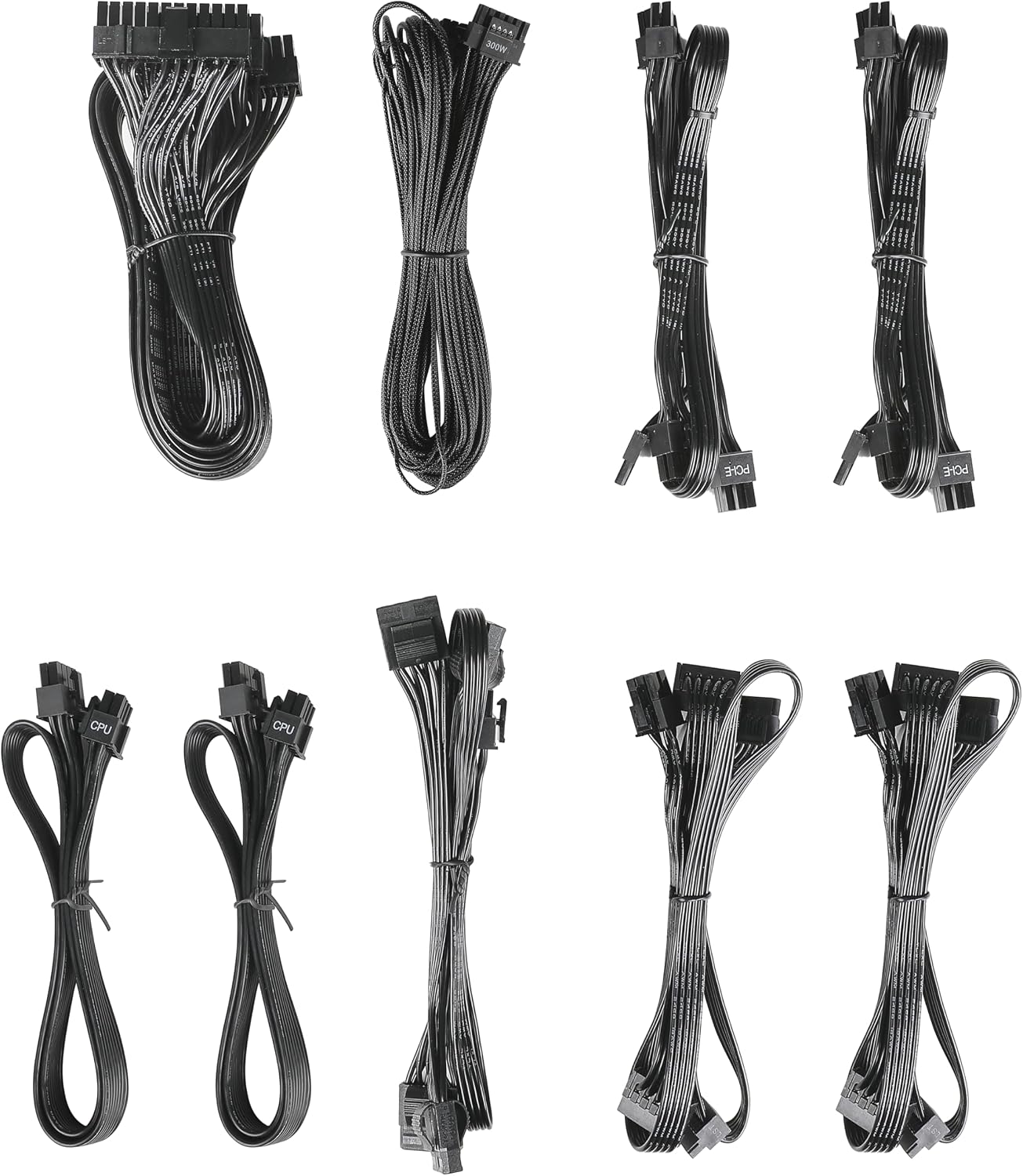
Image: The modular cable set included with the ANTEC GSK750 power supply unit. This includes various cables for motherboard, CPU, PCIe, SATA, and Molex connections.
3.2. ການຕິດຕັ້ງທາງດ້ານຮ່າງກາຍ
- ກວດໃຫ້ແນ່ໃຈວ່າຄອມພິວເຕີຂອງທ່ານປິດເຄື່ອງ ແລະຖອດປລັກຈາກປລັກສຽບໃສ່ຝາ.
- Mount the PSU into the designated PSU bay in your computer case using the provided screws. Ensure the fan is oriented correctly for optimal airflow (typically facing downwards if there's a bottom vent, or upwards if not).

ຮູບພາບ: ເທິງລົງລຸ່ມ view of the ANTEC GSK750 power supply unit, showing the fan grille and overall compact form factor.
3.3. ການເຊື່ອມຕໍ່ສາຍ
Connect the necessary modular cables to the PSU and your system components. The full modular design allows you to connect only the cables you need, reducing clutter.
- 24-Pin Main Power: Connect to your motherboard.
- 8-Pin (4+4) CPU Power: Connect to your motherboard's CPU power connector.
- PCI-E (6+2 Pin): Connect to your graphics card(s).
- ພະລັງງານ SATA: ເຊື່ອມຕໍ່ກັບ SSDs, HDDs, ແລະ optical drives.
- Molex Power: Connect to older peripherals or case fans.

Image: The modular connector panel on the side of the ANTEC GSK750 power supply, clearly labeled for PCI-E, CPU, SATA/Molex, and M/B (motherboard) connections.
3.4. ການເປີດເຄື່ອງເບື້ອງຕົ້ນ
After all connections are secure, plug the AC power cord into the PSU and then into a wall outlet. Flip the main power switch on the back of the PSU to the 'ON' position. You can then power on your computer.
4. ຄໍາແນະນໍາການດໍາເນີນງານ
4.1. Hybrid Mode
The ANTEC GSK750 features a Hybrid Mode switch located on the rear of the unit. When Hybrid Mode is enabled, the PSU fan will remain off under low load conditions, providing silent operation. The fan will automatically activate when the load increases to maintain optimal temperatures. When Hybrid Mode is disabled, the fan will operate continuously.

Image: The rear panel of the ANTEC GSK750 power supply, featuring the main power switch, AC input, and the 'Hybrid Mode' toggle switch.
5. ບໍາລຸງຮັກສາ
To ensure the longevity and optimal performance of your PSU, follow these maintenance guidelines:
- ທໍາຄວາມສະອາດ: Periodically clean the exterior of the PSU and the fan grille to prevent dust buildup. Use compressed air to gently clear dust from the fan and internal components. Ensure the PSU is unplugged before cleaning.
- ກະແສລົມ: Ensure that the PSU has adequate airflow within your computer case. Avoid blocking the intake or exhaust vents.
6. ການແກ້ໄຂບັນຫາ
If you encounter issues with your ANTEC GSK750 PSU, consider the following:
- ບໍ່ມີພະລັງງານ: Check all cable connections, especially the 24-pin motherboard connector and the CPU power connector. Ensure the AC power cord is securely plugged into both the PSU and the wall outlet. Verify the main power switch on the PSU is in the 'ON' position.
- ລະບົບບໍ່ສະຖຽນ/ຂັດຂ້ອງ: ຮັບປະກັນ PSU wat ຂອງທ່ານtage is sufficient for all your components. Overloading the PSU can lead to instability. Check for loose connections.
- ສຽງດັງຂອງພັດລົມ: If the fan is excessively noisy and Hybrid Mode is off, ensure there is no obstruction. If Hybrid Mode is on, the fan will spin up under load, which is normal.
If problems persist, consult the ANTEC support webເວັບໄຊ ຫຼືຕິດຕໍ່ບໍລິການລູກຄ້າ.
7. ຂໍ້ມູນຈໍາເພາະ
Detailed specifications for the ANTEC GSK750 ATX3.1 80PLUS GOLD PSU:

Image: The specification label of the ANTEC GSK750 power supply, detailing output voltages, currents, and total wattage.
| ຂໍ້ມູນຈໍາເພາະ | ມູນຄ່າ |
|---|---|
| ຍີ່ຫໍ້ | ANTEC |
| ໝາຍເລກຕົວແບບ | GSK750 ATX3.1 |
| ຜົນຜະລິດວັດtage | 750 ວ |
| ປັດໄຈແບບຟອມ | ATX |
| ການຢັ້ງຢືນປະສິດທິພາບ | 80 Plus Gold |
| ຂະໜາດສິນຄ້າ (LxWxH) | 14 x 15 x 8.6 cm |
| ນ້ຳໜັກສິນຄ້າ | 2.5 ກິໂລ |
| ການປ້ອນຂໍ້ມູນຕໍາ່ສຸດທີ່ Voltage | 100 ໂວນ (AC) |
| System Bus Connector Type | 24 Pin |
| ຈຳ ນວນແຟນ | 2 |
| UPC | 761345200547 |
| ປະເທດຕົ້ນກໍາເນີດ | ຈີນ |
8. ການຮັບປະກັນແລະການສະຫນັບສະຫນູນ
8.1. ຂໍ້ມູນການຮັບປະກັນ
The ANTEC GSK750 ATX3.1 80PLUS GOLD Power Supply Unit comes with a ຮັບປະກັນ 7 ປີ ຈາກວັນທີ່ຊື້. ການຮັບປະກັນນີ້ກວມເອົາຂໍ້ບົກພ່ອງຂອງວັດສະດຸແລະການເຮັດວຽກພາຍໃຕ້ການນໍາໃຊ້ປົກກະຕິ. ກະລຸນາຮັກສາຫຼັກຖານການຊື້ຂອງທ່ານສໍາລັບການຮຽກຮ້ອງການຮັບປະກັນ.
8.2. ການຊ່ວຍເຫຼືອລູກຄ້າ
For technical assistance, troubleshooting, or warranty inquiries, please visit the official ANTEC website or contact their customer support department. Contact information can typically be found on the ANTEC webສະຖານທີ່ຫຼືການຫຸ້ມຫໍ່ຜະລິດຕະພັນ.