
1. ບົດແນະນຳ
This manual provides detailed instructions for the installation, operation, and maintenance of your darkFlash DS900 ATX Mid-Tower PC Case. The DS900 is designed to accommodate ATX, M-ATX, and ITX motherboards, featuring a panoramic dual tempered glass design for an unobstructed view of internal components. It includes advanced cooling support and convenient I/O options.
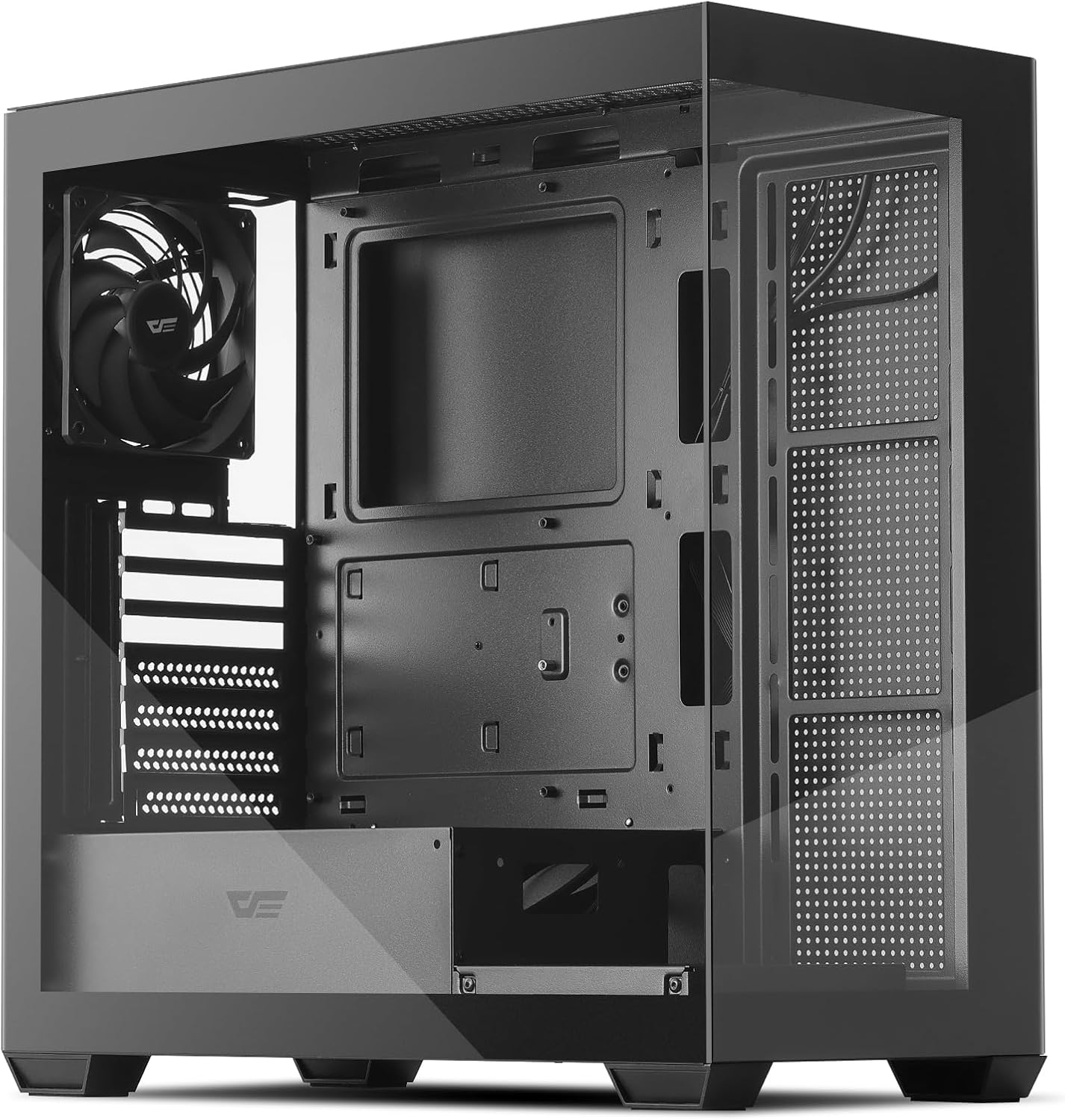
Figure 1: darkFlash DS900 ATX Mid-Tower PC Case
2. ຄຸນນະສົມບັດທີ່ສໍາຄັນ
- Panoramic Dual Tempered Glass: Offers a 270° unobstructed view of your PC hardware and lighting.
- High-Speed I/O Panel: Equipped with USB 3.0, USB 2.0, and Type-C ports for versatile connectivity.
- Advanced Cooling Support: Supports up to 10 fans and a 360mm water cooling radiator for efficient heat dissipation. Includes one pre-installed non-LED PWM fan.
- ການໄຫຼວຽນຂອງອາກາດທີ່ດີທີ່ສຸດ: Designed with multiple airflow channels to maintain optimal component temperatures.
- Magnetic Dust Filters: Features magnetic dust filters on the top and bottom for easy cleaning and component protection.
- ການອອກແບບທີ່ເປັນມິດກັບຜູ້ໃຊ້: Facilitates easy installation and cable management with tool-free access to panels.
- ຄວາມເຂົ້າກັນໄດ້ຂອງເມນບອດ: Supports ATX, M-ATX, and ITX motherboard form factors.
3. ຂໍ້ມູນຈໍາເພາະ
| ຄຸນສົມບັດ | ຂໍ້ມູນຈໍາເພາະ |
|---|---|
| ປະເພດກໍລະນີ | ຫໍກາງ |
| ຄວາມເຂົ້າກັນໄດ້ຂອງເມນບອດ | ATX, M-ATX, ITX |
| ວັດສະດຸ | ໂລຫະ, ແກ້ວທີ່ມີຄວາມແຂງແກ່ນ |
| ຂະໜາດ (LxWxH) | 8.6 x 17.8 x 17 ນິ້ວ (218 x 452 x 432 ມມ) |
| ນ້ໍາຫນັກລາຍການ | 14 ປອນ (6.35 ກິໂລ) |
| ຄວາມຍາວສູງສຸດຂອງ GPU | 425ມມ |
| ຄວາມສູງຂອງ CPU Cooler ສູງສຸດ | 170ມມ |
| ສະຫນັບສະຫນູນ radiator | ເຖິງ 360 ມມ |
| ສະຫນັບສະຫນູນພັດລົມ | Up to 10 fans (1x 120mm PWM fan pre-installed) |
| ຂັບລົດ Bays | 2x 3.5" HDD, 2x 2.5" SSD |
| ສະລັອດຕິງຂະຫຍາຍ | 7 |
| ທ່າເຮືອທາງ ໜ້າ I / O | 1x USB 3.0, 1x USB 2.0, 1x Type-C, HD Audio, Mic, Power, Reset, LED Control |
4. ການຕິດຕັ້ງແລະການຕິດຕັ້ງ
4.1 ການຫຸ້ມຫໍ່
Carefully remove the PC case from its packaging. Inspect for any damage during transit. Keep all packaging materials for future transport or warranty claims.
4.2 ການກໍາຈັດແຜງ
The darkFlash DS900 features tool-free disassembly on three sides for easy access to components. The tempered glass side panel and the metal side panel are secured with thumb screws at the rear. The top panel can also be removed for fan or radiator installation.

Figure 2: Panel Removal and Upgraded Design
4.3 ການຕິດຕັ້ງເມນບອດ
- Ensure the correct standoffs are installed for your motherboard form factor (ATX, M-ATX, ITX).
- Align your motherboard with the standoffs and gently place it into position.
- ຮັບປະກັນ motherboard ດ້ວຍ screws ທີ່ສະຫນອງໃຫ້.
4.4 ການຕິດຕັ້ງ Drive
The case supports 2x 3.5" HDDs and 2x 2.5" SSDs. Refer to the included manual for specific mounting locations and procedures for each drive type.
4.5 ການຕິດຕັ້ງລະບົບເຮັດຄວາມເຢັນ
The DS900 supports extensive cooling configurations, including up to a 360mm radiator and up to 10 fans. One 120mm non-LED PWM fan is pre-installed at the rear.

Figure 3: Cooling Support Layout
Radiators can be mounted at the top or side. Fans can be installed at the front, top, rear, and bottom. Ensure proper airflow direction for optimal cooling performance.

Figure 4: High-Airflow Performance
4.6 ການຈັດການສາຍ
The case is designed with ample space behind the motherboard tray and cable routing cutouts to facilitate clean cable management. Utilize the included zip ties to secure cables and maintain an organized interior.
4.7 ການເຊື່ອມຕໍ່ I/O ດ້ານໜ້າ
Connect the front I/O panel cables to the corresponding headers on your motherboard. The I/O panel includes:
- ປຸ່ມເປີດປິດ
- ປຸ່ມຣີເຊັດ
- ປຸ່ມຄວບຄຸມ LED
- ພອດ USB 3.0
- ພອດ USB 2.0
- Type-C Port
- HD Audio Jack
- Microphone Jack
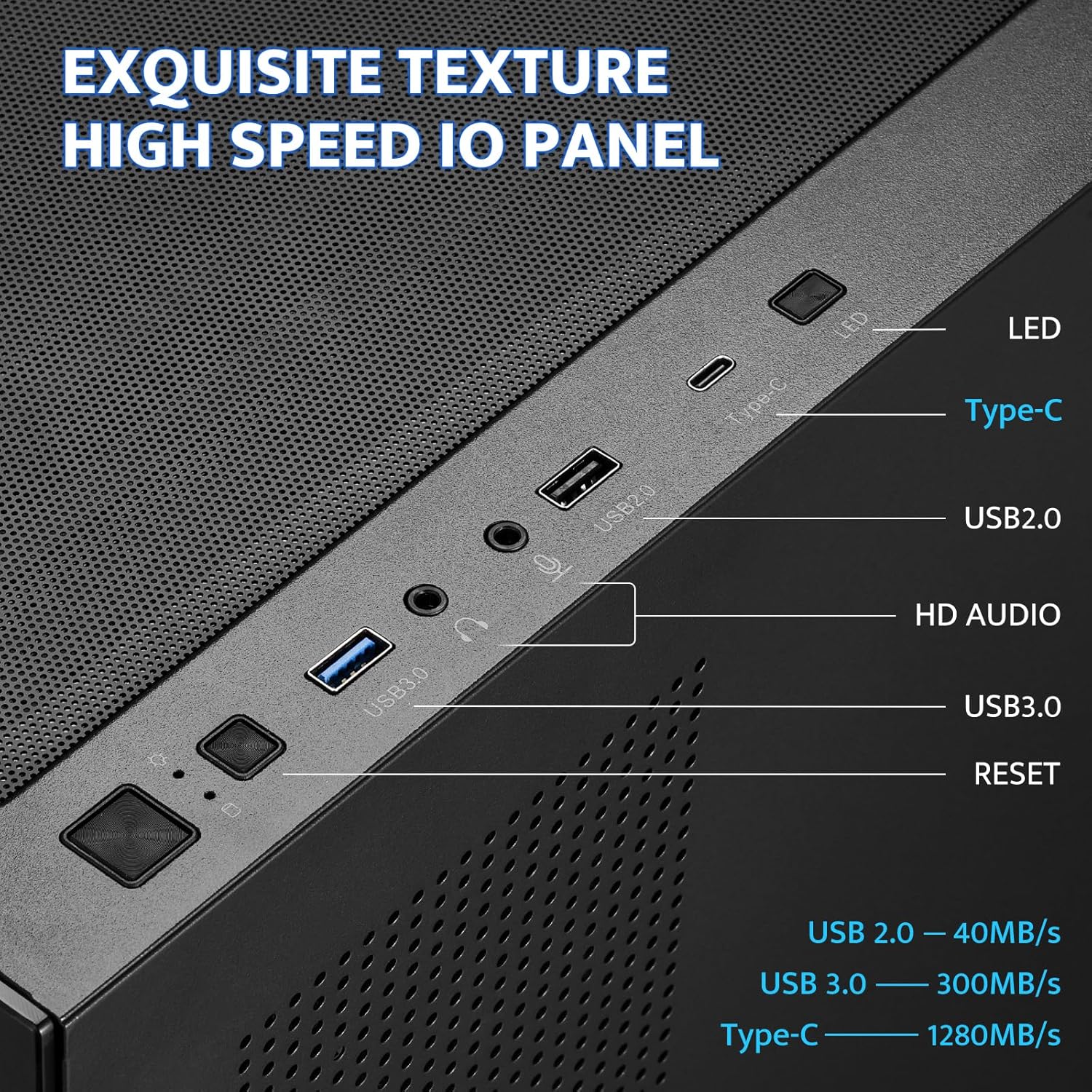
Figure 5: Front I/O Panel
5. ຄໍາແນະນໍາການດໍາເນີນງານ
Once all components are installed and connected, ensure all panels are securely reattached. Connect your power supply to a wall outlet and turn on the PC using the power button on the front I/O panel. Use the LED control button to cycle through any available lighting modes for compatible fans or accessories.
6. ບໍາລຸງຮັກສາ
Regular maintenance helps ensure optimal performance and longevity of your PC components. The darkFlash DS900 features magnetic dust filters for easy cleaning.
6.1 ການເຮັດຄວາມສະອາດຕົວກອງຝຸ່ນ
- Gently pull the magnetic dust filters located on the top and bottom of the case to remove them.
- ເຮັດຄວາມສະອາດຕົວກອງໂດຍໃຊ້ລົມອັດ, ແປງອ່ອນໆ, ຫຼື ລ້າງອອກດ້ວຍນ້ຳ (ຮັບປະກັນວ່າພວກມັນແຫ້ງໝົດກ່ອນທີ່ຈະຕິດຄືນ).
- Reattach the magnetic filters to their respective positions.

Figure 6: Magnetic Dust Filter
6.2 Cleaning Tempered Glass Panels
Use a microfiber cloth and a non-abrasive glass cleaner to clean the tempered glass panels. Avoid harsh chemicals that may damage the glass or coatings.
7. ການແກ້ໄຂບັນຫາ
If you encounter issues with your PC build, consider the following general troubleshooting steps:
- ບໍ່ມີພະລັງງານ: Double-check all power connections from the power supply to the motherboard, CPU, and graphics card. Ensure the power button cable is correctly connected to the motherboard header.
- Fans Not Spinning/Lights Off: Verify fan and LED connections to the motherboard or fan controller. Check motherboard BIOS settings for fan control.
- ສະແດງບັນຫາ: Ensure your graphics card is properly seated in its PCIe slot and all power cables are connected. Verify monitor cables are securely attached to the graphics card.
- ຄວາມຮ້ອນເກີນ: Confirm all fans are spinning in the correct direction for optimal airflow. Ensure CPU cooler and GPU fans are functioning. Check for proper thermal paste application on the CPU.
- ການເຊື່ອມຕໍ່ວ່າງ: Re-seat all components (RAM, GPU, storage drives) and re-check all cable connections.
For specific component-related issues, refer to the instruction manuals provided with those components.
8. ການຮັບປະກັນແລະການສະຫນັບສະຫນູນ
For warranty information and technical support, please refer to the official darkFlash webເວັບໄຊ ຫຼືຕິດຕໍ່ບໍລິການລູກຄ້າຂອງເຂົາເຈົ້າ. ຮັກສາຫຼັກຖານການຊື້ຂອງທ່ານສໍາລັບການຮຽກຮ້ອງການຮັບປະກັນໃດໆ.


