
1. ບົດແນະນຳ
Thank you for choosing the Anmite 24-inch IPS 100Hz Full HD Gaming Monitor, model AN-238W02. This manual provides essential information for setting up, operating, and maintaining your new monitor. Please read this manual thoroughly before use to ensure proper functionality and to maximize your viewປະສົບການ.
This monitor features a 24-inch IPS panel with a 1920 x 1080 Full HD resolution, a 100Hz refresh rate, and a 1ms response time, designed to deliver smooth and vibrant visuals for gaming and multimedia. It also includes AMD FreeSync Premium technology for tear-free gameplay and specialized FPS/RTS game modes.
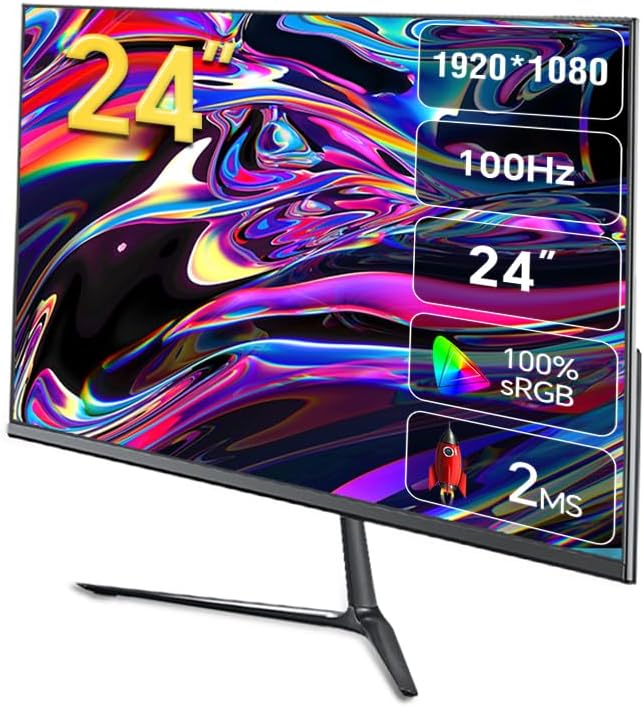
ຮູບພາບ 1.1: ດ້ານຫນ້າ view of the Anmite AN-238W02 monitor, showcasing its 24-inch display, 1920x1080 resolution, 100Hz refresh rate, and 1ms response time.
2. ຂໍ້ມູນຄວາມປອດໄພ
- ວາງຈໍພາບຢູ່ເທິງພື້ນທີ່ຄົງທີ່, ຮາບພຽງຢູ່ສະເໝີເພື່ອປ້ອງກັນບໍ່ໃຫ້ມັນຕົກ.
- ຫ້າມປິດຊ່ອງລະບາຍອາກາດ. ຮັບປະກັນພື້ນທີ່ພຽງພໍຮອບຈໍພາບສໍາລັບການໄຫຼວຽນຂອງອາກາດທີ່ເຫມາະສົມ.
- ໃຊ້ພຽງແຕ່ອະແດັບເຕີພະລັງງານທີ່ສະໜອງໃຫ້ກັບຈໍພາບເທົ່ານັ້ນ.
- Keep the monitor away from water, moisture, and direct sunlight.
- Do not attempt to open the monitor casing. ອ້າງອີງການບໍລິການທັງໝົດໃຫ້ກັບບຸກຄະລາກອນທີ່ມີຄຸນວຸດທິ.
- ຖອດປລັກຈໍພາບອອກຈາກປລັກສຽບໄຟໃນເວລາມີພາຍຸຟ້າຜ່າ ຫຼືເມື່ອບໍ່ໄດ້ໃຊ້ເປັນເວລາດົນນານ.
3. ເນື້ອໃນຊຸດ
ກະລຸນາກວດເບິ່ງເນື້ອໃນຂອງແພັກເກັດເມື່ອ unboxing. ຖ້າລາຍການໃດຂາດຫາຍໄປ ຫຼືເສຍຫາຍ, ໃຫ້ຕິດຕໍ່ຮ້ານຂາຍຍ່ອຍຂອງເຈົ້າ.
- Anmite 24" IPS 100Hz Full HD Gaming Monitor (AN-238W02)
- Monitor Stand (ຖານ ແລະ ຄໍ)
- Power Adapter ແລະສາຍໄຟ
- ສາຍ HDMI
- ຄູ່ມືຜູ້ໃຊ້ (ເອກະສານນີ້)
4. ຕັ້ງຄ່າ
4.1 ການປະກອບ Monitor Stand
- ເອົາຈໍພາບອອກຈາກເຄື່ອງຫຸ້ມຫໍ່ຂອງມັນຢ່າງລະມັດລະວັງ, ຮັກສາຫນ້າຈໍປ້ອງກັນ.
- Attach the stand neck to the back of the monitor by aligning the mounting points and securing with screws (if provided).
- Connect the stand base to the stand neck, ensuring it clicks into place or is secured with the provided screw.
- ວາງຈໍສະແດງຜົນທີ່ປະກອບໃສ່ໃນພື້ນທີ່ຮາບພຽງທີ່ຫມັ້ນຄົງ.
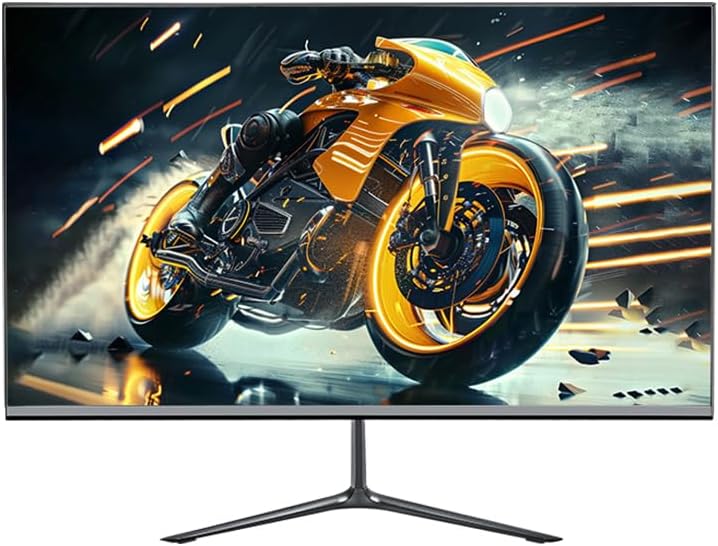
Image 4.1: The Anmite AN-238W02 monitor fully assembled with its stand, ready for connection.
4.2 ການເຊື່ອມຕໍ່ Monitor ຂອງທ່ານ
ກວດໃຫ້ແນ່ໃຈວ່າອຸປະກອນທັງໝົດຖືກປິດກ່ອນທີ່ຈະເຊື່ອມຕໍ່.
- ການເຊື່ອມຕໍ່ພະລັງງານ: ເຊື່ອມຕໍ່ອະແດບເຕີໄຟເຂົ້າກັບຊ່ອງສຽບໄຟຂອງຈໍພາບ, ຈາກນັ້ນສຽບສາຍໄຟເຂົ້າກັບປລັກໄຟທີ່ຕິດຝາ.
- ການເຊື່ອມຕໍ່ວິດີໂອ: Connect one end of the HDMI cable (or VGA cable) to the corresponding port on your computer's graphics card and the other end to the HDMI (or VGA) input on the monitor. For optimal performance and 100Hz refresh rate, HDMI is recommended.
- ສຽງອອກ: If you wish to connect external speakers or headphones, plug them into the Audio Out Jack on the monitor.
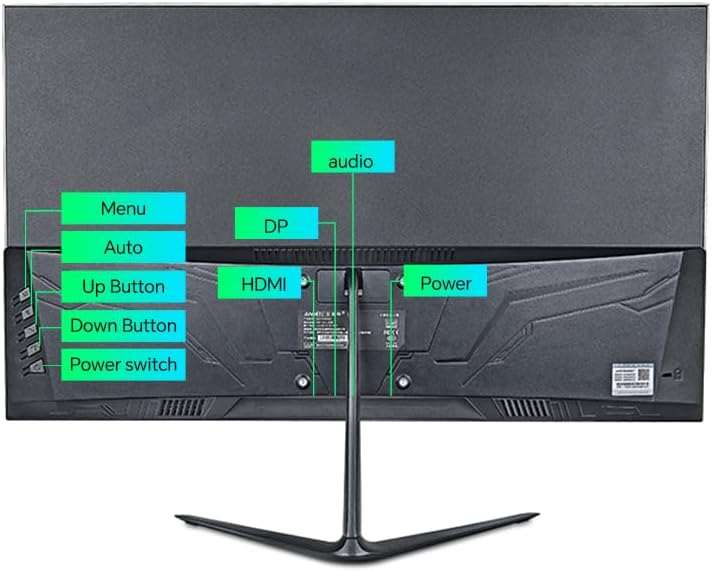
ຮູບພາບ 4.2: ດ້ານຫລັງ view of the monitor, highlighting the power input, HDMI, DP (DisplayPort, if available), VGA, and audio ports, along with the control buttons.
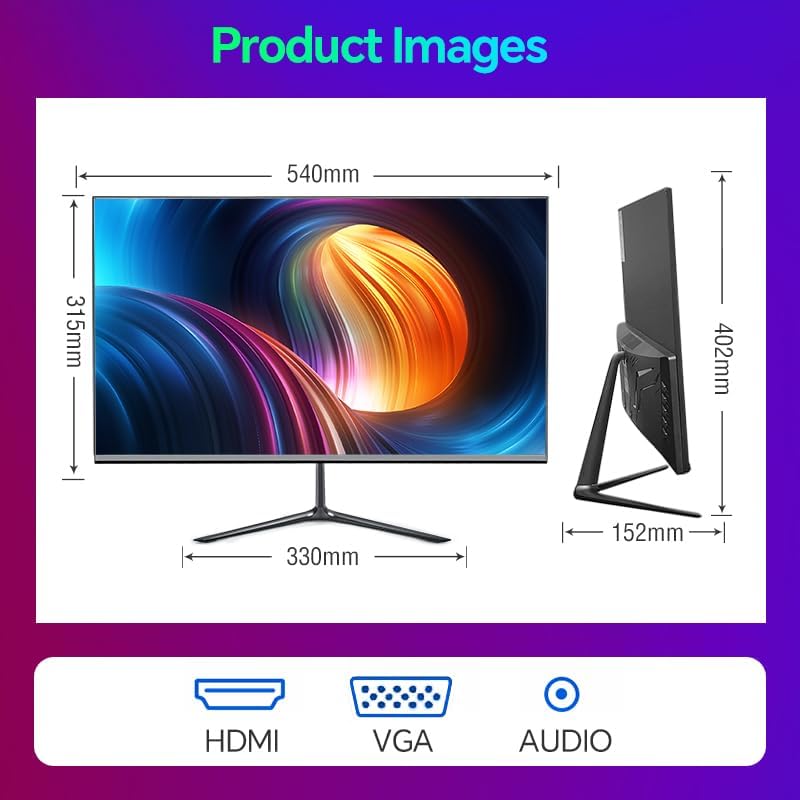
Image 4.3: Diagram illustrating the monitor's physical dimensions and the types of input ports available: HDMI, VGA, and Audio Out.
5. ຄໍາແນະນໍາການດໍາເນີນງານ
5.1 ເປີດ/ປິດ
ກົດ ສະວິດໄຟ button located on the back of the monitor to turn it on or off. The power indicator light will illuminate when the monitor is on.
5.2 ເມນູການສະແດງເທິງໜ້າຈໍ (OSD).
The OSD menu allows you to adjust various monitor settings. Use the buttons on the back of the monitor to navigate:
- ເມນູ: ກົດເພື່ອເປີດເມນູ OSD ຫຼື ເຂົ້າສູ່ເມນູຍ່ອຍ.
- ປຸ່ມ Up: Navigate up or increase a value.
- ປຸ່ມລົງ: Navigate down or decrease a value.
- Auto (or Exit): Automatically adjust image settings (VGA only) or exit the current menu.
5.3 ຄຸນສົມບັດຫຼັກ ແລະການຕັ້ງຄ່າ
- ອັດຕາການສົດຊື່ນ 100Hz: This monitor supports a 100Hz refresh rate, providing smoother motion and reduced input lag compared to standard 60Hz monitors. Ensure your graphics card and connection cable (HDMI recommended) support this refresh rate, and set it in your operating system's display settings.
- AMD FreeSync Premium: This technology synchronizes the monitor's refresh rate with your AMD graphics card's frame rate, eliminating screen tearing and stuttering. Enable FreeSync in your graphics card's control panel and ensure it is active in the monitor's OSD settings (if applicable).
- FPS/RTS Game Modes: The monitor includes pre-calibrated display settings optimized for First-Person Shooter (FPS) and Real-Time Strategy (RTS) games. Access these modes through the OSD menu to enhance visibility and color profiles for specific game genres.
- ຕ້ານ Flicker: This feature reduces screen flickering, which can cause eye strain during prolonged use. It operates by preventing the backlight from flickering periodically, providing a more comfortable viewປະສົບການ.
- Micro-Bezel Design: The monitor features a micro-bezel on three sides, maximizing the visible screen area and providing an immersive viewປະສົບການ.

Image 5.1: The monitor displaying a high-refresh-rate gaming experience, emphasizing smooth visuals.

ຮູບພາບ 5.2: A ລາຍລະອຽດ view of the monitor's micro-bezel design, illustrating the minimal border around the display.
6. ບໍາລຸງຮັກສາ
6.1 ການທໍາຄວາມສະອາດ Monitor
- ຖອດສາຍຈໍສະແດງຜົນກ່ອນທຳຄວາມສະອາດທຸກຄັ້ງ.
- ໃຊ້ຜ້າແພອ່ອນໆ ທີ່ບໍ່ມີເສັ້ນດ່າງ ງampened with water or a non-abrasive screen cleaner to wipe the screen.
- ສຳລັບຈໍພາບ ຄasing, use a soft, dry cloth. Avoid using harsh chemicals or abrasive materials.
6.2 ການເກັບຮັກສາ
If storing the monitor for an extended period, unplug it, cover it to protect from dust, and store it in a cool, dry place.
7. ການແກ້ໄຂບັນຫາ
| ບັນຫາ | ສາເຫດທີ່ເປັນໄປໄດ້ | ການແກ້ໄຂ |
|---|---|---|
| ບໍ່ມີພະລັງງານ | ສາຍໄຟບໍ່ໄດ້ເຊື່ອມຕໍ່; ປລັກສຽບໄຟບໍ່ເຮັດວຽກ | ໃຫ້ແນ່ໃຈວ່າສາຍໄຟຖືກເຊື່ອມຕໍ່ຢ່າງປອດໄພກັບຕິດຕາມກວດກາແລະເຕົ້າສຽບ; ທົດສອບຊ່ອງສຽບກັບອຸປະກອນອື່ນ. |
| ບໍ່ມີສັນຍານ | ສາຍວິດີໂອບໍ່ໄດ້ເຊື່ອມຕໍ່; ເລືອກແຫຼ່ງປ້ອນຂໍ້ມູນບໍ່ຖືກຕ້ອງ | Check video cable connections (HDMI/VGA); Use OSD menu to select correct input source. |
| ຮູບພາບມົວຫຼືບິດເບືອນ | ການແກ້ໄຂບໍ່ຖືກຕ້ອງ; ບັນຫາສາຍ | Set display resolution to 1920 x 1080 in your computer's display settings; Try a different video cable. |
| ໜ້າຈໍກະພິບ | ອັດຕາການໂຫຼດໜ້າຈໍຄືນໃໝ່ບໍ່ກົງກັນ; ບັນຫາສາຍ | Ensure refresh rate is set to 100Hz in display settings; Check for Anti-Flicker setting in OSD; Try a different video cable. |
8. ຂໍ້ມູນຈໍາເພາະ
| ຄຸນສົມບັດ | ຂໍ້ມູນຈໍາເພາະ |
|---|---|
| ໝາຍເລກຕົວແບບ | AN-238W02 |
| ຂະໜາດໜ້າຈໍ | 23.8 ນິ້ວ |
| ປະເພດແຜງ | IPS |
| ຄວາມລະອຽດ | 1920 x 1080 (Full HD) |
| ອັດຕາການໂຫຼດຂໍ້ມູນຄືນໃໝ່ | ເຖິງ 100Hz |
| ເວລາຕອບສະຫນອງ | 1ms |
| ການເຊື່ອມຕໍ່ | VGA, HDMI, Audio Out Jack |
| AMD FreeSync | Yes (Premium Compatible) |
| ຕ້ານ Flicker | ແມ່ນແລ້ວ |
| ຂະໜາດສິນຄ້າ (ມີຂາຕັ້ງ) | 21 x 38 x 49 ນິ້ວ |
| ນ້ໍາຫນັກລາຍການ | 5.5 ປອນ |
| ຜູ້ຜະລິດ | Shenzhen Anmite Technology Co.,Ltd. |
9. ການຮັບປະກັນແລະການສະຫນັບສະຫນູນ
Anmite monitors are designed for reliability and performance. For information regarding warranty coverage, please refer to the warranty card included with your purchase or the retailer's policy where the product was acquired.
For technical support, troubleshooting assistance beyond this manual, or service inquiries, please contact Anmite customer support through the contact information provided with your product documentation or visit the official Anmite webເວັບໄຊ.