
wanwaytech PET-4G
ຄູ່ມືຜູ້ໃຊ້ wanwaytech PET-4G GPS Tracker ສຳລັບໝາ
Model: PET-4G
ແນະນຳ
The wanwaytech PET-4G GPS Tracker is designed to help you monitor your pet's location and activity in real-time. This device offers features such as unlimited range tracking, electronic fence alerts, and integrated light and sound signals for quick retrieval. This manual provides essential instructions for setting up, operating, and maintaining your GPS tracker.
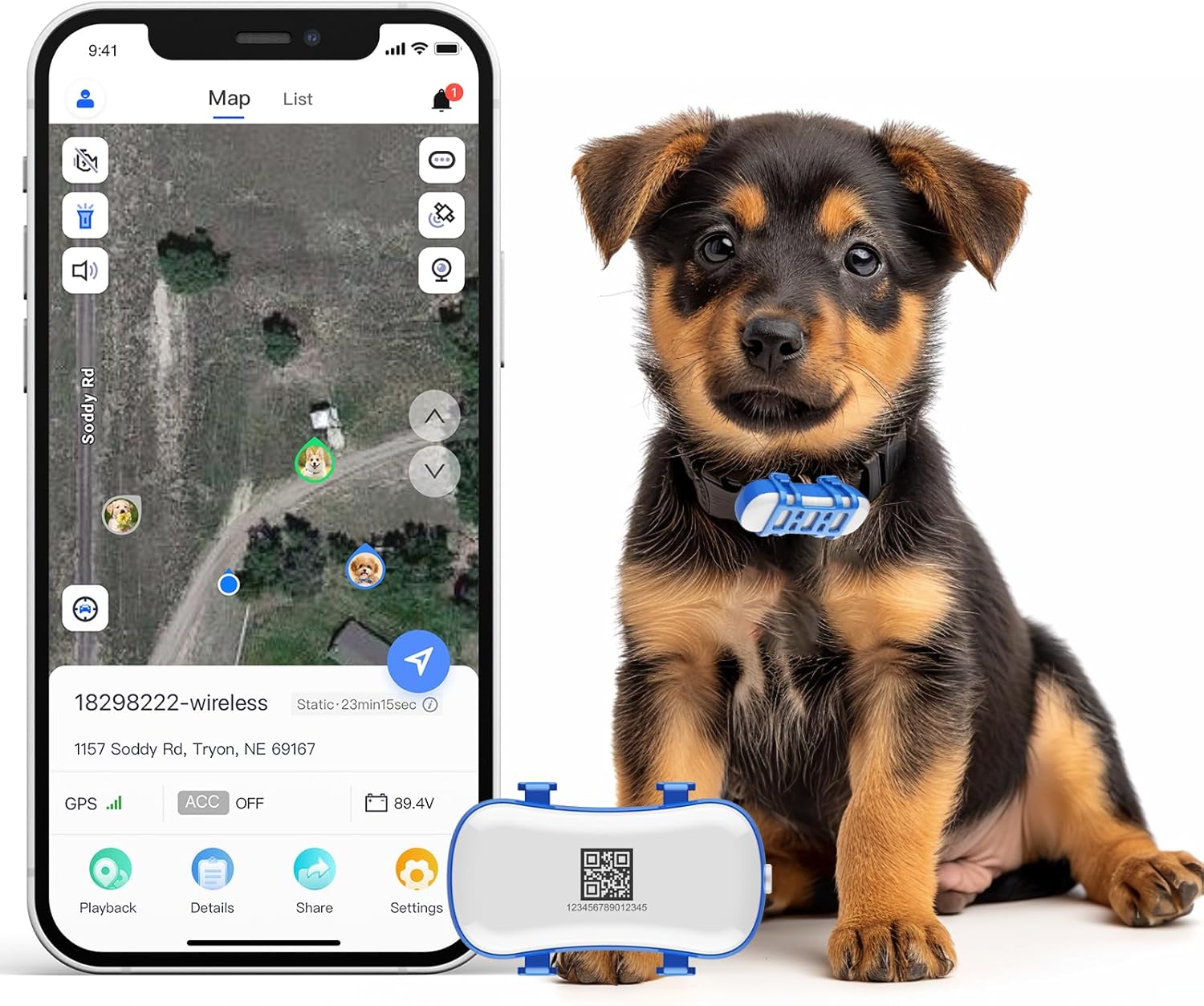
Image: The wanwaytech PET-4G GPS Tracker shown alongside a puppy wearing the device and a smartphone displaying the tracking application interface.
ເນື້ອໃນຊຸດ
ໃຫ້ແນ່ໃຈວ່າທຸກລາຍການຢູ່ໃນຊຸດ:
- wanwaytech PET-4G GPS Tracker
- ສາຍສາກ USB ແບບແມ່ເຫຼັກ
- ຄູ່ມືຜູ້ໃຊ້ (ເອກະສານນີ້)
- SIM Card (pre-installed or included separately)
ຄູ່ມືການຕິດຕັ້ງ
1. ການສາກອຸປະກອນ
Before first use, fully charge the GPS tracker. Connect the magnetic USB charging cable to the charging port on the device and to a standard USB power adapter (not included). The charging indicator will show the charging status and turn off when fully charged. A full charge typically takes 2-3 hours.
2. ການຕິດຕັ້ງແອັບ ແລະການສ້າງບັນຊີ
Download the official wanwaytech tracking application from your smartphone's app store (available for Android and iOS). Install the app and create a new user account. Follow the on-screen prompts to complete the registration process.
3. Device Activation and Pairing
- Ensure the SIM card is correctly inserted into the tracker.
- Power on the device by pressing and holding the power button until the indicator lights activate.
- Open the wanwaytech app on your smartphone.
- In the app, select "Add Device" or a similar option.
- Scan the QR code located on the back of the tracker or manually enter the device ID.
- Follow any additional prompts in the app to complete the pairing process. The device should now appear on your app's main screen.

Image: Initial setup showing the tracker, a puppy, and the mobile application interface for tracking.
ຄໍາແນະນໍາການດໍາເນີນງານ
1. ການຕິດຕາມແບບເວລາຈິງ
Once your tracker is active and paired, open the wanwaytech app to view your pet's current location on the map. The app provides real-time updates, allowing you to monitor your pet's movements without distance limitations. You can also view historical routes and playback past movements.

Image: The mobile application displaying live tracking data and historical routes of a pet.
2. Electronic Fence (Geo-Fence)
Set up virtual boundaries, or "electronic fences," directly within the app. Define safe zones, such as your home or yard. If your pet exits or enters these designated areas, you will receive an instant notification on your smartphone, helping you keep your pet within safe limits.

Image: Setting up a geo-fence boundary within the tracking application.
3. Equipment Alerts (Buzzer and Light)
In situations where your pet is nearby but out of sight, you can activate the tracker's built-in buzzer and light through the app. The device will emit a beeping sound and flash its lights, assisting you in quickly locating your pet, especially in low-light conditions.

Image: Visual representation of activating the light and sound alerts on the tracker.
4. Activity Monitoring
The tracker can also provide insights into your pet's activity levels, helping you ensure they receive adequate exercise. Consult the app for detailed activity reports.
ບໍາລຸງຮັກສາ
1. ການສາກໄຟ
Regularly charge your device to ensure continuous tracking. Battery life varies based on usage and tracking frequency. Use only the provided magnetic USB charging cable.
2. ກັນນ້ຳ
The wanwaytech PET-4G GPS Tracker is IP65 waterproof, meaning it is protected against dust ingress and low-pressure water jets from any direction. It can withstand splashes, rain, and brief immersion. However, avoid prolonged submersion or high-pressure water exposure to maintain its integrity.
3. ທໍາຄວາມສະອາດ
Clean the tracker periodically with a soft, damp cloth. Do not use harsh chemicals or abrasive cleaners, as these can damage the device's casing ຫຼືອົງປະກອບພາຍໃນ.
ການແກ້ໄຂບັນຫາ
- ອຸປະກອນບໍ່ເປີດ: ໃຫ້ແນ່ໃຈວ່າອຸປະກອນສາກເຕັມແລ້ວ. ເຊື່ອມຕໍ່ມັນກັບເຄື່ອງສາກ ແລະລໍຖ້າສອງສາມນາທີກ່ອນທີ່ຈະພະຍາຍາມເປີດມັນອີກຄັ້ງ.
- No GPS signal or inaccurate location: ໃຫ້ແນ່ໃຈວ່າອຸປະກອນມີຄວາມຊັດເຈນ view of the sky. GPS signals can be obstructed by buildings, dense foliage, or indoors. Move to an open outdoor area. Check if the subscription is active.
- ແອັບບໍ່ໄດ້ເຊື່ອມຕໍ່ກັບອຸປະກອນ: Verify that the device is powered on and within cellular network coverage. Ensure the app is updated to the latest version. Try restarting both the device and your smartphone.
- Geo-fence alerts are inaccurate or frequent false alarms: GPS accuracy can vary. Adjust the size of your geo-fence area to be larger to reduce false triggers, especially in areas with varying signal strength.
- QR code on device not working for "help me home" feature: This feature may require specific setup within the app or may not be fully functional. Refer to the app's help section or contact customer support for assistance with this specific function.
- Buzzer sound is too quiet: The buzzer is designed for close-range location assistance. Its volume cannot be adjusted. For longer distances, rely on GPS tracking and the flashing light.
Subscription Information
The wanwaytech PET-4G GPS Tracker requires an active subscription plan for full functionality, including real-time tracking and alerts. Various subscription options are available to suit your needs:
- 3 ເດືອນ: $28.99 (approximately $9.67 per month)
- 6 ເດືອນ: $46.99 (approximately $7.83 per month)
- 1 ປີ: $74.99 (approximately $6.25 per month)
Subscription plans can be managed directly through the wanwaytech application. A free SIM card is typically included with the purchase of the tracker.

ຮູບພາບ: ຫຼາຍກວ່າview of available subscription plans and their costs.
ຂໍ້ມູນຈໍາເພາະ
| ຊື່ຕົວແບບ | PET-4G |
| ຍີ່ຫໍ້ | wanwaytech |
| ເຕັກໂນໂລຊີການເຊື່ອມຕໍ່ | GPS, 4G LTE+ |
| ຄວາມເຂົ້າກັນໄດ້ຂອງລະບົບປະຕິບັດການ | Android, iOS |
| ການປະເມີນກັນນ້ໍາ | IP65 |
| ນ້ໍາຫນັກລາຍການ | 4.6 ອອນ |
| ຂະໜາດແພັກເກັດ | 3.98 x 3.94 x 1.65 ນິ້ວ |
| ປະເພດຫມໍ້ໄຟ | ແບັດເຕີຣີ Lithium Ion 1 ອັນ (ລວມ) |
| ອາຍຸທີ່ແນະນໍາ | Suitable for ages 3 and older (as per product directions) |
ການຮັບປະກັນແລະການສະຫນັບສະຫນູນ
wanwaytech offers ສະ ໜັບ ສະ ໜູນ ຕະຫຼອດຊີວິດ for the PET-4G GPS Tracker. For technical assistance, troubleshooting, or any inquiries regarding your device or subscription, please contact wanwaytech customer service through the official app or website. Refer to the app's "Help" or "Support" section for contact details.
Ask a question about this manual
Ask about setup, troubleshooting, compatibility, parts, safety, or missing instructions. Manuals+ will review the question and use this page’s manual context to help answer it.