
1. ບົດແນະນຳ
This manual provides comprehensive instructions for the installation, operation, and maintenance of the Coliao W3230 Digital Temperature Controller. The W3230 is a versatile digital thermostat switch designed for precise temperature control in various applications, offering both heating and cooling functionalities. It features a clear LED display and a waterproof probe for reliable performance.
2. ຜະລິດຕະພັນເກີນview
The Coliao W3230 Digital Temperature Controller is a high-precision device equipped with a digital LED display for enhanced readability. It supports a wide temperature measuring range and offers high control precision of 0.1°C. All parameter settings are saved automatically after a short circuit or power cycle. The unit features a relay output for controlling external heating or cooling devices.
2.1 ລັກສະນະທີ່ສໍາຄັນ
- Clear digital LED display for actual and set temperatures.
- Wide temperature control range: -50°C to 120°C.
- High control precision: 0.1°C.
- Programmable heating or cooling control modes.
- NTC10K waterproof sensor probe (1 meter wire).
- Relay output with contact capacity up to 20A.
2.2 ອົງປະກອບ
- W3230 Digital Temperature Controller Module
- NTC10K Waterproof Sensor Probe (1 meter)

Figure 1: Two Coliao W3230 Digital Temperature Controllers with connected probes.
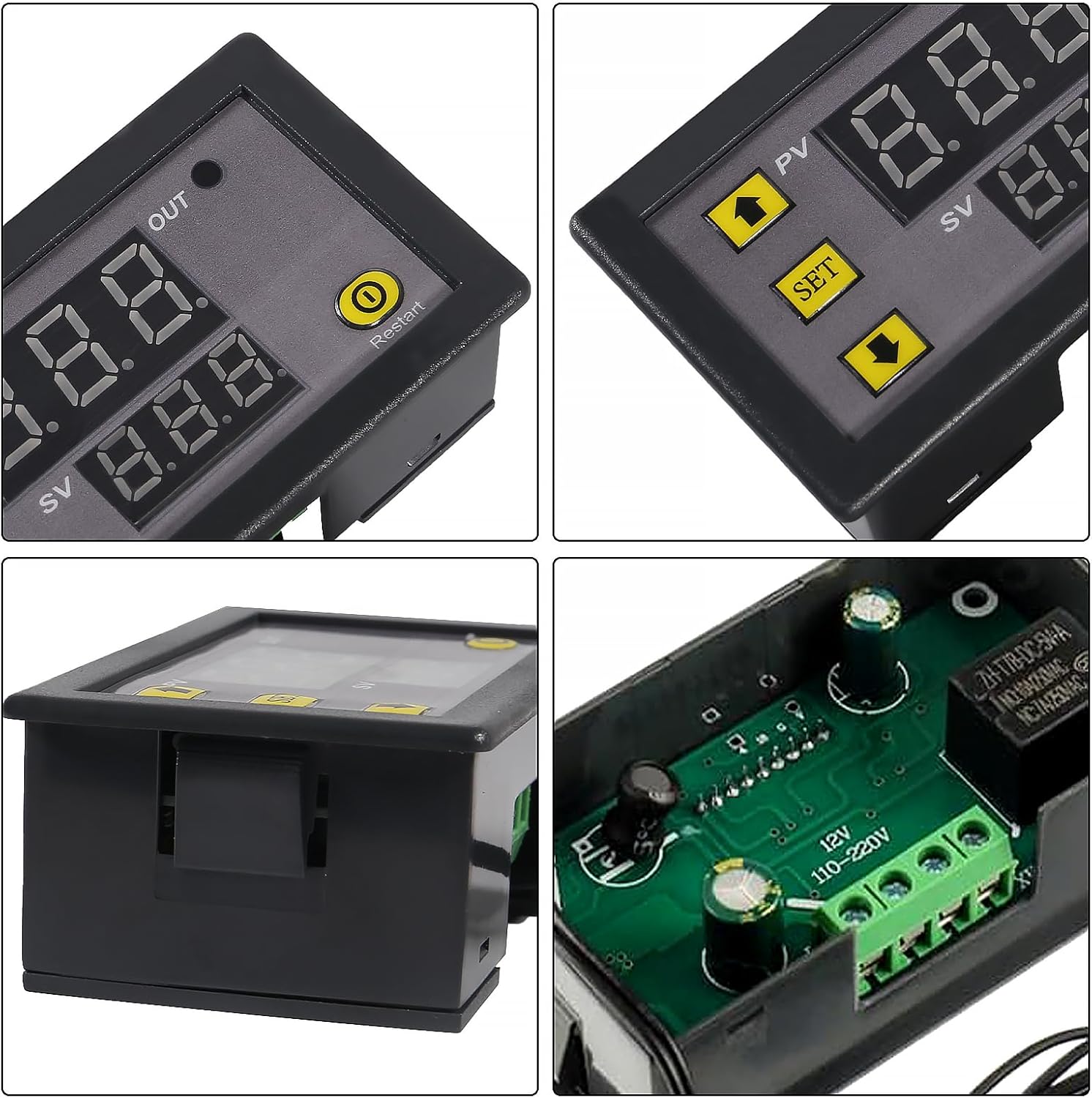
ຮູບທີ 2: ລາຍລະອຽດ views of the W3230 controller, highlighting the display, control buttons, and internal relay.
3. ຂໍ້ມູນຈໍາເພາະ
| ພາລາມິເຕີ | ມູນຄ່າ |
|---|---|
| ການສະຫນອງພະລັງງານ | DC 12V / DC 24V / AC 110V~220V (model dependent) |
| ໄລຍະການຄວບຄຸມອຸນຫະພູມ | -50°C ເຖິງ 120°C |
| ອັດຕາສ່ວນການແກ້ໄຂ | 0.1°C (-9.9 to 99.9°C); 1°C (other ranges) |
| ຄວາມຖືກຕ້ອງຂອງການຄວບຄຸມອຸນຫະພູມ | 0.1°C |
| ຄວາມຖືກຕ້ອງຂອງການວັດແທກ | ±0.1°C |
| Return Precision | 0.1°C |
| ເຊັນເຊີ | NTC10K waterproof sensor; Wire: 1 meter |
| ຜົນຜະລິດ | Relay Contact Capacity: 10A 220V / 20A 12V / 20A 24V |
| ຄວາມຕ້ອງການດ້ານສິ່ງແວດລ້ອມ | -10°C to 60°C, humidity 20%-85%RH |
| LED Displaying Color | Red (PV) / Blue (SV) |
| ຂະໜາດ (ປະມານ) | 78mm x 42mm x 21mm (3.07in x 1.65in x 0.82in) |

Figure 3: Product dimensions of the W3230 Digital Temperature Controller.

Figure 4: Product details and a code table for parameter settings.
4. ການຕິດຕັ້ງ ແລະສາຍໄຟ
ສຳຄັນ: ຮັບປະກັນການສະຫນອງພະລັງງານ voltage matches the label on the product. Incorrect voltage can damage the module. Always disconnect power before wiring.
4.1 ແຜນວາດສາຍ
The W3230 controller has terminals for power input (+VCC, -GND), sensor input (S1, S2), and relay output (LOAD). Connect the power supply to +VCC and -GND. Connect the NTC sensor to S1 and S2. The load (heating or cooling device) should be connected to the relay output terminals, ensuring it is within the relay's specified current and voltage ຄວາມອາດສາມາດ.

Figure 5: Wiring diagram for the W3230 Digital Temperature Controller. Connect +VCC and -GND for power, S1 and S2 for the sensor, and the LOAD to the relay output.
5. ການດໍາເນີນງານ
5.1 ຕົວຊີ້ວັດການສະແດງ
- Output Indicator (OUT):
- ກະພິບ: Indicates cooling or heating start-up delay is active.
- ແສງຄົງທີ່: Indicates the relay is closed (output is active).
- ບໍ່ມີແສງ: Indicates the relay is disconnected (output is inactive).
- PV Digital Tube (Red Display): Shows the actual measured temperature.
- SV Digital Tube (Blue Display): Shows the set temperature value (relay on/off threshold).
5.2 ການຕັ້ງຄ່າອຸນຫະພູມ
ເພື່ອກໍານົດອຸນຫະພູມທີ່ຕ້ອງການ:
- Press the "SET" button once. The SV digital tube (blue display) will flash.
- Use the "Up" (▲) and "Down" (▼) arrow buttons to adjust the temperature value.
- Press "SET" again to confirm the setting, or wait 8 seconds for automatic confirmation and return to normal display.
5.3 Main Menu Settings (P0-P8)
To access and configure advanced parameters:
- Long press the "SET" button for 3 seconds to enter the main menu. The display will show "P0".
- Press "SET" repeatedly to cycle through modes P0 to P8.
- When the desired mode (e.g., P0) is displayed, use the "Up" (▲) and "Down" (▼) arrow buttons to adjust its value.
- Long press "SET" for 3 seconds, or wait 8 seconds without any key action, to automatically confirm the setting and exit the menu.
5.4 ສະວິດໄຟ
- Turn Off Display/Relay: Long press the "Restart" button for 1.5 seconds.
- Turn On Display/Relay: Press the "Restart" button again for 1.5 seconds.
6. Parameter Settings (Code Table)
The following table details the various programmable parameters (P0-P8) and their functions.
| ລະຫັດ | ຟັງຊັນ | ຕັ້ງ Range | ຄ່າເລີ່ມຕົ້ນ |
|---|---|---|---|
| P0 | ໂໝດຄວາມຮ້ອນ/ເຢັນ | H / C | C (Cooling) |
| P1 | Return Difference (Hysteresis) | 0.1-15°C | 2°C |
| P2 | ກໍານົດຂອບເຂດຈໍາກັດສູງສຸດ | 120°C | 120°C |
| P3 | ກໍານົດຂອບເຂດຈໍາກັດຕ່ໍາ | -50°C | -50°C |
| P4 | ການແກ້ໄຂອຸນຫະພູມ | -7.0 ຫາ 7.0 ອົງສາ | 0°C |
| P5 | ເລື່ອນເວລາເລີ່ມຕົ້ນ | 0-10 ນາທີ | 0 ນາທີ |
| P6 | ແຈ້ງເຕືອນອຸນຫະພູມສູງ | OFF / 120°C | ປິດ |
| P7 | ລັອກຂໍ້ມູນ | ເປີດ/ປິດ | ປິດ |
| P8 | ຣີເຊັດເປັນຄ່າໂຮງງານ | ເປີດ/ປິດ | ປິດ |
7. Troubleshooting (Warning Codes)
The display may show specific codes to indicate abnormal conditions. Refer to the table below for explanations and solutions.
| ລະຫັດ | ເຫດຜົນສໍາລັບຄວາມຜິດພາດ | ການແກ້ໄຂ |
|---|---|---|
| ຮຮ | Temperature exceeds alarm temperature or maximum measuring range. | The temperature drops below the alarm temperature and returns to normal. If it exceeds the maximum measuring range, the relay is forced to disconnect. |
| ລ.ລ | No temperature sensor detected or sensor open circuit. | Replace or reconnect the temperature sensor. |
| ---- | Setting of high-temperature alarm exceeds the maximum value. | Adjust the P6 (High Temperature Alarm) setting to a valid range. |

Figure 6: Excerpt from the W3230 instruction manual detailing warning codes and basic operation.
8. ຄໍາຮ້ອງສະຫມັກ
The W3230 Digital Temperature Controller is suitable for a wide range of temperature-controlled systems, including but not limited to:
- Domestic freezers and refrigerators
- Water tanks and aquariums
- Industrial chillers and steamers
- Greenhouses and agricultural settings
- Industrial equipment requiring precise temperature regulation

ຮູບທີ 7: ຕົວຢ່າງamples of common applications for the W3230 Digital Temperature Controller.
9. ບໍາລຸງຮັກສາ
To ensure optimal performance and longevity of your W3230 Digital Temperature Controller:
- ຮັກສາອຸປະກອນໃຫ້ສະອາດ ແລະບໍ່ມີຝຸ່ນ ແລະ ຄວາມຊຸ່ມຊື່ນ.
- Avoid exposing the controller to extreme temperatures or direct sunlight beyond its specified environmental requirements.
- ກວດສອບການເຊື່ອມຕໍ່ສາຍໄຟເປັນປະຈຳເພື່ອຄວາມປອດໄພ ແລະ ຄວາມສົມບູນ.
- Ensure the sensor probe is clean and properly positioned for accurate readings.
10. ການຮັບປະກັນແລະການສະຫນັບສະຫນູນ
For warranty information or technical support, please refer to the documentation provided with your purchase or contact Coliao customer service directly. Keep your purchase receipt as proof of purchase.