
ແນະນຳ
The Linsoul Kiwi Ears Allegro Mini is a compact and portable Digital-to-Analog Converter (DAC) and amplifier designed to elevate your audio experience. It provides high-fidelity sound for your in-ear monitors (IEMs) and headphones, connecting seamlessly to various devices via USB-C. This manual will guide you through the setup, operation, and maintenance of your Allegro Mini to ensure optimal performance.

Image: The Kiwi Ears Allegro Mini, a compact silver DAC with a USB-C connector and audio output ports.
ແມ່ນຫຍັງຢູ່ໃນກ່ອງ
- Kiwi Ears Allegro Mini Portable IEM DAC
- ຄູ່ມືຜູ້ໃຊ້
ຕັ້ງຄ່າ
- ເຊື່ອມຕໍ່ຫາອຸປະກອນ: Insert the USB-C connector of the Allegro Mini into the USB-C port of your smartphone, tablet, or computer. Ensure a secure connection.
- Connect Headphones/IEMs: Plug your 3.5mm single-ended or 4.4mm balanced headphones/IEMs into the corresponding output port on the Allegro Mini.
- ການຮັບຮູ້ອັດຕະໂນມັດ: Most modern Android devices (version 5.1 and above), PCs, and other compatible devices will automatically recognize the Allegro Mini as an external audio output device. No additional drivers are typically required for basic functionality.
- ການປັບລະດັບສຽງ: ປັບລະດັບສຽງໂດຍໃຊ້ການຄວບຄຸມລະດັບສຽງຂອງອຸປະກອນທີ່ເຊື່ອມຕໍ່ຂອງທ່ານ.
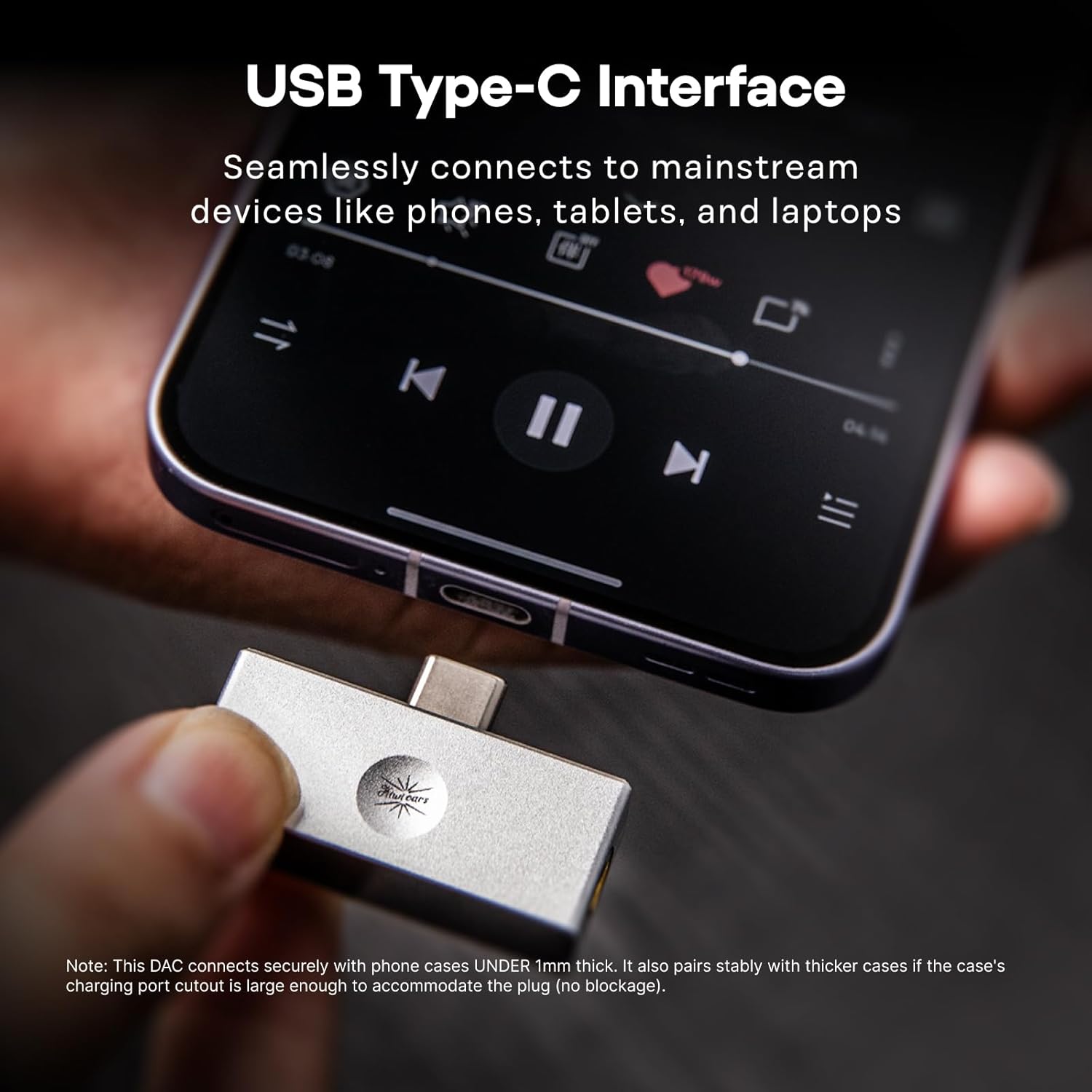
Image: The Allegro Mini connected to a smartphone via its USB-C port, with an IEM cable plugged into the 3.5mm output.
ຄໍາແນະນໍາການດໍາເນີນງານ
- ສຽບ ແລະ ຫຼິ້ນ: The Allegro Mini is designed for immediate use. Simply connect it to your source device and audio output.
- ການຫຼິ້ນສຽງ: Begin playing audio from your device. Sound will be routed through the Allegro Mini to your connected headphones or IEMs.
- ການຄວບຄຸມລະດັບສຽງ: Use the volume buttons on your connected smartphone, tablet, or computer to adjust the playback volume.
- ຕົວເລືອກຜົນຜະລິດ: The Allegro Mini features both 3.5mm single-ended and 4.4mm balanced output ports. Choose the appropriate port for your headphones or IEMs. The 4.4mm balanced output may offer improved sound quality and power for compatible headphones.

Image: The Allegro Mini connected to a smartphone, demonstrating its plug-and-play functionality for audio playback.
ຄຸນສົມບັດ
- ການອອກແບບກະທັດລັດແລະ Portable: Inspired by the original Allegro, the Mini version offers high-fidelity sound in a smaller, all-aluminum alloy body for enhanced durability and a minimalist aesthetic.
- ຕົວເລືອກຜົນຜະລິດທີ່ມີຄວາມຍືດຫຍຸ່ນ: Equipped with both 4.4mm balanced and 3.5mm single-ended outputs to accommodate a wide range of headphones and IEMs.
- High-Resolution Audio Performance: Supports PCM up to 32bit/384kHz and DSD up to DSD128, ensuring detailed and clear audio reproduction.
- ຄວາມເຂົ້າກັນໄດ້ທົ່ວໂລກ: Features a USB Type-C interface for seamless plug-and-play connection with most modern Android devices (version 5.1 and above), as well as PCs and other compatible devices.
- ຄວາມຊັດເຈນຂອງສຽງທີ່ດີເລີດ: Achieves an ultra-low THD+N of 0.004% at 32 Ohms, providing pure, undistorted sound with a wide frequency response and excellent signal-to-noise ratio.

Image: The Allegro Mini highlighting its 3.5mm single-ended and 4.4mm balanced output options.
ຂໍ້ມູນຈໍາເພາະ
| ຄຸນລັກສະນະ | ມູນຄ່າ |
|---|---|
| ຍີ່ຫໍ້ | Linsoul |
| ຊື່ຕົວແບບ | Kiwi Ears Allegro Mini |
| ສີ | ເງິນ |
| ເຕັກໂນໂລຊີການເຊື່ອມຕໍ່ | Wired (USB Type-C input) |
| ພອດຂາອອກ | 3.5 ມມ ປາຍດຽວ, 4.4 ມມ ສົມດຸນ |
| ສະຫນັບສະຫນູນ PCM | ສູງສຸດ 32bit/384kHz |
| ຮອງຮັບ DSD | ເຖິງ DSD128 |
| THD+N | 0.004% (at 32 Ohms) |
| ປັດໄຈແບບຟອມ | Mini Portable |
| ຜູ້ຜະລິດ | Linsoul |
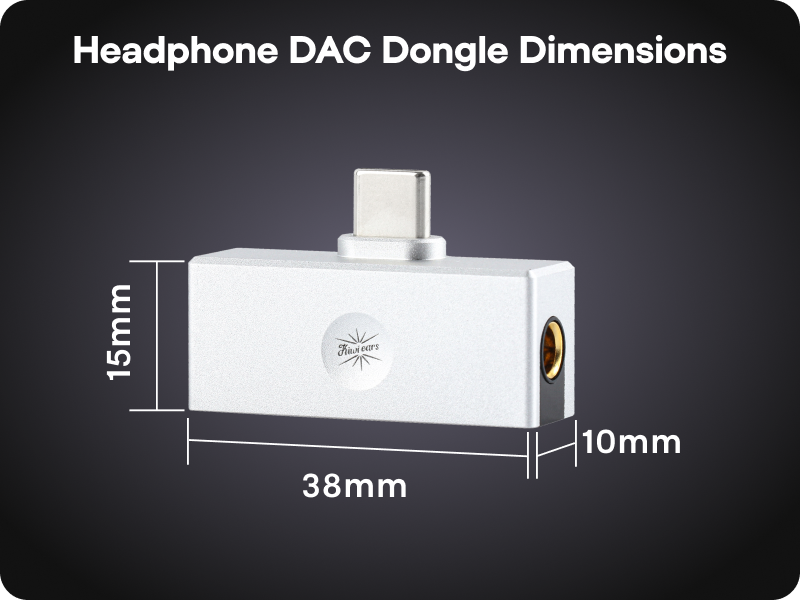
Image: A diagram illustrating the compact dimensions of the Kiwi Ears Allegro Mini.
ບໍາລຸງຮັກສາ
- ທໍາຄວາມສະອາດ: Use a soft, dry cloth to wipe the exterior of the Allegro Mini. Avoid using liquid cleaners or abrasive materials.
- ການເກັບຮັກສາ: ເກັບຮັກສາອຸປະກອນໄວ້ໃນບ່ອນທີ່ເຢັນ, ແຫ້ງ, ຫ່າງຈາກແສງແດດໂດຍກົງ ແລະອຸນຫະພູມທີ່ຮ້າຍກາດ.
- ຈັດການດ້ວຍຄວາມລະມັດລະວັງ: ໃນຂະນະທີ່ທົນທານ, ໃຫ້ຫຼີກລ່ຽງການຕົກອຸປະກອນ ຫຼື ກະທົບທີ່ຮຸນແຮງ.
- ການປົກປ້ອງພອດ: When not in use, consider using dust caps for the USB-C and audio ports to prevent dust and debris accumulation.
ການແກ້ໄຂບັນຫາ
- ບໍ່ມີສຽງອອກ:
- Ensure the Allegro Mini is securely connected to both your source device and headphones/IEMs.
- ກວດສອບການຕັ້ງຄ່າລະດັບສຽງຂອງອຸປະກອນຂອງທ່ານ ແລະ ຮັບປະກັນວ່າມັນບໍ່ໄດ້ຖືກປິດສຽງໄວ້.
- Verify that your source device recognizes the Allegro Mini as the active audio output. This can usually be checked in your device's sound settings.
- Test with different headphones/IEMs to rule out an issue with your audio output device.
- ລະດັບສຽງຕໍ່າ ຫຼືສຽງບິດເບືອນ:
- ເພີ່ມລະດັບສຽງໃນອຸປະກອນແຫຼ່ງທີ່ມາຂອງທ່ານ.
- Ensure your headphones/IEMs are fully plugged into the Allegro Mini. A partial connection can cause distortion or sound only in one channel.
- If using a phone case, ensure it does not obstruct the USB-C connection, as this can prevent a full connection.
- For optimal performance, especially with demanding headphones, use the 4.4mm balanced output if your headphones support it.
- ອຸປະກອນບໍ່ຮັບຮູ້:
- Disconnect and reconnect the Allegro Mini.
- Try connecting to a different USB-C port or a different compatible device to isolate the issue.
- ໃຫ້ແນ່ໃຈວ່າລະບົບປະຕິບັດການຂອງອຸປະກອນຂອງທ່ານແມ່ນອັບເດດແລ້ວ.
ວິດີໂອຜະລິດຕະພັນຢ່າງເປັນທາງການ
Linsoul Kiwi Ears Allegro Mini Portable IEM DAC Overview
ວີດີໂອ: ຢ່າງເປັນທາງການview of the Linsoul Kiwi Ears Allegro Mini Portable IEM DAC, showcasing ລັກສະນະແລະການອອກແບບຂອງມັນ.
Linsoul Kiwi Ears In-Ear Monitor Manufacturing Process
Video: A detailed look into the manufacturing process of Linsoul Kiwi Ears in-ear monitors, demonstrating the craftsmanship and quality control.
ການຮັບປະກັນແລະການສະຫນັບສະຫນູນ
The Linsoul Kiwi Ears Allegro Mini comes with a ຮັບປະກັນ 1 ປີ ຈາກວັນທີ່ຊື້. ການຮັບປະກັນນີ້ກວມເອົາຄວາມບົກຜ່ອງດ້ານການຜະລິດແລະບັນຫາທີ່ເກີດຂື້ນຈາກການນໍາໃຊ້ປົກກະຕິ.
For technical support, warranty claims, or any questions regarding your product, please contact Linsoul Audio customer service through their official webເວັບໄຊທ໌ ຫຼື ຮ້ານຄ້າປີກທີ່ທ່ານຊື້ຜະລິດຕະພັນ. ກະລຸນາເກັບຫຼັກຖານການຊື້ຂອງທ່ານໄວ້ເພື່ອການກວດສອບການຮັບປະກັນ.
You can visit the Linsoul Store for more information: Linsoul Official Store