
ຍິນດີຕ້ອນຮັບ
Thank you for choosing the BYTECH BICONIC True Wireless Earbuds. This manual provides essential information on how to set up, operate, maintain, and troubleshoot your new earbuds. Please read this manual thoroughly before use to ensure optimal performance and longevity of your device.
ຄໍາແນະນໍາຄວາມປອດໄພທີ່ສໍາຄັນ
- ຢ່າເປີດຫູຟັງຫູຟັງ ຫຼືກ່ອງສາກໃສ່ກັບອຸນຫະພູມ, ຄວາມຊຸ່ມຊື່ນ, ຫຼືຂອງແຫຼວທີ່ຮຸນແຮງທີ່ສຸດ.
- ຫຼີກເວັ້ນການຫຼຸດລົງ, ຜົນກະທົບ, ຫຼືການຖອດອຸປະກອນ.
- Do not use abrasive cleaners or harsh chemicals to clean the earbuds or case.
- ຟັງໃນລະດັບສຽງທີ່ປານກາງເພື່ອປ້ອງກັນຄວາມເສຍຫາຍຕໍ່ການໄດ້ຍິນ. ການສຳຜັດກັບສຽງດັງເປັນເວລາດົນອາດເຮັດໃຫ້ສູນເສຍການໄດ້ຍິນທີ່ບໍ່ສາມາດປິ່ນປົວໄດ້.
- ຮັກສາໃຫ້ໄກຈາກເດັກນ້ອຍ ແລະສັດລ້ຽງ.
- Dispose of the device responsibly according to local regulations. Do not dispose of with household waste.
ມີຫຍັງແດ່
ກະລຸນາກວດສອບເນື້ອໃນຂອງຊຸດເພື່ອໃຫ້ແນ່ໃຈວ່າລາຍການທັງຫມົດມີຢູ່:
- BYTECH BICONIC True Wireless Earbuds (Left and Right)
- ກ່ອງສາກ
- ສາຍສາກ
- ຄູ່ມືຜູ້ໃຊ້
ສິນຄ້າເກີນview
Familiarize yourself with the components of your BYTECH BICONIC True Wireless Earbuds.

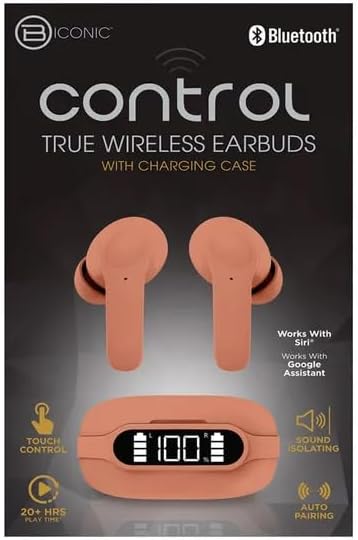
ການເລີ່ມຕົ້ນ
ກຳລັງສາກຫູຟັງ ແລະ ເຄສ
The BYTECH BICONIC earbuds come with a rechargeable battery in both the earbuds and the charging case. Ensure both are fully charged before first use.
- Place the earbuds into the charging case, ensuring they are correctly seated in their respective slots (L for left, R for right).
- ເຊື່ອມຕໍ່ສາຍສາກທີ່ໃຫ້ມາເຂົ້າກັບພອດສາກໄຟໃນເຄສ ແລະ ປາຍອີກດ້ານໜຶ່ງເຂົ້າກັບແຫຼ່ງພະລັງງານ USB (ເຊັ່ນ: ພອດ USB ຂອງຄອມພິວເຕີ, ອະແດບເຕີຕິດຝາ).
- The digital display on the charging case will show the battery level. Allow sufficient time for a full charge.
- ເມື່ອສາກເຕັມແລ້ວ, ໃຫ້ຖອດສາຍສາກອອກ.
ການຈັບຄູ່ Bluetooth
ປະຕິບັດຕາມຂັ້ນຕອນເຫຼົ່ານີ້ເພື່ອຈັບຄູ່ຫູຟັງຂອງທ່ານກັບອຸປະກອນທີ່ເປີດໃຊ້ Bluetooth ຂອງທ່ານ:
- ກວດໃຫ້ແນ່ໃຈວ່າໄດ້ສາກຫູຟັງຫູຟັງ ແລະຢູ່ພາຍໃນກ່ອງສາກ.
- Open the charging case. The earbuds will automatically enter pairing mode, and an indicator light on the earbuds will flash.
- ໃນອຸປະກອນຂອງທ່ານ (ໂທລະສັບສະຫຼາດ, ແທັບເລັດ, ແລະອື່ນໆ), ໄປທີ່ການຕັ້ງຄ່າ Bluetooth ແລະເປີດ Bluetooth.
- ຊອກຫາ available devices. You should see "BYTECH BICONIC" or a similar name appear in the list.
- Select "BYTECH BICONIC" to connect. Once connected, a voice prompt will confirm the successful pairing, and the indicator lights on the earbuds will stop flashing.
- ຫູຟັງເອຍບັດຈະເຊື່ອມຕໍ່ຄືນໃໝ່ກັບອຸປະກອນທີ່ຈັບຄູ່ຄັ້ງສຸດທ້າຍໂດຍອັດຕະໂນມັດເມື່ອເອົາອອກຈາກກ່ອງ, ໂດຍມີເງື່ອນໄຂວ່າ Bluetooth ຖືກເປີດໃຊ້ຢູ່ໃນອຸປະກອນ.
ຄໍາແນະນໍາການດໍາເນີນງານ
ແຕະການຄວບຄຸມ
The BYTECH BICONIC earbuds feature intuitive touch controls for easy management of your audio and calls.
| ການປະຕິບັດ | ຟັງຊັນ |
|---|---|
| ແຕະເທື່ອດຽວ (ຫູຟັງຊ້າຍ/ຂວາ) | ຫຼິ້ນ/ຢຸດເພງ, ຮັບສາຍ/ວາງສາຍ |
| ແຕະສອງເທື່ອ (ຫູຟັງຂວາ) | ຕິດຕາມຕໍ່ໄປ |
| ແຕະສອງເທື່ອ (ຫູຟັງຊ້າຍ) | ເພງກ່ອນໜ້າ |
| ແຕະສາມເທື່ອ (ຫູຟັງຊ້າຍ/ຂວາ) | ເປີດໃຊ້ຜູ້ຊ່ວຍສຽງ (Siri/Google Assistant) |
| ກົດຄ້າງໄວ້ (ຫູຟັງຊ້າຍ/ຂວາ) | ປະຕິເສດການໂທ |
ເປີດ ແລະ ປິດ
- ເປີດ: ຫູຟັງເອຍບັດຈະເປີດອັດຕະໂນມັດເມື່ອຖອດອອກຈາກກ່ອງສາກ.
- ປິດພະລັງງານ: ວາງຫູຟັງເອຍບັດໃສ່ໃນກ່ອງສາກ ແລະປິດຝາປິດ. ພວກເຂົາຈະປິດອັດຕະໂນມັດ ແລະເລີ່ມສາກໄຟ.
ການບໍາລຸງຮັກສາແລະການດູແລ
Proper care will extend the life of your BYTECH BICONIC True Wireless Earbuds.
- ທໍາຄວາມສະອາດ: Use a soft, dry, lint-free cloth to clean the earbuds and charging case. Do not use liquids or aerosol cleaners.
- ການເກັບຮັກສາ: ເມື່ອບໍ່ໄດ້ໃຊ້, ໃຫ້ເກັບຮັກສາຫູຟັງໃສ່ໃນກະເປົ໋າສາກໄຟສະເໝີເພື່ອປົກປ້ອງພວກມັນ ແລະ ຮັກສາໃຫ້ມັນສາກ.
- ຫຼີກລ້ຽງສະພາບທີ່ຮ້າຍແຮງ: Do not expose the device to extreme heat, cold, or direct sunlight.
- ຄວາມຕ້ານທານນ້ໍາ: ຫູຟັງເຫຼົ່ານີ້ບໍ່ກັນນ້ຳ. ຫຼີກລ່ຽງການສຳຜັດກັບນ້ຳ ຫຼື ຄວາມຊຸ່ມຫຼາຍເກີນໄປ.
ການແກ້ໄຂບັນຫາ
ຖ້າທ່ານພົບບັນຫາໃດໆກັບຫູຟັງຂອງທ່ານ, ໃຫ້ອ້າງອີງເຖິງວິທີແກ້ໄຂທົ່ວໄປຕໍ່ໄປນີ້:
| ບັນຫາ | ການແກ້ໄຂ |
|---|---|
| ຫູຟັງບໍ່ຈັບຄູ່ | ກວດໃຫ້ແນ່ໃຈວ່າໄດ້ສາກຫູຟັງຫູຟັງແລ້ວ. ປິດ ແລະເປີດ Bluetooth ໃນອຸປະກອນຂອງທ່ານ. ລືມອຸປະກອນໃນການຕັ້ງຄ່າ Bluetooth ແລະຈັບຄູ່ຄືນໃໝ່. |
| ຫູຟັງຫູຟັງອັນດຽວເຮັດວຽກໄດ້ | ໃສ່ຫູຟັງທັງສອງຂ້າງກັບຄືນໃສ່ໃນກ່ອງສາກໄຟ, ປິດຝາ, ລໍຖ້າສອງສາມວິນາທີ, ຈາກນັ້ນເອົາອອກອີກຄັ້ງ. ໃຫ້ແນ່ໃຈວ່າທັງສອງໜ່ວຍສາກໄຟແລ້ວ. |
| ບໍ່ມີສຽງ | Check volume levels on both your device and the earbuds. Ensure earbuds are properly connected. Try playing different audio. |
| ກ່ອງສາກບໍ່ສາກ | ໃຫ້ແນ່ໃຈວ່າສາຍສາກໄຟໄດ້ເຊື່ອມຕໍ່ກັບທັງເຄສ ແລະ ແຫຼ່ງພະລັງງານຢ່າງແໜ້ນໜາແລ້ວ. ລອງໃຊ້ພອດ USB ຫຼື ອະແດບເຕີໄຟຟ້າອື່ນ. |
ຂໍ້ມູນຈໍາເພາະ
Detailed specifications for your BYTECH BICONIC True Wireless Earbuds:
| ຄຸນສົມບັດ | ລາຍລະອຽດ |
|---|---|
| ໝາຍເລກຕົວແບບ | BC-AU-BE-144-TN |
| ເຕັກໂນໂລຊີການເຊື່ອມຕໍ່ | ໄຮ້ສາຍ (Bluetooth) |
| ປັດໄຈແບບຟອມ | In-Ear (Intraurales) |
| ສີ | ຮ້ານ |
| ຄຸນນະສົມບັດພິເສດ | Rechargeable Battery, Touch Control, Sound Isolating, Auto Pairing |
| ອົງປະກອບລວມ | ສາຍ |
| Estimated Play Time | 20+ ຊົ່ວໂມງ (ພ້ອມກ່ອງສາກໄຟ) |
ຂໍ້ມູນການຮັບປະກັນ ແລະການຊ່ວຍເຫຼືອລູກຄ້າ
BYTECH products are designed and manufactured to the highest quality standards. For information regarding warranty coverage, please refer to the warranty card included with your purchase or visit the official BYTECH webເວັບໄຊ.
If you require further assistance or have questions not covered in this manual, please contact BYTECH customer support through their official channels. Please have your model number (BC-AU-BE-144-TN) and purchase details ready when contacting support.