
1. ບົດແນະນຳ
ຂອບໃຈສໍາລັບການຊື້asing the RCA SP550BT Portable Speaker. This manual provides important information regarding the setup, operation, and maintenance of your new speaker. Please read it thoroughly before use and keep it for future reference.
The RCA SP550BT is a versatile portable speaker featuring 50W output, Bluetooth connectivity, USB playback, FM radio, AUX input, True Wireless Stereo (TWS) function, LED lights, and a microphone input for an enhanced audio experience.
2. ເນື້ອໃນຊຸດ
ກະລຸນາກວດເບິ່ງຊຸດສຳລັບລາຍການຕໍ່ໄປນີ້:
- RCA SP550BT Portable Speaker
- ການຄວບຄຸມໄລຍະໄກ
- ສາຍໄຟ
- ຄູ່ມືຜູ້ໃຊ້ (ເອກະສານນີ້)
3. ຜະລິດຕະພັນເກີນview
Familiarize yourself with the main components and features of your RCA SP550BT speaker.

ຮູບທີ 3.1: ດ້ານໜ້າ view of the RCA SP550BT portable speaker. This image displays the speaker in an upright position, highlighting the top control panel and the three prominent speaker cones with red illumination.

ຮູບທີ 3.2: ຂ້າງ view of the RCA SP550BT portable speaker. This perspective shows the depth of the speaker and the integrated handle for portability.

ຮູບທີ 3.3: ລວງນອນ view of the RCA SP550BT portable speaker. This image illustrates the speaker's design when placed on its side, emphasizing the speaker grille and LED lighting.
3.1 ການຄວບຄຸມໄລຍະໄກ
The included remote control allows for convenient operation of the speaker from a distance.
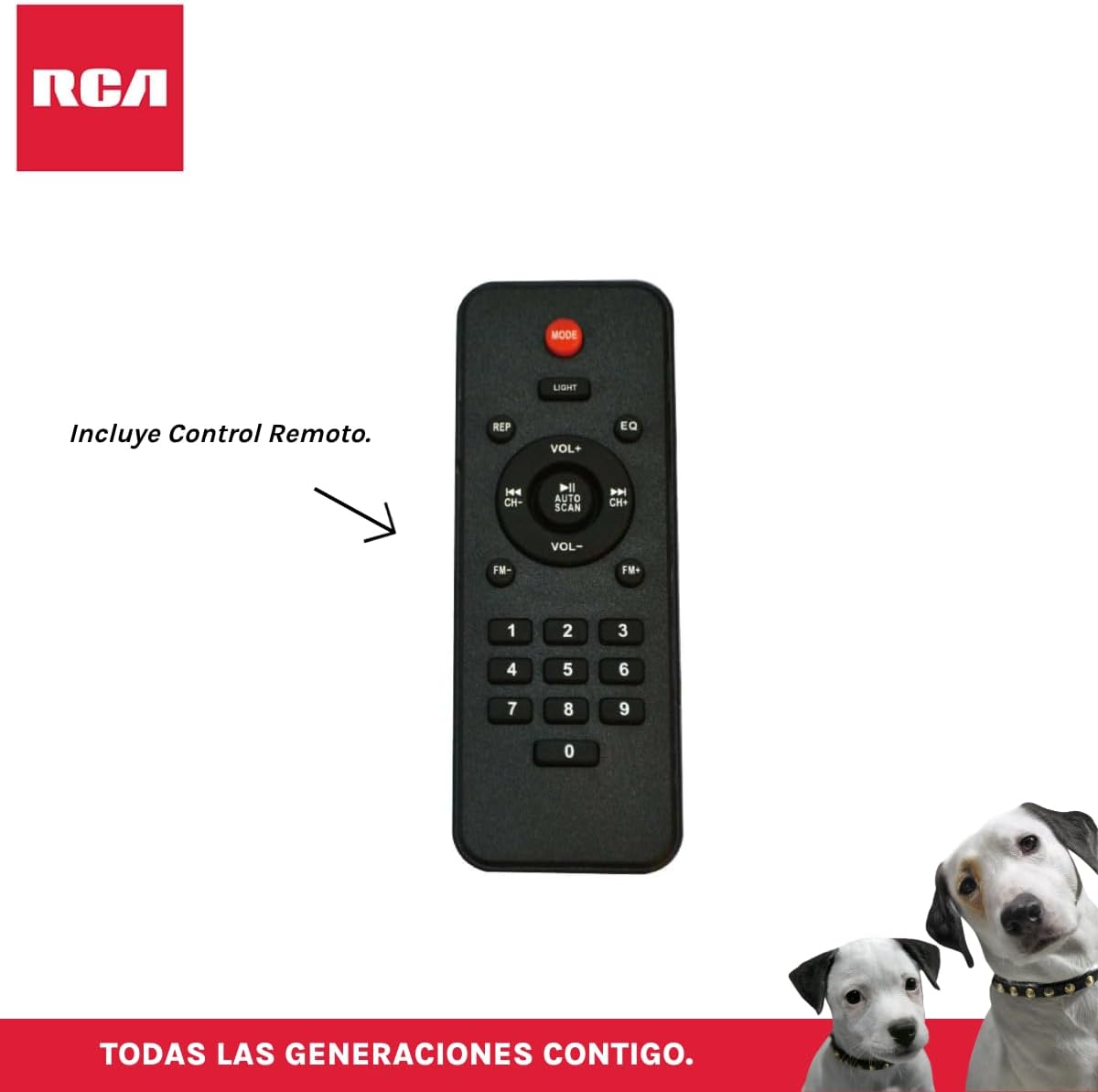
ຮູບທີ 3.4: RCA SP550BT Remote Control. This image displays the full layout of the remote control, including buttons for power, mode selection, volume adjustment, track navigation, equalizer settings, and a numeric keypad.
4. ຕັ້ງຄ່າ
4.1 ການເຊື່ອມຕໍ່ພະລັງງານ
- ຮັບປະກັນວ່າລຳໂພງຖືກວາງຢູ່ເທິງພື້ນຜິວທີ່ຮາບພຽງ.
- Connect the power cable to the speaker's power input port.
- Plug the other end of the power cable into a standard electrical outlet (AC 100-240V, 50/60Hz).
- Press the power button on the speaker or remote control to turn it on.
5. ຄໍາແນະນໍາການດໍາເນີນງານ
5.1 ເປີດ/ປິດ
- To turn on the speaker, press the ພະລັງງານ ຢູ່ເທິງແຜງຄວບຄຸມ ຫຼື ຣີໂໝດຄວບຄຸມ.
- To turn off the speaker, press the ພະລັງງານ ປຸ່ມອີກເທື່ອຫນຶ່ງ.
5.2 ການເລືອກໂໝດ
ກົດ ໂໝດ button on the control panel or remote control to switch between Bluetooth, USB, FM, and AUX input modes.
5.3 ການຈັບຄູ່ Bluetooth
- ເປີດລຳໂພງ ແລະ ເລືອກໂໝດ Bluetooth ໂດຍໃຊ້ ໂໝດ button. The display will show "BLUE" and a pairing indicator will flash.
- ເປີດໃຊ້ Bluetooth ໃນອຸປະກອນມືຖືຂອງທ່ານ (ໂທລະສັບສະຫຼາດ, ແທັບເລັດ, ແລະອື່ນໆ).
- ຊອກຫາ "RCA SP550BT" in your device's Bluetooth list and select it to pair.
- Once paired, the speaker will emit a confirmation sound, and the Bluetooth indicator will stop flashing.
- ດຽວນີ້ທ່ານສາມາດຫຼິ້ນສຽງຈາກອຸປະກອນຂອງທ່ານຜ່ານລຳໂພງໄດ້.
5.4 ການຫຼິ້ນ USB
- Insert a USB flash drive (FAT32 format, max 32GB) containing MP3 audio files ເຂົ້າໄປໃນພອດ USB.
- The speaker will automatically switch to USB mode and begin playing the first track. If not, press the ໂໝດ ປຸ່ມເພື່ອເລືອກໂຫມດ USB.
- ໃຊ້ ຫຼິ້ນ/ຢຸດຊົ່ວຄາວ, ກ່ອນໜ້ານີ້, ແລະ ຕໍ່ໄປ buttons on the control panel or remote to control playback.
ວິທະຍຸ 5.5 FM
- Turn on the speaker and select FM mode using the ໂໝດ ປຸ່ມ.
- ກົດຄ້າງໄວ້ ຫຼິ້ນ/ຢຸດຊົ່ວຄາວ ປຸ່ມ (ຫຼື ສະແກນອັດຕະໂນມັດ on remote) to automatically scan and save available FM stations.
- ໃຊ້ ກ່ອນໜ້ານີ້ ແລະ ຕໍ່ໄປ ປຸ່ມເພື່ອນໍາທາງຜ່ານສະຖານີທີ່ບັນທຶກໄວ້.
5.6 AUX Input
- Connect an external audio device (e.g., MP3 player, laptop) to the speaker's AUX input port using a 3.5mm audio cable (not included).
- ເລືອກໂໝດ AUX ໂດຍໃຊ້ ໂໝດ ປຸ່ມ.
- ຄວບຄຸມການຫຼິ້ນ ແລະລະດັບສຽງຈາກອຸປະກອນທີ່ເຊື່ອມຕໍ່ຂອງທ່ານ.
ຟັງຊັນ 5.7 TWS (True Wireless Stereo).
The TWS function allows you to connect two RCA SP550BT speakers wirelessly for a stereo sound experience.
- Ensure both SP550BT speakers are powered on and in Bluetooth mode, but not yet paired with any device.
- ໃນລຳໂພງອັນໜຶ່ງ, ໃຫ້ກົດຄ້າງໄວ້ TWS button (if available, or a dedicated TWS pairing button) until you hear a confirmation tone. The speakers will attempt to pair with each other.
- ເມື່ອຈັບຄູ່ສຳເລັດແລ້ວ, ລຳໂພງໜຶ່ງຈະເຮັດໜ້າທີ່ເປັນລຳໂພງຫຼັກ (ຊ່ອງຊ້າຍ) ແລະ ອີກລຳໂພງໜຶ່ງຈະເຮັດໜ້າທີ່ເປັນລຳໂພງສະເລ (ຊ່ອງຂວາ).
- Now, pair your mobile device with the master speaker via Bluetooth as described in section 5.3.
ໄຟ LED 5.8 ອັນ
ກົດ ແສງສະຫວ່າງ button on the control panel or remote control to cycle through different LED light modes or to turn them off.
5.9 ການນຳໃຊ້ໄມໂຄຣໂຟນ
Connect a wired microphone (not included) to the microphone input port on the speaker. Adjust the microphone volume using the dedicated knob (if available) or the main volume control.
6. ບໍາລຸງຮັກສາ
- ທໍາຄວາມສະອາດ: ໃຊ້ຜ້າປຽກແຫ້ງເພື່ອເຮັດຄວາມສະອາດດ້ານນອກຂອງລຳໂພງ. ຢ່າໃຊ້ເຄື່ອງເຮັດຄວາມສະອາດຂັດຫຼືສານລະລາຍ.
- ການເກັບຮັກສາ: ເມື່ອບໍ່ໄດ້ໃຊ້ເປັນເວລາດົນ, ໃຫ້ເກັບຮັກສາລໍາໂພງໄວ້ໃນບ່ອນທີ່ເຢັນ, ແຫ້ງແລ້ງຫ່າງຈາກແສງແດດໂດຍກົງ ແລະ ອຸນຫະພູມທີ່ຮຸນແຮງ.
- ການເປີດເຜີຍນ້ໍາ: ລຳໂພງນີ້ບໍ່ກັນນ້ຳ. ຫຼີກລ້ຽງການໃຫ້ມັນກັບນ້ໍາຫຼືຄວາມຊຸ່ມຫຼາຍເກີນໄປ.
7. ການແກ້ໄຂບັນຫາ
ຖ້າເຈົ້າພົບບັນຫາກັບຜູ້ເວົ້າຂອງເຈົ້າ, ໃຫ້ອ້າງອີງເຖິງບັນຫາ ແລະວິທີແກ້ໄຂບັນຫາທົ່ວໄປຕໍ່ໄປນີ້:
| ບັນຫາ | ສາເຫດທີ່ເປັນໄປໄດ້ | ການແກ້ໄຂ |
|---|---|---|
| ບໍ່ມີພະລັງງານ | Power cable not connected; Power outlet not working; Speaker off. | ກວດສອບການເຊື່ອມຕໍ່ສາຍໄຟ; ລອງໃຊ້ປລັກສຽບອື່ນ; ກົດປຸ່ມ POWER. |
| ບໍ່ມີສຽງ | Volume too low; Incorrect mode selected; Device not connected properly. | Increase volume; Select correct input mode (Bluetooth, USB, AUX); Reconnect device. |
| ການຈັບຄູ່ Bluetooth ລົ້ມເຫລວ | Speaker not in pairing mode; Device Bluetooth off; Speaker already paired. | Ensure speaker is in Bluetooth pairing mode; Turn on device Bluetooth; Disconnect from other devices. |
| ການຫຼິ້ນ USB ບໍ່ເຮັດວຽກ | USB drive format incompatible; Corrupt files; USB drive not inserted correctly. | Ensure USB is FAT32 format; Check file integrity; Reinsert USB drive. |
| FM radio poor reception | ສັນຍານອ່ອນ; ແຊກແຊງ. | Relocate speaker; Extend antenna (if applicable). |
8. ຂໍ້ມູນຈໍາເພາະ
| ຄຸນສົມບັດ | ຂໍ້ມູນຈໍາເພາະ |
|---|---|
| ຕົວແບບ | SP550BT |
| ຍີ່ຫໍ້ | RCA |
| ລຳໂພງກຳລັງອອກ | 50 ວັດ (ສູງສຸດ) |
| ເຕັກໂນໂລຊີການເຊື່ອມຕໍ່ | Bluetooth, USB, AUX |
| ເຕັກໂນໂລຊີໄຮ້ສາຍ | Bluetooth |
| ຮູບແບບການອອກສຽງ | ສະເຕຣິໂອ |
| ປະເພດລຳໂພງ | Portable, ນອກ |
| ປະເພດການຕິດຕັ້ງ | ພູຕັ້ງໂຕະ |
| ວິທີການຄວບຄຸມ | ການຄວບຄຸມໄລຍະໄກ |
| ຂະຫນາດລໍາໂພງ | 6.5 ນິ້ວ |
| Woofer ເສັ້ນຜ່າສູນກາງ | 6.5 ນິ້ວ |
| ຄວາມອາດສາມາດຫມໍ້ໄຟ | 4400 ລ້ານamp ຊົ່ວໂມງ |
| ແຫຼ່ງພະລັງງານ | ສາຍໄຟຟ້າ |
| ອຸປະກອນທີ່ເຂົ້າກັນໄດ້ | ແລັບທັອບ, ເຄື່ອງຫຼິ້ນ MP3, ໂທລະສັບສະຫຼາດ, ແທັບເລັດ |
| GTIN / UPC | 044476152061 |
9. ການຮັບປະກັນແລະການສະຫນັບສະຫນູນ
This product comes with a limited warranty. Please refer to the warranty card included in your package for specific terms and conditions. For technical support or service inquiries, please contact RCA customer service through their official webເວັບໄຊ ຫຼືຂໍ້ມູນການຕິດຕໍ່ທີ່ສະໜອງໃຫ້ກັບການຊື້ຂອງທ່ານ.
ໝາຍເຫດ: ເງື່ອນໄຂການຮັບປະກັນອາດຈະແຕກຕ່າງກັນໄປຕາມພາກພື້ນ. ຮັກສາຫຼັກຖານການຊື້ຂອງທ່ານສໍາລັບການຮ້ອງຂໍການຮັບປະກັນ.