
1. ບົດແນະນຳ
Thank you for choosing an Aveek Professional Audio Mixer. This manual provides detailed instructions for the setup, operation, and maintenance of your Aveek F-5A Professional Audio Mixer and Aveek MIX400 4-Channel Low Noise Mini Line Audio Mixer. Please read this manual thoroughly before using your device to ensure proper functionality and to prevent damage.
The Aveek audio mixer series is designed to provide high-quality audio mixing solutions for various applications, from home studios to live performances. Both models offer distinct features tailored to different user needs.

Image 1.1: Aveek F-5A (left) and Aveek MIX400 (right) Audio Mixers. The F-5A is a multi-channel mixer with XLR inputs and USB connectivity, while the MIX400 is a compact 4-channel line mixer.
2. ຄໍາແນະນໍາຄວາມປອດໄພທີ່ສໍາຄັນ
- Read these instructions carefully before operation.
- ຮັກສາຄໍາແນະນໍາເຫຼົ່ານີ້ສໍາລັບການອ້າງອີງໃນອະນາຄົດ.
- ປະຕິບັດຕາມຄໍາເຕືອນທັງຫມົດກ່ຽວກັບຜະລິດຕະພັນແລະໃນຄໍາແນະນໍາການດໍາເນີນງານ.
- ຢ່າໃຊ້ອຸປະກອນນີ້ຢູ່ໃກ້ກັບນ້ໍາ.
- ເຮັດຄວາມສະອາດດ້ວຍຜ້າແຫ້ງເທົ່ານັ້ນ.
- ຫ້າມປິດຊ່ອງລະບາຍອາກາດໃດໆ. ຕິດຕັ້ງຕາມຄໍາແນະນໍາຂອງຜູ້ຜະລິດ.
- ຫ້າມຕິດຕັ້ງໃກ້ກັບແຫຼ່ງຄວາມຮ້ອນເຊັ່ນລັງສີ, ເຄື່ອງບັນທຶກຄວາມຮ້ອນ, ເຕົາຫຼືອຸປະກອນອື່ນໆ (ລວມທັງ. amplifiers) ທີ່ຜະລິດຄວາມຮ້ອນ.
- ຢ່າທຳລາຍຈຸດປະສົງດ້ານຄວາມປອດໄພຂອງປລັກຂົ້ວໂລກ ຫຼື ປະເພດດິນ. ປລັກຂົ້ວມີສອງໃບມີໃບໜຶ່ງກວ້າງກວ່າອີກແຜ່ນໜຶ່ງ. ປລັກສາຍດິນມີສອງໃບ ແລະ ງ່າເຂົ້າດິນທີສາມ. ແຜ່ນໃບກວ້າງຫຼືງ່າທີສາມແມ່ນສະຫນອງໃຫ້ເພື່ອຄວາມປອດໄພຂອງທ່ານ. ຖ້າປລັກສຽບທີ່ໃຫ້ມານັ້ນບໍ່ພໍດີກັບປລັກສຽບໄຟຂອງທ່ານ, ໃຫ້ປຶກສາກັບຊ່າງໄຟຟ້າເພື່ອທົດແທນປລັກສຽບທີ່ໝົດແລ້ວ.
- ປົກປ້ອງສາຍໄຟຈາກການຖືກສຽບ ຫຼື ສຽບ, ໂດຍສະເພາະຢູ່ປລັກສຽບ, ກ່ອງຮັບສະດວກ, ແລະຈຸດທີ່ພວກມັນອອກຈາກອຸປະກອນ.
- ໃຊ້ໄຟລ໌ແນບ/ອຸປະກອນເສີມທີ່ຜູ້ຜະລິດລະບຸໄວ້ເທົ່ານັ້ນ.
- ຖອດອຸປະກອນນີ້ອອກໃນລະຫວ່າງການມີພາຍຸຟ້າຜ່າ ຫຼືເມື່ອບໍ່ໄດ້ໃຊ້ເປັນເວລາດົນນານ.
- ອ້າງອີງການບໍລິການທັງໝົດໃຫ້ກັບພະນັກງານບໍລິການທີ່ມີຄຸນວຸດທິ. ການບໍລິການແມ່ນຕ້ອງການເມື່ອອຸປະກອນໄດ້ຮັບຄວາມເສຍຫາຍໃນທາງໃດກໍ່ຕາມເຊັ່ນ: ສາຍໄຟຫຼືປລັກສຽບຖືກເສຍຫາຍ, ແຫຼວຮົ່ວໄຫຼຫຼືສິ່ງຂອງຕົກເຂົ້າໄປໃນອຸປະກອນ, ອຸປະກອນຖືກຝົນຫຼືຄວາມຊຸ່ມຊື່ນ, ບໍ່ເຮັດວຽກຕາມປົກກະຕິ. , ຫຼືໄດ້ຖືກຫຼຸດລົງ.
3. ເນື້ອໃນຊຸດ
Please check the package contents upon unboxing. If any items are missing or damaged, contact Aveek customer support.
- Aveek Audio Mixer (F-5A or MIX400, depending on model purchased)
- Power Adapter (5V-2A Type-C for F-5A, 5V for MIX400)
- USB Type-C to USB Cable (for F-5A)
- ຄູ່ມືຜູ້ໃຊ້ (ເອກະສານນີ້)
4. ຜະລິດຕະພັນເກີນview ແລະຄຸນສົມບັດ
4.1 Aveek F-5A Professional Audio Mixer
The Aveek F-5A is a versatile professional audio mixer designed for comprehensive sound control and recording. It features multiple input options and advanced functionalities.
- ການປ້ອນຂໍ້ມູນໄມ/ສາຍ: 3 XLR/TRS combo jacks for microphones or line-level instruments.
- ການປ້ອນຂໍ້ມູນສາຍສະເຕຣິໂອ: L/R 6.35mm and L/R RCA stereo inputs for connecting CD players, keyboards, or computers.
- USB-B Interface: Built-in sound card for direct connection to computers, mobile phones, or tablets for mixing and recording. Requires a USB to Phone OTG Adapter for mobile devices.
- USB-A Interface: For MP3 music playback from a USB stick or recording audio output to a USB stick.
- Ultra-Low Noise Design: Utilizes a 5V-2A (Type-C) adapter power supply and six ROHM low-noise operational amplifiers for superior sound quality.
- ຜົນໄດ້ຮັບ: L/R RCA output and L/R 6.35mm Main output for active speakers, power amplifiers, or active sound systems.
- ພະລັງງານ Phantom: ພະລັງງານ phantom +48V ສຳລັບໄມໂຄຣໂຟນ condenser.
- ຜົນກະທົບ: Built-in digital effects processor (Reverb, Delay).

Image 4.1: Front panel overview of the Aveek F-5A mixer, detailing input jacks, control knobs (gain, treble, bass, effect, volume), USB ports, and output connections.
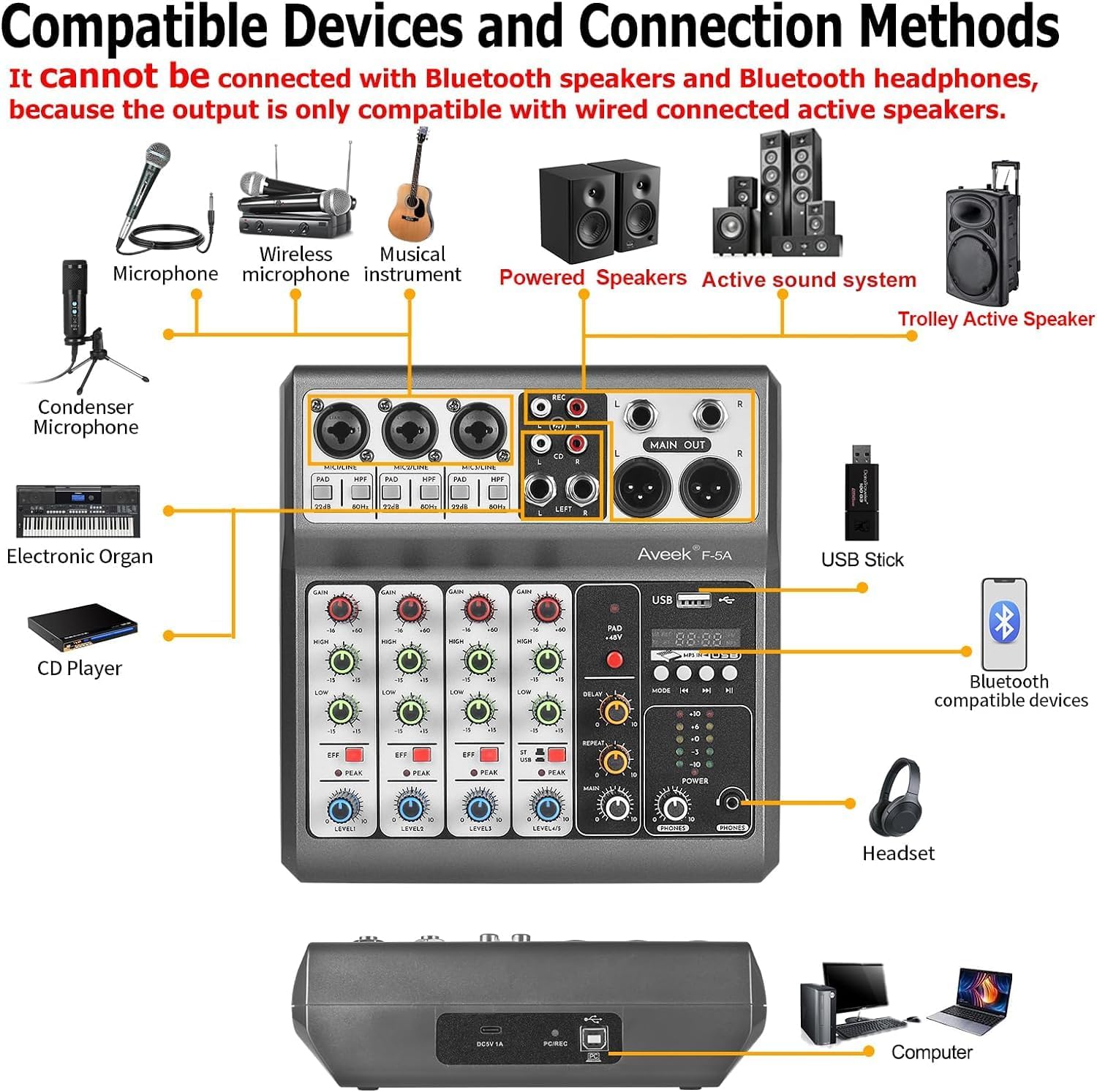
Image 4.2: Diagram illustrating compatible devices and connection methods for the Aveek F-5A mixer, including microphones, instruments, speakers, and computers. Note: Bluetooth output devices are not supported.
4.2 Aveek MIX400 4-Channel Low Noise Mini Line Audio Mixer
The Aveek MIX400 is a compact and efficient 4-channel stereo line mixer, ideal for combining multiple audio sources into a single output with minimal noise.
- 4-Inputs 1-Output: Four independent stereo/mono input channels combining into one stereo output.
- ຄວາມເຂົ້າກັນໄດ້ຂອງວັດສະດຸປ້ອນ: Suitable for dynamic microphones, electronic instruments, CDs, and computers.
- ສຽງລົບກວນຕໍ່າສຸດ: Designed for superior sound quality with low noise and minimal distortion.
- ການອອກແບບກະທັດຮັດ: Small footprint for easy integration into any setup.

Image 4.3: Front panel of the Aveek MIX400, showing four input channels with individual volume controls, mono/stereo switches, and a master output volume control.
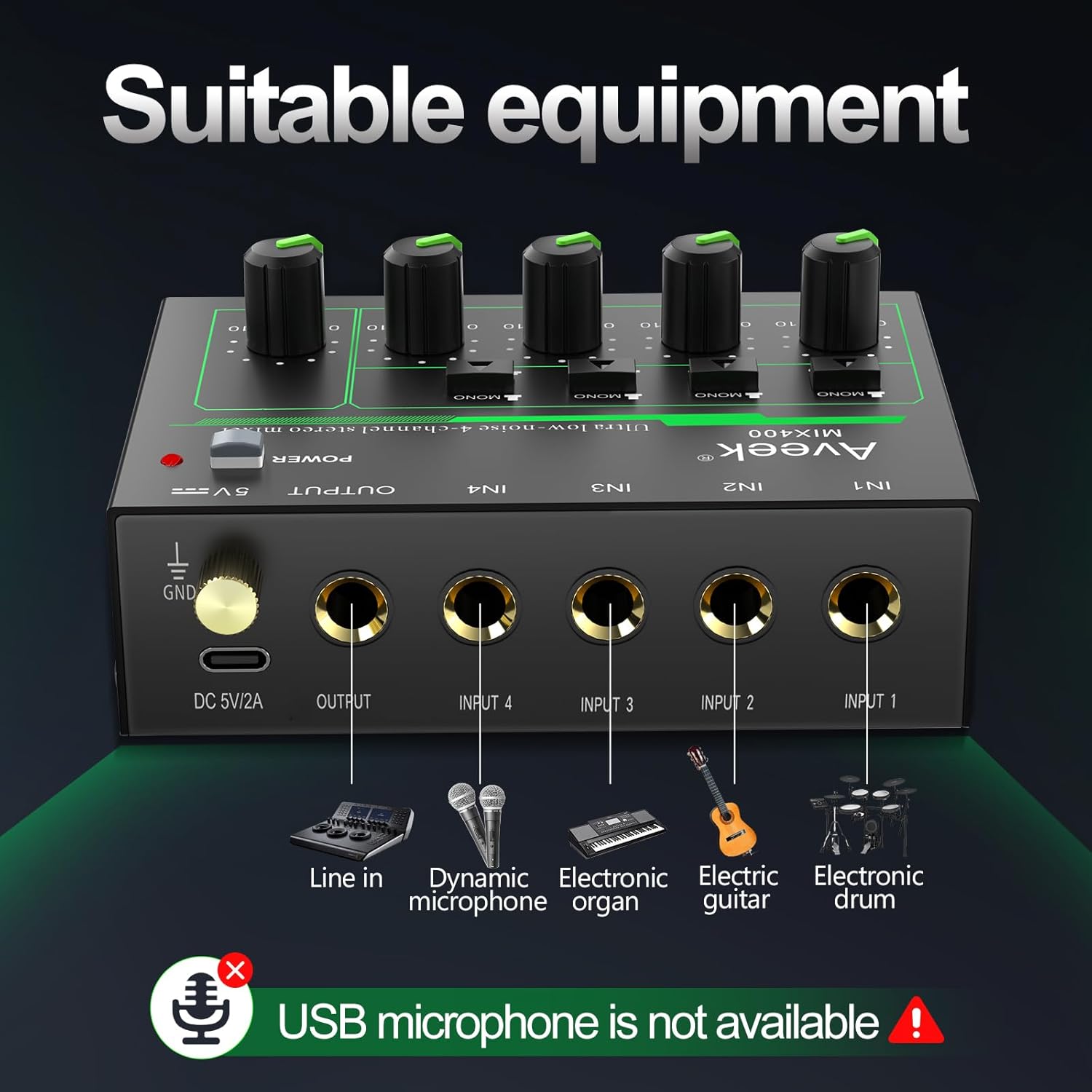
Image 4.4: Diagram illustrating suitable equipment for the Aveek MIX400, including line-in devices, dynamic microphones, electronic organs, electric guitars, and electronic drums. USB microphones are not supported.
5. ການຕິດຕັ້ງ ແລະການເຊື່ອມຕໍ່
5.1 Powering the Mixer
Both Aveek mixers require external power. Ensure the mixer is turned off before connecting the power supply.
- Aveek F-5A: Connect the provided USB Type-C to USB cable to the mixer's Type-C power port and then to the 5V-2A power adapter. Plug the adapter into a standard wall outlet. The F-5A can also be powered by a power bank or a computer's USB port.
- Aveek MIX400: Connect the provided 5V power adapter to the mixer's DC 5V/2A port and then to a standard wall outlet.
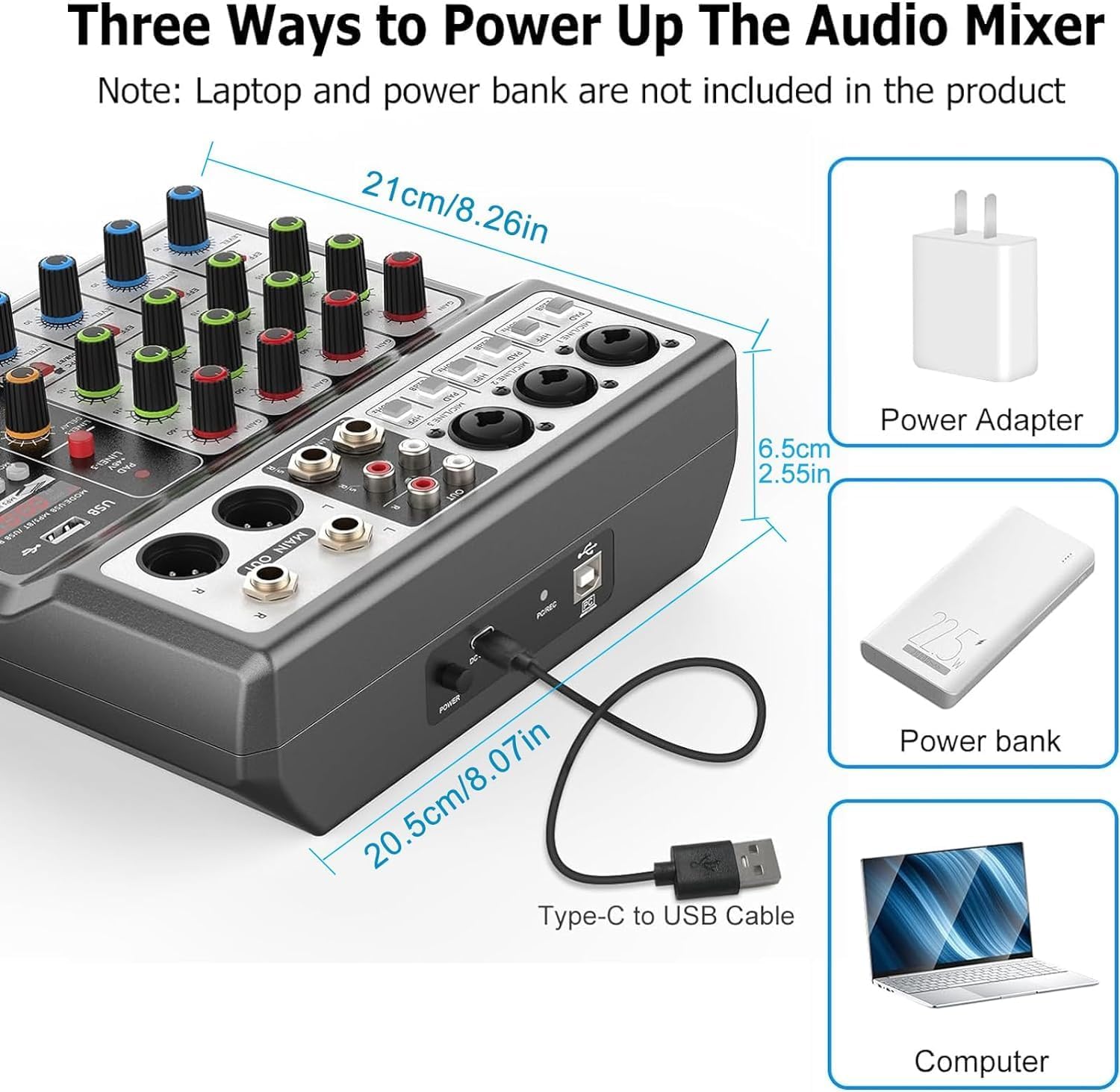
Image 5.1: Powering options for the Aveek F-5A mixer, including a power adapter, power bank, or computer USB port via a Type-C to USB cable.
5.2 Connecting Audio Devices (Aveek F-5A)
Refer to Image 4.1 and 4.2 for visual guidance.
- ໄມໂຄຣໂຟນ: Connect dynamic or condenser microphones to the XLR/TRS combo jacks (MIC1, MIC2, MIC3). For condenser microphones, activate the +48V phantom power switch if required.
- ເຄື່ອງມື/ອຸປະກອນສາຍ: Connect instruments (e.g., guitar, keyboard) or other line-level devices to the TRS inputs or the L/R RCA stereo inputs.
- Computer/Mobile Device (USB-B): Use a USB-B cable to connect the mixer to your computer for recording or playback. For mobile phones/tablets, an OTG adapter is required for data transfer.
- USB Stick (USB-A): Insert a USB stick into the USB-A port for MP3 playback or recording.
- ຜົນໄດ້ຮັບ: Connect your active speakers, power amplifier, or active sound system to the MAIN OUT (6.35mm TRS) or RCA OUT jacks.
- ຫູຟັງ: ເຊື່ອມຕໍ່ຫູຟັງກັບຊ່ອງສຽບ PHONES ເພື່ອຕິດຕາມ.
5.3 Connecting Audio Devices (Aveek MIX400)
Refer to Image 4.3 and 4.4 for visual guidance.
- ວັດສະດຸປ້ອນ: Connect your audio sources (e.g., dynamic microphone, electronic organ, electric guitar, electronic drum, CD player) to the IN1, IN2, IN3, IN4 jacks. These are 1/4" TS/TRS inputs.
- ຜົນຜະລິດ: Connect the mixer's OUTPUT jack to your active speakers or ampມີຊີວິດຊີວາ.

ຮູບພາບ 5.2: ລາຍລະອຽດ view of the Aveek MIX400 input and output jacks, illustrating the use of TRS for stereo and TS for mono connections.

Image 5.3: The Aveek MIX400 connected to a dynamic microphone, demonstrating a typical input setup. USB microphones are not compatible.
6. ການດໍາເນີນງານ
6.1 Aveek F-5A Operation
- ເປີດ: After connecting all devices and power, press the POWER switch to turn on the mixer.
- ການປ້ອນຂໍ້ມູນ: Adjust the GAIN knob for each channel to set the input level. Ensure the PEAK indicator does not light up consistently, which indicates clipping.
- ຄວາມສະເໝີພາບ: Use the TREBLE and BASS knobs to adjust the high and low frequencies for each channel.
- ຜົນກະທົບ: Use the EFF knob to send a portion of the channel signal to the internal effects processor. Adjust the MP3 playback adjustment and Reverb/Delay controls for desired effect.
- ປະລິມານຊ່ອງທາງ: Adjust the CHANNEL VOLUME knob for each input to balance the mix.
- ປະລິມານໂທ: Use the MASTER VOLUME knob to control the overall output level.
- ການຕິດຕາມ: Adjust the MONITOR VOLUME knob for headphone output.
- ຟັງຊັນ USB:
- USB-B (PC/Mobile): When connected to a computer, the mixer acts as an audio interface. Select it as your input/output device in your operating system's sound settings.
- USB-A (Playback/Record): Insert a USB stick. Use the MODE/USB/MP3/BT/REC controls to play MP3 files or record the main mix directly to the USB stick.
6.2 Aveek MIX400 Operation
- ເປີດ: After connecting all devices and power, press the POWER switch to turn on the mixer. The power indicator light will illuminate.
- ໂໝດປ້ອນຂໍ້ມູນ: For each input channel (IN1-IN4), select either MONO (TS input) or STEREO (TRS input) using the switch.
- MONO Mode: Recommended for mono sound input. Mono sound uses one channel output in Stereo mode.
- STEREO Mode: Stereo sound uses two channels output in any mode.
- ປະລິມານປ້ອນຂໍ້ມູນ: Adjust the individual volume control knob for each input channel (IN1-IN4) to balance the levels of your audio sources.
- Master Output Volume: Adjust the OUTPUT volume control knob to set the overall output level of the mixed audio.
Image 6.1: Front panel of the Aveek MIX400, highlighting the power switch, mono/stereo input mode selectors, individual input volume controls, and master output volume control.
7. ບໍາລຸງຮັກສາ
- ທໍາຄວາມສະອາດ: ໃຊ້ຜ້າອ່ອນໆແຫ້ງເພື່ອທຳຄວາມສະອາດດ້ານນອກຂອງເຄື່ອງປະສົມ. ຢ່າໃຊ້ນ້ຳຢາທຳຄວາມສະອາດ ຫຼື ຕົວລະລາຍ.
- ການເກັບຮັກສາ: ເມື່ອບໍ່ໄດ້ໃຊ້ເປັນເວລາດົນ, ໃຫ້ເກັບຮັກສາເຄື່ອງປະສົມໄວ້ໃນບ່ອນເຢັນ, ແຫ້ງແລ້ງ, ຫ່າງຈາກແສງແດດໂດຍກົງ ແລະ ອຸນຫະພູມທີ່ຮ້າຍກາດ.
- ການລະບາຍອາກາດ: ຮັບປະກັນການລະບາຍອາກາດທີ່ເຫມາະສົມຮອບເຄື່ອງປະສົມເພື່ອປ້ອງກັນຄວາມຮ້ອນເກີນໄປ. ຫ້າມປິດຊ່ອງລະບາຍອາກາດ.
- ການຄຸ້ມຄອງສາຍໄຟ: Avoid bending or pinching cables, especially power cords, to prevent damage.
8. ການແກ້ໄຂບັນຫາ
| ບັນຫາ | ສາເຫດທີ່ເປັນໄປໄດ້ | ການແກ້ໄຂ |
|---|---|---|
| ບໍ່ມີພະລັງງານ | Power cable not connected; power adapter faulty; power outlet not working. | Check power connections; try a different power outlet; ensure correct power adapter is used. |
| ບໍ່ມີສຽງອອກ | Output cables not connected; output volume too low; incorrect input selection; connected to passive speakers. | Verify output cable connections; increase MASTER VOLUME; ensure input devices are active; connect to active speakers or an ampມີຊີວິດຊີວາ. |
| ສຽງບິດເບືອນ | Input gain too high (clipping); faulty cables; impedance mismatch. | Reduce input GAIN (F-5A) or individual channel volume (MIX400); replace cables; ensure compatible devices are connected. |
| Microphone not working (F-5A) | +48V phantom power not enabled for condenser mic; mic cable faulty; mic gain too low. | Activate +48V switch; check/replace mic cable; increase GAIN. |
| USB recording/playback issues (F-5A) | Incorrect USB mode selected; USB stick not formatted correctly; USB to OTG adapter not working (for mobile). | Ensure correct USB mode; format USB stick to FAT32; verify OTG adapter functionality. |
If you encounter issues not listed here or if the problem persists, please contact Aveek customer support for assistance.
9. ຂໍ້ມູນຈໍາເພາະ
General Specifications (Applicable to both models where relevant)
- ຍີ່ຫໍ້: ອາເວກ
- ແຫຼ່ງພະລັງງານ: ໄຟຟ້າສາຍ
- ເຕັກໂນໂລຍີການເຊື່ອມຕໍ່: USB (F-5A), Line (MIX400)
- ປະເພດ Output Connector: RCA, TRS
ເຄື່ອງປະສົມສຽງມືອາຊີບ Aveek F-5A
- ຊ່ອງທາງເຂົ້າ: 3 x XLR/TRS Combo, 1 x Stereo 6.35mm, 1 x Stereo RCA
- ຊ່ອງທາງອອກ: 1 x Stereo 6.35mm Main Out, 1 x Stereo RCA Out, 1 x Headphone Out
- ການໂຕ້ຕອບ USB: USB-B (PC/Mobile), USB-A (Playback/Record)
- ພະລັງງານ Phantom: +48V
- ການສະຫນອງພະລັງງານ: 5V-2A (ປະເພດ-C)
- ຂະໜາດ (ໂດຍປະມານ): 21cm (W) x 20.5cm (D) x 6.5cm (H) / 8.26in (W) x 8.07in (D) x 2.55in (H)
Image 9.1: Approximate dimensions of the Aveek F-5A mixer.
Aveek MIX400 4-Channel Low Noise Mini Line Audio Mixer
- ຈຳນວນຊ່ອງ: 4 Input, 1 Output
- ປະເພດຂາເຂົ້າ: 1/4" TS/TRS (Mono/Stereo selectable)
- ປະເພດຜົນຜະລິດ: 1/4" TRS
- ການສະຫນອງພະລັງງານ: 5V DC
10. ການຮັບປະກັນແລະການສະຫນັບສະຫນູນ
Aveek products are designed for reliability and performance. For information regarding warranty coverage, technical support, or service inquiries, please refer to the warranty card included with your product or visit the official Aveek webເວັບໄຊ.
For direct assistance, you may contact Aveek customer support through the retailer where the product was purchased or via the contact information provided on the Aveek brand store page on Amazon: Aveek Store.