
1. ບົດແນະນຳ
This manual provides detailed instructions for the safe installation, operation, and maintenance of your PHORUS 48-inch Modern White Ceiling Fan with Lights and Remote/APP Control. Please read all instructions carefully before beginning installation and retain this manual for future reference.
2. ຂໍ້ມູນຄວາມປອດໄພ
- Ensure the power is disconnected at the circuit breaker before installation or servicing.
- ສາຍໄຟທັງໝົດຕ້ອງສອດຄ່ອງກັບລະຫັດໄຟຟ້າແຫ່ງຊາດ ແລະທ້ອງຖິ່ນ. ຖ້າທ່ານບໍ່ຄຸ້ນເຄີຍກັບສາຍໄຟ, ໃຫ້ປຶກສາກັບຊ່າງໄຟຟ້າທີ່ມີຄຸນວຸດທິ.
- The fan must be mounted with a minimum of 7 feet (2.1 meters) clearance from the floor to the blade trailing edge.
- The mounting structure must be capable of supporting the fan's weight (approximately 13.4 pounds).
- ຢ່າງໍຕົວຍຶດແຜ່ນໃນລະຫວ່າງການຕິດຕັ້ງຫຼືເຮັດຄວາມສະອາດ.
- ພັດລົມນີ້ຖືກອອກແບບມາ ສຳ ລັບໃຊ້ພາຍໃນເຮືອນ.
3. ເນື້ອໃນຊຸດ
ກວດສອບວ່າອົງປະກອບທັງຫມົດແມ່ນມີຢູ່ກ່ອນທີ່ຈະເລີ່ມຕົ້ນການຕິດຕັ້ງ:
- ການປະກອບມໍເຕີພັດລົມ
- ກະດານຫ້ອຍ
- 5 ໃບພັດລົມ
- ໄຟ LED Lampຮົ່ມ
- ຣີໂມດຄວບຄຸມ (ມີແບັດ AAA 2 ອັນ)
- ສະກູ ແລະ ອຸປະກອນຕິດຕັ້ງ
- ຄູ່ມືການສອນ

4. ຂໍ້ມູນຈໍາເພາະ
| ຄຸນສົມບັດ | ຂໍ້ມູນຈໍາເພາະ |
|---|---|
| ຍີ່ຫໍ້ | ຟໍຣັສ |
| ຊື່ຕົວແບບ | #8907 |
| ຂະໜາດ | 48 ນິ້ວ |
| ສີ | ສີຂາວ |
| ວັດສະດຸ | ອະຄິລິກ, ພາດສະຕິກ |
| ປະເພດມໍເຕີ | DC Motor (30W) |
| ແຫຼ່ງແສງ | LED (28W) |
| ສີອ່ອນ | 3 (White, Warm, Neutral) |
| ໄລຍະການຫຼຸດແສງ | Stepless (10%-100%) |
| ຄວາມໄວລົມ | 6 |
| ວິທີການຄວບຄຸມ | Remote Control, APP Control |
| ຄຸນນະສົມບັດພິເສດ | Reversible Function, 2-Hour Timer, Memory Function |
| ລະດັບສຽງ | ຕ່ຳກວ່າ 35 dB |
| ຂະໜາດສິນຄ້າ | 48"L x 48"W x 10.83"H |
| ນ້ໍາຫນັກລາຍການ | 13.4 ປອນ |
5. ການຕິດຕັ້ງແລະການຕິດຕັ້ງ
5.1 ລາຍການກວດກ່ອນການຕິດຕັ້ງ
- ໃຫ້ແນ່ໃຈວ່າແຫຼ່ງຈ່າຍໄຟຖືກປິດຢູ່ທີ່ເບຣກເກີຫຼັກ.
- Confirm you have all necessary tools (screwdriver, drill, wire strippers, etc.).
- Verify that the ceiling junction box is securely mounted and capable of supporting the fan.
5.2 ການຕິດຕັ້ງຂັ້ນຕອນໂດຍຂັ້ນຕອນ
- Attach Blades to Motor Assembly: Secure each of the five fan blades to the motor assembly using the provided screws. Ensure the 'THIS SIDE UP' marking on the blade attachment is facing upwards.
- Install LED Light Board: Carefully place the LED light board into the designated area on the motor assembly and secure it with screws. Connect the LED wires.
- Attach LED Lampຮົ່ມ: ວາງ LED lampshade over the light board and twist it clockwise until it is securely fastened.
- Mount Hanging Board: Secure the hanging board to your ceiling junction box using appropriate screws. Ensure it is firmly attached.
- ເຊື່ອມຕໍ່ສາຍໄຟ: Connect the fan's electrical wires to your household wiring. The typical connections are: Black (Live) to Black (Live), White (Neutral) to White (Neutral), and Yellow/Green (Ground) to Green (Ground). Use the provided wire connectors.
- Secure Fan to Hanging Board: Lift the fan assembly and attach it to the hanging board, ensuring all wires are tucked safely inside the canopy. Secure the fan with the provided screws.
6. ຄໍາແນະນໍາການດໍາເນີນງານ
6.1 ຫນ້າທີ່ຄວບຄຸມໄລຍະໄກ
The included remote control allows for convenient operation of your ceiling fan:
- ເປີດ/ປິດ: ກົດປຸ່ມເປີດ/ປິດເພື່ອເປີດ ຫຼື ປິດພັດລົມ ແລະ ໄຟ.
- ຄວາມໄວພັດລົມ: Select from 6 wind speeds (1-6) to adjust airflow.
- ແສງເປີດ/ປິດ: Control the light independently from the fan.
- ອຸນຫະພູມສີ: Cycle through 3 light colors: White (6000K), Neutral (4500K), and Warm (3000K).
- ມືດມົວ: Adjust light brightness from 10% to 100%.
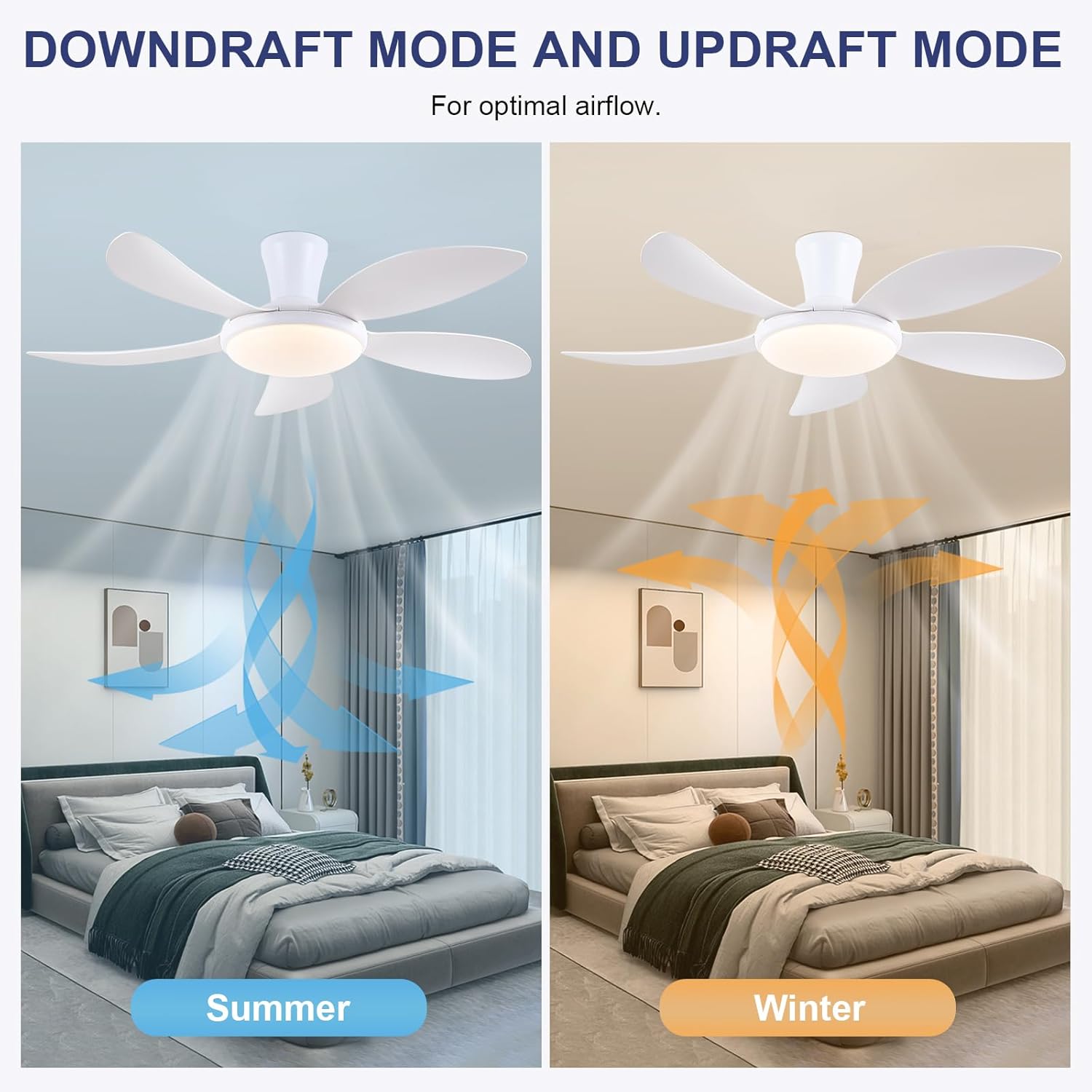
- ຟັງຊັນປີ້ນກັບກັນ: Press the F/R key to change the blade rotation direction for summer (downdraft) or winter (updraft) modes. The fan will stop briefly before reversing.
- ໂມງຈັບເວລາ: Set a 2-hour timer for automatic shutdown.
- ໂໝດກາງຄືນ: Activates a low-speed fan and dim light setting.

6.2 Remote Code Pairing
If the remote control is not responding, it may need to be paired:
- Turn off the main power supply to the fan for one minute.
- Turn on the main power supply and simultaneously long-press the 'Code Key' button on the remote control for 3-5 seconds.
- The fan light will blink 2-3 times, indicating successful code matching. The remote can now be operated normally.
6.3 ການຄວບຄຸມ APP
Control your fan using the 'Fan Lamp Pro' mobile application:
- ດາວໂຫລດ APP: Scan the QR code provided in the product images or search for "Fan Lamp Pro" in your app store.
- ເຊື່ອມຕໍ່ຜ່ານ Bluetooth: ກວດໃຫ້ແນ່ໃຈວ່າ Bluetooth ຂອງໂທລະສັບຂອງທ່ານເປີດຢູ່.
- ຈັບຄູ່ອຸປະກອນ: Open the app, add a new device, and follow the on-screen instructions to connect to your fan. The fan light will blink twice upon successful connection.
- ຟັງຊັນ: The app allows control over fan speeds, light colors, dimming, reverse function, and timer settings, similar to the remote control.
6.4 Fan Speed and Airflow
- ລະດັບ 1-2: Low Comfortable Wind, suitable for sleep.
- ລະດັບ 3-4: Medium Natural Wind, suitable for daily life.
- ລະດັບ 5-6: High Cooling Wind, suitable for hot weather.

6.5 ການຕັ້ງຄ່າແສງສະຫວ່າງ
- The LED light source supports stepless dimming and memory function, retaining your last brightness and color temperature setting.
- Choose from 3 color temperatures: 3000K (Warm Light), 4500K (Natural Light), and 6000K (White Light).

6.6 ຟັງຊັນປີ້ນກັບກັນ
The reversible DC motor allows you to change the direction of the fan seasonally:
- ໂໝດລະດູຮ້ອນ (ລົມພັດລົງ): Blades rotate counter-clockwise, pushing cool air downwards.
- ໂໝດລະດູໜາວ (ລົມພັດຂຶ້ນ): Blades rotate clockwise, drawing cool air up and circulating warm air downwards.
7. ບໍາລຸງຮັກສາ
- ທໍາຄວາມສະອາດ: ເພື່ອເຮັດຄວາມສະອາດພັດລົມ, ເຊັດດ້ວຍຜ້າອ່ອນ, damp ຜ້າ. ຢ່າໃຊ້ເຄື່ອງເຮັດຄວາມສະອາດຂັດຫຼືສານລະລາຍ.
- ການດູແລແຜ່ນ: The ABS blades are designed to be easy to clean and resistant to deformation.
- ກວດກາປົກກະຕິ: Periodically check all connections and screws to ensure they are secure.
8. ການແກ້ໄຂບັນຫາ
ຖ້າເຈົ້າພົບບັນຫາກັບພັດລົມຂອງເຈົ້າ, ໃຫ້ອ້າງອີງເຖິງບັນຫາທົ່ວໄປ ແລະວິທີແກ້ໄຂບັນຫາຕໍ່ໄປນີ້:
- ພັດລົມບໍ່ເຮັດວຽກ: Check power supply, ensure all wiring connections are secure, and verify remote control pairing.
- ແສງບໍ່ເຮັດວຽກ: Check power supply, ensure light wires are connected, and verify remote control pairing.
- ພັດລົມມີສຽງດັງ: Ensure all screws are tightened, especially on the blades and mounting bracket. Check for any obstructions.
- ການຄວບຄຸມໄລຍະໄກບໍ່ເຮັດວຽກ: Replace batteries, ensure line of sight to the fan, and re-pair the remote control as per section 6.2.
- ບັນຫາການເຊື່ອມຕໍ່ແອັບ: Ensure Bluetooth is on, the app is updated, and try re-pairing the device.
9. ການຮັບປະກັນແລະການສະຫນັບສະຫນູນ
PHORUS provides a one-year quality warranty for this product. For any damage or quality problems, free replacement service is offered. If you have any questions or require assistance, please contact PHORUS customer service. You will receive a satisfactory answer within 24 hours.
For additional support and resources, please visit the official PHORUS webເວັບໄຊ ຫຼືອ້າງອີງເຖິງຂໍ້ມູນການຕິດຕໍ່ທີ່ສະໜອງໃຫ້ກັບການຊື້ຂອງທ່ານ.