
1. ບົດແນະນຳ
The Relaxweex Magic Christmas Wand Wireless Remote Control Outlet provides a convenient way to control your indoor and outdoor lighting. This kit includes a wireless wand remote and an AC outlet receiver, allowing you to turn lights on and off from a distance of up to 100 feet. It is designed for ease of use and versatility, suitable for various decorative lighting applications.
2. ຂໍ້ມູນຄວາມປອດໄພ
- ອ່ານຄໍາແນະນໍາທັງຫມົດກ່ອນທີ່ຈະນໍາໃຊ້.
- Ensure the product is used within its specified electrical ratings (1 Amps, 220 Volts).
- Do not immerse the receiver in water. The product is water-resistant for outdoor use, but not waterproof.
- Keep the wand remote away from excessive heat or direct sunlight.
- Use only the specified battery type (2 AA batteries) for the wand remote. Do not mix old and new batteries or different types of batteries.
- If the wand becomes excessively hot or emits a burning smell, immediately remove the batteries and discontinue use. Contact customer support.
- This product is recommended for ages 15 years and up. Adult supervision is advised when children are using the wand.
3. ເນື້ອໃນຊຸດ
ກວດສອບວ່າລາຍການທັງຫມົດແມ່ນມີຢູ່ໃນຊຸດຂອງທ່ານ:
- 1 x Magic Light Wand remote control
- 1 x AC outlet wall receiver (Two 3-pin Plugs)
- Sealing plugs (for outdoor use)
- ຄູ່ມືຜູ້ໃຊ້

Image 3.1: The Magic Christmas Wand remote and the wireless AC outlet receiver.
4. ຕັ້ງຄ່າ
- Install Batteries in the Wand:
Unscrew the battery compartment cover on the wand remote. Insert 2 AA batteries (not included), ensuring correct polarity. Securely replace the cover. - ສຽບໃນຕົວຮັບ:
Insert the AC outlet receiver into a standard wall socket. For outdoor use, ensure the socket is weather-protected and use the provided sealing plugs for any unused outlets on the receiver. - Connect Your Lights:
Plug your Christmas lights, lamps, or other electrical decorations into the 3-pin outlets on the receiver. - Initial Pairing (Pre-paired):
The wand remote and receiver are typically pre-paired from the factory. If they do not respond, ensure batteries are correctly installed and the receiver is powered. No manual pairing steps are usually required.

Image 4.1: Visual guide for plugging the receiver into a socket and connecting lights.
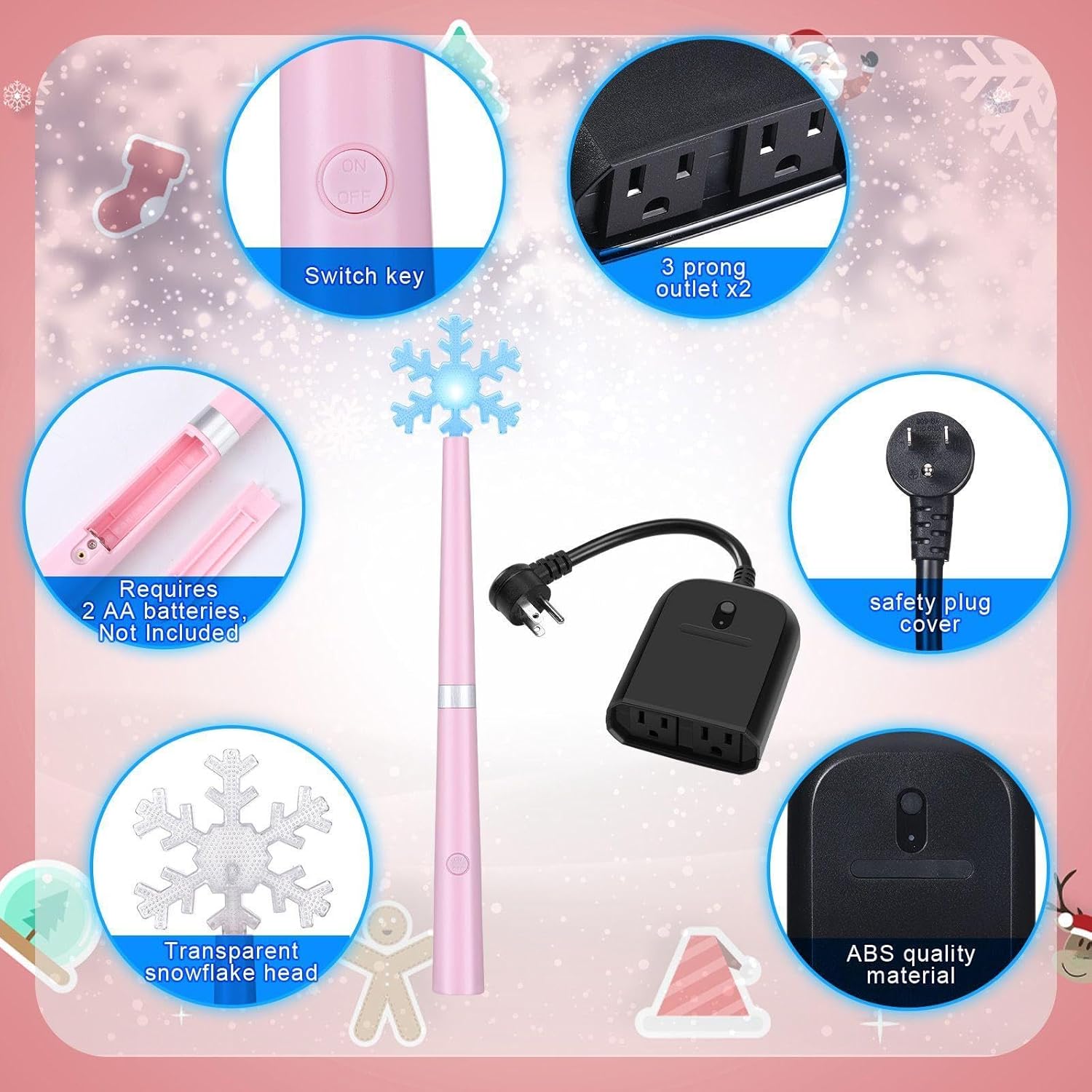
ຮູບພາບ 4.2: ລາຍລະອຽດ view of the wand's battery compartment and the receiver's outlets.
ວິດີໂອທີ 4.1: ຈົບແລ້ວview of the product components, battery installation in the wand, and connecting the receiver to a power source and lights.
5. ຄໍາແນະນໍາການດໍາເນີນງານ
- Wireless Control with the Wand:
Point the wand remote towards the receiver and press the button. The wand will light up and play a magical sound, and your connected lights will turn on or off. The wand operates up to 100 feet away. - Manual Control on the Receiver:
The receiver also features a manual ON/OFF button. Press this button to toggle the connected lights directly at the outlet. - ການຄວບຄຸມສຽງ:
To turn off the magical sound effect on the wand, press and hold the wand's button for approximately 3 seconds. Repeat the action to re-enable the sound.

Image 5.1: Demonstrates both manual control via the receiver button and wireless control using the wand remote.

Image 5.2: A child demonstrating the use of the wand remote to activate Christmas tree lights.

ຮູບພາບ 5.3: ຕົວຢ່າງamples of multiple uses for the remote control outlet, including indoor and outdoor light strings.
6. ບໍາລຸງຮັກສາ
- ການປ່ຽນແບັດເຕີຣີ: Replace the 2 AA batteries in the wand remote when the light dims or the remote's range decreases.
- ທໍາຄວາມສະອາດ: Wipe the wand and receiver with a soft, dry cloth. Do not use abrasive cleaners or immerse in liquids.
- ການເກັບຮັກສາ: Store the product in a cool, dry place when not in use. Remove batteries from the wand if storing for extended periods to prevent leakage.
- ຄວາມຕ້ານທານນ້ໍາ: The receiver is designed for indoor/outdoor use and is water-resistant (IP20 rating). Ensure sealing plugs are used for unused outlets when outdoors. Protect from heavy rain or direct water spray.
7. ການແກ້ໄຂບັນຫາ
| ບັນຫາ | ສາເຫດທີ່ເປັນໄປໄດ້ | ການແກ້ໄຂ |
|---|---|---|
| Lights do not turn on/off with wand. | Low or dead batteries in wand; receiver unplugged; lights unplugged from receiver; wand out of range. | Replace wand batteries; ensure receiver is plugged in and powered; ensure lights are securely plugged into receiver; move closer to receiver (within 100 ft). |
| Wand becomes hot or smells burnt. | Faulty batteries; internal short circuit. | Immediately remove batteries. Discontinue use and contact customer support. |
| No sound from wand. | ຄຸນສົມບັດສຽງຖືກປິດໄວ້. | Press and hold the wand button for 3 seconds to re-enable sound. |
| Lights do not respond to manual button on receiver. | Receiver unplugged; lights unplugged from receiver. | Ensure receiver is plugged in and powered; ensure lights are securely plugged into receiver. |
8. ຂໍ້ມູນຈໍາເພາະ
- ຍີ່ຫໍ້: Relaxweex
- ຕົວແບບ: Two 3-pin Plugs
- ASIN: B0DCBMWWMY
- ການຈັດອັນດັບປັດຈຸບັນ: 1 Amps
- ການດໍາເນີນງານ Voltage: 220 ໂວນ
- ປະເພດການຕິດຕໍ່: ເປີດປົກກະຕິ
- ປະເພດຕົວເຊື່ອມຕໍ່: ສຽບເຂົ້າ
- ວັດສະດຸ: Acrylonitrile Butadiene Styrene (ABS)
- ປະເພດວົງຈອນ: 2 ທາງ
- ການຈັດອັນດັບການປົກປ້ອງສາກົນ: IP20
- ຈຳນວນຕຳແໜ່ງ: 2
- Batteries (Wand): 2 ຫມໍ້ໄຟ AA ຕ້ອງການ (ບໍ່ລວມ)
- ຜູ້ຜະລິດທີ່ແນະນໍາອາຍຸ: 15 ປີຂຶ້ນໄປ
- ວັນທີທໍາອິດທີ່ມີ: ວັນທີ 6 ສິງຫາ 2024
9. ການຮັບປະກັນແລະການສະຫນັບສະຫນູນ
For warranty information or technical support, please refer to the contact details provided with your purchase or visit the official Relaxweex webເວັບໄຊ. ຮັກສາຫຼັກຖານການຊື້ຂອງທ່ານສໍາລັບການຮຽກຮ້ອງການຮັບປະກັນໃດໆ.