
1. ບົດແນະນຳ
This manual provides detailed instructions for the installation, operation, and maintenance of your Active Pixel 4G Solar Powered Dual Lens Security Camera. Please read this manual thoroughly before using the product to ensure proper function and safety. This camera is designed for outdoor surveillance, featuring 4G connectivity, solar power, dual lenses for 10x zoom, 2-way audio, and motion detection capabilities.
1.1 ເນື້ອໃນຊຸດ
- 1x 4G Solar Camera (with included battery)
- 1x ຄູ່ມືຜູ້ໃຊ້
- 1x Screw Kit for installation
- 1x ແຜງພະລັງງານແສງອາທິດ
2. ຂໍ້ມູນຄວາມປອດໄພ
Observe the following safety precautions to prevent damage to the product or injury to yourself or others.
- ການຕິດຕັ້ງ: Ensure the camera is securely mounted to prevent falling. Avoid installing near flammable or explosive materials.
- ແຫຼ່ງພະລັງງານ: Use only the provided solar panel and integrated battery. Do not attempt to replace the battery with unapproved alternatives.
- ຄວາມຕ້ານທານນ້ໍາ: The camera is IP65/IP66 rated for water and dust resistance. However, avoid submerging the camera in water or exposing it to high-pressure water jets.
- ອຸນຫະພູມ: Operate the camera within the specified temperature range of -15°C to 60°C.
- ການຖອດອອກໄດ້: ຢ່າພະຍາຍາມຖອດປະກອບ ຫຼື ດັດແປງກ້ອງຖ່າຍຮູບ. ການເຮັດແບບນີ້ຈະເຮັດໃຫ້ການຮັບປະກັນເປັນໂມຄະ ແລະ ອາດຈະເຮັດໃຫ້ເກີດຄວາມເສຍຫາຍ ຫຼື ການບາດເຈັບໄດ້.
- ເດັກນ້ອຍ: ຮັກສາກ້ອງຖ່າຍຮູບ ແລະອຸປະກອນເສີມຂອງມັນໃຫ້ໄກຈາກເດັກນ້ອຍ.
3. ຜະລິດຕະພັນເກີນview
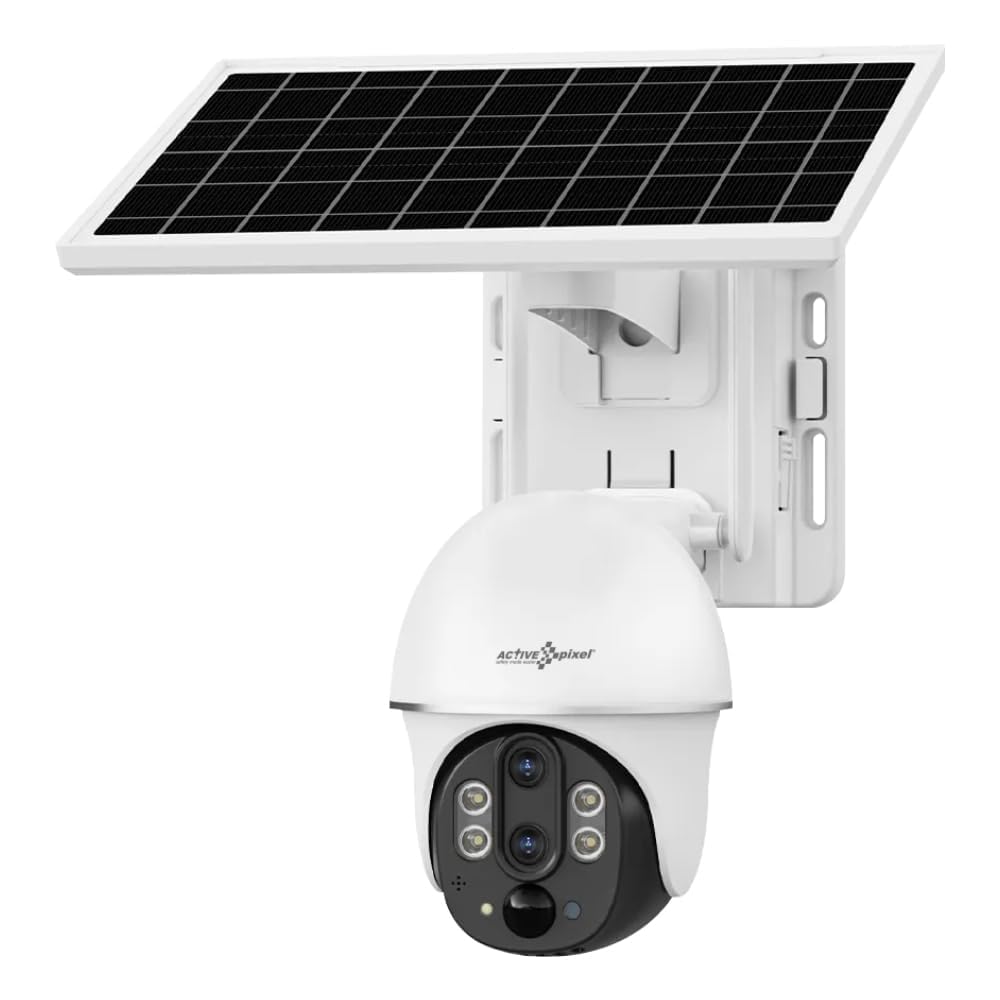
The Active Pixel 4G Solar Powered Dual Lens Security Camera is a robust surveillance solution. Key features include:
- ລະບົບເລນຄູ່: Provides 10x zoom capability (3x optical + 3.2x digital).
- ການເຊື່ອມຕໍ່ 4G: Operates on 4G LTE networks, ideal for locations without Wi-Fi. (Note: 4G Jio Sim Card Not Supported. VI and Airtel SIM recommended.)
- ພະລັງງານແສງອາທິດ: Equipped with a 7W solar panel and 8000mAh battery for continuous operation.
- ຄວາມລະອຽດສູງ: 2MP+2MP sensors delivering 1080P Full HD video.
- Pan-Tilt-Zoom (PTZ): ແຊ່ແນວນອນ 355° ແລະອຽງແນວຕັ້ງ 90° ສໍາລັບພື້ນທີ່ກວ້າງ.
- ການກວດຫາອັດສະລິຍະ: PIR + Radar dual induction detection for human/animal detection.
- ສຽງສອງທາງ: ໄມໂຄຣໂຟນ ແລະ ລຳໂພງໃນຕົວສຳລັບການສື່ສານ.
- ວິໄສທັດກາງຄືນສີ: Clear color night vision up to 50ft.
- ການເກັບຮັກສາ: Supports local TF card (up to 128GB, not included) and cloud storage.
- ທົນທານຕໍ່ສະພາບອາກາດ: IP65/IP66 rated for outdoor use.
4. ຕັ້ງຄ່າ
4.1 ການຕິດຕັ້ງ SIM card
- Locate the SIM card slot on the camera body.
- Insert a compatible 4G SIM card (VI or Airtel recommended) into the slot. Ensure the SIM card is correctly oriented.
- Close the SIM card slot cover securely to maintain waterproofing.
4.2 ການຕິດຕັ້ງແອັບ ແລະ ການຕັ້ງຄ່າບັນຊີ
- Download the "V380 Pro" app from your smartphone's app store (Android or iOS).
- ເປີດ app ແລະລົງທະບຽນບັນຊີໃຫມ່ຫຼືເຂົ້າສູ່ລະບົບຖ້າຫາກວ່າທ່ານມີແລ້ວ.
- ປະຕິບັດຕາມຄຳແນະນຳໃນແອັບເພື່ອເພີ່ມກ້ອງຖ່າຍຮູບຂອງທ່ານ. ໂດຍປົກກະຕິແລ້ວສິ່ງນີ້ກ່ຽວຂ້ອງກັບການສະແກນລະຫັດ QR ໃນກ້ອງຖ່າຍຮູບ ຫຼື ການປ້ອນລະຫັດຂອງມັນດ້ວຍຕົນເອງ.
4.3 ການຕິດຕັ້ງກ້ອງຖ່າຍຮູບ ແລະແຜງແສງອາທິດ
- ເລືອກສະຖານທີ່: Select a location with good 4G signal strength and ample direct sunlight for the solar panel. The camera should be mounted at a height that provides optimal viewing angle and security.
- ຕິດກ້ອງ: Use the provided screw kit to securely mount the camera to a wall or pole. Ensure the mounting surface is stable.
- Mount the Solar Panel: Mount the solar panel in a position where it receives maximum direct sunlight throughout the day. Adjust its angle for optimal charging efficiency.
- ເຊື່ອມຕໍ່ແຜງແສງອາທິດ: Connect the solar panel cable to the camera's charging port. Ensure the connection is secure and waterproof.
5. ຄໍາແນະນໍາການດໍາເນີນງານ
5.1 ດໍາລົງຊີວິດ View ແລະການຄວບຄຸມ PTZ
- Open the V380 Pro app and select your camera from the device list.
- The app will display the live video feed.
- ໃຊ້ການຄວບຄຸມໃນໜ້າຈໍເພື່ອເລື່ອນ (355° ອອກຕາມລວງນອນ) ແລະອຽງ (90° ຕັ້ງ) ກ້ອງຖ່າຍຮູບ.
- Pinch to zoom on the live feed to utilize the 10x dual lens zoom.
5.2 ສຽງສອງທາງ
- ໃນຂະນະທີ່ຢູ່ໃນຊີວິດ view, ແຕະໄອຄອນໄມໂຄຣໂຟນເພື່ອເວົ້າຜ່ານລຳໂພງຂອງກ້ອງຖ່າຍຮູບ.
- ແຕະໄອຄອນລຳໂພງເພື່ອຟັງສຽງຈາກໄມໂຄຣໂຟນຂອງກ້ອງຖ່າຍຮູບ.
5.3 ກວດຈັບການເຄື່ອນໄຫວ ແລະການແຈ້ງເຕືອນ
- Access the camera settings in the V380 Pro app.
- Enable "Smart Detection" (PIR+Radar dual induction) for human/animal detection.
- Configure alert settings, including push notifications to your mobile phone.
- When motion is detected, the camera will automatically record the event and send an alert.
5.4 ການບັນທຶກແລະການຫຼິ້ນ
- ການເກັບຮັກສາທ້ອງຖິ່ນ: Insert a TF card (up to 128GB, not included) into the camera's slot for local recording. Recordings can be accessed via the app.
- Cloud Storage: Subscribe to the cloud storage service through the V380 Pro app for alarm video storage.
- ເຖິງ view ບັນທຶກ footage, navigate to the playback section in the app and select the desired date and time.
5.5 ວິໄສທັດກາງຄືນ
The camera automatically switches to night vision mode in low light conditions using its IR-CUT switch and 4pcs Double Core LEDs. It provides clear color night vision up to 50 feet (15 meters).
6. ບໍາລຸງຮັກສາ
- ທໍາຄວາມສະອາດ: ເຊັດເລນກ້ອງຖ່າຍຮູບ ແລະ ແຜງໂຊລາເຊວຢ່າງເປັນປະຈໍາດ້ວຍເຄື່ອງອ່ອນ, ງamp cloth to ensure clear vision and efficient charging. Do not use harsh chemicals.
- ການດູແລຫມໍ້ໄຟ: The integrated battery is designed for long life. Ensure the solar panel is clean and receives adequate sunlight for optimal charging. Avoid prolonged storage in extreme temperatures.
- ການອັບເດດເຟີມແວ: Check the V380 Pro app periodically for firmware updates. Keeping the firmware updated ensures optimal performance and security.
- ການຄຸ້ມຄອງບັດ TF: If using a TF card, periodically check its storage capacity and format it if necessary to maintain recording efficiency.
7. ການແກ້ໄຂບັນຫາ
| ບັນຫາ | ສາເຫດທີ່ເປັນໄປໄດ້ | ການແກ້ໄຂ |
|---|---|---|
| ກ້ອງຖ່າຍຮູບບໍ່ເປີດ. | Low battery; Solar panel not charging; Faulty connection. | Ensure solar panel is clean and receiving direct sunlight. Check solar panel connection to the camera. Allow time for battery to charge. |
| No 4G signal or offline. | SIM card not inserted correctly; SIM card not activated; Poor network coverage; Incompatible SIM card. | Reinsert SIM card. Verify SIM card is active and has data plan. Move camera to an area with better 4G coverage. Ensure using a compatible SIM (VI/Airtel). |
| ການກວດຈັບການເຄື່ອນໄຫວບໍ່ເຮັດວຽກ. | Detection sensitivity too low; Feature disabled in app; Obstructions in detection area. | Check app settings to ensure motion detection is enabled and sensitivity is appropriate. Clear any obstructions. |
| ຄຸນນະພາບວິດີໂອບໍ່ດີ. | Dirty lens; Poor network signal; Low light conditions. | Clean the camera lens. Ensure good 4G signal. Video quality may be reduced in very low light, but night vision should activate. |
| ບໍ່ສາມາດເຊື່ອມຕໍ່ກັບແອັບໄດ້. | Incorrect camera ID; App issues; Network problems. | Verify camera ID. Restart the app or your phone. Check your phone's internet connection. Reset the camera if necessary (refer to app for reset procedure). |
8. ຂໍ້ມູນຈໍາເພາະ
| ຄຸນສົມບັດ | ລາຍລະອຽດ |
|---|---|
| ຕົວແບບ | AP-4G-SY2.0MP-DUAL LENS-V-3.6MM |
| ເຊັນເຊີ | 1/2.8" Progressive Scan CMOS *2 |
| ເລນ | 4mm F1.6 (Horizontal View: 80±5°, Vertical: 90±5°), 12mm F1.6 (Horizontal View: 26±1°, Vertical: 30±1°) |
| ຊູມ | 10X Conflate Zoom (3X Optical + 3.2X Digital) |
| ການບີບອັດວິດີໂອ | H.265/15FPS |
| ຄວາມລະອຽດ | Main stream: 1920*1080P, Sub-stream: 640×360P |
| ເຄືອຂ່າຍ | 4G LTE (SIM Supported) |
| ວິທີການກວດຫາ | PIR + Radar dual induction detection |
| ໄລຍະການກວດພົບ | 0~12M |
| ມຸມກວດຫາ | 120° |
| Pan-tilt | ລວງນອນ: 355°, ຕັ້ງ: 90° |
| ຄວາມໄວຫມຸນ | ແນວນອນ 55°/s, ຕັ້ງ 40°/s |
| ວິໄສທັດກາງຄືນ | IR-CUT automatic switch, 4pcs Double Core LEDs, effective distance 10M (IR/White LED) |
| ສຽງ | Built-in speaker (3W), Built-in microphone (pickup area ~20M) |
| ການເກັບຮັກສາ | TF card (Max 128GB), Cloud Storage (Alarm video) |
| ພະລັງງານ | 7W Solar Panel, 8000mAh Battery (included) |
| ການຕໍ່ຕ້ານນ້ໍາ | IP65, IP66 |
| ອຸນຫະພູມປະຕິບັດການ | -15°C ເຖິງ 60°C |
| ຂະໜາດ (L x W x H) | 20 x 18 x 16 cm |
| ນ້ຳໜັກ | 1.2 ກິໂລ |
| ວິທີການຄວບຄຸມ | App (V380 Pro) |
| OS ທີ່ເຂົ້າກັນໄດ້ | Android, iOS |
9. ການຮັບປະກັນແລະການສະຫນັບສະຫນູນ
For warranty information and technical support, please refer to the contact details provided at the point of purchase or on the official Active Pixel website. The manufacturer is Glorious Digital Solution Pvt Ltd. For customer care, you may contact 9321367328.
ກະລຸນາຮັກສາຫຼັກຖານການຊື້ຂອງທ່ານສໍາລັບການຮຽກຮ້ອງການຮັບປະກັນ.