
1. ບົດແນະນຳ
Welcome to the user manual for your Orbic JOURNEY Pro 4G flip phone. This device is designed for essential communication with the added benefits of 4G connectivity and smart features powered by KaiOS 3.1. This manual will guide you through the setup, operation, maintenance, and troubleshooting of your new phone, ensuring you can utilize all its functionalities effectively.
2. ເນື້ອໃນຊຸດ
Please check that all the following items are included in your product package:
- Orbic JOURNEY Pro 4G Main Unit
- ອະແດບເຕີ AC
- ສາຍ USB (ປະເພດ-C)
- ແບັດເຕີຣີ
- ຄູ່ມືເລີ່ມຕົ້ນດ່ວນ
3. ອຸປະກອນເກີນview
The Orbic JOURNEY Pro 4G features a classic flip phone design with a physical keypad and two displays for convenience.


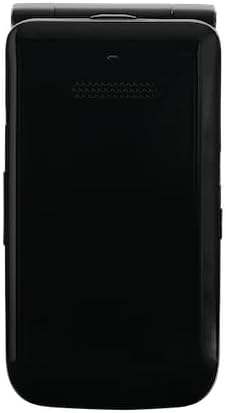
ອົງປະກອບທີ່ສໍາຄັນ:
- ຈໍສະແດງຜົນຫຼັກ: The internal 3.2-inch TFT LCD screen for primary interaction.
- ການສະແດງພາຍນອກ: A 1.77-inch external display for time, notifications, and caller ID when the phone is closed.
- ປຸ່ມກົດ: Alphanumeric keys and navigation buttons for easy input and menu navigation.
- ກ້ອງຖ່າຍຮູບ: A 5-megapixel rear camera with flash for capturing photos.
- ພອດ USB Type-C: ສໍາລັບການສາກໄຟແລະການໂອນຂໍ້ມູນ.
- Jack ຫູຟັງ 3.5 ມມ: ສໍາລັບການເຊື່ອມຕໍ່ຫູຟັງແບບມີສາຍ.
4. ການຕິດຕັ້ງເບື້ອງຕົ້ນ
4.1. ການຕິດຕັ້ງແບັດເຕີລີ ແລະຊິມກາດ
- ເອົາຝາປິດຫຼັງຂອງໂທລະສັບອອກ.
- Insert the nanoSIM card into the designated SIM slot. Ensure the gold contacts face downwards and the card is correctly oriented.
- Insert the 1850mAh removable battery into its compartment, aligning the contacts.
- ປ່ຽນຝາຫຼັງ, ໃຫ້ແນ່ໃຈວ່າມັນຄລິກໃສ່ບ່ອນປອດໄພ.
4.2. ການສາກອຸປະກອນ
- ເຊື່ອມຕໍ່ສາຍ USB Type-C ກັບຊ່ອງສາກໄຟຂອງໂທລະສັບ.
- Connect the other end of the USB cable to the provided AC adapter.
- ສຽບອະແດບເຕີ AC ເຂົ້າໄປໃນປລັກສຽບໄຟ.
- The phone will indicate that it is charging. Allow the battery to fully charge before initial use.
4.3. ເປີດ / ປິດພະລັງງານ
- ເພື່ອເປີດເຄື່ອງ: ກົດປຸ່ມເປີດ/ປິດການໂທຄ້າງໄວ້ຈົນກວ່າໜ້າຈໍຈະສະຫວ່າງຂຶ້ນ.
- ປິດເຄື່ອງ: ກົດປຸ່ມເປີດ/ປິດການໂທຄ້າງໄວ້, ຈາກນັ້ນເລືອກ 'ປິດເຄື່ອງ' ຈາກຕົວເລືອກໃນໜ້າຈໍ.
5. ການດໍາເນີນງານພື້ນຖານ
5.1. ເຮັດ ແລະ ຮັບສາຍ
- ໂທອອກ: Open the phone, enter the phone number using the keypad, and press the Green Call button.
- ເພື່ອຮັບສາຍ: When the phone rings, press the Green Call button. You can answer with the phone closed by pressing the Green Call button, or open the phone to answer.
- ເພື່ອວາງສາຍ: ກົດປຸ່ມວາງສາຍສີແດງ.
5.2. ການສົ່ງ ແລະ ຮັບຂໍ້ຄວາມ
- ທ່ອງໄປຫາແອັບພລິເຄຊັນ 'ຂໍ້ຄວາມ' ຈາກເມນູຫຼັກ.
- Select 'New Message' to compose a new text message.
- Enter the recipient's number or select from contacts, then type your message using the keypad.
- ກົດ 'ສົ່ງ' ເພື່ອສົ່ງຂໍ້ຄວາມ.
5.3. Navigation and Smart Features
The Orbic JOURNEY Pro 4G runs on KaiOS 3.1, offering access to various smart applications:
- Web ຕົວທ່ອງເວັບ: Access the internet to browse webສະຖານທີ່.
- Google Maps: Use for navigation and location services.
- YouTube: Watch videos directly on your device.
- Wi-Fi Hotspot (Tethering): Share your phone's 4G internet connection with up to 8 other devices simultaneously. Access this feature through the phone's settings menu.
6. ການບໍາລຸງຮັກສາແລະການດູແລ
- ທໍາຄວາມສະອາດ: ໃຊ້ຜ້າປຽກແຫ້ງເພື່ອເຮັດຄວາມສະອາດດ້ານນອກຂອງໂທລະສັບ. ຫຼີກເວັ້ນການນໍາໃຊ້ສານເຄມີທີ່ຮຸນແຮງຫຼືວັດສະດຸຂັດ.
- ການດູແລຫມໍ້ໄຟ: ເພື່ອຍືດອາຍຸແບັດເຕີຣີ, ຫຼີກເວັ້ນການເຮັດໃຫ້ໂທລະສັບຖືກອຸນຫະພູມສູງສຸດ. ຢ່າປະໄວ້ແບັດເຕີຣີໃຫ້ໝົດເປັນໄລຍະເວລາທີ່ຍາວນານ.
- ນ້ໍາແລະຂີ້ຝຸ່ນ: This device is not rated for water or dust resistance. Avoid exposure to liquids and dusty environments.
- ການຈັດການ: ໃຫ້ຈັບໂທລະສັບດ້ວຍຄວາມລະມັດລະວັງ. ຫຼີກລ່ຽງການຕົກ ຫຼື ກະທົບທີ່ຮຸນແຮງ.
7. ການແກ້ໄຂບັນຫາ
If you encounter issues with your Orbic JOURNEY Pro 4G, please refer to the following common solutions:
| ບັນຫາ | ການແກ້ໄຂ |
|---|---|
| ໂທລະສັບບໍ່ເປີດ | Ensure the battery is correctly installed and charged. Connect the charger and try again. |
| ບໍ່ສາມາດໂທ ຫຼືຮັບສາຍໄດ້ | Check if the SIM card is properly inserted and activated. Verify network signal strength. Contact your service provider if the issue persists. |
| ບໍ່ມີການເຊື່ອມຕໍ່ອິນເຕີເນັດ | Ensure mobile data is enabled in settings. Check Wi-Fi connection if using Wi-Fi. Verify your data plan with your service provider. |
| ແບັດເຕີຣີໝົດໄວ | Reduce screen brightness, close unused applications, and disable Wi-Fi/Bluetooth when not in use. Avoid extreme temperatures. |
| ໂທລະສັບບໍ່ມີການຕອບສະໜອງ | ຖອດແບັດເຕີຣີອອກ ແລະ ໃສ່ຄືນໃໝ່ເພື່ອປະຕິບັດການຣີເຊັດແບບ soft reset. |
8. ຂໍ້ມູນຈໍາເພາະ
| ຄຸນສົມບັດ | ຂໍ້ມູນຈໍາເພາະ |
|---|---|
| ຊື່ຜະລິດຕະພັນ | Orbic JOURNEY Pro 4G |
| ໝາຍເລກຕົວແບບ | O4F231JP |
| ສີ | Jet Black |
| ລະບົບປະຕິບັດການ | KaiOS® 3.1 |
| ໂຮງງານຜະລິດ | Qualcomm® QM215 Quad-Core (4x 1.3 GHz-ARM Cortex A53) |
| RAM | 1GB |
| ການເກັບຮັກສາພາຍໃນ | 8GB |
| ການເກັບຮັກສາທີ່ຂະຫຍາຍໄດ້ | Supports up to 128GB Micro SD |
| ເຊັນເຊີ | Magnetic Sensor, Barometric Sensor |
| ການຢັ້ງຢືນລາຍນິ້ວມື | ບໍ່ຮອງຮັບ |
| ຄວາມອາດສາມາດຫມໍ້ໄຟ | 1,850mAh (ສາມາດຖອດອອກໄດ້) |
| ເຄື່ອງສາກ | 5W (Type C 2.0) Charger |
| ການສາກໄວ | ບໍ່ຮອງຮັບ |
| ການສາກໄຟໄຮ້ສາຍ | ບໍ່ຮອງຮັບ |
| ເວລາສົນທະນາຢ່າງຕໍ່ເນື່ອງ | ສູງສຸດ 5.6 ຊົ່ວໂມງ |
| ເວລາສະແຕນບາຍຢ່າງຕໍ່ເນື່ອງ | ສູງສຸດ 150 ຊົ່ວໂມງ |
| ຂະໜາດຈໍສະແດງຜົນຫຼັກ | 3.2 ນິ້ວ TFT LCD |
| ຄວາມລະອຽດຈໍສະແດງຜົນຫຼັກ | 240x320 (125ppi) |
| ຂະຫນາດຈໍສະແດງຜົນພາຍນອກ | 1.77 ນິ້ວ TFT LCD |
| ຄວາມລະອຽດຈໍສະແດງຜົນພາຍນອກ | 128x160 (116ppi) |
| ຂະໜາດ (H x W x D) | ປະມານ. 115.3 x 60.9 x 19.8 ມມ |
| ນ້ຳໜັກ | ປະມານ. 148g |
| ວັດສະດຸຮ່າງກາຍ | ຢາງ |
| ຕົວເຊື່ອມຕໍ່ | USB Type-C 2.0 |
| ການຕໍ່ຕ້ານນ້ໍາ / ຝຸ່ນ | ບໍ່ສາມາດໃຊ້ໄດ້ |
| ຄວາມທົນທານ | ບໍ່ສາມາດໃຊ້ໄດ້ |
| ລໍາໂພງ | 2 |
| ໄມໂຄຣໂຟນ | 2 |
| Jack ຫູຟັງ 3.5 ມມ | ແມ່ນແລ້ວ |
| ກ້ອງຫຼັງ | 5 Megapixels (f/2.2) with Flash |
| ກ້ອງໜ້າ | ບໍ່ຮອງຮັບ |
| ແຖບ 2G | GSM: 850/900/1800/1900MHz |
| ແຖບ 3G | UMTS: B1/B5/B6/B8/B19 |
| ແຖບ 4G | LTE: B1/B3/B5/B7/B8/B18/B19/B20/B26/B28/B38/B40/B41 |
| ແຖບ 5G | ບໍ່ຮອງຮັບ |
| ປະເພດ SIM | nanoSIM/4EF |
| ການເຊື່ອມຕໍ່ Wi-Fi® | 802.11 b/g/n 2.4GHz |
| ການປ່ອຍສັນຍານ | Supported (up to 8 devices simultaneously) |
| Bluetooth® | 4.2 |
| NFC | ບໍ່ຮອງຮັບ |
| FeliCa | ບໍ່ຮອງຮັບ |
| ລະບົບສະຖານທີ່ | GPS/AGPS/GLONASS |
9. ການຮັບປະກັນແລະການສະຫນັບສະຫນູນ
9.1. ຂໍ້ມູນການຮັບປະກັນ
The Orbic JOURNEY Pro 4G comes with a ຮັບປະກັນ 1 ປີຈໍາກັດ ຈາກວັນທີ່ຊື້. ການຮັບປະກັນນີ້ກວມເອົາຄວາມບົກຜ່ອງດ້ານການຜະລິດພາຍໃຕ້ການນໍາໃຊ້ປົກກະຕິ. ກະລຸນາຮັກສາຫຼັກຖານການຊື້ຂອງທ່ານສໍາລັບການຮຽກຮ້ອງການຮັບປະກັນ.
ການຍົກເວັ້ນການຮັບປະກັນ:
- Damage caused by misuse, alteration, or unauthorized repair.
- Damage due to fire, earthquake, water damage, lightning, or other natural disasters.
- Damage or injury resulting from operations or usage methods contrary to the warnings and instructions in this manual.
- Loss of personal data or property damage incurred from the use or malfunction of this product.
- Products imported privately or parallel imports from overseas businesses are not covered by the product warranty.
9.2. ການຊ່ວຍເຫຼືອລູກຄ້າ
For further assistance, technical support, or warranty inquiries, please refer to the contact information provided in your Quick Start Guide or visit the official Orbic webເວັບໄຊສໍາລັບພາກພື້ນຂອງທ່ານ.